-
 Indian Rhythm Action Game Suri: The Seventh Note Will Launch on October 30; Pre-Orders Now Live29 September 2026
 -
Smart TV OS in India, Compared: Where webOS Pulls Ahead29 September 2026
-
iQOO 16 Launched With Snapdragon 8 Elite Extreme Gen 6 Chipset, Samsung M16 AMOLED Display: Price, Features29 September 2026
-
Why LG NU885 Is a 4K TV to Buy if You're Not Spending Flagship Money29 September 2026
-
OpenAI Sets Up Australia Task Force After AI Models Accessed Government Websites Without Authorisation29 September 2026
Sponsored Content
LG Channels: 150+ Free Channels, Zero Extra Hardware
By Sponsored Content | Updated: 29 September 2026 18:12 IST
Click Here to Add Gadgets360 As A Trusted Source

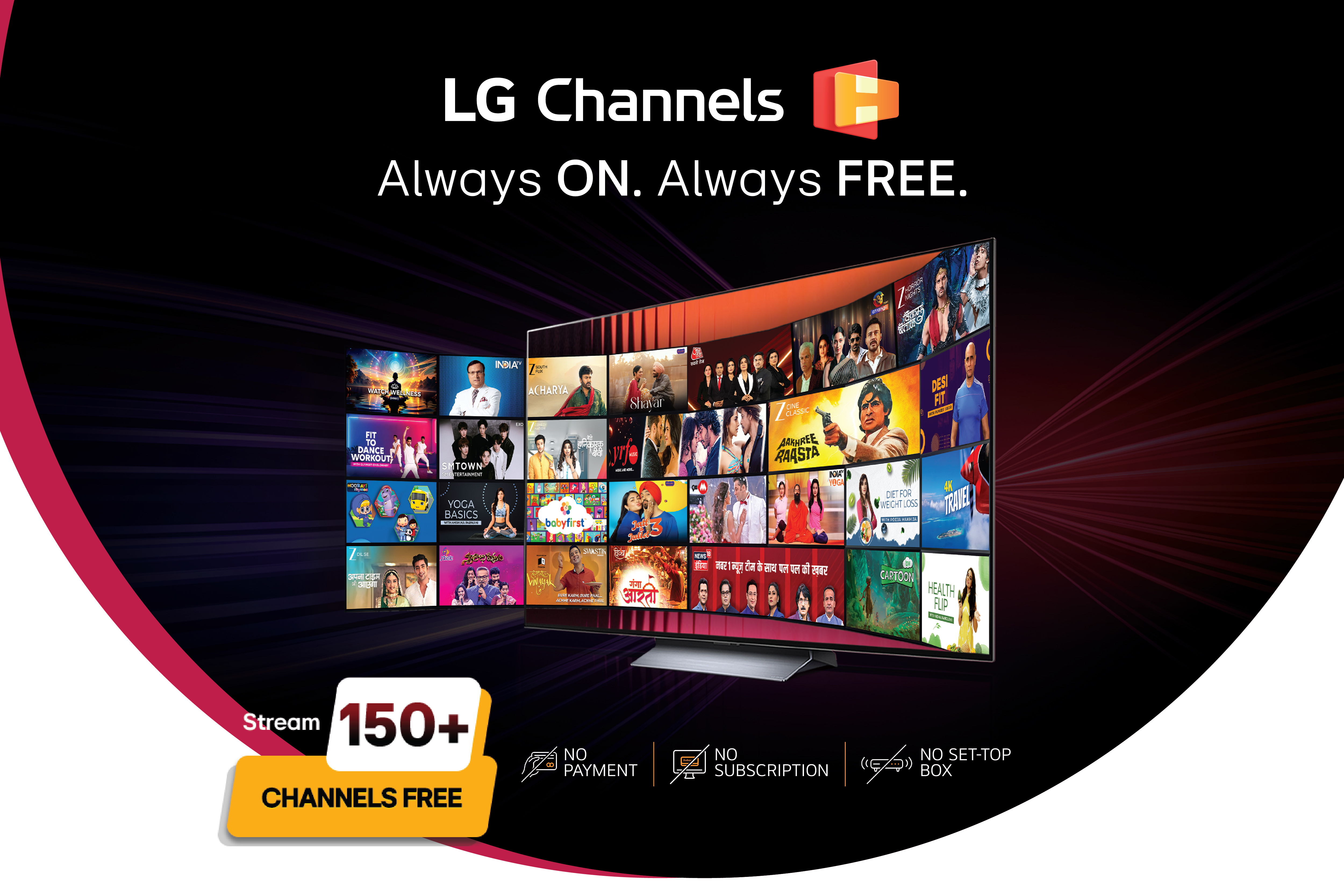
There is a particular kind of fatigue that comes with modern television. You want to watch something, but first you have to remember which app has it, whether the subscription is still active, and where the remote for the set-top box has gone. LG Channels exists to remove that friction. It gives you access to more than 150 live channels the moment you turn the television on, with no subscription, no set-top box, and no separate account to create.
What You Actually Get
LG Channels is not a stripped-down bonus feature tucked away in a menu. It is a full lineup of live, linear channels spanning news, entertainment, movies, music, lifestyle, devotional content, and programming for kids, along with sports coverage. The channels are available in more than 12 languages, including Hindi, English, and several regional languages, so the lineup reflects how Indian households actually watch television rather than defaulting to a single national feed. LG also adds new channels over time, so the selection is not fixed.
Everything runs on webOS, LG's smart TV platform, and works on any LG Smart TV from the 2018 lineup onward, provided it runs webOS 4.0 or later. The only real requirement on your end is an internet connection. There is no signup form, no email verification, and no separate LG Channels account. You open the app from the home screen and the channels are already there.
Live Television, Without the Usual Friction
The appeal of linear TV has always been that you do not have to decide what to watch. You turn it on, and something is playing. The trouble is that cable and traditional set-top boxes bring a lot of baggage along with that convenience. Installation appointments, monthly bills, a separate remote, and a channel list cluttered with tiers and packages you never asked for. LG Channels keeps the part people actually like about linear TV, the ability to just start watching, while cutting out the cost and the physical hardware.
This matters most in the small, everyday moments. Someone gets home, picks up the remote, and wants the news on while they change out of work clothes. A parent needs twenty minutes of kids' programming to get dinner on the table. A grandparent in the house wants a devotional channel playing quietly in the morning without having to navigate a streaming app or remember a password. None of these are dramatic use cases, but they are the ones that make up most of a household's actual television time, and they are exactly where LG Channels is meant to work.
Browsing Without Breaking the Moment
One detail that separates LG Channels from a plain live-TV feed is the on-screen schedule overlay. While something is playing, you can pull up the programme guide to see what else is on across the lineup, without pausing the show or losing your place. That sounds minor until you are actually looking for something to watch next. Instead of blindly flipping through channels one at a time, you can scan what is coming up on entertainment, movies, or music channels and decide before you switch. It is a small interface choice, but it is the difference between channel surfing and actually knowing what your options are.
Where It Fits Into Different Households
For a family with a shared living room television, LG Channels functions as the default layer underneath whatever paid streaming services the household already subscribes to. It is what plays when nobody has a specific show in mind: the news in the background during breakfast, a movie channel on a lazy Sunday afternoon, a kids' channel to hold attention for half an hour.
For someone furnishing a second home, a rental property, or a room for guests, it solves a real practical problem. You cannot always justify paying for streaming subscriptions on a TV that is used occasionally, and a set-top box means an installation and an ongoing bill for a screen that might sit idle for weeks. LG Channels gives that television a working entertainment option from day one, with nothing to activate and nothing to cancel later.
For households with elderly family members, the appeal is more about accessibility than variety. Devotional channels, regional-language news, and familiar entertainment programming are available without logging into an app, remembering a password, or navigating a menu built around search and recommendations. You turn the TV on, go to LG Channels, and the content that matters to that person is already there in a format they recognise from years of watching cable.
And for anyone who has felt the low-grade irritation of paying for four or five streaming subscriptions only to spend ten minutes deciding what to watch, LG Channels is a reminder that not every viewing decision needs to be that deliberate. Sometimes you just want to turn the television on.
What It Comes Down To
LG Channels gives you 150-plus live channels across news, entertainment, movies, music, lifestyle, devotional content, kids' programming, and sports, in 12 or more languages, built into every LG Smart TV running webOS 4.0 or above. There is no cost, no contract, no set-top box, and no account to set up. All it needs is an internet connection and a TV you already own.
Comments
Get your daily dose of tech news, reviews, and insights, in under 80 characters on Gadgets 360 Turbo. Connect with fellow tech lovers on our Forum. Follow us on X, Facebook, WhatsApp, Threads and Google News for instant updates. Catch all the action on our YouTube channel.
Related Stories




Follow Us




-
![[Sponsored] Samsung Galaxy Z Fold8, Fold8 Ultra](https://www.gadgets360.com/static/desktop/images/spacer.png)
00:21
[Sponsored] Samsung Galaxy Z Fold8, Fold8 Ultra -
03:41
[Sponsored] Samsung Galaxy Z Fold8: How It Fits Into an Actor’s Busy Day | Camera, Multitasking & More -
09:53
iPhone 18 Goes On Sale In India: Huge Crowds, Long Queues At Apple Stores -
06:32
Google Pixel 11 Pro XL Review: The Most Exciting Pixel Yet? | 120X Zoom + Tensor G6 -
05:20
Samsung Galaxy Watch Ultra 2 Review: Is This the Best Android Smartwatch?
Popular on Gadgets
- Samsung Galaxy S26 Ultra
- Motorola Razr Fold
- ChatGPT
- OPPO Find N6
- Mobiles Under Rs. 40,000
- Vivo X300 Ultra
- Asus Zenbook S14
- iQOO 15
- Vivo X300 Pro
- Lenovo Yoga Slim 7i Aura Edition
- iQOO 15R
- Vivo X Fold 5
- Sony PlayStation 5
- HP OmniPad 12
- OnePlus Nord CE 6 Lite
- OnePlus Pad 4
- OPPO F33 Pro 5G
- Cryptocurrency
- HP OmniBook Ultra 14 (2026)
- iPhone 17
- Eureka Forbes AP 355 Room Air Purifier
- Latest Mobile Phones
- Compare Phones
Latest Gadgets
- HMD Vibe 2 Pro 5G
- OPPO K14 Plus 5G
- Lava Shark 2 Pro 5G
- Ai+ Pulse 2 FE
- OPPO Reno 16t
- Itel Zeno 300
- Vivo Y600i
- Mivi One 5G
- Dell 14 Plus 2-in-1 (AMD Ryzen AI 7 350, 2025)
- Microsoft Surface Laptop, 13-inch (2nd Edition)
- Ai+ NovaTab
- Microsoft Surface Pro, 12-inch (2nd Edition)
- Amazfit T-Rex Dual Solar
- OPPO Watch S2
- Toshiba 65-Inch 4K Ultra HD Smart Mini LED QLED TV (65Z670SP)
- Haier M70 Mini LED 65-inch
- Acer Predator Atlas 8
- Asus ROG Ally
- Blue Star 1.5 Ton 5 Star Inverter Split AC (IE518ZNURS)
- Blue Star 2 Ton 3 Star Inverter Window AC (WIE324L)

- About Us
- Sitemaps
- Feedback
- Archives
- Contact Us
- RSS
- Advertise
- Career
- Privacy Policy
- Ethics
- Editorial Policy
- Terms & Conditions
- Complaint Redressal
Download Our Apps
Available in Hindi
© Copyright Red Pixels Ventures Limited 2026. All rights reserved.