-
 WhatsApp Reels Shortcut for Chats Rolling Out to Android Beta Testers23 October 2026
 -
How to Export a WhatsApp Chat on Android and iOS: A Step-by-Step Guide17 October 2026
-
WhatsApp Introduces Guest Calls for Up to 32 Participants With No Account Requirement15 October 2026
-
WhatsApp May Soon Let Android Users Schedule Messages, Photos and Videos12 October 2026
-
WhatsApp Could Get a New Contacts Tab With Online Status and Birthday Reminders7 October 2026
- Home
- Apps
- Apps Features
- What Is WhatsApp Chat Lock and How Does It Work?
What Is WhatsApp Chat Lock and How Does It Work?
The feature conceals message details and sender information in notifications, although WhatsApp calls from locked contacts can still come through.
Written by Sucharita Ganguly, Edited by Rohan Pal | Updated: 24 October 2026 12:00 IST
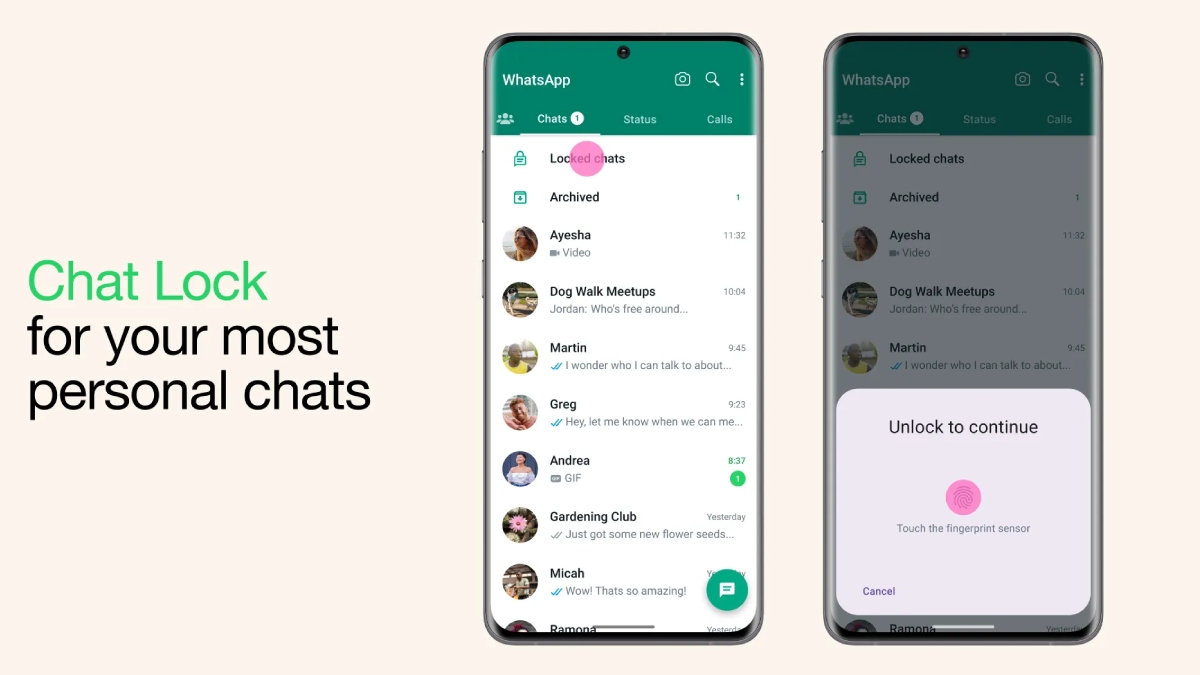
Photo Credit: WhatsApp
WhatsApp lets users hide locked chats with a secret code
Click Here to Add Gadgets360 As A Trusted Source

Advertisement
There are some WhatsApp chats you might want to keep to yourself, especially if you occasionally hand your phone to friends or family. You could lock the entire app, of course, but that can get annoying when you just want to let someone look at a photo or make a quick call. WhatsApp's Chat Lock feature offers another option. It lets you lock specific conversations and move them to a separate folder that only you can open with your phone's authentication method. You can even hide this folder from your main chat list, so those conversations are less likely to catch someone's eye. Let's look at how Chat Lock works, how you can set it up, and what to keep in mind when using it.
What Is WhatsApp Chat Lock?
WhatsApp Chat Lock is handy if you want to keep a few conversations private without locking the whole app. Once you turn it on for a chat, WhatsApp moves it out of your usual chat list and into a separate Locked Chats folder. You can open the folder using your phone's authentication method, such as your fingerprint, face recognition or passcode, depending on your device.
You can use it for both individual and group chats, so you get to choose which conversations you want to keep under wraps. WhatsApp also hides the message details in notifications from locked chats, so someone glancing at your screen won't be able to read the message. And if you don't even want the Locked Chats folder showing up in your chat list, you can hide it with a secret code.
When a message comes in from a locked chat, you won't see the sender's name or the message preview in your notifications. So, if someone happens to glance at your phone, they won't be able to read the message or tell who it's from. You'll still know you've received a message, but you'll have to open the locked chat to see what it says.
WhatsApp calls work a little differently, though. Locking someone's chat won't stop them from calling you on WhatsApp, and their calls will still come through as usual.
How to Lock a WhatsApp Chat
Locking a WhatsApp chat takes just a few steps, and you won't have to change anything about your other conversations. Here's how to do it.
- Open WhatsApp and find the individual or group chat you want to lock.
- Tap the contact's name or the group name at the top to open the chat information page.
- Scroll down until you find the Chat Lock option and tap it.
- Turn on Chat Lock and follow the on-screen instructions to confirm your identity using your fingerprint, face recognition or your phone's passcode, depending on your device.
- WhatsApp will move the conversation to the Locked Chats folder, which you'll need to authenticate yourself to open.
If you'd rather not open the conversation first, you may also be able to lock it directly from your chat list. Press and hold the chat, then look for the lock option in the menu. The exact steps may vary slightly depending on your phone and WhatsApp version.
How to Hide Locked Chats on WhatsApp
WhatsApp also allows you to hide the Locked Chats folder from your regular chat list, so it won't be visible alongside your other conversations. To do this, you'll first need to set up a secret code.
- Open WhatsApp and swipe down on your chat list to find Locked Chats. If you've already hidden the folder, enter your secret code in the search bar to bring it up.
- Open Locked Chats and tap the three-dot menu or the settings option, depending on your device.
- Go to Chat lock settings and tap Secret code.
- Choose a code you can remember but that others won't easily guess, then enter it again to confirm.
- Head back to Chat lock settings and turn on Hide locked chats.
Once you've done this, the folder will disappear from your main chat list. Whenever you want to access your conversations, type your secret code into WhatsApp's search bar and tap Locked Chats when it appears.
Just be careful not to forget your code. WhatsApp's reset option can clear your locked chats, including their messages and media, so pick a code you'll remember.
How to Find and Open Locked Chats
Once you've locked a chat, you won't have to go looking through all your conversations to find it again. Just open WhatsApp and swipe down on your chat list to bring up the Locked Chats folder. You can then tap it and confirm it's you using your fingerprint, face recognition or phone passcode, depending on your device. You'll then be able to catch up on messages and reply just as you normally would.
If you've hidden the folder with a secret code, it won't show up in your chat list at all. To get it back, type your code into WhatsApp's search bar. The hidden folder should appear, and you can tap it to get back to your conversations.
FAQs
1. What is WhatsApp Chat Lock?
WhatsApp Chat Lock protects selected conversations by moving them to a separate folder that requires authentication to open.
2. How do I lock a chat on WhatsApp?
Open the conversation, tap the contact or group name, select Chat Lock and follow the on-screen instructions.
3. Can I hide locked chats on WhatsApp?
Yes. Set up a secret code in Chat lock settings and enable the Hide locked chats option.
4. How do I find hidden locked chats?
Enter your secret code in WhatsApp's search bar to make the hidden Locked Chats folder appear.
5. Does WhatsApp Chat Lock block calls?
No. WhatsApp calls from contacts whose chats are locked can still come through.
Comments
Get your daily dose of tech news, reviews, and insights, in under 80 characters on Gadgets 360 Turbo. Connect with fellow tech lovers on our Forum. Follow us on X, Facebook, WhatsApp, Threads and Google News for instant updates. Catch all the action on our YouTube channel.
Related Stories





Advertisement
Follow Us




-
![[Sponsored] Galaxy Watch9 for Everyday Health Insights | Smarter Wellness Choices](https://www.gadgets360.com/static/desktop/images/spacer.png)
01:42
[Sponsored] Galaxy Watch9 for Everyday Health Insights | Smarter Wellness Choices -
01:15
[Sponsored] Galaxy Tab S10 Lite for Students: Notes, Solve Math and More -
04:17
[Sponsored] LG NANO 4K UHD AI TV NU885: Gemini Search, Dolby Atmos & 5 Years of Updates -
00:57
[Sponsored] Samsung Galaxy Z Fold8 My Fan Cam in Action: Find the Moment, Then Share It -
01:41
[Sponsored] What Do You Need To Know Before Your Next Run? | Samsung Galaxy Watch Ultra2
-
NVIDIA के सीईओ ने पेश किए माइक्रोडक रोबोट, AI से चलते हैं, क्या काम आएंगे
-
iPhone Duo को बीच से खोला, फोल्डेबल डिस्प्ले से हटाया कवर, फिर क्या दिखा?
-
1 जनवरी से फोन में बिना सिम नहीं चलेगा WhatsApp, सिम बाइडिंग हुआ अनिवार्य
-
IND vs NZ 2nd T20 Live Streaming: भारत-न्यूजीलैंड के बीच दूसरा T20 मैच आज, यहां देखें फ्री!
-
Oppo Reno 17 सीरीज के लॉन्च की तैयारी, NBTC पर हुई लिस्टिंग
Advertisement
Popular on Gadgets
- Samsung Galaxy S26 Ultra
- Motorola Razr Fold
- ChatGPT
- OPPO Find N6
- Mobiles Under Rs. 40,000
- Vivo X300 Ultra
- Asus Zenbook S14
- iQOO 15
- Vivo X300 Pro
- Lenovo Yoga Slim 7i Aura Edition
- iQOO 15R
- Vivo X Fold 5
- Sony PlayStation 5
- HP OmniPad 12
- OnePlus Nord CE 6 Lite
- OnePlus Pad 4
- OPPO F33 Pro 5G
- Cryptocurrency
- HP OmniBook Ultra 14 (2026)
- iPhone 17
- Eureka Forbes AP 355 Room Air Purifier
- Latest Mobile Phones
- Compare Phones
Latest Gadgets
- HMD 2660 Flip Senior Edition
- Lava Aura Curve
- Poco X8s
- Samsung Galaxy F70 5G
- Tecno Spark 50S 5G
- Vivo Y600s Pro
- Vivo Y32 (2026)
- Infinix Smart 20 HD
- Lenovo Yoga 9n 2-in-1
- Lenovo Yoga Pro 9n
- Amazon Alexa Tablet 8
- Amazon Alexa Tablet 11
- Pebble Qore 2
- Amazfit T-Rex Dual Solar
- Toshiba 65-Inch 4K Ultra HD Smart Mini LED QLED TV (65Z670SP)
- Haier M70 Mini LED 65-inch
- Acer Predator Atlas 8
- Asus ROG Ally
- Blue Star 1.5 Ton 5 Star Inverter Split AC (IE518ZNURS)
- Blue Star 2 Ton 3 Star Inverter Window AC (WIE324L)

- About Us
- Sitemaps
- Feedback
- Archives
- Contact Us
- RSS
- Advertise
- Career
- Privacy Policy
- Ethics
- Editorial Policy
- Terms & Conditions
- Complaint Redressal
Download Our Apps
Available in Hindi
© Copyright Red Pixels Ventures Limited 2026. All rights reserved.