- Home
- How to
- How to Features
- How to Use the Jeevan Pramaan App to Submit a Life Certificate Online
How to Use the Jeevan Pramaan App to Submit a Life Certificate Online
Here's how to generate a Digital Life Certificate using the Jeevan Pramaan app.
Written by Shaurya Tomer, Edited by Rohan Pal | Updated: 8 November 2026 13:00 IST
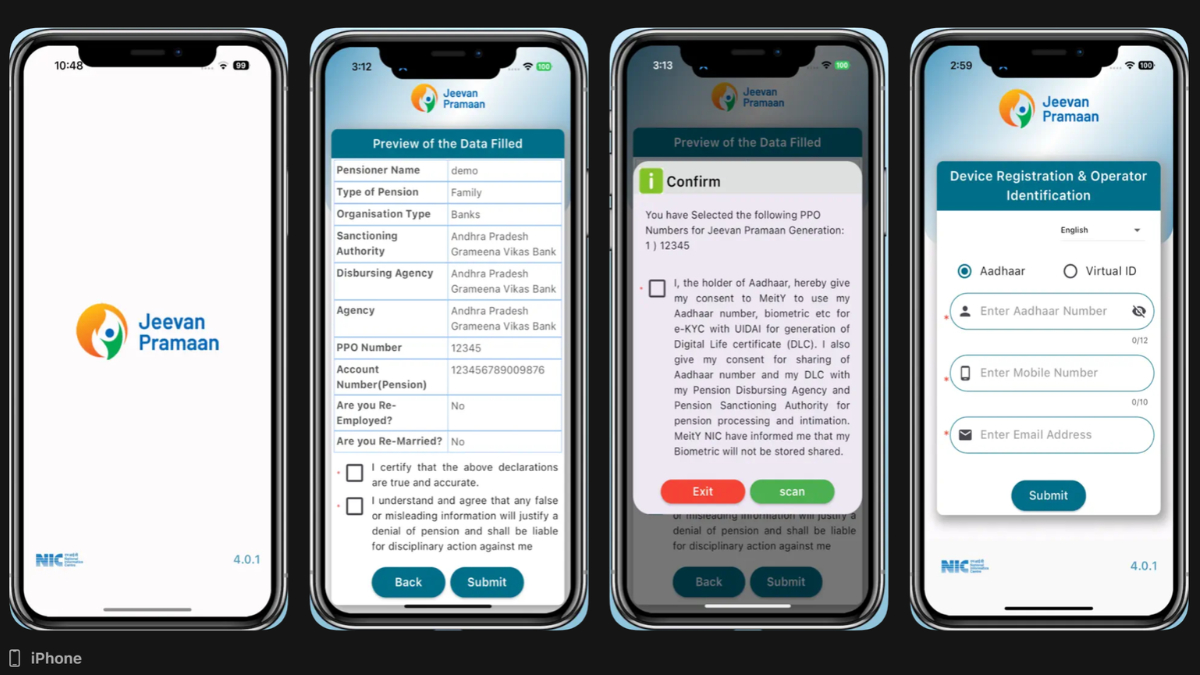
Photo Credit: App Store
Click Here to Add Gadgets360 As A Trusted Source

Advertisement
Pensioners in India are required to submit a life certificate every year to continue receiving their pension. Traditionally, this process involves visiting a bank or post office in person. This can especially be difficult for elderly pensioners and those with limited mobility. The government's Jeevan Pramaan scheme offers a digital alternative, which allows pensioners to generate and submit a Digital Life Certificate (DLC) using Aadhaar-based biometric authentication. The certificate is stored online and can be accessed by both the pensioner and their Pension Disbursing Agency (PDA). Pensioners can generate it themselves using the Jeevan Pramaan app or seek assistance at an authorised service centre.
What Is a Life Certificate and the Jeevan Pramaan App?
A life certificate is a document that pensioners are required to submit to their Pension Disbursing Authorities (PDAs), such as banks and post offices, to confirm that they are alive and remain eligible to receive their pension. According to the government, pensioners are required to furnish this certificate in November every year. They can do so by appearing in person or submitting the certificate in the prescribed format.
However, this process can be inconvenient, particularly for elderly pensioners and those who are unwell or have limited mobility.
The Government of India's Jeevan Pramaan (JP) scheme was launched by Prime Minister Narendra Modi on November 10, 2014, to digitise the process. It allows pensioners to generate a Digital Life Certificate using a software application and Aadhaar-based biometric authentication. Once generated, the certificate is stored online and can be accessed by the pensioner and the relevant Pension Disbursing Agency.
Prerequisites for Generating a Digital Life Certificate
Before starting the process, pensioners need to ensure that they have the following:
- Valid Aadhaar Card
- Registered Mobile Number
- Aadhaar Registration with Pension Disbursing Agency
- Biometric Device
How to Generate and Submit a Digital Life Certificate Using Jeevan Pramaan
The procedure for generating a Digital Life Certificate through the Jeevan Pramaan client application involves two main stages: operator authentication and device registration, followed by pensioner authentication and certificate generation.
Step 1: Download the Jeevan Pramaan application
Step 2: Open the client application and begin the operator authentication or device registration process. This is a one-time registration for a particular biometric device. Enter the Aadhaar number and mobile number of the operator or pensioner, as applicable. An OTP will be sent to the registered mobile number. Enter the OTP in the application to proceed.
Step 3: After the OTP is verified, the application will ask for the operator's name and email address. Enter the required details and select the 'Scan Finger' option. Once the authentication is successful, the application will display a 'Device Registration successful' message. Click 'OK' to proceed to pensioner authentication.
Step 4: On the pensioner authentication screen, enter the pensioner's Aadhaar number and mobile number. The application will send an OTP to the registered mobile number. Enter the OTP in the application and click 'OK' to continue.
Step 5: Once the OTP is verified, the application will ask for the pensioner's information. Enter the mandatory details.
Step 6: Check the small grey box displayed on the application screen and click the 'Scan Finger' button. Place your finger on the fingerprint scanner or use the connected iris scanner to complete the pensioner's biometric authentication.
Step 7: After successful biometric authentication, the application will display the generated Digital Life Certificate. An SMS acknowledgement will also be sent to the pensioner's registered mobile number. This message contains the Jeevan Pramaan Certificate ID, also referred to as the Pramaan ID. The generated certificate is stored in the Life Certificate Repository and can be accessed by the pensioner and the Pension Disbursing Agency when required.
Step 8: Pensioners can download a PDF copy of their generated Digital Life Certificate from the Jeevan Pramaan website. The certificate can be retrieved using the Jeevan Pramaan ID or the pensioner's Aadhaar number.
Comments
Get your daily dose of tech news, reviews, and insights, in under 80 characters on Gadgets 360 Turbo. Connect with fellow tech lovers on our Forum. Follow us on X, Facebook, WhatsApp, Threads and Google News for instant updates. Catch all the action on our YouTube channel.
Further reading:
Jeevan Pramaan app, Digital Life Certificate


Advertisement
Follow Us


-

00:50
Expectation vs Reality: Dad Wanted Good Scores. She Made a Lasting Impression! | Galaxy S26 FE -
01:33
A Festive Surprise for Her | Samsung Galaxy A57 5G -
00:54
Expectation vs Reality: Parents Said Notice Every Detail. She Added One | Galaxy S26 FE -
01:55
From Group Photos to Festive Nights | Samsung Galaxy A57 5G -
01:33
Galaxy Watch Ultra2 on the Trail: Tracking, Hydration & Elevation
-
Diwali की रात लेनी हैं शानदार फोटो? फोन में बदलें ये कैमरा सेटिंग्स
-
कैमरा टेस्ट में iPhone 18 Pro से आगे निकला Motorola का ये फोन
-
itel दिवाली ऑफर: टीवी-वॉशिंग मशीन खरीदें सिर्फ ₹40 प्रतिदिन में
-
Vivo V80 FE में होगी 8GB रैम, Dimensity 7400 Turbo चिप! Geekbench में स्पॉट
-
Amazon Sale 2026 में ₹15,000 से सस्ते मिल रहे Poco फोन! 6300mAh बैटरी
Advertisement
Popular on Gadgets
- Samsung Galaxy S26 Ultra
- Motorola Razr Fold
- ChatGPT
- OPPO Find N6
- Mobiles Under Rs. 40,000
- Vivo X300 Ultra
- Asus Zenbook S14
- iQOO 15
- Vivo X300 Pro
- Lenovo Yoga Slim 7i Aura Edition
- iQOO 15R
- Vivo X Fold 5
- Sony PlayStation 5
- HP OmniPad 12
- OnePlus Nord CE 6 Lite
- OnePlus Pad 4
- OPPO F33 Pro 5G
- Cryptocurrency
- HP OmniBook Ultra 14 (2026)
- iPhone 17
- Eureka Forbes AP 355 Room Air Purifier
- Latest Mobile Phones
- Compare Phones
Latest Gadgets
- Karbonn Rebel
- Karbonn Rebel Pro
- OnePlus Turbo 6Vs
- Redmi M100 Pro
- OnePlus Ace 7 Pro
- OnePlus Ace 7
- Samsung W27
- Huawei Pura 90 Plus
- Dell 14S (2026)
- HP ProBook 4 G2iS 14
- iPad mini (2026)
- Amazon Alexa Tablet 8
- Moto Watch 2 Fit
- Pebble Qore 2
- Toshiba 65-Inch 4K Ultra HD Smart Mini LED QLED TV (65Z670SP)
- Haier M70 Mini LED 65-inch
- Acer Predator Atlas 8
- Asus ROG Ally
- Blue Star 1.5 Ton 5 Star Inverter Split AC (IE518ZNURS)
- Blue Star 2 Ton 3 Star Inverter Window AC (WIE324L)

- About Us
- Sitemaps
- Feedback
- Archives
- Contact Us
- RSS
- Advertise
- Career
- Privacy Policy
- Ethics
- Editorial Policy
- Terms & Conditions
- Complaint Redressal
Download Our Apps
Available in Hindi
© Copyright Red Pixels Ventures Limited 2026. All rights reserved.