Truecaller: How to Change Name, Delete Account, Remove Tags, and Create Business Account
Truecaller is free to download on Android via Google Play store and on iOS via App Store.

Advertisement
Truecaller lets you mark callers as spam
Truecaller app allows users to find out who is calling or messaging them. This is ideal when you don't have the number saved in your contacts as you can know before picking up the call if you should answer or reject. The app crowdsources contact details from all its users' address books which means your contact could be on Truecaller's database. While this may be a drawback of the app, it does have many benefits as well such as blocking numbers, marking numbers as spam so you can avoid those calls, and more.
So, to help you out, we have put together a step-by-step guide on how you can change your name on Truecaller, delete your account, edit or remove tags, and more.
Truecaller: How to change name
-
Open the Truecaller app on Android or iOS.
-
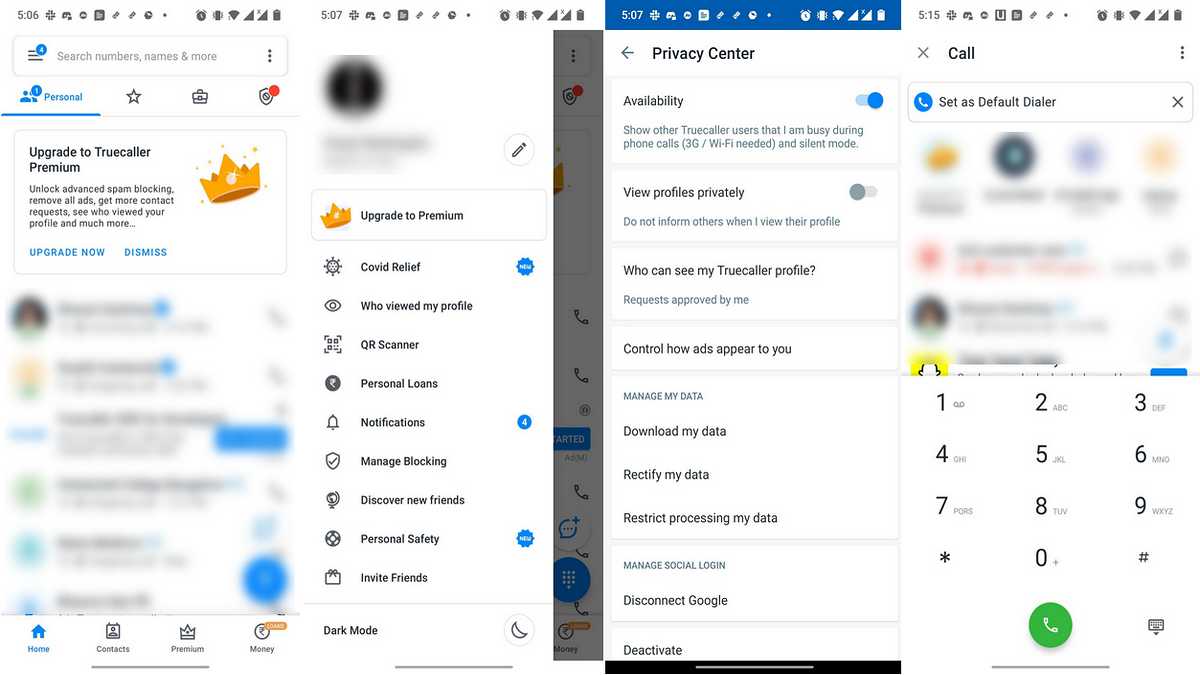
Tap on the hamburger menu icon on the top left (bottom right on iOS).
-
Tap on the edit icon next to your name and phone number (Edit Profile on iOS).
-
Change your name by editing the first and last name fields.
Truecaller: How to delete/ deactivate your account in Truecaller
- Open the Truecaller app on Android or iOS.
- Tap on the hamburger menu icon on the top left (bottom right on iOS).
- Tap on Settings.
- Tap on Privacy Center.
- Scroll down and you should see a Deactivate option here, tap on it.
- On iOS, you will see Keep My Data and Delete My Data options. Keep My Data will allow you to be searchable but you will not be able to edit how you are displayed on Truecaller. With Delete My Data option, you will not be searchable and your data will be deleted.
Your Truecaller profile should now be deactivated.
Truecaller: How to edit or remove tags in Truecaller
- Open the Truecaller app on Android or iOS.
- Tap on the hamburger menu icon on the top left (bottom right on iOS).
- Tap on the edit icon next to your name and phone number (Edit Profile on iOS).
- Scroll to the bottom and tap on the Add tag field. You can select whichever tag you want to add from here or deselect all tags.
Truecaller: How to create a Truecaller Business profile
A business profile allows you to let people know important information about your business. Things like address, website, email, opening hours, closing hours, and more can be added to a business profile in Truecaller.
- If you are just signing up with Truecaller for the first time, the create your profile section has the Create A Business Profile option at the bottom.
- If you are already a Truecaller user, tap on the hamburger menu icon on the top left (bottom right on iOS).
- Tap the edit icon next to your name and phone number (Edit Profile on iOS).
- Scroll to the bottom and tap on the Create A Business Profile option.
- You will be asked to agree to the terms of service and privacy policy. Tap on Continue.
- Enter the details and tap Finish.
Your business profile should now be created on Truecaller.
Is Mi 11X the best phone under Rs. 35,000? We discussed this on Orbital, the Gadgets 360 podcast. Later (starting at 23:50), we jump over to the Marvel series The Falcon and the Winter Soldier. Orbital is available on Apple Podcasts, Google Podcasts, Spotify, Amazon Music and wherever you get your podcasts.
Affiliate links may be automatically generated - see our ethics statement for details.
Get your daily dose of tech news, reviews, and insights, in under 80 characters on Gadgets 360 Turbo. Connect with fellow tech lovers on our Forum. Follow us on X, Facebook, WhatsApp, Threads and Google News for instant updates. Catch all the action on our YouTube channel.


Advertisement