Google Gemini Memory Summary Feature Rolls Out With Options to Edit and Delete Saved Details
Google Gemini Memory Summary feature requires Keep Activity and Memory to be enabled.
Written by Nithya P Nair, Edited by Rohan Pal | Updated: 10 November 2026 15:20 IST

Photo Credit: Google
Google's official support page currently lists US as the supported region for the feature
Click Here to Add Gadgets360 As A Trusted Source

Advertisement
Google has started rolling out a new Memory summary feature for its Gemini AI assistant. The new tool is designed to provide users more control over the personal information Gemini keeps about users based on previous conversations. It remembers details and organises them into categories, and users can update or remove the details directly. With the new feature, users can now get an overview of what the AI assistant remembers about them without having to check individual chat conversations. It is built on Gemini's existing memory capabilities.
Google Gemini Memory Summary Feature
Google's Memory summary feature is rolling out to Gemini users with additional controls for managing saved information. Gemini groups the remembered details into categories such as personal background, location, relationships, work, interests, and preferences.
Users can open these sections to check the information Gemini has retained about them. They can also make changes to individual details or remove information they no longer want the chatbot to remember. The feature includes a history of memory changes, allowing users to keep track of updates made to their saved information.
To access the feature, users can open Gemini and navigate to Settings > Personal Intelligence > Memory summary. The option provides a central place to review the information associated with their Gemini account.
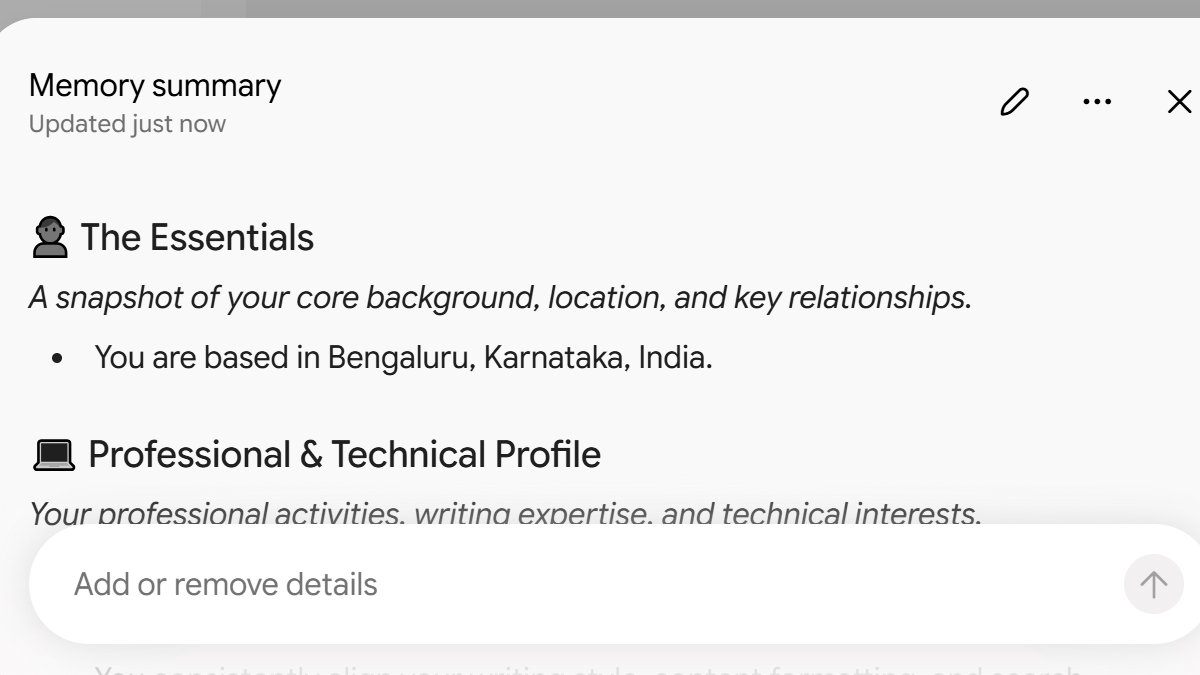
Photo Credit: Gemini
According to Google's support documentation, Memory summary is available to users in the US with an active Google AI plan. The feature currently supports English. It can be accessed through the Gemini mobile app and the web version at gemini.google.com. Gadgets360 was able to use the feature on a free account.
Google has outlined certain requirements for users who want to access the Memory summary feature. The Google Support page says users must be signed in to Gemini with a personal Google account and should be at least 18 years old. The feature also requires Keep Activity and Memory to be enabled in the account settings. Users who have disabled either of these options may not be able to access the new functionality.
Users can manage their Google AI subscription through the Gemini app. Google has not yet shared details about when Memory summary will expand to additional languages.
Comments
Get your daily dose of tech news, reviews, and insights, in under 80 characters on Gadgets 360 Turbo. Connect with fellow tech lovers on our Forum. Follow us on X, Facebook, WhatsApp, Threads and Google News for instant updates. Catch all the action on our YouTube channel.
Further reading:
Google Gemini Memory Summary Feature, Google Gemini Memory Summary, Google Gemini, Gemini


Google Gemini Memory Summary Feature Rolls Out With Options to Edit and Delete Saved Details


Advertisement
Follow Us


-
00:50
Expectation vs Reality: Dad Wanted Good Scores. She Made a Lasting Impression! | Galaxy S26 FE -
01:33
A Festive Surprise for Her | Samsung Galaxy A57 5G -
00:54
Expectation vs Reality: Parents Said Notice Every Detail. She Added One | Galaxy S26 FE -
01:55
From Group Photos to Festive Nights | Samsung Galaxy A57 5G -
01:33
Galaxy Watch Ultra2 on the Trail: Tracking, Hydration & Elevation
-
Instagram पर AI करेगा आयु की पहचान, फिर दिखाएगा कंटेंट, झूठ होने पर करेगा
-
1 रिचार्ज और साल भर तक डेली 2GB डाटा, अनलिमिटेड कॉल और फ्री TV के फायदे
-
₹30000 एमआरपी वाला Ai+ Nova 2 Power 5G खरीदें ₹17,999 में!
-
Vivo के नए फोन में मिलेगी 12,000mAh बैटरी! लॉन्च से पहले लीक हुए फीचर्स
-
₹3000 सस्ता मिल रहा Lava Virat Curve 5G, Flipkart दिवाली सेल में ऑफर
Advertisement
Popular on Gadgets
- Samsung Galaxy S26 Ultra
- Motorola Razr Fold
- ChatGPT
- OPPO Find N6
- Mobiles Under Rs. 40,000
- Vivo X300 Ultra
- Asus Zenbook S14
- iQOO 15
- Vivo X300 Pro
- Lenovo Yoga Slim 7i Aura Edition
- iQOO 15R
- Vivo X Fold 5
- Sony PlayStation 5
- HP OmniPad 12
- OnePlus Nord CE 6 Lite
- OnePlus Pad 4
- OPPO F33 Pro 5G
- Cryptocurrency
- HP OmniBook Ultra 14 (2026)
- iPhone 17
- Eureka Forbes AP 355 Room Air Purifier
- Latest Mobile Phones
- Compare Phones
Latest Gadgets
- Vivo Y6k
- Karbonn Rebel
- Karbonn Rebel Pro
- OnePlus Turbo 6Vs
- Redmi M100 Pro
- OnePlus Ace 7 Pro
- OnePlus Ace 7
- Samsung W27
- Dell 14S (2026)
- HP ProBook 4 G2iS 14
- iPad mini (2026)
- Amazon Alexa Tablet 8
- Moto Watch 2 Fit
- Pebble Qore 2
- Toshiba 65-Inch 4K Ultra HD Smart Mini LED QLED TV (65Z670SP)
- Haier M70 Mini LED 65-inch
- Acer Predator Atlas 8
- Asus ROG Ally
- Blue Star 1.5 Ton 5 Star Inverter Split AC (IE518ZNURS)
- Blue Star 2 Ton 3 Star Inverter Window AC (WIE324L)

- About Us
- Sitemaps
- Feedback
- Archives
- Contact Us
- RSS
- Advertise
- Career
- Privacy Policy
- Ethics
- Editorial Policy
- Terms & Conditions
- Complaint Redressal
Download Our Apps
Available in Hindi
© Copyright Red Pixels Ventures Limited 2026. All rights reserved.