Meta Introduces Spaces for Designing Custom Experiences Inside Muse AI App
Meta wants users to convert their ideas into Spaces, which work like custom-made, AI-generated feeds
Written by Sheldon Pinto, Edited by Rohan Pal | Updated: 9 November 2026 13:37 IST
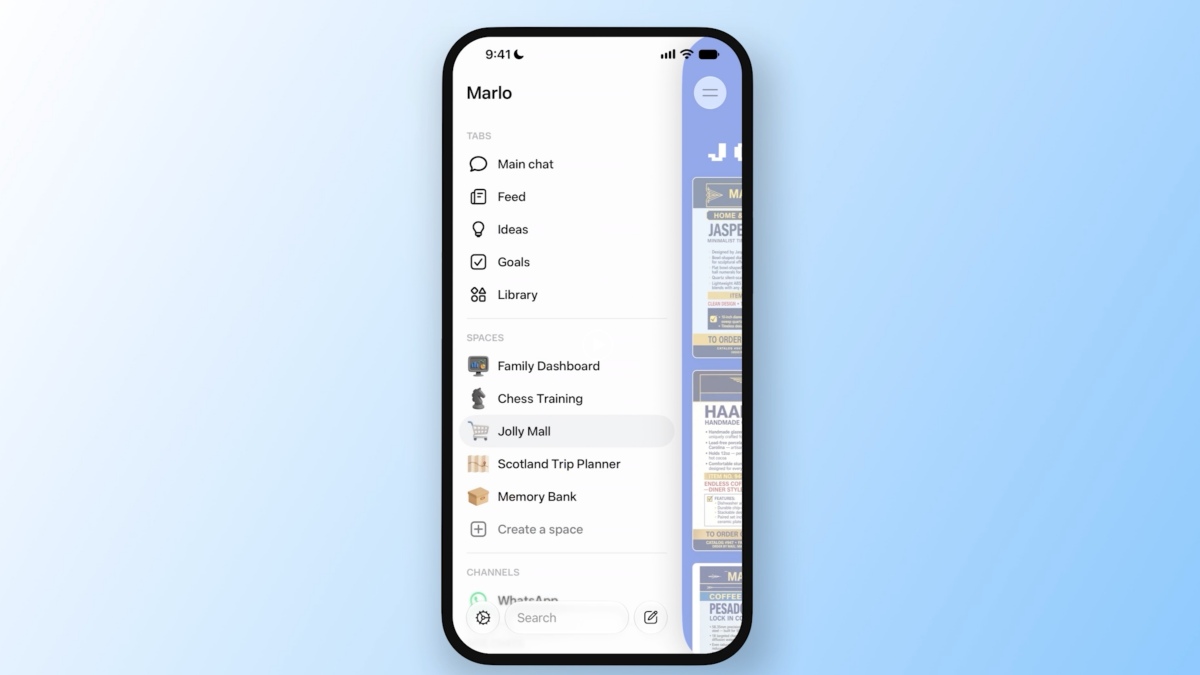
Photo Credit: Meta
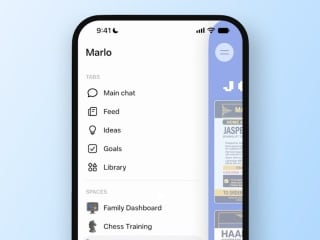
Spaces can be moved with the Muse app’s interface for a customised experience
Click Here to Add Gadgets360 As A Trusted Source
Advertisement
After adding Muse Voice for agentic AI-assistant, Meta is back with another interesting feature called Spaces, which can be used in the Muse app. Spaces basically work like feeds, bringing you information from the sources that you choose and in the format that you would like to see it in. Spaces within the app can also be organised within the Muse AI app to suit the user's requirements depending on what they prioritise at the given moment. Meta claims that Spaces can be used to track a variety of things and can even generate small games.
Meta Introduces Spaces to Customise Your Muse App
Meta's has launched yet another feature for its Muse AI called Spaces. Spaces exists and works with the Muse AI app, helping users build custom experiences around the things or topics they are interested in, in the format that they would like to view it in.
Meta claims Muse Spaces can be used for a variety of interests. For keeping track of personal projects, routines, goals or building a planner. More importantly, Meta even lets you move these Spaces around its app. From the sidebar, to the main tabs, letting you keep track or focus on the Spaces when you need to and hide them when you don't.
The company has even provided a short list of things that users can build at the moment (even though the possibilities are limited to your imagination). Spaces can be used to build a shopping hub using saves from Instagram and Marketplace listings. It can also be used to create a simple school dashboard, finding events from schools emails and creating a custom calendar from them. There's even trivia games that can be generated from the music or movies you love or the sports teams that you follow. Small business owners can also use Spaces to build an order tracker integrating information from orders, messages and other feeds into one place.
Meta claims that Spaces are “personal” and that the company will let users connect various apps that they use to build their feeds so that they always remain updated in the background. The company is also working on making Spaces shareable so that users can share their Spaces with other users on the platform.
Comments
Get your daily dose of tech news, reviews, and insights, in under 80 characters on Gadgets 360 Turbo. Connect with fellow tech lovers on our Forum. Follow us on X, Facebook, WhatsApp, Threads and Google News for instant updates. Catch all the action on our YouTube channel.


Advertisement
Follow Us


-

00:50
Expectation vs Reality: Dad Wanted Good Scores. She Made a Lasting Impression! | Galaxy S26 FE -
01:33
A Festive Surprise for Her | Samsung Galaxy A57 5G -
00:54
Expectation vs Reality: Parents Said Notice Every Detail. She Added One | Galaxy S26 FE -
01:55
From Group Photos to Festive Nights | Samsung Galaxy A57 5G -
01:33
Galaxy Watch Ultra2 on the Trail: Tracking, Hydration & Elevation
-
Jio vs Airtel vs Vi: अनलिमिटेड कॉल, डाटा के कोई एक्स्ट्रा खर्च नहीं
-
दिल्ली में AQI पहुंचा 700 के पार, कार Air Purifier करेंगे प्रदूषण से बचाव
-
Samsung का प्रीमियम फोन मिल रहा 6500 सस्ता, 4 कैमरा, 4300mAh बैटरी से लैस
-
Amazon Sale 2026 में ₹12,000 से सस्ते मिल रहे Samsung फोन! 5000mAh बैटरी
-
बैग में लेकर घूमें मॉनिटर! 8mm पतला OLED डिस्प्ले वाला AOC पोर्टेबल मॉनिटर लॉन्च
Advertisement
Popular on Gadgets
- Samsung Galaxy S26 Ultra
- Motorola Razr Fold
- ChatGPT
- OPPO Find N6
- Mobiles Under Rs. 40,000
- Vivo X300 Ultra
- Asus Zenbook S14
- iQOO 15
- Vivo X300 Pro
- Lenovo Yoga Slim 7i Aura Edition
- iQOO 15R
- Vivo X Fold 5
- Sony PlayStation 5
- HP OmniPad 12
- OnePlus Nord CE 6 Lite
- OnePlus Pad 4
- OPPO F33 Pro 5G
- Cryptocurrency
- HP OmniBook Ultra 14 (2026)
- iPhone 17
- Eureka Forbes AP 355 Room Air Purifier
- Latest Mobile Phones
- Compare Phones
Latest Gadgets
- Karbonn Rebel
- Karbonn Rebel Pro
- OnePlus Turbo 6Vs
- Redmi M100 Pro
- OnePlus Ace 7 Pro
- OnePlus Ace 7
- Samsung W27
- Huawei Pura 90 Plus
- Dell 14S (2026)
- HP ProBook 4 G2iS 14
- iPad mini (2026)
- Amazon Alexa Tablet 8
- Moto Watch 2 Fit
- Pebble Qore 2
- Toshiba 65-Inch 4K Ultra HD Smart Mini LED QLED TV (65Z670SP)
- Haier M70 Mini LED 65-inch
- Acer Predator Atlas 8
- Asus ROG Ally
- Blue Star 1.5 Ton 5 Star Inverter Split AC (IE518ZNURS)
- Blue Star 2 Ton 3 Star Inverter Window AC (WIE324L)

- About Us
- Sitemaps
- Feedback
- Archives
- Contact Us
- RSS
- Advertise
- Career
- Privacy Policy
- Ethics
- Editorial Policy
- Terms & Conditions
- Complaint Redressal
Download Our Apps
Available in Hindi
© Copyright Red Pixels Ventures Limited 2026. All rights reserved.