Canva Code 2.0 With Vibe Coding Support for Website Building Now Available to All Users
Canva says teams can collaboratively build, review, and comment on interactive designs in real-time with Canva Code 2.0.
Written by Nithya P Nair, Edited by David Delima | Updated: 15 July 2026 15:28 IST
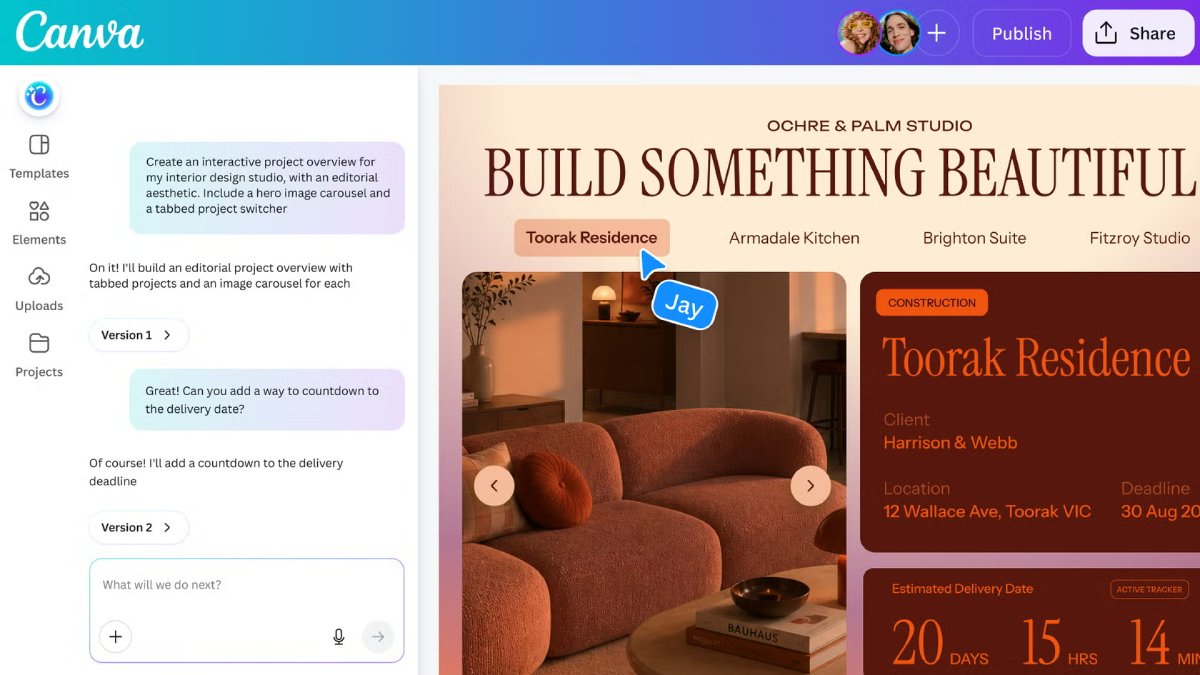
Photo Credit: Canva
Canva Code 2.0 is available to users starting today
Click Here to Add Gadgets360 As A Trusted Source

Advertisement
Canva on Tuesday took the wraps off Code 2.0, its latest AI-powered tool that allows users to build and edit websites, apps, and web experiences using text prompts. This vibe coding tool offers more than 50 new Canva Code templates for designs, and users can personalize it with photos and graphics. Canva Code 2.0 can be accessed by free, pro, business, enterprise, and education users. It also supports an HTML Import feature, and it lets users access the visual library or their own uploaded media.
Canva Code 2.0 Is Also Available to Free Users
The company announced that Canva Code 2.0 is now available to all users, and the new AI-powered app and website creation tool can be accessed by Free, Pro, Business, Enterprise, and Education users. It is available directly within existing design projects, including presentations, whiteboards, and documents.
The update integrates AI coding directly into Canva's editor. Users can manually tweak their projects in the editor or use Canva AI to prompt edits. Canva is offering over 50 Canva Code templates for interactive designs, and users can customise them using Canva's library or their own uploaded media.
The HTML import tool lets users bring projects created with other AI assistants into Canva as editable designs. This allows creators to continue working on existing projects without having to recreate them from scratch. Additionally, users can select a specific element and prompt Canva AI to refine or edit that piece.
Canva says Code 2.0 combines AI-powered code generation and lets users swap in their own images by dragging directly from Canva's library, update colours and fonts through the toolbar, click into any section to retype text directly, or select a specific element to refine with conversational AI.
The company says teams can collaboratively build, review, and comment on interactive designs in real-time with Canva Code 2.0. After completion, the creations can automatically adapt to different screen sizes. Users can preview how it will look on mobile and publish their work to a free Canva domain, connect a custom domain, or share it within their organisation using a single sign-on.
Comments
Get your daily dose of tech news, reviews, and insights, in under 80 characters on Gadgets 360 Turbo. Connect with fellow tech lovers on our Forum. Follow us on X, Facebook, WhatsApp, Threads and Google News for instant updates. Catch all the action on our YouTube channel.


Advertisement
Follow Us




-
 EV सब्सिडी सिर्फ उन्हीं टू-व्हीलर को, जिनमें होगी रीजेनरेटिव ब्रेकिंग
 -
8000mAh बैटरी वाला नया Poco फोन भारत में जल्द हो सकता है लॉन्च!
-
50 मेगापिक्सल कैमरा के साथ Huawei Pura 90s Pro, Pura 90s Pro Max लॉन्च
-
OnePlus की अफोर्डेबल सेगमेंट में नया स्मार्टफोन लॉन्च करने की तैयारी, 8,000mAh तक हो सकती है बैटरी
Advertisement
Popular on Gadgets
- Samsung Galaxy S26 Ultra
- Motorola Razr Fold
- ChatGPT
- OPPO Find N6
- Mobiles Under Rs. 40,000
- Vivo X300 Ultra
- Asus Zenbook S14
- iQOO 15
- Vivo X300 Pro
- Lenovo Yoga Slim 7i Aura Edition
- iQOO 15R
- Vivo X Fold 5
- Sony PlayStation 5
- HP OmniPad 12
- OnePlus Nord CE 6 Lite
- OnePlus Pad 4
- OPPO F33 Pro 5G
- Cryptocurrency
- HP OmniBook Ultra 14 (2026)
- iPhone 17
- Eureka Forbes AP 355 Room Air Purifier
- Latest Mobile Phones
- Compare Phones
Latest Gadgets
- Realme Narzo 100x 5G
- Motorola Edge 70 Max
- Huawei Pura 90s Pro Max
- Huawei Pura 90s Pro
- Redmi Note 17
- Redmi Note 17 Pro
- Moto G77 Power
- Vivo G5z
- Acer Aspire 3 (2026, 11.6)
- Acer Aspire 3 (2026, 15.6)
- Red Magic Gaming Tablet 5 Pro
- Vivo Pad 5c
- Amazfit Cheetah 2 Ultra
- Amazfit Bip Max
- Sony Bravia 9 II
- Haier HQLED P7 Pro
- Acer Predator Atlas 8
- Asus ROG Ally
- IFB 1.5 Ton 3 Star Inverter Split AC (CI193GN22RGM3)
- IFB 2 Ton 3 Star Inverter Split AC (CI223GD32RGM3)

- About Us
- Sitemaps
- Feedback
- Archives
- Contact Us
- RSS
- Advertise
- Career
- Privacy Policy
- Ethics
- Editorial Policy
- Terms & Conditions
- Complaint Redressal
Download Our Apps
Available in Hindi
© Copyright Red Pixels Ventures Limited 2026. All rights reserved.