Codex Micro Launched as a Dedicated Controller for OpenAI Codex Power Users: Price, Features
OpenAI co-designed the Codex Micro with keyboard designer Work Louder.
Written by Nithya P Nair, Edited by Rohan Pal | Updated: 16 July 2026 13:50 IST
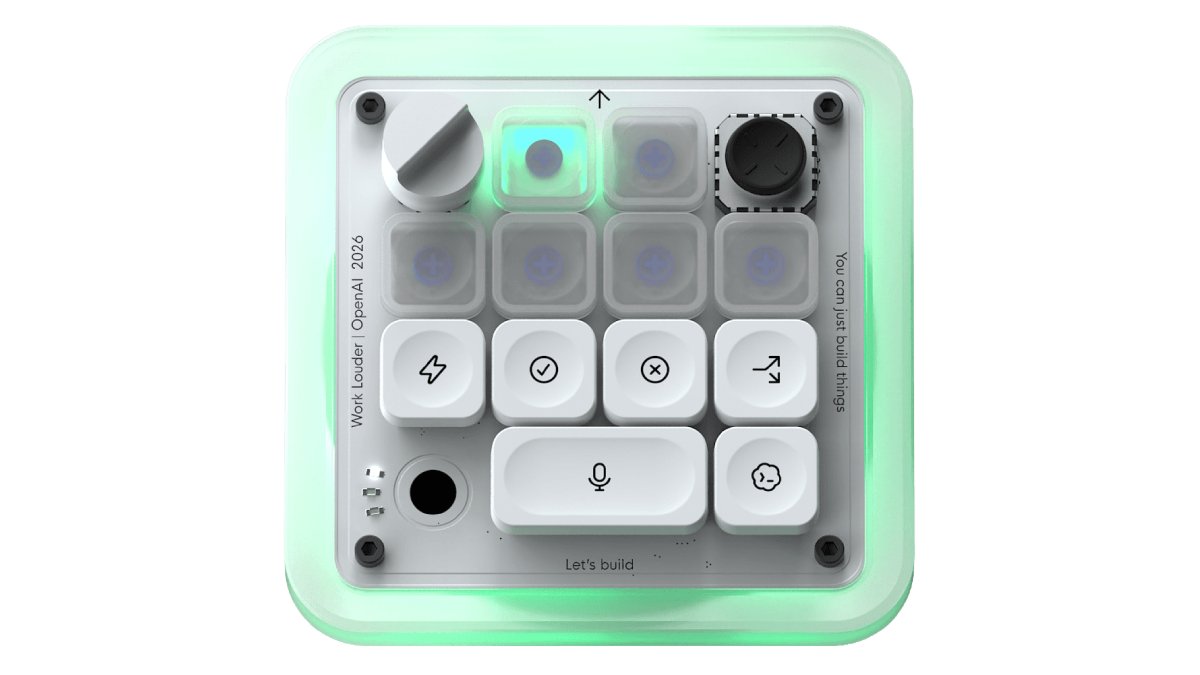
Photo Credit: OpenAI
Codex Micro's joystick can be used for flicking between Codex workflows
Click Here to Add Gadgets360 As A Trusted Source

Advertisement
OpenAI has launched the Codex Micro in global markets. The new keyboard, developed in association with keyboard maker Work Louder, is designed to work with the company's AI coding assistant Codex. It can be used to switch between agents and start new chats instantly. The Codex Micro includes a joystick for navigation and a rotary dial for adjusting the agent's reasoning level. It offers Codex integration and lets users remap commands, adjust layouts, and more, without requiring additional software downloads. The latest hardware device by OpenAI is designed for developers working with agentic workflows.
Codex Micro Price, Availability
The Codex Micro is priced at $230 (roughly Rs. 22,000). It is currently available for purchase through the OpenAI and Work Louder websites.
Codex Micro Specifications, Features
The Codex Micro supports both Bluetooth and USB Type-C connectivity and is compatible with Mac and Windows systems. It has RGB lighting, and each Agent Key lights up with a live RGB status from Codex. The keypad is integrated with ChatGPT Codex and Work Louder Input. OpenAI claims that the "Codex Micro is the only AI controller that is directly integrated into Codex".
The Codex Micro has a CNC-machined polycarbonate (PC) and aluminium chassis with a sandblasted anodised aluminium bottom. The keyboard boasts 13 mechanical switches, a touch sensor, a rotary encoder, and a planar joystick.
OpenAI co-designed the Codex Micro with keyboard designer Work Louder. This programmable keypad functions like a physical control centre for developers using OpenAI's Codex AI coding assistant. The included keyset consists of 32 custom icon keycaps and 11 solid-colour keycaps. It offers six programmable layers, allowing users to group and organise workflows into dedicated layouts.
Codex Micro'S joystick can be used to flick between Codex workflows, including reviewing a PR, debugging an error, or refactoring code. The Codex Micro features Command keys to accept changes, reject outputs, push-to-talk, start new chats, and trigger custom actions instantly. The dial can be used to adjust the reasoning level.
Comments
Get your daily dose of tech news, reviews, and insights, in under 80 characters on Gadgets 360 Turbo. Connect with fellow tech lovers on our Forum. Follow us on X, Facebook, WhatsApp, Threads and Google News for instant updates. Catch all the action on our YouTube channel.
Further reading:
Codex Micro, Codex Micro Price, Codex Micro Specifications, OpenAI, Codex Micro Keyboard, Worklouder


Codex Micro Launched as a Dedicated Controller for OpenAI Codex Power Users: Price, Features


Advertisement
Follow Us




-
01:24
[Sponsored] A Last-Minute Diwali Makeover With Galaxy Z Fold8 -
01:42
[Sponsored] Galaxy Watch9 for Everyday Health Insights | Smarter Wellness Choices -
01:15
[Sponsored] Galaxy Tab S10 Lite for Students: Notes, Solve Math and More -
04:17
[Sponsored] LG NANO 4K UHD AI TV NU885: Gemini Search, Dolby Atmos & 5 Years of Updates -
00:57
[Sponsored] Samsung Galaxy Z Fold8 My Fan Cam in Action: Find the Moment, Then Share It
Advertisement
Popular on Gadgets
- Samsung Galaxy S26 Ultra
- Motorola Razr Fold
- ChatGPT
- OPPO Find N6
- Mobiles Under Rs. 40,000
- Vivo X300 Ultra
- Asus Zenbook S14
- iQOO 15
- Vivo X300 Pro
- Lenovo Yoga Slim 7i Aura Edition
- iQOO 15R
- Vivo X Fold 5
- Sony PlayStation 5
- HP OmniPad 12
- OnePlus Nord CE 6 Lite
- OnePlus Pad 4
- OPPO F33 Pro 5G
- Cryptocurrency
- HP OmniBook Ultra 14 (2026)
- iPhone 17
- Eureka Forbes AP 355 Room Air Purifier
- Latest Mobile Phones
- Compare Phones
Latest Gadgets
- OnePlus Ace 7 Pro
- OnePlus Ace 7
- Samsung W27
- Huawei Pura 90 Plus
- iQOO Neo 12
- Redmi K100
- Vivo Y600
- HMD 2660 Flip Senior Edition
- MacBook Pro With PROLED XDR (16-Inch, M5 Max)
- MacBook Pro With PROLED XDR (14-Inch, M5 Max)
- iPad mini (2026)
- Amazon Alexa Tablet 8
- Pebble Qore 2
- Amazfit T-Rex Dual Solar
- Toshiba 65-Inch 4K Ultra HD Smart Mini LED QLED TV (65Z670SP)
- Haier M70 Mini LED 65-inch
- Acer Predator Atlas 8
- Asus ROG Ally
- Blue Star 1.5 Ton 5 Star Inverter Split AC (IE518ZNURS)
- Blue Star 2 Ton 3 Star Inverter Window AC (WIE324L)

- About Us
- Sitemaps
- Feedback
- Archives
- Contact Us
- RSS
- Advertise
- Career
- Privacy Policy
- Ethics
- Editorial Policy
- Terms & Conditions
- Complaint Redressal
Download Our Apps
Available in Hindi
© Copyright Red Pixels Ventures Limited 2026. All rights reserved.