-
 Apple's iPhone Duo Hands-On Video Shows Soft Spot Around Display Crease22 October 2026
 -
iPhone Duo to Get Apple Pencil Support With iOS 27.2 Update, Reachability Feature Later This Year: Report22 October 2026
-
iOS 27.2 Update to Reportedly Bring New iPhone Features Across Messages, Apple TV and More Apps22 October 2026
-
Apple Music Gets a New Black-and-White Brand Identity Inspired by Sound, Liquid Glass22 October 2026
-
Perplexity Computer for Mac Adds Local AI Mode for Pro, Max Subscribers21 October 2026
Apple Releases Developer Preview of Photos, the iPhoto Replacement for OS X
By Jamshed Avari | Updated: 6 February 2015 17:00 IST
Click Here to Add Gadgets360 As A Trusted Source

Advertisement
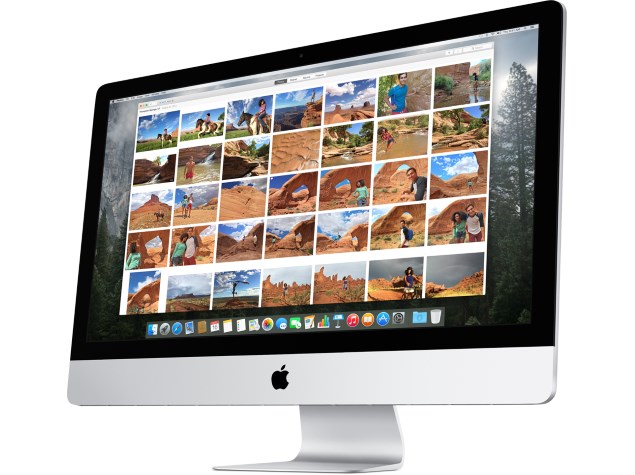
Apple has released a new developer seed of OS X 10.10.3, which includes a beta of the new Photos app. The preview shows off the new app's interface, which is similar to that of the Photos app on iOS. One of the main attractions of Photos is its promised ability to handle large image libraries without slowing down.
Photos, including edits, are aggregated from across a user's devices and saved to iCloud so that they are also available from any device. Shared streams can also be seen and managed. Photos can of course be shared to social networks and contacts, slideshows can be created, and printing options such as photo books and greeting cards will be available in some regions.
Much like on iOS, Photos are organised into Moments, Collections and Years, and users can zoom out to see thumbnail overviews of groups of photos. Smart albums automatically gather all panoramas, burst shots, slow-motion videos, etc. Advanced editing tools allow users to crop, rotate, retouch and apply filters to photos. Other adjustments include colour, definition, vignette, and white balance levels. Apple's smart editing tools group controls that affect each other, such as brightness and exposure. A user can make fine adjustments to all by dragging a single slider, or adjust them individual if so desired. EXIF information can be edited in batches across multiple photos, and you can also tag people, places and keywords.
- Apple Watch vs Garmin: which would you pick if charging every day gets on your nerves?
- Apple Watch or AirPods upgrade first?
- Apple to Introduce redesigned Apple Pencil models in 2027
- Apple to introduce a new device leasing programme, Apple Upgrade tomorrow
- Apple has increased the prices of Apple Music and Apple One Subscription plans
iCloud integration will be emphasised heavily. Users can choose to free up space on their devices by retaining only low-resolution versions of photos, while high-res ones are offloaded to Apple's online storage service. Unlike the Photo Stream function, these will count against a user's storage limit, as Macworld notes.
Developers with access to pre-release versions of OS X can find the Photos app in the Mac App Store, and it is also available as a standalone download through the Mac Dev Centre.
Apple first announced the Photos app, which will replace iPhoto as well as Aperture and unify the photo organisation and sharing experience across iOS and OS X, in mid-2014 at its annual World Wide Developers Conference. While OS X Yosemite was released later in 2014, the Photos app will only be available in spring 2015. It will be a free update for all OS X Yosemite users.
Comments
Get your daily dose of tech news, reviews, and insights, in under 80 characters on Gadgets 360 Turbo. Connect with fellow tech lovers on our Forum. Follow us on X, Facebook, WhatsApp, Threads and Google News for instant updates. Catch all the action on our YouTube channel.
Related Stories




Advertisement
Follow Us




-
![[Sponsored] Galaxy Tab S10 Lite for Students: Notes, Solve Math and More](https://www.gadgets360.com/static/desktop/images/spacer.png)
01:15
[Sponsored] Galaxy Tab S10 Lite for Students: Notes, Solve Math and More -
04:17
[Sponsored] LG NANO 4K UHD AI TV NU885: Gemini Search, Dolby Atmos & 5 Years of Updates -
00:57
[Sponsored] Samsung Galaxy Z Fold8 My Fan Cam in Action: Find the Moment, Then Share It -
01:41
[Sponsored] What Do You Need To Know Before Your Next Run? | Samsung Galaxy Watch Ultra2 -
01:32
[Sponsored] Big Day Tomorrow? Prep Today | Samsung Galaxy Watch Ultra2
Advertisement
Popular on Gadgets
- Samsung Galaxy S26 Ultra
- Motorola Razr Fold
- ChatGPT
- OPPO Find N6
- Mobiles Under Rs. 40,000
- Vivo X300 Ultra
- Asus Zenbook S14
- iQOO 15
- Vivo X300 Pro
- Lenovo Yoga Slim 7i Aura Edition
- iQOO 15R
- Vivo X Fold 5
- Sony PlayStation 5
- HP OmniPad 12
- OnePlus Nord CE 6 Lite
- OnePlus Pad 4
- OPPO F33 Pro 5G
- Cryptocurrency
- HP OmniBook Ultra 14 (2026)
- iPhone 17
- Eureka Forbes AP 355 Room Air Purifier
- Latest Mobile Phones
- Compare Phones
Latest Gadgets
- HMD 2660 Flip Senior Edition
- Lava Aura Curve
- Poco X8s
- Samsung Galaxy F70 5G
- Tecno Spark 50S 5G
- Vivo Y600s Pro
- Vivo Y32 (2026)
- Infinix Smart 20 HD
- Acer TravelLite TL44-53M-G2
- HP ZBook Ultra G3a
- Amazon Alexa Tablet 8
- Amazon Alexa Tablet 11
- Pebble Qore 2
- Amazfit T-Rex Dual Solar
- Toshiba 65-Inch 4K Ultra HD Smart Mini LED QLED TV (65Z670SP)
- Haier M70 Mini LED 65-inch
- Acer Predator Atlas 8
- Asus ROG Ally
- Blue Star 1.5 Ton 5 Star Inverter Split AC (IE518ZNURS)
- Blue Star 2 Ton 3 Star Inverter Window AC (WIE324L)

- About Us
- Sitemaps
- Feedback
- Archives
- Contact Us
- RSS
- Advertise
- Career
- Privacy Policy
- Ethics
- Editorial Policy
- Terms & Conditions
- Complaint Redressal
Download Our Apps
Available in Hindi
© Copyright Red Pixels Ventures Limited 2026. All rights reserved.