-
 iOS 27 Update for iPhone Rolling Out Today: How to Download, India Release Time, Supported iPhones and More14 September 2026
 -
Google Rolls Out Gemini App for Windows With Video Generation Support, Multi Agents11 September 2026
-
iOS 27: Top New Features, List of Compatible Devices, and More10 September 2026
-
Flipkart Takes on Blinkit and Zepto With New Dedicated Minutes App in India9 September 2026
-
Apple Plans to Make New Changes to App Store to Increase Margins and Recurring Revenue: Report7 September 2026
Google Drive Now Lets Users Select Which Folders to Sync
By Ketan Pratap | Updated: 15 April 2016 17:06 IST
Click Here to Add Gadgets360 As A Trusted Source

Advertisement
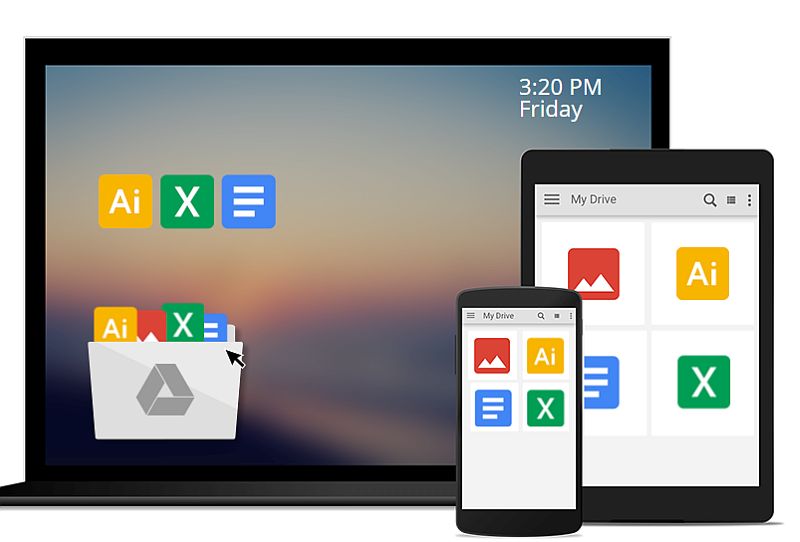
Google has rolled out a new feature for its Drive desktop app for Windows and OS X that will now allow users to select which folders or sub-folders they want to sync and deselect the ones they don't. Announcing the new feature, Aakash Sahney, Google Drive Product Manager, confirmed that the new features will roll out to users over the next few weeks.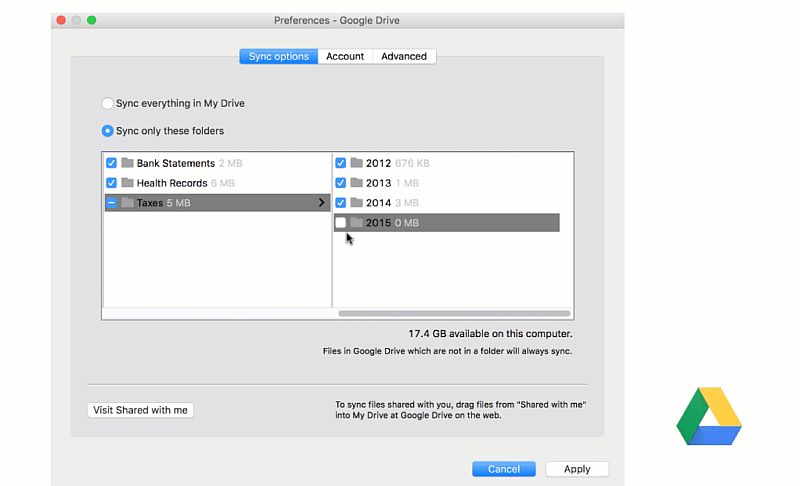
In order to access the new folder sync option, users will need to tap Menu > Preference > Sync Options > Sync only these folders.
Google explains that while Drive can store "terabytes (upon terabytes)" of data, a computer's hard drive can run out of space if users sync everything. Adding further, Sahney said that when a user deselects a folder, it'll be removed from the computer but will be saved in Drive. The app will also show the size of each folder.
- I started with cooling as the priority and somehow ended up comparing apps
- I never realised how much storage speed matters until my old phone started taking forever to open big apps
- There is a common myth that many apps are not fully optimized for foldable devices.
- On the Samsung Galaxy Z Fold 8 Ultra, you do not need to open multiple apps just to check multiple things
- What apps look dramatically better on the Samsung Galaxy Z Fold8 when unfolded?
"After you sync your files, Drive makes it easy to move and delete items directly from your computer. But doing that with shared files can cause others to lose access. Now, Drive warns you when this might happen," explains Sahney.
Google's cloud storage app, Drive, has been receiving some stiff competition from other services such as Dropbox and OneDrive among others. Dropbox last month announced it had 500 million registered users.
Earlier this year, Google once again offered 2GB of free permanent storage to Google Drive users on the eve of Safer Internet Day. All users needed to do were to complete a short security checkup on their Google Account. Google has been lately emphasising on the Gmail's account security check-up process and added several layers of security including review account recovery options, connected devices, services with permissions, and 2-step verification settings.
Comments
Get your daily dose of tech news, reviews, and insights, in under 80 characters on Gadgets 360 Turbo. Connect with fellow tech lovers on our Forum. Follow us on X, Facebook, WhatsApp, Threads and Google News for instant updates. Catch all the action on our YouTube channel.
Related Stories



Advertisement
Follow Us




-

06:32
Google Pixel 11 Pro XL Review: The Most Exciting Pixel Yet? | 120X Zoom + Tensor G6 -
05:20
Samsung Galaxy Watch Ultra 2 Review: Is This the Best Android Smartwatch? -
07:01
Samsung Galaxy Z Fold 8 Review: Is This the Best Foldable Phone? -
06:39
Samsung Galaxy Z Fold8 Ultra Review: Cameras, Battery, Performance Tested -
04:33
[Sponsored] JBL Live 780NC: Great Sound, Perfect Comfort, Smart ANC & 80-Hour Battery
Advertisement
Popular on Gadgets
- Samsung Galaxy S26 Ultra
- Motorola Razr Fold
- ChatGPT
- OPPO Find N6
- Mobiles Under Rs. 40,000
- Vivo X300 Ultra
- Asus Zenbook S14
- iQOO 15
- Vivo X300 Pro
- Lenovo Yoga Slim 7i Aura Edition
- iQOO 15R
- Vivo X Fold 5
- Sony PlayStation 5
- HP OmniPad 12
- OnePlus Nord CE 6 Lite
- OnePlus Pad 4
- OPPO F33 Pro 5G
- Cryptocurrency
- HP OmniBook Ultra 14 (2026)
- iPhone 17
- Eureka Forbes AP 355 Room Air Purifier
- Latest Mobile Phones
- Compare Phones
Latest Gadgets
- Samsung Galaxy A08
- Itel Muzik 450L
- OPPO K14 Lite
- Samsung Galaxy A18 4G
- iPhone Duo
- OPPO A7 Pro
- Huawei Mate XT 2 Ultimate Design
- Realme 16 Pro Harry Potter Edition
- Asus Vivobook S14 (S5452MA)
- Acer Aspire G 3D 16
- Xiaomi Pad 9 Pro
- Xiaomi Pad 9
- Apple Watch Ultra 4
- Apple Watch Series 12
- Haier M70 Mini LED 65-inch
- Xiaomi TV FX Mini LED 65
- Acer Predator Atlas 8
- Asus ROG Ally
- Blue Star 1.5 Ton 5 Star Inverter Split AC (IE518ZNURS)
- Blue Star 2 Ton 3 Star Inverter Window AC (WIE324L)

- About Us
- Sitemaps
- Feedback
- Archives
- Contact Us
- RSS
- Advertise
- Career
- Privacy Policy
- Ethics
- Editorial Policy
- Terms & Conditions
- Complaint Redressal
Download Our Apps
Available in Hindi
© Copyright Red Pixels Ventures Limited 2026. All rights reserved.