-
 Microsoft Rolls Out Standalone Cloud Playtime Packs to Xbox Insiders22 October 2026
-
GTA 6 Will Get Xbox Cloud Gaming Support on Xbox Series S/X, but Will Not Stream on PC7 October 2026
-
Xbox Game Pass Rumoured to Drop Day-One Games in Major Shake-Up, Microsoft Says Plans Not 'Finalised'17 September 2026
-
Microsoft Will Put Monthly Cap on Xbox Cloud Gaming Hours for Game Pass Members in November4 September 2026
-
Xbox's Free Ad-Supported Game Streaming Begins Testing With One-Hour Session Limit24 July 2026
- Home
- Games
- Games News
- Xbox Cloud Gaming Now Lets You Connect Your Phone as a Controller on Smart TVs
Xbox Cloud Gaming Now Lets You Connect Your Phone as a Controller on Smart TVs
Xbox is also rolling out cloud connect support for the newly launched Xbox Nano controller.
Written by Manas Mitul | Updated: 5 November 2026 15:33 IST
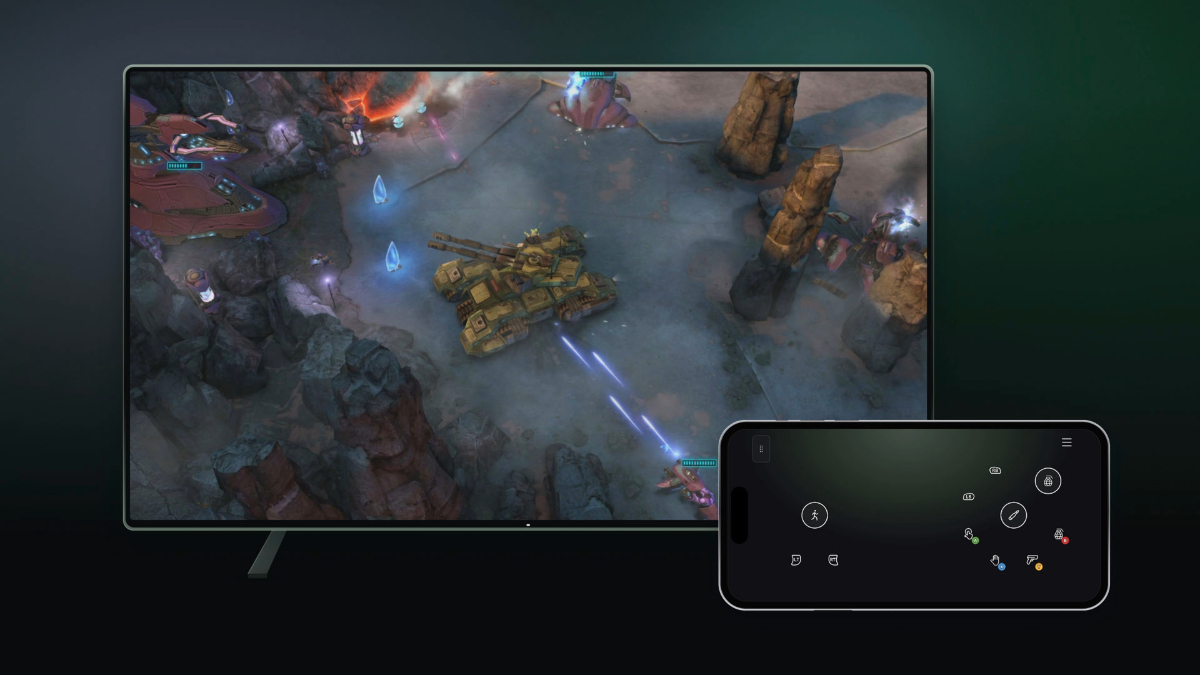
Photo Credit: Microsoft
Users can start using their phones as controllers in countries where Xbox Cloud Gaming is supported
Click Here to Add Gadgets360 As A Trusted Source
Advertisement
Xbox Cloud Gaming is getting two new controller options, one of which allows players to use their phones as gamepads connected to smart TVs. Xbox users in the US will also be able to connect to cloud gaming sessions directly via WiFi with the newly launched Xbox Nano controller.
Microsoft is rolling out both options in preview and the controller experiences are being tested right now to gather feedback before a wider rollout. The Xbox parent said availability and supported games or devices may be limited at the moment.
The Xbox Cloud Gaming service has seen major changes over the past year under new Xbox CEO Asha Sharma. To access cloud gaming on supported smart TVs, Xbox users previously needed a Game Pass subscription and a compatible controller. Now, they need neither.
The new feature, rolling out now on select smart TVs in countries where Xbox Cloud Gaming is supported, allows users to connect a supported Android or iOS phone as a controller to a supported smart TV and start steaming games via the Xbox Cloud Gaming app. Controls will open on the phone's browser and will be tailored for select games.
To turn the feature on, users need to head to Preview Features in Settings > Account in the updated Xbox Cloud Gaming app on smart TVs. When launching a game without a physical controller, users will see an option to use their phone as a controller.
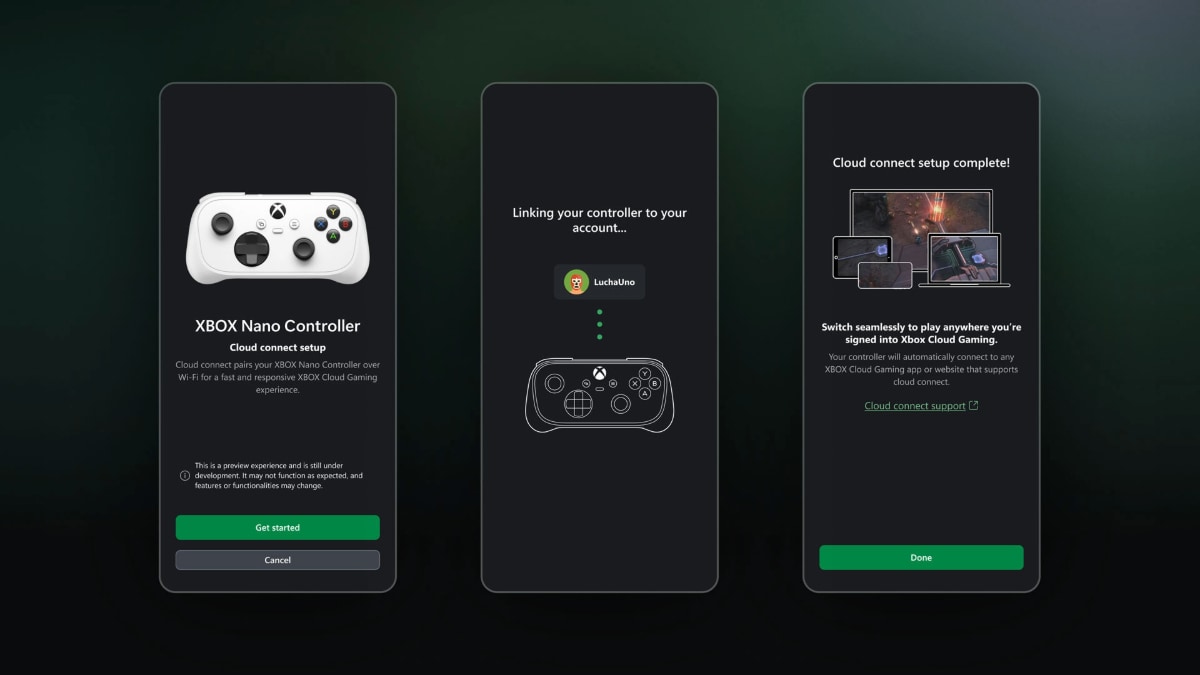
The Xbox Nano controller now connects to Cloud Gaming directly via WiFi
Photo Credit: Microsoft
Xbox Nano Controller Gets Cloud Connect
For users in the US, the Xbox Nano controller now supports cloud connect in preview, allowing users to connect to the smart TV using WiFi instead of Bluetooth. Xbox said that connecting directly to the cloud server running Xbox games will help reduce input latency.
The cloud connect feature is still in early testing and does not support every Xbox Cloud Gaming experience yet. Users in the US can test the feature on supported smart TVs and the web.
Xbox users can set up cloud connect with the Nano controller via the Xbox beta app on Android or the Xbox Accessories app on PC. Once the controller is connected to WiFi, they can open the Xbox Cloud Gaming experience on smart TVs or the web and sign in with the same Xbox account used during the setup.
Xbox Cloud Gaming is also now available as a standalone option outside of a Game Pass subscription. Cloud playtime plans were rolled out to Xbox Insiders last month and will be widely available to all Xbox users starting this month.
Xbox rolled out three cloud playtime packs during the preview period, offering 10, 25, and 50 hours of cloud gaming at introductory launch prices of $3.99, $7.99, and $11.99, respectively.
The Xbox Nano controller, which costs $50, was announced last month. The pocket-sized controller went on sale in select regions on November 4.
Comments
Get your daily dose of tech news, reviews, and insights, in under 80 characters on Gadgets 360 Turbo. Connect with fellow tech lovers on our Forum. Follow us on X, Facebook, WhatsApp, Threads and Google News for instant updates. Catch all the action on our YouTube channel.
Related Stories




Advertisement
Follow Us


-

00:54
Expectation vs Reality: Parents Said Notice Every Detail. She Added One | Galaxy S26 FE -
01:55
From Group Photos to Festive Nights | Samsung Galaxy A57 5G -
01:33
Galaxy Watch Ultra2 on the Trail: Tracking, Hydration & Elevation -
01:38
Galaxy Z Fold8 Captures the Funniest Diwali Moments | My Fan Cam -
01:37
Samsung Galaxy S26 Ultra Diwali Offer in India: ₹79,999 + World's First Privacy Display on Mobile
-
₹44500 सस्ता मिल रहा Samsung फ्लिप स्मार्टफोन, Amazon दिवाली सेल में मौका
-
दिल्ली में प्रदूषण, एयर प्यूरिफर करेंगे मदद, Amazon सेल में सस्ते खरीदें
-
Google Pixel 11 Pro XL vs Vivo X300 Ultra vs Samsung Galaxy S26 Ultra
-
Samsung Galaxy A38 में मिल सकती है 6,000mAh की बैटरी, 50 मेगापिक्सल प्राइमरी कैमरा
-
200MP कैमरा और 7800mAh बैटरी वाली Vivo X500 Series की प्री-बुकिंग शुरू, 25 नवंबर को लॉन्च!
Advertisement
Popular on Gadgets
- Samsung Galaxy S26 Ultra
- Motorola Razr Fold
- ChatGPT
- OPPO Find N6
- Mobiles Under Rs. 40,000
- Vivo X300 Ultra
- Asus Zenbook S14
- iQOO 15
- Vivo X300 Pro
- Lenovo Yoga Slim 7i Aura Edition
- iQOO 15R
- Vivo X Fold 5
- Sony PlayStation 5
- HP OmniPad 12
- OnePlus Nord CE 6 Lite
- OnePlus Pad 4
- OPPO F33 Pro 5G
- Cryptocurrency
- HP OmniBook Ultra 14 (2026)
- iPhone 17
- Eureka Forbes AP 355 Room Air Purifier
- Latest Mobile Phones
- Compare Phones
Latest Gadgets
- Karbonn Rebel
- Karbonn Rebel Pro
- OnePlus Turbo 6Vs
- Redmi M100 Pro
- OnePlus Ace 7 Pro
- OnePlus Ace 7
- Samsung W27
- Huawei Pura 90 Plus
- Dell 14S (2026)
- HP ProBook 4 G2iS 14
- iPad mini (2026)
- Amazon Alexa Tablet 8
- Pebble Qore 2
- Amazfit T-Rex Dual Solar
- Toshiba 65-Inch 4K Ultra HD Smart Mini LED QLED TV (65Z670SP)
- Haier M70 Mini LED 65-inch
- Acer Predator Atlas 8
- Asus ROG Ally
- Blue Star 1.5 Ton 5 Star Inverter Split AC (IE518ZNURS)
- Blue Star 2 Ton 3 Star Inverter Window AC (WIE324L)

- About Us
- Sitemaps
- Feedback
- Archives
- Contact Us
- RSS
- Advertise
- Career
- Privacy Policy
- Ethics
- Editorial Policy
- Terms & Conditions
- Complaint Redressal
Download Our Apps
Available in Hindi
© Copyright Red Pixels Ventures Limited 2026. All rights reserved.