- Home
- How to
- How to Features
- Ask Google Pay Explained: What It Is, Features, How to Use, and More
Ask Google Pay Explained: What It Is, Features, How to Use, and More
Ask Google Pay is powered by Google’s Gemini AI models, offering a conversational experience to users.
Written by Dhruv Raghav, Edited by Rohan Pal | Updated: 2 August 2026 16:00 IST

Here's everything you need to know about the new Ask Google Pay AI chatbot
Click Here to Add Gadgets360 As A Trusted Source

Advertisement
Google has been rolling out various updates, bringing new features to the Google Pay app, its digital payments platform. Building on this, the Mountain View-based tech giant launched Ask Google Pay for users in India with the aim to offer a conversational experience within the digital payments app. The update introduces a dedicated AI chatbot in the Google Pay app, which lets you get insights based on your past UPI transactions made through the app. The chatbot is powered by Google's Gemini AI models, bringing generative capabilities to the Google Pay app. Ask Google Pay can also create infographics, which are claimed to help you manage your finances better.
If you are wondering what Ask Google Pay is, how you can enable it on your phone, and how you can use it, we have prepared an explainer to help you with the same.

What is Ask Google Pay?
Ask Google Pay is a dedicated Gemini-powered chatbot, integrated directly into the Google Pay app on your smartphone. The tech giant is currently rolling out the functionality in phases. As previously mentioned, Google aims to bring a conversational experience to its digital payments platform with the launch of the Ask Google Pay feature. Google claims that it will help users manage their finances better and help users become more fiscally disciplined.
With a text prompt, you can request Ask Google Pay to analyse your past spending. You can ask the Ask Google Pay chatbot to look at your last month's transactions, and the AI chatbot will then retrieve the data to generate various kinds of infographics, like a pie chart, and list the transactions based on categories. Ask Google Pay is also capable of providing its own observations.
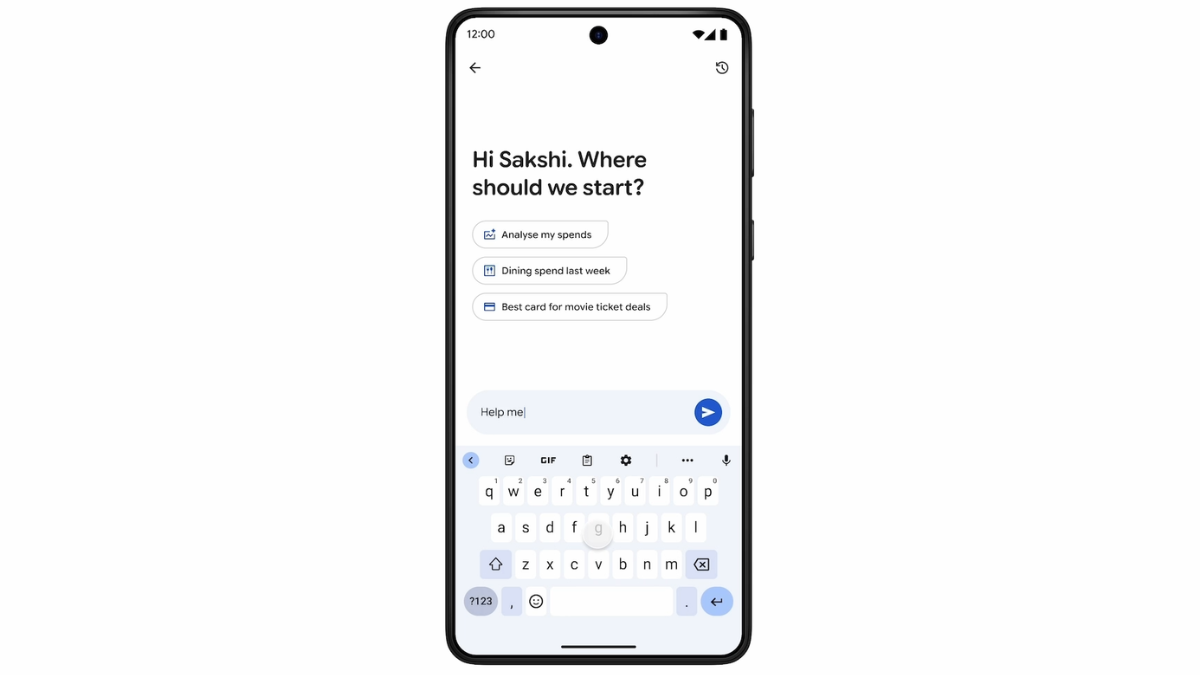
Further, the Ask Google Pay chatbot provides tips on how you can improve your spending patterns. It is capable of curating tailored offers and finding credit card options based on your financial habits. If you want to understand complex financial concepts, like compounding interest, SIPs, and credit scores, the chatbot can also simplify them. On top of this, you can also ask it to explain the differences between tax regimes.
To offer more personalised recommendations and suggestions, Ask Google Pay can refer to your transaction history and credit report data. It can understand and answer your queries in 10 Indian languages. You can use text or voice commands to use Ask Google Pay.
How to Enable Ask Google Pay on Your Phone
Ask Google Pay is an opt-in, which means that you will manually have to enable it. To turn it on, you can follow the steps mentioned below.
- Open the Google Pay app on your smartphone.
- Then, tap on the You button in the bottom-right corner of the screen.
- Navigate to the Settings menu > Privacy & Security > Data and personalisation.
- Here, you must toggle Personalisation within Google Pay on to enable Ask Google Pay.
How to Use Ask Google Pay on Your Phone
- Open the Google Pay app on your handset.
- Click on the Money button, which appears at the bottom of the screen.
- Now, tap on the Ask a question button, placed under the Ask About your finances section.
- Then, the AI chatbot window will appear. Here, you can ask any question with text, ask follow-up questions on a topic, and ask the chatbot to analyse your data.
- You can type text prompts, like "Analyse my spends from last week" and "What is the best card for my spends?".
1. Is my financial data safe if I use Ask Google Pay?
Google claims that your financial and transaction data remains secure if you use Ask Google Pay.
2. Do I have to pay extra to use Ask Google Pay?
Google does not charge a fee for offering Ask Google Pay to users.
3. Why can I not see Ask Google Pay on my phone?
Google is currently rolling out the Ask Google Pay functionality in phases. You can expect to see the feature in the Google Pay app soon.
Comments
Get your daily dose of tech news, reviews, and insights, in under 80 characters on Gadgets 360 Turbo. Connect with fellow tech lovers on our Forum. Follow us on X, Facebook, WhatsApp, Threads and Google News for instant updates. Catch all the action on our YouTube channel.


Advertisement
Follow Us




-

00:54
Expectation vs Reality: Parents Said Notice Every Detail. She Added One | Galaxy S26 FE -
01:55
From Group Photos to Festive Nights | Samsung Galaxy A57 5G -
01:33
Galaxy Watch Ultra2 on the Trail: Tracking, Hydration & Elevation -
01:38
Galaxy Z Fold8 Captures the Funniest Diwali Moments | My Fan Cam -
01:37
Samsung Galaxy S26 Ultra Diwali Offer in India: ₹79,999 + World's First Privacy Display on Mobile
Advertisement
Popular on Gadgets
- Samsung Galaxy S26 Ultra
- Motorola Razr Fold
- ChatGPT
- OPPO Find N6
- Mobiles Under Rs. 40,000
- Vivo X300 Ultra
- Asus Zenbook S14
- iQOO 15
- Vivo X300 Pro
- Lenovo Yoga Slim 7i Aura Edition
- iQOO 15R
- Vivo X Fold 5
- Sony PlayStation 5
- HP OmniPad 12
- OnePlus Nord CE 6 Lite
- OnePlus Pad 4
- OPPO F33 Pro 5G
- Cryptocurrency
- HP OmniBook Ultra 14 (2026)
- iPhone 17
- Eureka Forbes AP 355 Room Air Purifier
- Latest Mobile Phones
- Compare Phones
Latest Gadgets
- Karbonn Rebel
- Karbonn Rebel Pro
- OnePlus Turbo 6Vs
- Redmi M100 Pro
- OnePlus Ace 7 Pro
- OnePlus Ace 7
- Samsung W27
- Huawei Pura 90 Plus
- Dell 14S (2026)
- Asus ProArt P14 (2026, RTX Spark)
- iPad mini (2026)
- Amazon Alexa Tablet 8
- Pebble Qore 2
- Amazfit T-Rex Dual Solar
- Toshiba 65-Inch 4K Ultra HD Smart Mini LED QLED TV (65Z670SP)
- Haier M70 Mini LED 65-inch
- Acer Predator Atlas 8
- Asus ROG Ally
- Blue Star 1.5 Ton 5 Star Inverter Split AC (IE518ZNURS)
- Blue Star 2 Ton 3 Star Inverter Window AC (WIE324L)

- About Us
- Sitemaps
- Feedback
- Archives
- Contact Us
- RSS
- Advertise
- Career
- Privacy Policy
- Ethics
- Editorial Policy
- Terms & Conditions
- Complaint Redressal
Download Our Apps
Available in Hindi
© Copyright Red Pixels Ventures Limited 2026. All rights reserved.