-
 Gmail Adds ‘Copy Code’ Shortcut for Copying Verification Codes on Android and iOS21 September 2026
 -
Claude Can Now Take Greater Control Over Gmail, Google Drive With Updated Google Workspace Connectors20 August 2026
-
Google Upgrades Gmail Help Me Write With Custom AI Email Edits16 July 2026
-
Google Begins Testing New Conversational Voice Features for Gmail and Google Keep1 July 2026
-
Google I/O 2026: Docs Live Brings Gemini Voice AI to Gmail, Docs and Keep20 May 2026
- Home
- How to
- How to Features
- How to Schedule an Email in Gmail via Desktop Browser, App
How to Schedule an Email in Gmail via Desktop Browser, App
Gmail lets you select a time and date for when you want to send an email. It can store up to 100 scheduled mails.
By Vineet Washington | Updated: 1 August 2021 10:00 IST

Gmail scheduled mails can be edited before the scheduled time
Click Here to Add Gadgets360 As A Trusted Source

Advertisement
Google added email scheduling to Gmail in April 2019. It allows you to draft an email and send it at your chosen date and time in the future. Email scheduling on Gmail is available on both the mobile app and via a desktop browser. It gives you the option to choose a pre-set date and time or enter a custom time at which you want the recipient to get your mail. This can be useful in a variety of situations and only the sender will know that the email has been scheduled.
Scheduling an email on Gmail is quite straightforward and can be done in a few simple steps. Read on to find out how you can schedule an email on Gmail through the desktop browser as well as the mobile app.
How to Scheduling an email on Gmail via desktop browser
- Click on Compose and draft your mail with the recipient's email ID.
- Now, instead of clicking on Send, click on the small drop down arrow next to the send button and select Schedule send.
- You will be shown a few pre-set options for the next couple of days. If one of those suits you, simply click on it and your email will be scheduled.
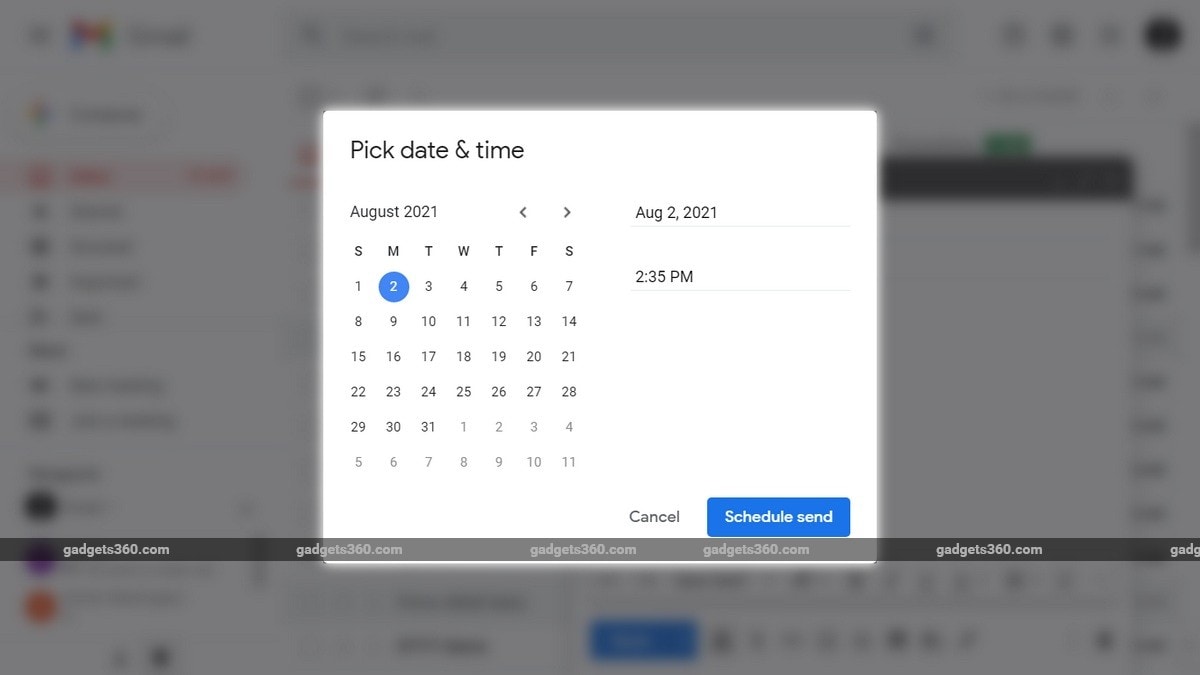
- If you want to pick a date and time, click on Pick date & time instead.
- You should see a calendar where you can select the date for when you want to schedule the mail. Alternatively, you can enter the date in the text field manually along with the time.
- Once done, click on Schedule send and your email will be scheduled for that date and time.
How to Scheduling an email on Gmail via mobile app
- Open the Gmail app on your Android or iOS device.
- Click on Compose and draft your mail with the recipient's email ID.
- On the top right, click on the three dot menu and tap on Schedule send.
- You should see a few preset options along with a Pick date & time option. Click on Pick date & time to enter a date and time manually.
- Select the desired date and time, and click on Schedule send.
The scheduled mails on Gmail are sent to the “Scheduled” category in the navigation panel. You can have up to 100 scheduled mails and can edit them any time before they are automatically dispatched.
The recently-concluded first season of Loki is our focus this week on Orbital, the Gadgets 360 podcast. Orbital is available on Apple Podcasts, Google Podcasts, Spotify, Amazon Music and wherever you get your podcasts.
Affiliate links may be automatically generated - see our ethics statement for details.
Comments
Get your daily dose of tech news, reviews, and insights, in under 80 characters on Gadgets 360 Turbo. Connect with fellow tech lovers on our Forum. Follow us on X, Facebook, WhatsApp, Threads and Google News for instant updates. Catch all the action on our YouTube channel.
Related Stories


Advertisement
Follow Us




-
![[Sponsored] LG NANO 4K UHD AI TV NU885: Gemini Search, Dolby Atmos & 5 Years of Updates](https://www.gadgets360.com/static/desktop/images/spacer.png)
04:17
[Sponsored] LG NANO 4K UHD AI TV NU885: Gemini Search, Dolby Atmos & 5 Years of Updates -
00:57
[Sponsored] Samsung Galaxy Z Fold8 My Fan Cam in Action: Find the Moment, Then Share It -
01:41
[Sponsored] What Do You Need To Know Before Your Next Run? | Samsung Galaxy Watch Ultra2 -
01:32
[Sponsored] Big Day Tomorrow? Prep Today | Samsung Galaxy Watch Ultra2 -
04:37
[Sponsored]: CP PLUS CarKam CP-F89B: 4K Dashcam With Rear Camera, GPS & Emergency Recording
-
iPhone 16 आज भी Amazon सेल में मिल रहा ₹15 हजार से ज्यादा सस्ता
-
OnePlus 15 को Amazon Great Indian Festival Sale में खरीदें सस्ता
-
₹2250 सस्ता मिल रहा Motorola का 7000mAh बैटरी वाला फोन! Flipkart पर ऑफर
-
Flipkart Sale में ₹14000 सस्ता मिल रहा Vivo का 50MP कैमरा, 9020mAh बैटरी वाला फोन
-
OnePlus 16 के जल्द भारत में लॉन्च की तैयारी, 200 मेगापिक्सल हो सकता है प्राइमरी कैमरा
Advertisement
Popular on Gadgets
- Samsung Galaxy S26 Ultra
- Motorola Razr Fold
- ChatGPT
- OPPO Find N6
- Mobiles Under Rs. 40,000
- Vivo X300 Ultra
- Asus Zenbook S14
- iQOO 15
- Vivo X300 Pro
- Lenovo Yoga Slim 7i Aura Edition
- iQOO 15R
- Vivo X Fold 5
- Sony PlayStation 5
- HP OmniPad 12
- OnePlus Nord CE 6 Lite
- OnePlus Pad 4
- OPPO F33 Pro 5G
- Cryptocurrency
- HP OmniBook Ultra 14 (2026)
- iPhone 17
- Eureka Forbes AP 355 Room Air Purifier
- Latest Mobile Phones
- Compare Phones
Latest Gadgets
- Samsung Galaxy F70 5G
- Tecno Spark 50S 5G
- Vivo Y600s Pro
- Vivo Y32 (2026)
- Infinix Smart 20 HD
- Vivo V80
- Vivo S2 FE
- Vivo Y600K Turbo
- HP ZBook Ultra G3a
- Dell Pro Rugged 14
- Amazon Alexa Tablet 8
- Amazon Alexa Tablet 11
- Amazfit T-Rex Dual Solar
- OPPO Watch S2
- Toshiba 65-Inch 4K Ultra HD Smart Mini LED QLED TV (65Z670SP)
- Haier M70 Mini LED 65-inch
- Acer Predator Atlas 8
- Asus ROG Ally
- Blue Star 1.5 Ton 5 Star Inverter Split AC (IE518ZNURS)
- Blue Star 2 Ton 3 Star Inverter Window AC (WIE324L)

- About Us
- Sitemaps
- Feedback
- Archives
- Contact Us
- RSS
- Advertise
- Career
- Privacy Policy
- Ethics
- Editorial Policy
- Terms & Conditions
- Complaint Redressal
Download Our Apps
Available in Hindi
© Copyright Red Pixels Ventures Limited 2026. All rights reserved.