-
 Best Games of 2023: Gadgets 360’s Favourite PC, PlayStation, Mobile, Xbox, and Nintendo Switch Games30 December 2023
 -
OnePlus 6 Gets Android 9.0 Pie Final Build With OxygenOS 9.0 Update22 September 2018
-
Nokia 7 Plus Receives New Android Pie Developer Preview Ahead of Stable Update11 September 2018
-
OnePlus 6 OxygenOS Open Beta 2 Brings UI Improvements: How to Download10 September 2018
-
Xiaomi Mi 8 Gets Android 9.0 Pie With MIUI 10.9.6 China Insider Beta ROM7 September 2018
- Home
- Mobiles
- Mobiles Features
- How to Install Android P Beta on Google Pixel Devices, Nokia 7 Plus Right Now
How to Install Android P Beta on Google Pixel Devices, Nokia 7 Plus Right Now
By Gadgets 360 Staff | Updated: 9 May 2018 20:58 IST

Click Here to Add Gadgets360 As A Trusted Source


Advertisement
As we saw at Google I/O 2018, Android P beta is now available for more than a few Android devices, not just limited to the Google Pixel series of smartphones. If you have a Nokia 7 Plus, Sony Xperia XZ2, Oppo R15 Pro, Vivo X21 UD, Vivo X21, Xiaomi Mi Mix 2S, or an Essential Phone, you can install Android P beta on your device.
In this guide, we will tell you how to install Android P beta on the Nokia 7 Plus and Google Pixel devices. The process is really simple on the Google Pixel, but not as easy on the Nokia 7 Plus. While this guide has you covered for both devices (we’ve verified all steps on both), if you have any of the other Android devices mentioned earlier, you can go to Google’s Android Beta website, scroll to your phone and click Get the Beta to see the steps the manufacturer has recommended for updates.
As always there is a price to pay for staying on the bleeding edge of software updates — stability. Gadgets 360 is in no way responsible for any consequences of you updating your smartphone to Android P beta. Follow these steps at your own risk.
Android P: The 7 Big New Features You Need to Know About
How to install Android P beta on Pixel devices
You can install Android P beta on Google Pixel, Google Pixel XL, Google Pixel 2, and Google Pixel 2 XL very easily. Back up your Android phone first and then get started with the steps below.
- Go to the Android Beta website.
- Scroll down to your Pixel device and click Get the Beta.
- Sign in to Google if you haven’t already.
- Now scroll down to see your Pixel device(s) listed. Click Opt in on the device you want to install Android P beta.
- Check I agree to terms of the beta program and click Join beta.
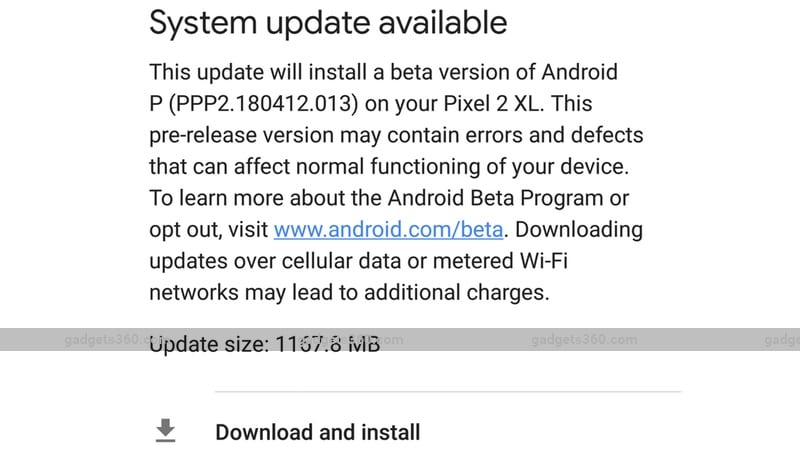
- Now wait for a few minutes, and then on your phone, go to Settings > System > System update. Tap Check for update. The device will start downloading Android P beta update.
- Once it is downloaded, click Download and install.
How to install Android P beta on Nokia 7 Plus
Android P beta is available for the Nokia 7 Plus but the installation process is nowhere near as easy as that on the Google Pixel devices. Before you proceed, please note that we have verified these steps on a Nokia 7 Plus but we did this at our own risk. Be sure to take a complete backup of your phone before you attempt to flash Android P beta, otherwise you could lose important personal data. There’s also another warning here — going back to the previous version of Android is not easy either. You’ll have to flash the previous version of Android back to the Nokia 7 Plus so if you aren’t ready to do that, stop right here. If you are, follow these steps.
Before you flash Android P beta on the Nokia 7 Plus
Remember these things before you flash Android P beta on your Nokia 7 Plus:
- Back up all of your data.
- Make sure your phone has a minimum of 60 percent battery. Ideally it should be 100 percent.
- You will not be able to use your phone even to make emergency calls until the flashing process is complete. You might want to put your SIM card in another phone until this is done.
- Users must wipe all user data (via Recovery Menu) before attempting to flash the device. Please note that the "factory reset" function (in System Menu) will not completely achieve this.
- You need a computer to flash Android P beta on your Nokia 7 Plus. The steps below are for Windows, so it’s best to find a Windows computer to follow these.
Downloading Android P beta system image
Follow these steps to download the Android P beta system image for Nokia 7 Plus.
- On your Windows PC, go to Nokia’s developer page.
- Scroll down and click Sign in to get started.
- Sign in with your Nokia account or just create one and sign in.
- Enter the Nokia 7 Plus’ IMEI, network operator name, and the country, then click the check box and finally click Register.
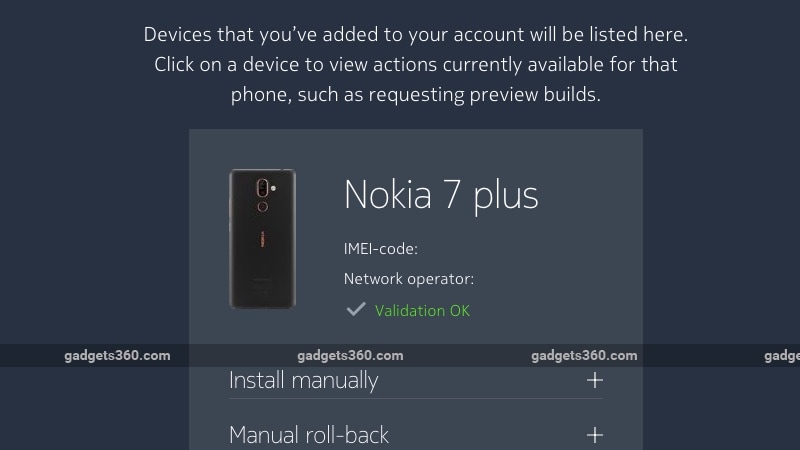
- Once your device is validated, you will see a status message saying Validation OK. Click Install manually and then tick the check box which says you’ve read the instructions, etc. Click Download.
- This will download the Android P beta image file on your computer. Rename it to something convenient such as AndroidP.
Flashing Android P beta on Nokia 7 Plus
These steps will guide you in your attempt to flash Android P beta on the Nokia 7 Plus.
- Switch off the Nokia 7 Plus and connect it to the Windows PC or laptop you are using to flash. Now wait until you see the charging icon, which will show up after the Android One logo appears on screen.
- Hold the Volume up and Power buttons at the same time until you feel a vibration. You will see an Android robot logo with a red exclamation mark and a No command message on screen.
- Hold the Power button and tap the Volume up button once. This will make the device enter Recovery mode.
- Use the volume keys to scroll down and go to Wipe data / factory recovery. Press the Power button to select. Nokia has recommended a complete data wipe from the recovery menu so a simple factory reset from your phone will not work.
- Use the volume key again to scroll to Yes on the warning message screen. Press the Power button again to confirm.
- You’ll need ADB (Android Debug Bridge) on your Windows PC to ‘talk’ to your device when flashing the preview. Platform Tools will be required to for this and you have the option to download the entire SDK Manager, or only download Platform Tools. Extract the files and this is the folder we will be working with. You can download the entire SDK Manager, or just the Platform Tools.
- Copy the AndroidP beta system image file which you downloaded earlier into the Platform Tools folder.
- After the data wipe is complete on your phone, scroll down using the Volume keys and select Apply update from ADB. Press the Power button to select.
- Now you might see your Windows PC trying to install ADB drivers, in case it’s not been installed already. Once this is done, go to the Platform Tools folder, press Shift + right-click in the white space and click Open command window here.
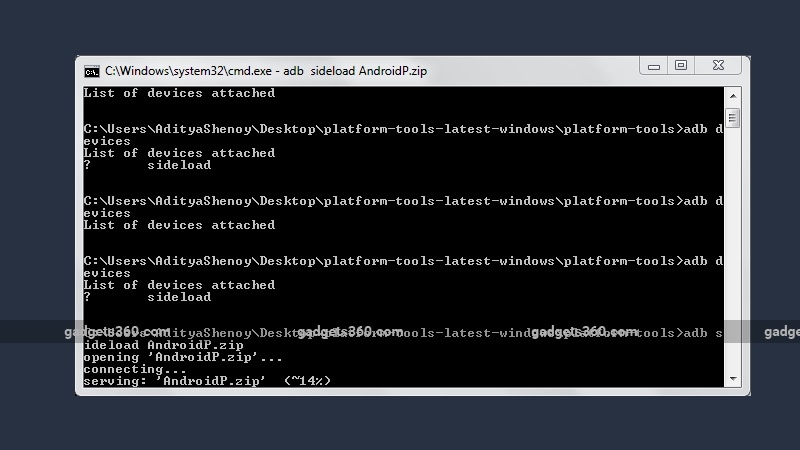
- In the command window type adb devices. It’ll show ? sideload in the command window. Now type adb sideload AndroidP.zip. You can replace AndroidP.zip with whatever file name you’ve saved the file as.
- Now wait for the process to complete. You’ll see a percentage progress bar in the Command Prompt on your Windows PC. Don’t let your machine go to sleep! Once the process is complete, you will see a message on your phone that reads: Install from ADB complete.
- Now, on your Nokia 7 Plus, click the Power button to select Reboot system now, which is selected by default on this screen. It may take a little longer than usual to start your phone, so do not panic.
Once this is done, follow the on-screen prompts to set up the device on Android P.
For more tutorials, visit our How To section.
We discussed Android P, Google Assistant, Google Photos, and also the most important things that Google did not mention during its I/O 2018 keynote, on Orbital, our weekly technology podcast, which you can subscribe to via Apple Podcasts or RSS, download the episode, or just hit the play button below.
Comments
Get your daily dose of tech news, reviews, and insights, in under 80 characters on Gadgets 360 Turbo. Connect with fellow tech lovers on our Forum. Follow us on X, Facebook, WhatsApp, Threads and Google News for instant updates. Catch all the action on our YouTube channel.
Related Stories



Advertisement
Follow Us




-
09:53
iPhone 18 Goes On Sale In India: Huge Crowds, Long Queues At Apple Stores -
06:32
Google Pixel 11 Pro XL Review: The Most Exciting Pixel Yet? | 120X Zoom + Tensor G6 -
05:20
Samsung Galaxy Watch Ultra 2 Review: Is This the Best Android Smartwatch? -
07:01
Samsung Galaxy Z Fold 8 Review: Is This the Best Foldable Phone? -
06:39
Samsung Galaxy Z Fold8 Ultra Review: Cameras, Battery, Performance Tested
Advertisement
Popular on Gadgets
- Samsung Galaxy S26 Ultra
- Motorola Razr Fold
- ChatGPT
- OPPO Find N6
- Mobiles Under Rs. 40,000
- Vivo X300 Ultra
- Asus Zenbook S14
- iQOO 15
- Vivo X300 Pro
- Lenovo Yoga Slim 7i Aura Edition
- iQOO 15R
- Vivo X Fold 5
- Sony PlayStation 5
- HP OmniPad 12
- OnePlus Nord CE 6 Lite
- OnePlus Pad 4
- OPPO F33 Pro 5G
- Cryptocurrency
- HP OmniBook Ultra 14 (2026)
- iPhone 17
- Eureka Forbes AP 355 Room Air Purifier
- Latest Mobile Phones
- Compare Phones
Latest Gadgets
- Samsung Galaxy A08
- Itel Muzik 450L
- OPPO K14 Lite
- Samsung Galaxy A18 4G
- iPhone Duo
- OPPO A7 Pro
- Huawei Mate XT 2 Ultimate Design
- Realme 16 Pro Harry Potter Edition
- Asus Vivobook S14 (S5452MA)
- Acer Aspire G 3D 16
- Xiaomi Pad 9 Pro
- Xiaomi Pad 9
- Apple Watch Ultra 4
- Apple Watch Series 12
- Haier M70 Mini LED 65-inch
- Xiaomi TV FX Mini LED 65
- Acer Predator Atlas 8
- Asus ROG Ally
- Blue Star 1.5 Ton 5 Star Inverter Split AC (IE518ZNURS)
- Blue Star 2 Ton 3 Star Inverter Window AC (WIE324L)

- About Us
- Sitemaps
- Feedback
- Archives
- Contact Us
- RSS
- Advertise
- Career
- Privacy Policy
- Ethics
- Editorial Policy
- Terms & Conditions
- Complaint Redressal
Download Our Apps
Available in Hindi
© Copyright Red Pixels Ventures Limited 2026. All rights reserved.