Logitech MX Keypad Launched in India as a Customisable AI Control Centre With LCD Keys: Price, Features
Logitech MX Keypad is compatible with devices running Windows 10 and newer versions and macOS 13 and newer updates.
Written by Dhruv Raghav, Edited by Rohan Pal | Updated: 9 September 2026 19:32 IST
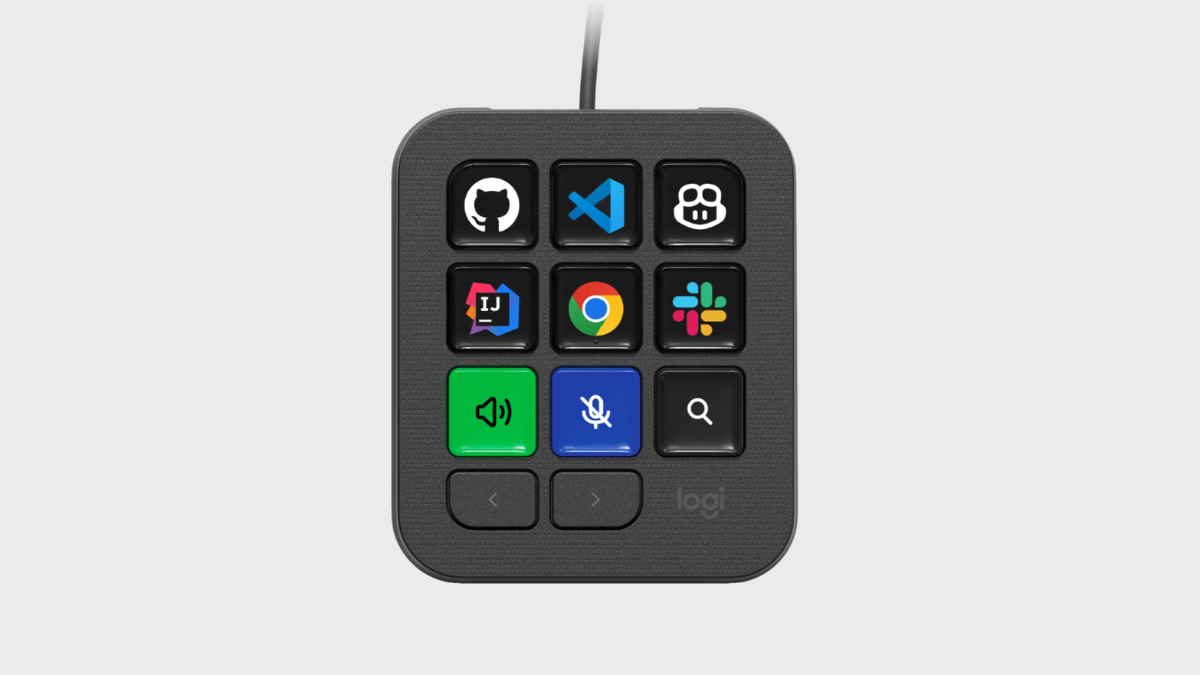
Photo Credit: Logitech
Logitech MX Keypad features nine LCD keys
Click Here to Add Gadgets360 As A Trusted Source

Advertisement
Logitech MX Keypad was launched in India on Wednesday as the tech firm's first customisable AI control centre. The new device will compete directly with Codex Micro from OpenAI, which was unveiled earlier this year in July as a dedicated customisable keyboard for OpenAI Codex. The new Logitech MX Keypad will soon be available for purchase in India via the company's online store in a single colourway. It features nice customisable LCD keys, along with two navigation buttons at the bottom, allowing users to set the keypad according to their daily AI workflows. The company claims that the keypad has been built with recycled plastic.
Logitech MX Keypad Price in India, Availability
The price of the new Logitech MX Keypad is set at Rs. 15,999. The new keypad will be available for purchase in the country via the Logitech India online store. The Logitech MX Keypad is offered in a single Graphite colour option. The company has yet to announce the exact sale date for its new keypad.
Moreover, the company is offering a one-year limited hardware warranty with the new Logitech MX Keypad. Apart from this, customers can get three months of GitHub Copilot Pro+ for free with the device.
Logitech MX Keypad Specifications, Features
The Logitech MX Keypad is compatible with devices running Windows 10 and newer versions and macOS 13 and newer updates. The keypad features nine customisable LCD keys. Users can customise the keys of the Logitech MX Keypad according to their AI workflow via the Logi Options+ App, which is available for download via the company website. There are also two navigation buttons placed under the LCD keys.
Moreover, the list of tools that the Logitech MX Keypad supports includes Visual Studio Code, GitHub Copilot, IntelliJ IDEA, Claude Code, OpenAI Codex, Zoom, Spotify, Microsoft Teams, PowerPoint, Excel, Notion, Slack, Figma, Adobe Lightroom, Photoshop, Premiere Pro, After Effects, Illustrator, Final Cut Pro, DaVinci Resolve, and OBS Studio. The company says that the Logitech MX Keypad is built for developers.
Based on the active AI tool, the LCD keys of the Logitech MX Keypad can change. The company claims that the keypad has been built using recycled plastics. The Logitech MX Keypad measures 91.7 x 77.9 x 25.5mm, while weighing about 96g. Meanwhile, its stand measures 112.7 x 58.5 x 20.5mm and weighs about 61g.
Comments
Get your daily dose of tech news, reviews, and insights, in under 80 characters on Gadgets 360 Turbo. Connect with fellow tech lovers on our Forum. Follow us on X, Facebook, WhatsApp, Threads and Google News for instant updates. Catch all the action on our YouTube channel.


Logitech MX Keypad Launched in India as a Customisable AI Control Centre With LCD Keys: Price, Features


Advertisement
Follow Us




-
01:42
[Sponsored] Galaxy Watch9 for Everyday Health Insights | Smarter Wellness Choices -
01:15
[Sponsored] Galaxy Tab S10 Lite for Students: Notes, Solve Math and More -
04:17
[Sponsored] LG NANO 4K UHD AI TV NU885: Gemini Search, Dolby Atmos & 5 Years of Updates -
00:57
[Sponsored] Samsung Galaxy Z Fold8 My Fan Cam in Action: Find the Moment, Then Share It -
01:41
[Sponsored] What Do You Need To Know Before Your Next Run? | Samsung Galaxy Watch Ultra2
-
NVIDIA के सीईओ ने पेश किए माइक्रोडक रोबोट, AI से चलते हैं, क्या काम आएंगे
-
iPhone Duo को बीच से खोला, फोल्डेबल डिस्प्ले से हटाया कवर, फिर क्या दिखा?
-
1 जनवरी से फोन में बिना सिम नहीं चलेगा WhatsApp, सिम बाइडिंग हुआ अनिवार्य
-
Realme 17 Pro सीरीज में मिल सकती है 10,000mAh की बैटरी
-
Amazon Sale में ₹15 हजार सस्ता हो गया Redmi का 50MP AI कैमरा, 6000mAh बैटरी वाला फोन!
Advertisement
Popular on Gadgets
- Samsung Galaxy S26 Ultra
- Motorola Razr Fold
- ChatGPT
- OPPO Find N6
- Mobiles Under Rs. 40,000
- Vivo X300 Ultra
- Asus Zenbook S14
- iQOO 15
- Vivo X300 Pro
- Lenovo Yoga Slim 7i Aura Edition
- iQOO 15R
- Vivo X Fold 5
- Sony PlayStation 5
- HP OmniPad 12
- OnePlus Nord CE 6 Lite
- OnePlus Pad 4
- OPPO F33 Pro 5G
- Cryptocurrency
- HP OmniBook Ultra 14 (2026)
- iPhone 17
- Eureka Forbes AP 355 Room Air Purifier
- Latest Mobile Phones
- Compare Phones
Latest Gadgets
- HMD 2660 Flip Senior Edition
- Lava Aura Curve
- Poco X8s
- Samsung Galaxy F70 5G
- Tecno Spark 50S 5G
- Vivo Y600s Pro
- Vivo Y32 (2026)
- Infinix Smart 20 HD
- Lenovo Yoga 9n 2-in-1
- Lenovo Yoga Pro 9n
- Amazon Alexa Tablet 8
- Amazon Alexa Tablet 11
- Pebble Qore 2
- Amazfit T-Rex Dual Solar
- Toshiba 65-Inch 4K Ultra HD Smart Mini LED QLED TV (65Z670SP)
- Haier M70 Mini LED 65-inch
- Acer Predator Atlas 8
- Asus ROG Ally
- Blue Star 1.5 Ton 5 Star Inverter Split AC (IE518ZNURS)
- Blue Star 2 Ton 3 Star Inverter Window AC (WIE324L)

- About Us
- Sitemaps
- Feedback
- Archives
- Contact Us
- RSS
- Advertise
- Career
- Privacy Policy
- Ethics
- Editorial Policy
- Terms & Conditions
- Complaint Redressal
Download Our Apps
Available in Hindi
© Copyright Red Pixels Ventures Limited 2026. All rights reserved.