-
 Motorola Adds Microsoft’s Copilot Vision to Moto AI Suite; Copilot App to Be Preinstalled on Upcoming Devices7 August 2025
 -
Microsoft Upgrades Copilot Vision With Desktop Share Feature, Adds Support for Voice Mode17 July 2025
-
Copilot Vision Is Now Available to All Users Within the Microsoft Edge Browser21 April 2025
Microsoft Expands Copilot Vision With Highlights on Windows, Can Work With Two Apps Simultaneously
Microsoft is rolling out Copilot Vision with Highlights on Windows in the US.
Written by Akash Dutta, Edited by Siddharth Suvarna | Updated: 13 June 2025 15:20 IST

Photo Credit: Microsoft
Copilot Vision was first unveiled by Microsoft in December 2024
Click Here to Add Gadgets360 As A Trusted Source

Advertisement
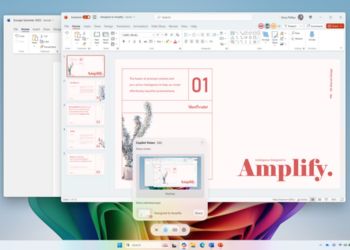
Microsoft announced the expansion of Copilot Vision with Highlights to Windows on Wednesday. Initially, the new artificial intelligence (AI) feature will only be available in the US, but the company plans to bring it to other regions soon. It uses computer vision and tool use to analyse the content on the user's screen and assist them with queries. Copilot Vision was first unveiled by the Redmond-based tech giant in December 2024, and in April, it was integrated within the Microsoft Edge browser.
Copilot Vision on Windows Gets a New Highlights Feature
In a blog post, the tech giant announced that Copilot Vision is finally being rolled out to Windows devices in the US. It will be available for both Windows 10 and Windows 11. The company said the feature will be introduced in more non-European countries soon. Notably, Copilot Vision on Windows is part of Copilot Labs.
Copilot Vision on Windows supports real-time voice, letting users ask verbal queries about the content. This version of the feature supports up to two apps simultaneously and can draw context from both screens at the same time. This means users can ask more complex questions, such as, “Which image from my gallery goes well with the story I've written in Word?”
The new Highlights feature in this version will allow users to command Copilot to show certain settings and other assistive help. It can tell users where to click and how to navigate to an option. Sharing some examples of the use cases of the feature, Microsoft said users can ask Copilot to give tips while playing a game, ask it for help to improve the lighting in a photo, or to review a travel itinerary.
To use Copilot Vision on Windows, users will have to open the Copilot app and click the new glasses icon in the composer. Then, users can select the browser window or app they want to share with the AI chatbot, and it can start assisting them. To stop sharing the app or browser window, users can press the X button in the composer. The company highlighted that the feature is entirely opt-in.
Affiliate links may be automatically generated - see our ethics statement for details.
Comments
Get your daily dose of tech news, reviews, and insights, in under 80 characters on Gadgets 360 Turbo. Connect with fellow tech lovers on our Forum. Follow us on X, Facebook, WhatsApp, Threads and Google News for instant updates. Catch all the action on our YouTube channel.
Related Stories



Microsoft Expands Copilot Vision With Highlights on Windows, Can Work With Two Apps Simultaneously


Advertisement
Follow Us




-
04:17
[Sponsored] LG NANO 4K UHD AI TV NU885: Gemini Search, Dolby Atmos & 5 Years of Updates -
00:57
[Sponsored] Samsung Galaxy Z Fold8 My Fan Cam in Action: Find the Moment, Then Share It -
01:41
[Sponsored] What Do You Need To Know Before Your Next Run? | Samsung Galaxy Watch Ultra2 -
01:32
[Sponsored] Big Day Tomorrow? Prep Today | Samsung Galaxy Watch Ultra2 -
04:37
[Sponsored]: CP PLUS CarKam CP-F89B: 4K Dashcam With Rear Camera, GPS & Emergency Recording
-
SBI डाटा लीक, क्या हुआ और कैसा डाटा था, अकाउंट है तो क्या करना चाहिए?
-
भारत में गिरी स्मार्टफोन की बिक्री, फोन महंगे होने से 26% कम हुई शिपमेंट
-
Lava Aura Curve 5G: 6000mAh बैटरी, 50 मेगापिक्सल कैमरा के साथ पेश, जानें
-
Realme C01 के जल्द लॉन्च की तैयारी, 6,500mAh हो सकती है बैटरी
-
10000mAh की विशाल बैटरी वाला HONOR WIN Tablet लॉन्च, बड़ी स्क्रीन के साथ प्रोसेसर भी दमदार
Advertisement
Popular on Gadgets
- Samsung Galaxy S26 Ultra
- Motorola Razr Fold
- ChatGPT
- OPPO Find N6
- Mobiles Under Rs. 40,000
- Vivo X300 Ultra
- Asus Zenbook S14
- iQOO 15
- Vivo X300 Pro
- Lenovo Yoga Slim 7i Aura Edition
- iQOO 15R
- Vivo X Fold 5
- Sony PlayStation 5
- HP OmniPad 12
- OnePlus Nord CE 6 Lite
- OnePlus Pad 4
- OPPO F33 Pro 5G
- Cryptocurrency
- HP OmniBook Ultra 14 (2026)
- iPhone 17
- Eureka Forbes AP 355 Room Air Purifier
- Latest Mobile Phones
- Compare Phones
Latest Gadgets
- Lava Aura Curve
- Poco X8s
- Samsung Galaxy F70 5G
- Tecno Spark 50S 5G
- Vivo Y600s Pro
- Vivo Y32 (2026)
- Infinix Smart 20 HD
- Vivo V80
- HP ZBook Ultra G3a
- Dell Pro Rugged 14
- Amazon Alexa Tablet 8
- Amazon Alexa Tablet 11
- Pebble Qore 2
- Amazfit T-Rex Dual Solar
- Toshiba 65-Inch 4K Ultra HD Smart Mini LED QLED TV (65Z670SP)
- Haier M70 Mini LED 65-inch
- Acer Predator Atlas 8
- Asus ROG Ally
- Blue Star 1.5 Ton 5 Star Inverter Split AC (IE518ZNURS)
- Blue Star 2 Ton 3 Star Inverter Window AC (WIE324L)

- About Us
- Sitemaps
- Feedback
- Archives
- Contact Us
- RSS
- Advertise
- Career
- Privacy Policy
- Ethics
- Editorial Policy
- Terms & Conditions
- Complaint Redressal
Download Our Apps
Available in Hindi
© Copyright Red Pixels Ventures Limited 2026. All rights reserved.
-
 Apple Watch Series 12
Starts from ₹56,900
Apple Watch Series 12
Starts from ₹56,900
-
 Samsung Galaxy Watch Ultra 2
Starts from ₹62,479
Samsung Galaxy Watch Ultra 2
Starts from ₹62,479
-
 Samsung Galaxy Watch 9 (44mm, LTE)
Starts from ₹41,999
Samsung Galaxy Watch 9 (44mm, LTE)
Starts from ₹41,999
-
 Samsung Galaxy Watch 9 (40mm, LTE)
Starts from ₹38,999
Samsung Galaxy Watch 9 (40mm, LTE)
Starts from ₹38,999
-
 Samsung Galaxy Watch 9 (40mm)
Starts from ₹36,999
Samsung Galaxy Watch 9 (40mm)
Starts from ₹36,999
-
 Samsung Galaxy Watch 9 (44mm)
Starts from ₹40,999
Samsung Galaxy Watch 9 (44mm)
Starts from ₹40,999