

-
 Meta Tests Instagram Direct App With Messaging Features for Users Without Instagram Accounts18 November 2026
-
Instagram Rolls Out Content Protection Feature to Help Creators Track and Claim Credit for Reposted Videos18 November 2026
-
Instagram Expands AI-Powered Age Verification Worldwide to Protect Teen Users10 November 2026
-
Instagram Launches Edits for Mac With Multi-Track Video Editing, 4K Exports6 November 2026
-
How to Download and Use Instagram on Apple TV: A Step-by-Step Guide1 November 2026
Edit Instagram Stories After Posting: New Feature Gives Users a 15-Minute Window
Users will be able to make changes to their Stories for up to 15 minutes after sharing them.
Written by Nithya P Nair, Edited by Ketan Pratap | Updated: 19 November 2026 16:55 IST
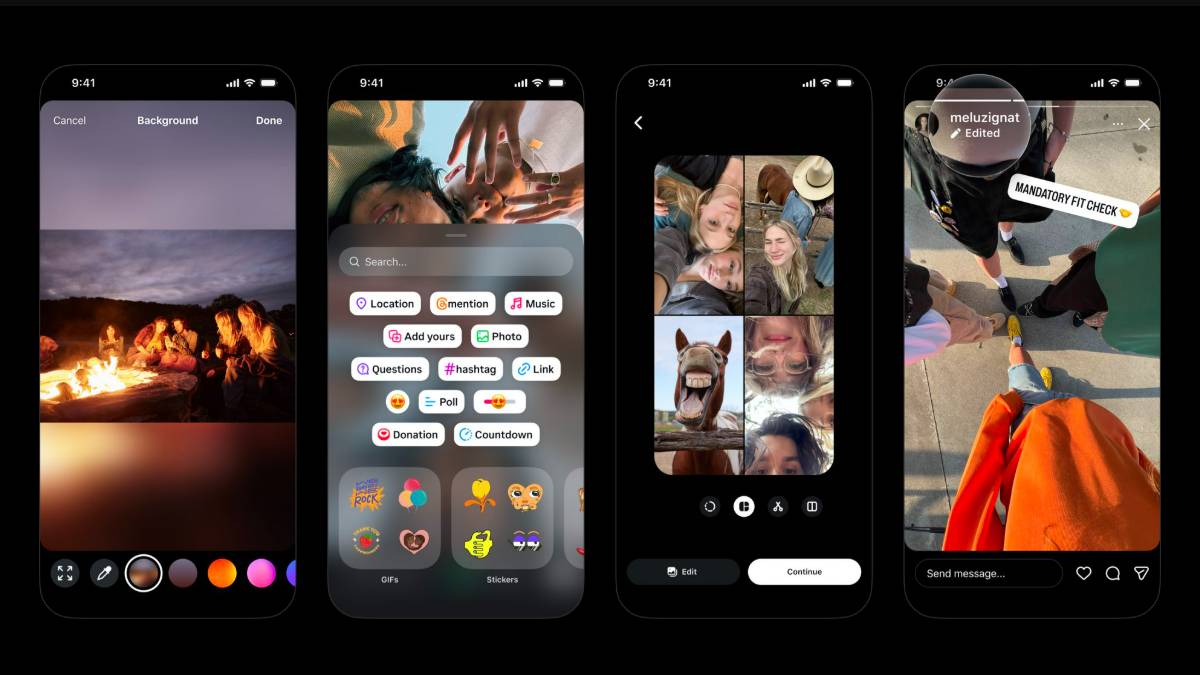
Photo Credit: Instagram
Instagram will mark modified Stories with an 'Edited' label
Click Here to Add Gadgets360 As A Trusted Source

Advertisement
Instagram launched Stories in 2016, letting users post photos and videos that disappear after 24 hours. Now, a decade after its debut, the Meta-owned platform has announced a new feature that allows users to edit their Stories without losing engagement. This long-awaited update gives users up to 15 minutes to make changes to the shared Stories. Instagram has also updated its Stories composer with new background options, easier multi-image selection and updated stickers.
Instagram Stories Get New Editing Feature, Backgrounds, Stickers, More
Instagram head Adam Mosseri announced in a social media post on Wednesday that users can now edit Stories for up to 15 minutes after posting. Users can edit the text, music, stickers, and drawings after sharing the story while keeping the post's existing views, likes and replies.
- Instagram Channels are just a way for influencers to spam us directly
- Instagram Reels vs. YouTube Shorts — Where do you waste more time?
- Instagram ending end-to-end encryption for DMs — how does this change things?
- Instagram Creators Have Wanted This Feature for Years
- Facebook and Instagram using bone structure analysis sounds a bit unsettling
The new option removes the need to delete and re-upload a Story for minor spelling mistakes and last-minute corrections. This update is likely to benefit content creators, businesses, and social media managers, as removing and reposting affects the engagement metrics of their published content.
Instagram says modified Stories will have an 'Edited' label, allowing viewers to identify posts that have been changed after publication. Users can access the editing option by opening the Story and selecting the three-dot menu at the bottom-right corner, then selecting Edit Story to make the required changes.
Additionally, Instagram has updated the Stories creation interface with additional tools. The platform has launched new sticker options with new fonts and colours. It has also added new blur and gradient background options. The app has also made it easier to select and share multiple images at once.
Instagram has rolled out several major announcements earlier this month. The app launched a content protection tool for creators. It is designed to automatically scan both Instagram and Facebook for visually similar reuploads of a creator's original videos. It will notify users whenever a similar video appears on the platform. It has also expanded the AI-driven age-estimation system on Instagram worldwide to spot teenage accounts.
Comments
Get your daily dose of tech news, reviews, and insights, in under 80 characters on Gadgets 360 Turbo. Connect with fellow tech lovers on our Forum. Follow us on X, Facebook, WhatsApp, Threads and Google News for instant updates. Catch all the action on our YouTube channel.
Further reading:
Instagram, Instagram Story, Instagram Update, Instagram Story Update, Instagram Features
Related Stories





Advertisement
Follow Us


-
 Top Sony 5.1 Soundbars with Subwoofers for a True Cinema Experience
-
Logitech vs. Razer: The Ultimate Showdown of Wireless Gaming Mice
-
Copper-Infused RO Water Purifiers: Do They Actually Provide Health Benefits?
-
Stylish Faux Fur Stoles and Scarves That Instantly Elevate Any Winter Outfit
-
Best Round Coffee Tables for Living Rooms: Modern Wooden, Marble, and Space-Saving Designs
Advertisement
Popular on Gadgets
- Samsung Galaxy S26 Ultra
- Motorola Razr Fold
- ChatGPT
- OPPO Find N6
- Mobiles Under Rs. 40,000
- Vivo X300 Ultra
- Asus Zenbook S14
- iQOO 15
- Vivo X300 Pro
- Lenovo Yoga Slim 7i Aura Edition
- iQOO 15R
- Vivo X Fold 5
- Sony PlayStation 5
- HP OmniPad 12
- OnePlus Nord CE 6 Lite
- OnePlus Pad 4
- OPPO F33 Pro 5G
- Cryptocurrency
- HP OmniBook Ultra 14 (2026)
- iPhone 17
- Eureka Forbes AP 355 Room Air Purifier
- Latest Mobile Phones
- Compare Phones
Latest Gadgets
- OPPO Reno 17 Pro (China)
- OPPO Reno 17 (China)
- Vivo Y6k
- Karbonn Rebel
- Karbonn Rebel Pro
- OnePlus Turbo 6Vs
- Redmi M100 Pro
- OnePlus Ace 7 Pro
- Dell 14S (2026)
- HP ProBook 4 G2iS 14
- OPPO Pad Air 6
- Infinix Xpad 30
- Xiaomi Watch S5 41mm
- OPPO Watch 5
- Toshiba 65-Inch 4K Ultra HD Smart Mini LED QLED TV (65Z670SP)
- Haier M70 Mini LED 65-inch
- Acer Predator Atlas 8
- Asus ROG Ally
- Blue Star 1.5 Ton 5 Star Inverter Split AC (IE518ZNURS)
- Blue Star 2 Ton 3 Star Inverter Window AC (WIE324L)

- About Us
- Sitemaps
- Feedback
- Archives
- Contact Us
- RSS
- Advertise
- Career
- Privacy Policy
- Ethics
- Editorial Policy
- Terms & Conditions
- Complaint Redressal
Download Our Apps
Available in Hindi
© Copyright Red Pixels Ventures Limited 2026. All rights reserved.