-
 Microsoft Starts Testing New Windows Search Update That Lets Users Disable Web Results19 June 2026
-
Microsoft Bing Adds an AI Video Creator Tool Powered by OpenAI’s Sora3 June 2025
-
Microsoft Hit by French Antitrust Probe Over Rivals’ Bing Access11 February 2025
-
Microsoft’s Bing Search Engine Reportedly Spoofed Its Results Page to Make It Appear Like Google9 January 2025
-
Meta Reportedly Developing an AI-Powered Search Engine to Take on Google and Microsoft’s Bing29 October 2024
Microsoft Bing’s New Extension Brings Back Traditional Search, Lets Users Turn Off AI Answers
The extension is currently available in preview for Google Chrome and Microsoft Edge.
Written by Shaurya Tomer, Edited by Rohan Pal | Updated: 12 November 2026 17:02 IST
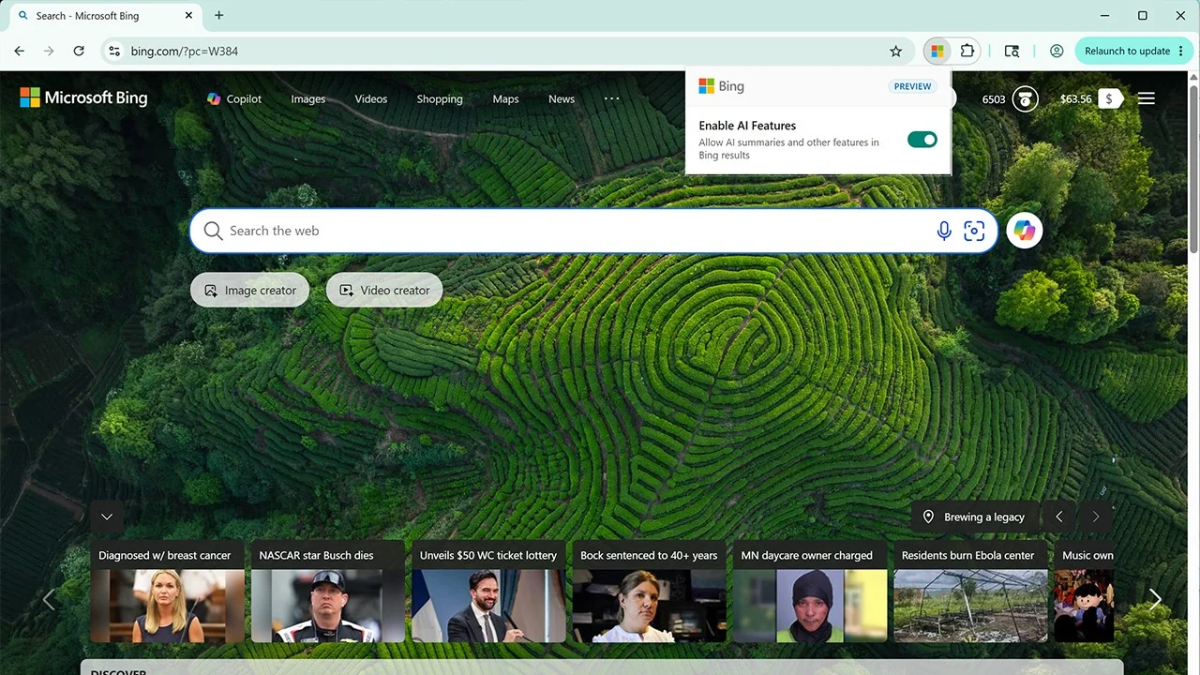
Photo Credit: Microsoft
Microsoft says the selected preference applies across all Bing searches
Click Here to Add Gadgets360 As A Trusted Source

Advertisement
Microsoft Bing has introduced a new way for users to control whether they see AI-generated answers while searching on the web. According to the company, users will have the option to switch between AI-powered summaries and traditional search results, depending on their preferences. The feature is said to be available through a new browser extension for Google Chrome and Microsoft Edge. Microsoft says users can also avoid AI-generated answers without installing an extension by adding a specific search operator to their queries.
Turn Off AI Answers in Microsoft Bing
In a blog post, Microsoft described the new Bing AI Search Choice extension as a way to give users more control over their search experience. The extension is currently available in preview for Google Chrome and Microsoft Edge.
Once installed, the extension provides a toggle that lets users choose whether they want AI-generated answers to appear in Bing search results. They can enable the feature when they need quick summaries and switch it off when they prefer to browse traditional search results and visit individual websites.
As per the company, the selected preference applies across all Bing searches. Installing the extension, however, will also set Bing as the default search engine in the browser.
Meanwhile, Microsoft has also rolled out a simpler way to exclude AI-generated answers from individual searches for users who do not want to install another browser extension. They can add the -ai operator at the end of a Bing search query to get results without AI-generated answers.
Citing an example, the company said that searching for why is the sky blue -ai will return traditional search results without the AI-generated answer. Unlike the browser extension, this method does not require users to change their browser's default search engine or install additional software.
The extension, however, is still in preview and will be updated based on user feedback. The move comes amidst growing integration of AI-generated summaries and answers into search engines. As per Microsoft, this has changed how users access information online. Although these features can provide quick responses without requiring users to open multiple websites, the company said that some users still prefer traditional search results to compare sources and evaluate information themselves.
Comments
Get your daily dose of tech news, reviews, and insights, in under 80 characters on Gadgets 360 Turbo. Connect with fellow tech lovers on our Forum. Follow us on X, Facebook, WhatsApp, Threads and Google News for instant updates. Catch all the action on our YouTube channel.
Further reading:
Microsoft Bing
Related Stories


Microsoft Bing’s New Extension Brings Back Traditional Search, Lets Users Turn Off AI Answers


Advertisement
Follow Us


-
Best Transformative Productivity & Habits Books to Reset Your Routine
-
Cheapest 5-Star Energy-Rated Washing Machines in India Right Now
-
Best Smartwatch Under ₹10,000: Find the Right Fit for Your Needs and Budget
-
Top-Rated Women's Ankle Boots: Buying Guide For Minimal Budget
-
High-Performing Sunscreen Mists & Sticks Under ₹599 for Easy Reapplication
Advertisement
Popular on Gadgets
- Samsung Galaxy S26 Ultra
- Motorola Razr Fold
- ChatGPT
- OPPO Find N6
- Mobiles Under Rs. 40,000
- Vivo X300 Ultra
- Asus Zenbook S14
- iQOO 15
- Vivo X300 Pro
- Lenovo Yoga Slim 7i Aura Edition
- iQOO 15R
- Vivo X Fold 5
- Sony PlayStation 5
- HP OmniPad 12
- OnePlus Nord CE 6 Lite
- OnePlus Pad 4
- OPPO F33 Pro 5G
- Cryptocurrency
- HP OmniBook Ultra 14 (2026)
- iPhone 17
- Eureka Forbes AP 355 Room Air Purifier
- Latest Mobile Phones
- Compare Phones
Latest Gadgets
- Vivo Y6k
- Karbonn Rebel
- Karbonn Rebel Pro
- OnePlus Turbo 6Vs
- Redmi M100 Pro
- OnePlus Ace 7 Pro
- OnePlus Ace 7
- Samsung W27
- Dell 14S (2026)
- HP ProBook 4 G2iS 14
- Infinix Xpad 30
- iPad mini (2026)
- Moto Watch 2 Fit
- Pebble Qore 2
- Toshiba 65-Inch 4K Ultra HD Smart Mini LED QLED TV (65Z670SP)
- Haier M70 Mini LED 65-inch
- Acer Predator Atlas 8
- Asus ROG Ally
- Blue Star 1.5 Ton 5 Star Inverter Split AC (IE518ZNURS)
- Blue Star 2 Ton 3 Star Inverter Window AC (WIE324L)

- About Us
- Sitemaps
- Feedback
- Archives
- Contact Us
- RSS
- Advertise
- Career
- Privacy Policy
- Ethics
- Editorial Policy
- Terms & Conditions
- Complaint Redressal
Download Our Apps
Available in Hindi
© Copyright Red Pixels Ventures Limited 2026. All rights reserved.