Google Upgrades Gemini for macOS With Ability to Transcribe, Refine Natural Language Voice Inputs, and More
Google is gradually rolling out the new update to all Mac users globally.
Written by Dhruv Raghav, Edited by Rohan Pal | Updated: 30 July 2026 11:27 IST
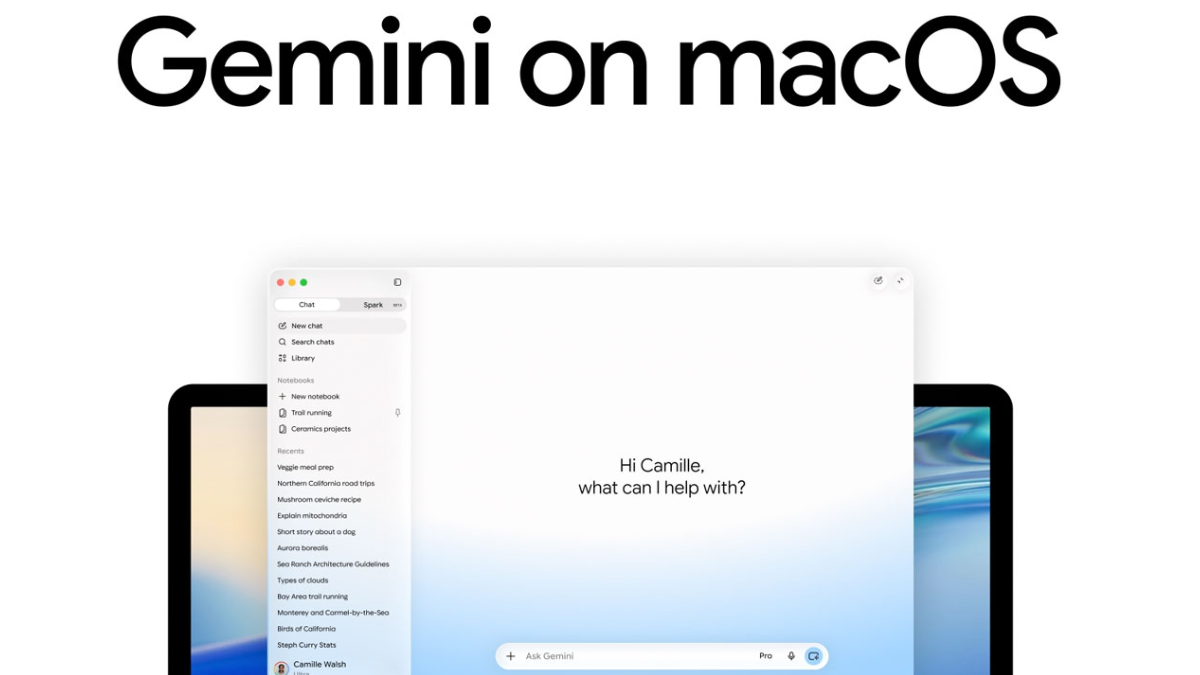
Photo Credit: Google
Gemini for macOS can now generate context-based transcriptions
Click Here to Add Gadgets360 As A Trusted Source

Advertisement
Google upgraded the Gemini for macOS with the introduction of Gemini Spark, the personal AI agent for Apple desktops and laptops, which was first showcased during the keynote presentation of this year's Google I/O. The dedicated Gemini AI app for the platform was launched earlier this year in April, making it relatively new compared to its rivals. Now, the Mountain View tech giant has released a new update for the Gemini for macOS app. Rolling out to all users globally, the update lets Gemini for macOS transcribe natural-language voice inputs and use on-screen context to generate better responses.
Gemini for macOS Update: What's New
In a blog post on Wednesday, the Mountain View-based tech giant announced a new update for the Gemini for macOS app, bringing new capabilities to the AI chatbot on Apple's desktops and laptops. The update is currently being rolled out to all users globally. It upgrades the Gemini for macOS app with the ability to generate transcriptions from a user's natural language voice inputs.

Google says that the feature will allow users to “create, edit, and summarise” with the Gemini for macOS app, regardless of the app the user is currently using. To access the ability, users must long-press the function key on their macOS device, and then they can “speak naturally into any window” on their device. The “intelligent dictation” functionality is turned on by default, the tech giant said.
The new Gemini for macOS ability is similar to the Rambler tool, which was first unveiled during this year's Android Show: I/O Edition event. For reference, Gemini for macOS will be able to correct words and remove unnecessary phrases like "um," "ah", and "like”. It will be able to refine text converted from speech for users on macOS devices. It will also be capable of removing formatted text automatically.
Apart from this, the new update also allows Gemini for macOS to transcribe “intelligently” by using the context on the screen of the user's device. This is an opt-in functionality, which can be turned on by enabling Gemini Reasoning in the Settings menu. Users will be able to extract and summarise information, highlight local files, images, and documents on their macOS device.
Moreover, users can compose, rewrite, and highlight text anywhere on their screen and use voice inputs to rewrite it, tweak the tone, and copy-paste the refined text. Similarly, the new update allows Gemini for macOS users to use voice prompts to generate and edit images and iterate on a design on their macOS device.
Comments
Get your daily dose of tech news, reviews, and insights, in under 80 characters on Gadgets 360 Turbo. Connect with fellow tech lovers on our Forum. Follow us on X, Facebook, WhatsApp, Threads and Google News for instant updates. Catch all the action on our YouTube channel.


Google Upgrades Gemini for macOS With Ability to Transcribe, Refine Natural Language Voice Inputs, and More


Advertisement
Follow Us




-
01:24
[Sponsored] A Last-Minute Diwali Makeover With Galaxy Z Fold8 -
01:42
[Sponsored] Galaxy Watch9 for Everyday Health Insights | Smarter Wellness Choices -
01:15
[Sponsored] Galaxy Tab S10 Lite for Students: Notes, Solve Math and More -
04:17
[Sponsored] LG NANO 4K UHD AI TV NU885: Gemini Search, Dolby Atmos & 5 Years of Updates -
00:57
[Sponsored] Samsung Galaxy Z Fold8 My Fan Cam in Action: Find the Moment, Then Share It
Advertisement
Popular on Gadgets
- Samsung Galaxy S26 Ultra
- Motorola Razr Fold
- ChatGPT
- OPPO Find N6
- Mobiles Under Rs. 40,000
- Vivo X300 Ultra
- Asus Zenbook S14
- iQOO 15
- Vivo X300 Pro
- Lenovo Yoga Slim 7i Aura Edition
- iQOO 15R
- Vivo X Fold 5
- Sony PlayStation 5
- HP OmniPad 12
- OnePlus Nord CE 6 Lite
- OnePlus Pad 4
- OPPO F33 Pro 5G
- Cryptocurrency
- HP OmniBook Ultra 14 (2026)
- iPhone 17
- Eureka Forbes AP 355 Room Air Purifier
- Latest Mobile Phones
- Compare Phones
Latest Gadgets
- OnePlus Ace 7 Pro
- OnePlus Ace 7
- Samsung W27
- Huawei Pura 90 Plus
- iQOO Neo 12
- Redmi K100
- Vivo Y600
- HMD 2660 Flip Senior Edition
- MacBook Pro With PROLED XDR (16-Inch, M5 Max)
- MacBook Pro With PROLED XDR (14-Inch, M5 Max)
- iPad mini (2026)
- Amazon Alexa Tablet 8
- Pebble Qore 2
- Amazfit T-Rex Dual Solar
- Toshiba 65-Inch 4K Ultra HD Smart Mini LED QLED TV (65Z670SP)
- Haier M70 Mini LED 65-inch
- Acer Predator Atlas 8
- Asus ROG Ally
- Blue Star 1.5 Ton 5 Star Inverter Split AC (IE518ZNURS)
- Blue Star 2 Ton 3 Star Inverter Window AC (WIE324L)

- About Us
- Sitemaps
- Feedback
- Archives
- Contact Us
- RSS
- Advertise
- Career
- Privacy Policy
- Ethics
- Editorial Policy
- Terms & Conditions
- Complaint Redressal
Download Our Apps
Available in Hindi
© Copyright Red Pixels Ventures Limited 2026. All rights reserved.