-
 Hackers Exploited Chrome and Qualcomm Vulnerabilities to Target Android Devices: Report6 November 2026
 -
WhatsApp for Android Could Soon Let You Preview Chats Without Opening Them5 November 2026
-
ColorOS 17 Release Schedule for November: Check Eligible Oppo, OnePlus, Realme Devices5 November 2026
-
Oppo F35 Pro Gets ColorOS 17 Skin Based on Android 17 in India4 November 2026
-
Xiaomi HyperOS 4 to Start Rolling Out Globally This Month With Android 17 Features, New Design: Full Release Schedule4 November 2026
- Home
- Apps
- Apps Features
- How to Backup Your WhatsApp Messages
How to Backup Your WhatsApp Messages
By NDTV Correspondent | Updated: 15 September 2014 11:18 IST

Click Here to Add Gadgets360 As A Trusted Source

Advertisement
Every one who uses any messaging app has accidentally deleted messages at some point. Like photos, these conversations hold some valuable memories and it is indeed a tragedy when a person deletes them by mistake. The most popular messaging app in the world, WhatsApp, allows people to take a backup of their conversation history (including media). In order to avert the disaster that is losing your precious WhatsApp conversations, here's how you can create backups.
Android
By default, WhatsApp for Android automatically creates a daily backup of your conversations and stores them in the WhatsApp folder on your phone's internal memory or microSD card. But if you wish, you can also create a backup manually. Here's how.
- Open WhatsApp and hit the menu button (three vertical dots on the top-right) > Settings > Chat Settings > Backup conversations.
- This file will be stored as "msgstore.db.crypt7" in your phone's /WhatsApp/Databases folder. WhatsApp recommends that you rename this file to "msgstore.db.crypt7.current", without the quotes, to make it easy to find when you want to restore the backup.
- To restore conversations from a backup, uninstall WhatsApp and find the correct backup file from the WhatsApp folder. Slightly older backups are named "msgstore-YYYY-MM-DD.1.db.crypt7". In order to restore any of these, rename the file to "msgstore.db.crypt7".
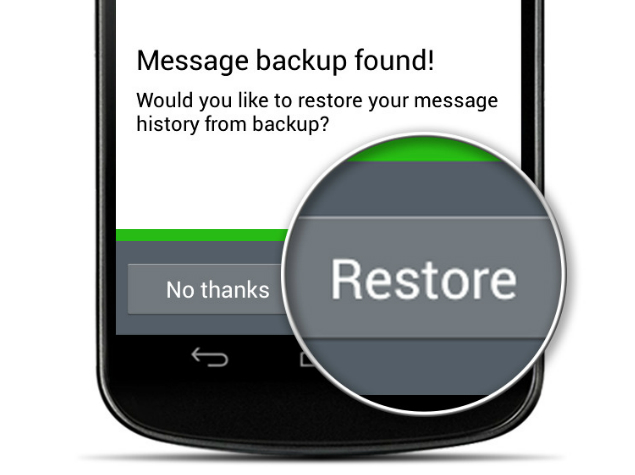
- Now reinstall WhatsApp. Once you verify your phone number, WhatsApp will show a prompt saying that it has found backed up messages. Tap Restore, choose the correct backup file and wait for the conversations to appear in the app.
iPhone
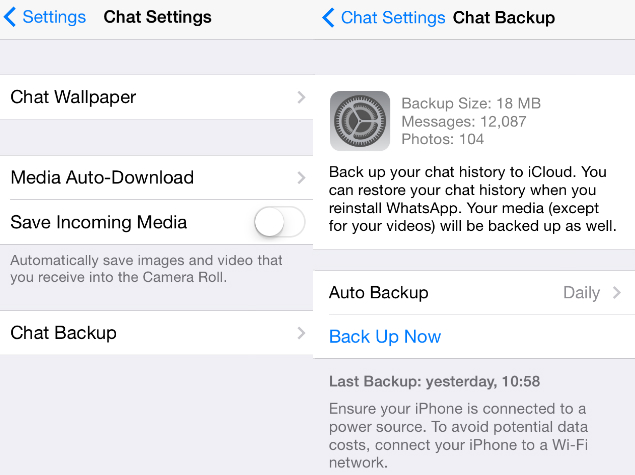
WhatsApp for iPhone uses Apple's iCloud service to back up your conversations. This backs up everything except videos. Here's how to use it.
- In your iPhone, go to Settings > iCloud > Documents & Data > On. You need to turn this on to save WhatsApp conversations.
- Now open WhatsApp, tap the Settings button at the bottom-right. Select Chat Settings > Chat Backup > Back Up Now.
- In the same place, you'll see an option called Auto Backup. Tap it. By default, this is set to Weekly. We suggest that you change this to Daily to avoid data loss.
- To restore backups, uninstall the app and reinstall it. Select Restore after verifying your phone number.
BlackBerry
Your WhatsApp conversations are backed up every day on your BlackBerry 10 smartphone. Here's how to create a backup and restore it.
- Open WhatsApp. Swipe down from the top of the screen to access the application menu. Select Settings > Media Settings > Backup conversations.
- This file will be saved as "messageStore-YYYY-MM-DD.1.db.crypt" in the /device/misc/whatsapp/backup folder on your BlackBerry 10 smartphone. WhatsApp recommends that you save this file as "messageStore-YYYY-MM-DD.1.db.crypt.current" so that you don't have trouble finding it.
- Now uninstall WhatsApp. Make sure that you know the name of the correct backup file.
- Reinstall WhatsApp. After verifying your phone number, select Restore and pick the correct backup file.
- If you are using a BlackBerry 7 smartphone, you need a microSD card to backup chat history. This is because message history is removed from the internal storage after restarting BB7 phones. If you have a microSD card in your phone, here's how to back up conversations.
- Open WhatsApp and select the Settings tab at the top.
- Select Media Settings > Message History > Media Card. This ensures that all your messages are saved on the memory card.
- If your chats have stopped showing up in the app, uninstall WhatsApp.
- Switch off the phone, remove and replace the battery. Restart the phone.
- Open your BlackBerry Media folder, press the BlackBerry button > Explore.
- Open Media Card > databases > WhatsApp and look for the "messagestore.db" file.
- Rename it to "123messagestore.db". This will ensure that WhatsApp restores the next most recent chat history that was saved.
Windows Phone
Here's how to create a chat history backup on WhatsApp for Windows Phone.
- Open WhatsApp and tap the three dots at the bottom-right.
- Select settings > chat settings > backup. This will create a backup of your WhatsApp conversations.
- If you accidentally deleted your chats, we suggest that you don't create a new backup. Instead, check the time of the previous backup, which can be found under the backup button mentioned in the previous step.
- If this time is after you received the chats you deleted, uninstall and reinstall WhatsApp.
- After verifying your phone number, WhatsApp will ask you if you want to restore a chat backup. Select yes.
Nokia feature phones
If you use WhatsApp on a Nokia S60 phone, here's how to create a backup.
- Open WhatsApp and select Options > Chat History > Backup chat history.
- Now tap Yes to create a backup.
- To restore backups, uninstall and reinstall WhatsApp.
- Select Restore after verifying your phone number.
- If you are trying to restore chat history on another Nokia S60 phone, remember to use the same microSD card that you used in the previous phone.
- Sadly, there is no way to create a chat history backup on Nokia S40 phones. The best you can do is email conversations to your personal email account to keep a record. Even this is possible only in phones that have a memory card. Here's how to email chat backups.
- Open WhatsApp and open the conversation you want to back up.
- Choose Options > Chat History > Email. Your chat history will be attached as a .txt file.
Comments
Get your daily dose of tech news, reviews, and insights, in under 80 characters on Gadgets 360 Turbo. Connect with fellow tech lovers on our Forum. Follow us on X, Facebook, WhatsApp, Threads and Google News for instant updates. Catch all the action on our YouTube channel.
Related Stories







Advertisement
Follow Us




-

01:33
A Festive Surprise for Her | Samsung Galaxy A57 5G -
00:54
Expectation vs Reality: Parents Said Notice Every Detail. She Added One | Galaxy S26 FE -
01:55
From Group Photos to Festive Nights | Samsung Galaxy A57 5G -
01:33
Galaxy Watch Ultra2 on the Trail: Tracking, Hydration & Elevation -
01:38
Galaxy Z Fold8 Captures the Funniest Diwali Moments | My Fan Cam
Advertisement
Popular on Gadgets
- Samsung Galaxy S26 Ultra
- Motorola Razr Fold
- ChatGPT
- OPPO Find N6
- Mobiles Under Rs. 40,000
- Vivo X300 Ultra
- Asus Zenbook S14
- iQOO 15
- Vivo X300 Pro
- Lenovo Yoga Slim 7i Aura Edition
- iQOO 15R
- Vivo X Fold 5
- Sony PlayStation 5
- HP OmniPad 12
- OnePlus Nord CE 6 Lite
- OnePlus Pad 4
- OPPO F33 Pro 5G
- Cryptocurrency
- HP OmniBook Ultra 14 (2026)
- iPhone 17
- Eureka Forbes AP 355 Room Air Purifier
- Latest Mobile Phones
- Compare Phones
Latest Gadgets
- Karbonn Rebel
- Karbonn Rebel Pro
- OnePlus Turbo 6Vs
- Redmi M100 Pro
- OnePlus Ace 7 Pro
- OnePlus Ace 7
- Samsung W27
- Huawei Pura 90 Plus
- Dell 14S (2026)
- HP ProBook 4 G2iS 14
- iPad mini (2026)
- Amazon Alexa Tablet 8
- Moto Watch 2 Fit
- Pebble Qore 2
- Toshiba 65-Inch 4K Ultra HD Smart Mini LED QLED TV (65Z670SP)
- Haier M70 Mini LED 65-inch
- Acer Predator Atlas 8
- Asus ROG Ally
- Blue Star 1.5 Ton 5 Star Inverter Split AC (IE518ZNURS)
- Blue Star 2 Ton 3 Star Inverter Window AC (WIE324L)

- About Us
- Sitemaps
- Feedback
- Archives
- Contact Us
- RSS
- Advertise
- Career
- Privacy Policy
- Ethics
- Editorial Policy
- Terms & Conditions
- Complaint Redressal
Download Our Apps
Available in Hindi
© Copyright Red Pixels Ventures Limited 2026. All rights reserved.