-
 Spotify Integrates With Meta Muse to Control Music, Podcasts and Audiobooks24 September 2026
 -
Spotify Will Label AI-Generated Artist Profiles With New AI Persona Badge12 August 2026
-
Boat Partners With Spotify, Bundles Four-Month Premium Subscription With Select Audio Products4 August 2026
-
Vodafone Idea (Vi) Bundles Spotify Premium With New Prepaid Plans; Prices Start at Rs. 2304 August 2026
-
Snapchat Brings Spotify Music Sharing to Snap Map With Now Playing28 July 2026
Spotify Introduces Playlist Notes for Songs, Podcasts and Audiobooks
Editor Notes and Editor Profiles are rolling out to Free and Premium 16+ users in the US, Canada, the UK, Ireland, Australia and New Zealand.
Written by Sucharita Ganguly, Edited by Rohan Pal | Updated: 18 August 2026 14:15 IST
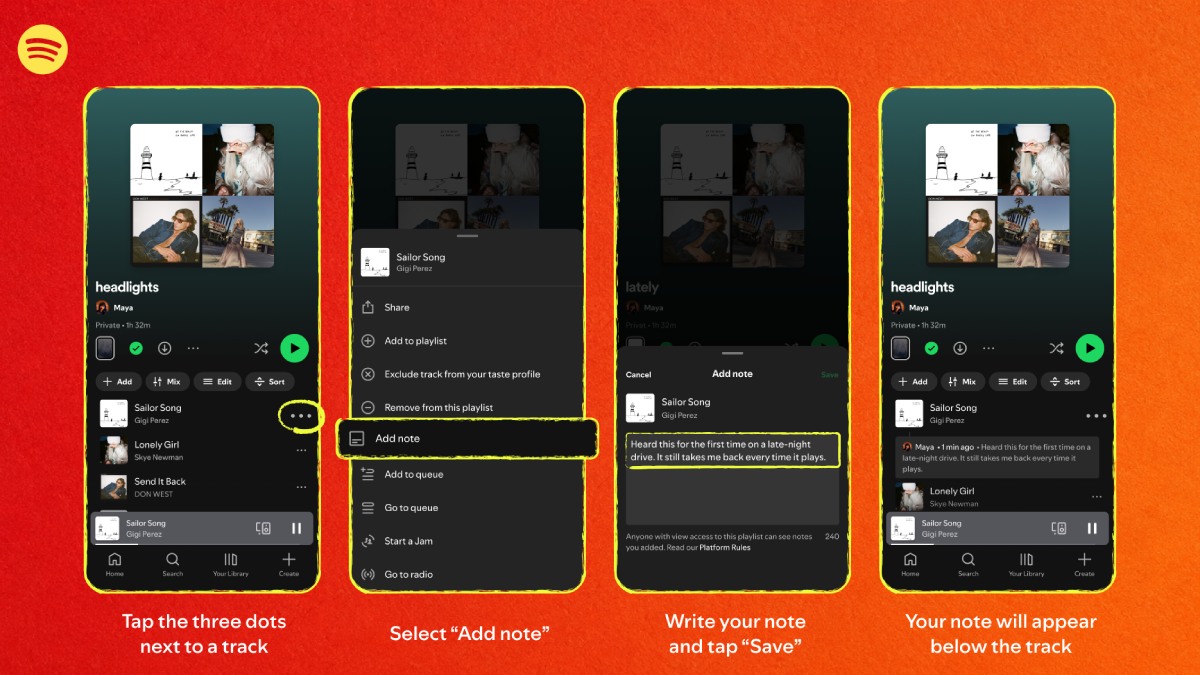
Photo Credit: Spotify
Spotify requires users to update the app for the feature
Click Here to Add Gadgets360 As A Trusted Source

Advertisement
Spotify is introducing Playlist Notes, a new feature that lets users add written context to songs, podcast episodes and audiobooks in their playlists. The feature also lets Spotify editors explain why they selected certain tracks for editorial playlists. Users can share memories, recommendations or other reasons behind their picks. Editor Notes and Editor Profiles are rolling out to users in select countries, while user-created notes are expanding to iOS and Android users across more than 100 markets.
Spotify Playlist Notes Add Memories and Context to Playlists
Spotify said Playlist Notes grew from an earlier concept called User Notes. The feature has two parts. Spotify editors can add Editor Notes to selected playlists to explain their song choices, while users can add their own notes to playlists they create or manage with collaborators.
- Spotify history feature suddenly sounds way more fun than expected
- Spotify and YouTube Music both have AI-powered features. But which one is overall a better music streaming platform?
- AI podcast creation tools could flood Spotify very quickly
- What is the new Spotify SongDNA feature?
- Apple Music vs Spotify vs YouTube Music — which one has the best algorithm?
Spotify is initially adding Editor Notes to Today's Top Hits, RapCaviar, Hot Country, All New Pop, Mint and Fresh Finds Hip-Hop. Editor Profiles will also show an editor's top tracks and albums, as well as the playlists they contribute to.
Editor Notes and Editor Profiles are rolling out to Free and Premium users aged 16 and above in the US, Canada, the UK, Ireland, Australia and New Zealand. Users can tap Notes at the top of a participating playlist to read the editorial comments. Tapping an editor's name opens their profile. These notes can also appear in Now Playing when the related song is played outside the playlist where the note was added.
For user-created playlists, Spotify lets users add notes to songs, podcast episodes and audiobooks. These notes can explain why an item was added, share a memory or recommend a particular pick. Anyone with access to the playlist can read these notes, and the author's name links to their Spotify profile. User-created notes must follow Spotify's Platform Rules and Terms of Use.
Users can add a note by opening a playlist they own or collaborate on and tapping the three-dot menu next to an added song, podcast episode or audiobook. They then need to select Add note, enter the text and tap Save. The note will appear below the relevant item.
User-created Playlist Notes are rolling out on iOS and Android in more than 100 markets worldwide. The Editor Notes feature has a more limited rollout across select countries. Users may need to update the Spotify app to get Playlist Notes as the feature rolls out.
Comments
Get your daily dose of tech news, reviews, and insights, in under 80 characters on Gadgets 360 Turbo. Connect with fellow tech lovers on our Forum. Follow us on X, Facebook, WhatsApp, Threads and Google News for instant updates. Catch all the action on our YouTube channel.
Related Stories





Advertisement
Follow Us




-
![[Sponsored]: CP PLUS CarKam CP-F89B: 4K Dashcam With Rear Camera, GPS & Emergency Recording](https://www.gadgets360.com/static/desktop/images/spacer.png)
04:37
[Sponsored]: CP PLUS CarKam CP-F89B: 4K Dashcam With Rear Camera, GPS & Emergency Recording -
04:23
[Partner Content] Your Phone Can Do WAY More Than You Think | OPPO ColorOS 16 -
01:59
Samsung Galaxy Z Fold8 Ultra: Unfold the Ultra Night -
03:24
Apple Pay Launches In India: Supported Devices, Cards And Payments Explained -
00:21
[Sponsored] Samsung Galaxy Z Fold8, Fold8 Ultra
-
Flipkart Big Billion Days: Xiaomi के 5 Redmi स्मार्टफोन्स पर Deals रिवील
-
Delhi Pollution 2026: 50% Work From Home, बिना PUCC नहीं मिलेगा Fuel
-
Oppo K15x हुआ लॉन्च; 6500mAh बैटरी, 120Hz डिस्प्ले के साथ आया बजट 5G फोन
-
Oppo F35 5G, Oppo F35 Pro 5G जल्द होंगे भारत में लॉन्च, Geekbench पर हुई लिस्टिंग
-
भारत में लॉन्च हुए Vivo T5 Lite 5G, Vivo T5 Pro 5G के नए RAM और स्टोरेज वेरिएंट्स
Advertisement
Popular on Gadgets
- Samsung Galaxy S26 Ultra
- Motorola Razr Fold
- ChatGPT
- OPPO Find N6
- Mobiles Under Rs. 40,000
- Vivo X300 Ultra
- Asus Zenbook S14
- iQOO 15
- Vivo X300 Pro
- Lenovo Yoga Slim 7i Aura Edition
- iQOO 15R
- Vivo X Fold 5
- Sony PlayStation 5
- HP OmniPad 12
- OnePlus Nord CE 6 Lite
- OnePlus Pad 4
- OPPO F33 Pro 5G
- Cryptocurrency
- HP OmniBook Ultra 14 (2026)
- iPhone 17
- Eureka Forbes AP 355 Room Air Purifier
- Latest Mobile Phones
- Compare Phones
Latest Gadgets
- Samsung Galaxy F08
- Samsung Galaxy M08
- OPPO K15x
- OPPO K15s
- HMD Vibe 2 Pro 5G
- OPPO K14 Plus 5G
- Lava Shark 2 Pro 5G
- Ai+ Pulse 2 FE
- Dell 14 Plus 2-in-1 (AMD Ryzen AI 7 350, 2025)
- Microsoft Surface Laptop, 13-inch (2nd Edition)
- Samsung Galaxy Tab S12+
- Samsung Galaxy Tab S12 Ultra
- Amazfit T-Rex Dual Solar
- OPPO Watch S2
- Toshiba 65-Inch 4K Ultra HD Smart Mini LED QLED TV (65Z670SP)
- Haier M70 Mini LED 65-inch
- Acer Predator Atlas 8
- Asus ROG Ally
- Blue Star 1.5 Ton 5 Star Inverter Split AC (IE518ZNURS)
- Blue Star 2 Ton 3 Star Inverter Window AC (WIE324L)

- About Us
- Sitemaps
- Feedback
- Archives
- Contact Us
- RSS
- Advertise
- Career
- Privacy Policy
- Ethics
- Editorial Policy
- Terms & Conditions
- Complaint Redressal
Download Our Apps
Available in Hindi
© Copyright Red Pixels Ventures Limited 2026. All rights reserved.