-
 Goodbye One UI? Samsung’s Next Android Update May Be Renamed Galaxy OS19 October 2026
 -
Google AI to Add More Anti-Scam Protections to Messages and Calls on Android Devices15 October 2026
-
ColorOS 17 Launched Globally: Android 17 Features, Eligible Oppo, OnePlus and Realme Devices14 October 2026
-
WhatsApp May Soon Let Android Users Schedule Messages, Photos and Videos12 October 2026
-
iQOO OriginOS 7 Update Timeline Revealed for India: Check Eligible Phones12 October 2026
- Home
- Mobiles
- Mobiles Features
- How to Allow or Deny Apps Access to Your Location on Android 6.0
How to Allow or Deny Apps Access to Your Location on Android 6.0
By Gadgets 360 Staff | Updated: 25 May 2016 16:15 IST
Click Here to Add Gadgets360 As A Trusted Source


Advertisement
A lot of apps that don't really need to access your location data often access it anyway. This can lead to excessive battery drain, which is something everyone would rather avoid. And there are also privacy issues involved in letting apps from developers you don't trust, access your location.
(Also see: How to Grant or Deny an iOS App Access to Your Location)
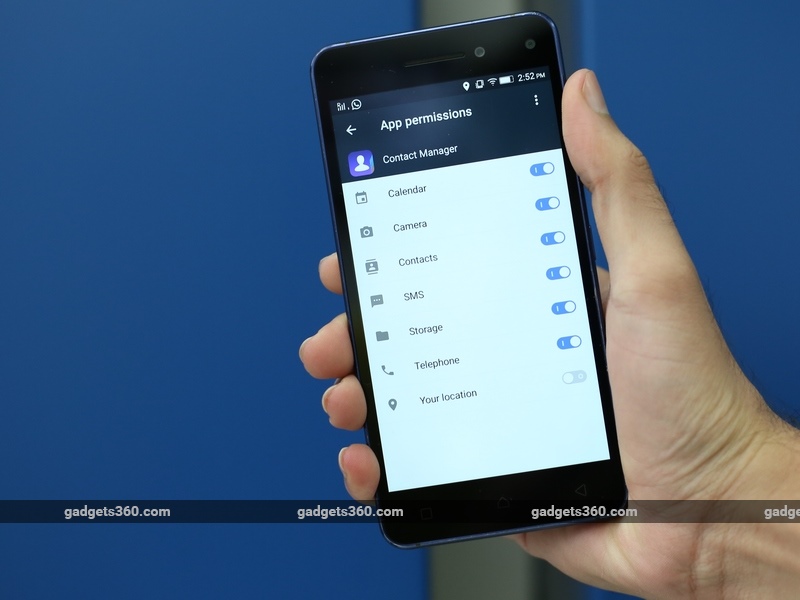
Whether it's to protect your privacy or your rapidly draining battery, you might want to disable location access for certain Android apps. Unfortunately, older versions of Android do not support granular permissions control so there's no way to do this without rooting your phone. That process varies from phone to phone and might void your warranty. However, if you have a phone that runs Android 6.0 Marshmallow, or a newer version of Android, you can do this easily. Just follow these steps.
- Open the Settings app on your phone.
- Tap Location. If you don't see the option, it might be inside a menu; for example, on Samsung phones, Location is inside the Privacy and safety menu.
- You'll most likely see a list of apps that recently requested your location. If you don't see it, go to step 6. Tap the name of the app you want to disable location for.
- Tap Permissions.
- Tap the switch next to Your location to turn it off.
- If the above worked for you, great, you can stop here. But for some handset makers such as Samsung, you won't see the list of apps mentioned in you'll need to instead tap the App permissions button instead.
- Here, you'll and then tap Location again, and you'll now see a list of apps that have access to your location information.
- Tap the app to deny location information on this screen.
You can follow this process to turn off location access manually for any app that's already installed on your phone. If you have Android 6.0 Marshmallow or a newer version of Android, when you run newly installed apps, they individually ask for permission to access your location. Just tap Deny to disable location access right at the beginning if you feel the app doesn't need access to your location. You can also use the steps above to remove access to your location from apps, if you gave an app permission at first, but later changed your mind.
For more tutorials, visit our How To section.
Comments
Get your daily dose of tech news, reviews, and insights, in under 80 characters on Gadgets 360 Turbo. Connect with fellow tech lovers on our Forum. Follow us on X, Facebook, WhatsApp, Threads and Google News for instant updates. Catch all the action on our YouTube channel.
Further reading:
Android, Android 6.0, Android 6.0 Marshmallow, Android Marshmallow, Apps, Google, Location, Location Services
Related Stories




Advertisement
Follow Us




-
04:17
[Sponsored] LG NANO 4K UHD AI TV NU885: Gemini Search, Dolby Atmos & 5 Years of Updates -
00:57
[Sponsored] Samsung Galaxy Z Fold8 My Fan Cam in Action: Find the Moment, Then Share It -
01:41
[Sponsored] What Do You Need To Know Before Your Next Run? | Samsung Galaxy Watch Ultra2 -
01:32
[Sponsored] Big Day Tomorrow? Prep Today | Samsung Galaxy Watch Ultra2 -
04:37
[Sponsored]: CP PLUS CarKam CP-F89B: 4K Dashcam With Rear Camera, GPS & Emergency Recording
-
iPhone 16 आज भी Amazon सेल में मिल रहा ₹15 हजार से ज्यादा सस्ता
-
OnePlus 15 को Amazon Great Indian Festival Sale में खरीदें सस्ता
-
₹2250 सस्ता मिल रहा Motorola का 7000mAh बैटरी वाला फोन! Flipkart पर ऑफर
-
Moto G47 Power लॉन्च होगा 7,000mAh बैटरी के साथ! IP64 रेटिंग
-
Realme लाई बजट फोन Realme C01, 6500mAh बैटरी के साथ!
Advertisement
Popular on Gadgets
- Samsung Galaxy S26 Ultra
- Motorola Razr Fold
- ChatGPT
- OPPO Find N6
- Mobiles Under Rs. 40,000
- Vivo X300 Ultra
- Asus Zenbook S14
- iQOO 15
- Vivo X300 Pro
- Lenovo Yoga Slim 7i Aura Edition
- iQOO 15R
- Vivo X Fold 5
- Sony PlayStation 5
- HP OmniPad 12
- OnePlus Nord CE 6 Lite
- OnePlus Pad 4
- OPPO F33 Pro 5G
- Cryptocurrency
- HP OmniBook Ultra 14 (2026)
- iPhone 17
- Eureka Forbes AP 355 Room Air Purifier
- Latest Mobile Phones
- Compare Phones
Latest Gadgets
- Samsung Galaxy F70 5G
- Tecno Spark 50S 5G
- Vivo Y600s Pro
- Vivo Y32 (2026)
- Infinix Smart 20 HD
- Vivo V80
- Vivo S2 FE
- Vivo Y600K Turbo
- HP ZBook Ultra G3a
- Dell Pro Rugged 14
- Amazon Alexa Tablet 8
- Amazon Alexa Tablet 11
- Amazfit T-Rex Dual Solar
- OPPO Watch S2
- Toshiba 65-Inch 4K Ultra HD Smart Mini LED QLED TV (65Z670SP)
- Haier M70 Mini LED 65-inch
- Acer Predator Atlas 8
- Asus ROG Ally
- Blue Star 1.5 Ton 5 Star Inverter Split AC (IE518ZNURS)
- Blue Star 2 Ton 3 Star Inverter Window AC (WIE324L)

- About Us
- Sitemaps
- Feedback
- Archives
- Contact Us
- RSS
- Advertise
- Career
- Privacy Policy
- Ethics
- Editorial Policy
- Terms & Conditions
- Complaint Redressal
Download Our Apps
Available in Hindi
© Copyright Red Pixels Ventures Limited 2026. All rights reserved.