
-
 Google Gemini Decisions API Debuts With Support for 1,000 Questions Per Request12 November 2026
-
Google Announces Gemini Intelligence for Android Auto With Proactive AI Suggestions12 November 2026
-
Google Labs Launches Tabletop as an AI-Powered Collaborative Tool for Trips, Games and Group Activities12 November 2026
-
Samsung One UI 9.5 May Bring Call Recording to WhatsApp, Telegram11 November 2026
-
Adobe and Google Expand Partnership With Gemini AI Models, Photoshop Features11 November 2026
Google Gemini Comes to Apple CarPlay With Gemini Live, Gmail and Calendar Integration
The update brings Gemini Live voice conversations to Apple's in-car platform, along with Google Calendar and Gmail functions.
Written by Sucharita Ganguly, Edited by Rohan Pal | Updated: 13 November 2026 11:34 IST
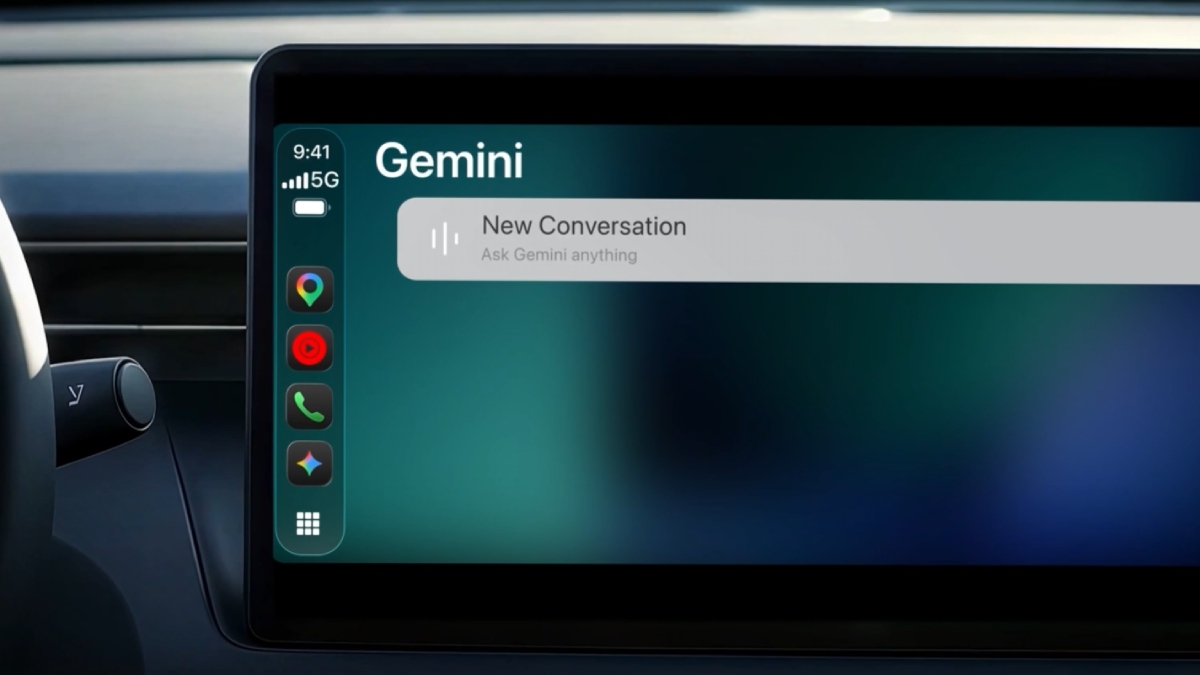
Photo Credit: Google
Gemini Live must be opened on an iPhone before use
Click Here to Add Gadgets360 As A Trusted Source
Advertisement
Google is bringing Gemini to Apple CarPlay, letting iPhone users talk to the AI assistant through their car's infotainment system. Drivers can use Gemini Live, check upcoming appointments through Google Calendar, or get a quick summary of emails in Gmail. They can also look for places to eat along their route. Conversations started in the car will appear in the Gemini app on their iPhone, where users can revisit them later.
Google Gemini on Apple CarPlay Features
Google's Gemini app will appear on Apple CarPlay as a standalone app, giving iPhone users access to the AI assistant through their car's infotainment display, the company revealed in a blog post. Drivers will be able to start a new conversation or resume an existing chat from their iPhone. The CarPlay version will also support Gemini Live, Google's conversational voice feature, which lets users interrupt the assistant, ask follow-up questions and switch topics during a conversation.
The app will connect with Google Calendar and Gmail, allowing drivers to ask about upcoming appointments and get summaries of unread emails or lengthy email threads. They can also discuss possible replies to messages with Gemini. The assistant will not send emails on their behalf.
Gemini will be available for navigation-related queries as well. Drivers can ask it to find restaurants near their destination or get information about places along their route. Google has also outlined other uses for Gemini Live, including rehearsing presentations, preparing for meetings and discussing unfamiliar topics.
Chats started through CarPlay will sync with the Gemini app on the iPhone, allowing users to return to them after their journey. Google already offers Gemini through Android Auto and in cars with Google built-in. The Apple CarPlay app brings the same assistant to Apple's in-car platform.
Google Gemini on Apple CarPlay Availability
Gemini on Apple CarPlay will be available globally to iPhone users in all languages supported by Gemini Live. Users do not need to download a separate app for CarPlay, but must have the latest version of the Gemini app installed on their iPhones and allow it to access the microphone.
Before using Gemini in the car, users must launch Gemini Live on their iPhones at least once. They can then connect the phone to a compatible car and open Gemini from the CarPlay display to start using the assistant.
Comments
Get your daily dose of tech news, reviews, and insights, in under 80 characters on Gadgets 360 Turbo. Connect with fellow tech lovers on our Forum. Follow us on X, Facebook, WhatsApp, Threads and Google News for instant updates. Catch all the action on our YouTube channel.
Further reading:
Google, Google Gemini, Apple CarPlay, Gemini Live, iPhone, Google Calendar, Gmail, AI Assistant, Apple
Related Stories




Advertisement
Follow Us


-
 Ergonomic & Stylish Leather Card Holders & Slim Wallets for Men Under ₹999
-
Best Seagate 2TB External Hard Drives: High-Speed Storage Tested
-
Best Citizen Watches for Men: Precision, Style, and Eco-Drive Power
-
Best Flite Footwear for Everyday Comfort: Sandals, Slippers & Casuals
-
Top Dishwashers for Working Couples in Metro Cities
Advertisement
Popular on Gadgets
- Samsung Galaxy S26 Ultra
- Motorola Razr Fold
- ChatGPT
- OPPO Find N6
- Mobiles Under Rs. 40,000
- Vivo X300 Ultra
- Asus Zenbook S14
- iQOO 15
- Vivo X300 Pro
- Lenovo Yoga Slim 7i Aura Edition
- iQOO 15R
- Vivo X Fold 5
- Sony PlayStation 5
- HP OmniPad 12
- OnePlus Nord CE 6 Lite
- OnePlus Pad 4
- OPPO F33 Pro 5G
- Cryptocurrency
- HP OmniBook Ultra 14 (2026)
- iPhone 17
- Eureka Forbes AP 355 Room Air Purifier
- Latest Mobile Phones
- Compare Phones
Latest Gadgets
- Vivo Y6k
- Karbonn Rebel
- Karbonn Rebel Pro
- OnePlus Turbo 6Vs
- Redmi M100 Pro
- OnePlus Ace 7 Pro
- OnePlus Ace 7
- Samsung W27
- Dell 14S (2026)
- HP ProBook 4 G2iS 14
- Infinix Xpad 30
- iPad mini (2026)
- Moto Watch 2 Fit
- Pebble Qore 2
- Toshiba 65-Inch 4K Ultra HD Smart Mini LED QLED TV (65Z670SP)
- Haier M70 Mini LED 65-inch
- Acer Predator Atlas 8
- Asus ROG Ally
- Blue Star 1.5 Ton 5 Star Inverter Split AC (IE518ZNURS)
- Blue Star 2 Ton 3 Star Inverter Window AC (WIE324L)

- About Us
- Sitemaps
- Feedback
- Archives
- Contact Us
- RSS
- Advertise
- Career
- Privacy Policy
- Ethics
- Editorial Policy
- Terms & Conditions
- Complaint Redressal
Download Our Apps
Available in Hindi
© Copyright Red Pixels Ventures Limited 2026. All rights reserved.