-
 WhatsApp Adds Status Caption Editing Feature for Android Beta Testers: Report28 July 2026
 -
WhatsApp Rolling Out Direct iPad Sign-Up, Revamped CarPlay Experience and In-Chat PDF Editing23 July 2026
-
WhatsApp Will Soon Let You Add a 'Close Friends' Status, Just Like Instagram: Report6 February 2026
-
WhatsApp Prepares to Expand Ads on Status and Channels to More Users10 December 2025
-
WhatsApp May Soon Let You Add Instagram-Inspired 'Questions' to Your Status8 October 2025
- Home
- How to
- How to Features
- How to Add Music to Your WhatsApp Status
How to Add Music to Your WhatsApp Status
You can add 15 second of audio to an image, and 60 seconds of audio when uploading a video to your WhatsApp Status.
Written by David Delima | Updated: 14 April 2025 20:58 IST

WhatsApp Status updates are available for 24 hours after they are published
Click Here to Add Gadgets360 As A Trusted Source

Advertisement
WhatsApp recently began rolling out a new feature that allows you to add music to your WhatsApp Status. Just like Meta's other social platforms Instagram and Facebook, you can now add up to 15 seconds of music for an image and up to 60 seconds when uploading a video. WhatsApp Status updates — including those with music — are protected with end-to-end encryption (so WhatsApp can't see which songs are added to a Status) and will be available for 24 hours after they are posted.
We've tested the new feature that lets you add music to your Status on the latest version of WhatsApp for iOS and Android. The WhatsApp Status composer now includes a new music icon, which displays a pop-up card when tapped. You can search for specific tracks, or select one of several tracks that are popular in your region.

Uploading an image with music to WhatsApp Status
- Facebook Profile Lock: How to Lock Your FB Profile on Mobile, Desktop, and More
- How to Activate New Airtel 5G SIM: A Step-by-Step Guide
- How to Activate Vodafone Idea (Vi) SIM Card: A Step-by-Step Guide
- Vodafone Idea (Vi) Message Centre Number: List of all State-wise Numbers
- How to Hide Google's AI Overviews in Your Search Results
Once you've selected a music track, you can check your Status audience, or make additional edits and mention other users or groups before you hit publish. Here's a step-by-step guide on how to add music to your WhatsApp Status.
How to Add Music to Your WhatsApp Status
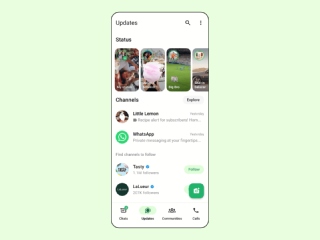
- Open WhatsApp and tap on the Updates tab on the bottom navigation bar.
- Tap the Add status button.
- Select an image or video from the built-in media picker.
- Tap the new music icon at the top of the screen.
- Search for a song or select one of the popular tracks listed on the pop-up card.
- Drag the slider at the bottom of the screen to select the part of the song that you want to use.
- After checking that the correct segment of the track has been selected, tap Done to go back to the Status composer.
- Tap the green send button to publish your WhatsApp Status.
Comments
Get your daily dose of tech news, reviews, and insights, in under 80 characters on Gadgets 360 Turbo. Connect with fellow tech lovers on our Forum. Follow us on X, Facebook, WhatsApp, Threads and Google News for instant updates. Catch all the action on our YouTube channel.
Further reading:
WhatsApp Status, WhatsApp Features, WhatsApp Status Music Feature, WhatsApp Status Features, WhatsApp
Related Stories






Advertisement
Follow Us




-
![[Sponsored] Galaxy Watch9 for Everyday Health Insights | Smarter Wellness Choices](https://www.gadgets360.com/static/desktop/images/spacer.png)
01:42
[Sponsored] Galaxy Watch9 for Everyday Health Insights | Smarter Wellness Choices -
01:15
[Sponsored] Galaxy Tab S10 Lite for Students: Notes, Solve Math and More -
04:17
[Sponsored] LG NANO 4K UHD AI TV NU885: Gemini Search, Dolby Atmos & 5 Years of Updates -
00:57
[Sponsored] Samsung Galaxy Z Fold8 My Fan Cam in Action: Find the Moment, Then Share It -
01:41
[Sponsored] What Do You Need To Know Before Your Next Run? | Samsung Galaxy Watch Ultra2
-
Infinix GT 50 Pro भारत में लॉन्च, गेमर्स के लिए है लिक्विड कूलिंग सिस्टम
-
Xiaomi की ये मशीन 20 मिनट में साफ करेगी गंदे जूते, इस कीमत में हुई लॉन्च
-
Samsung Galaxy S25 Ultra Deal: Amazon पर ₹12 हजार से ज्यादा की बचत
-
Flipkart दिवाली सेल: ₹25 हजार से ज्यादा सस्ता मिल रहा Samsung का फ्लैगशिप फोन
-
Honor X9e Pro लॉन्च; 11,000mAh बैटरी से चार्जिंग की टेंशन खत्म! 108MP कैमरा के साथ Snapdragon चिप
Advertisement
Popular on Gadgets
- Samsung Galaxy S26 Ultra
- Motorola Razr Fold
- ChatGPT
- OPPO Find N6
- Mobiles Under Rs. 40,000
- Vivo X300 Ultra
- Asus Zenbook S14
- iQOO 15
- Vivo X300 Pro
- Lenovo Yoga Slim 7i Aura Edition
- iQOO 15R
- Vivo X Fold 5
- Sony PlayStation 5
- HP OmniPad 12
- OnePlus Nord CE 6 Lite
- OnePlus Pad 4
- OPPO F33 Pro 5G
- Cryptocurrency
- HP OmniBook Ultra 14 (2026)
- iPhone 17
- Eureka Forbes AP 355 Room Air Purifier
- Latest Mobile Phones
- Compare Phones
Latest Gadgets
- Vivo Y600
- HMD 2660 Flip Senior Edition
- Lava Aura Curve
- Poco X8s
- Samsung Galaxy F70 5G
- Tecno Spark 50S 5G
- Vivo Y600s Pro
- Vivo Y32 (2026)
- Lenovo Yoga 9n 2-in-1
- Lenovo Yoga Pro 9n
- iPad mini (2026)
- Amazon Alexa Tablet 8
- Pebble Qore 2
- Amazfit T-Rex Dual Solar
- Toshiba 65-Inch 4K Ultra HD Smart Mini LED QLED TV (65Z670SP)
- Haier M70 Mini LED 65-inch
- Acer Predator Atlas 8
- Asus ROG Ally
- Blue Star 1.5 Ton 5 Star Inverter Split AC (IE518ZNURS)
- Blue Star 2 Ton 3 Star Inverter Window AC (WIE324L)

- About Us
- Sitemaps
- Feedback
- Archives
- Contact Us
- RSS
- Advertise
- Career
- Privacy Policy
- Ethics
- Editorial Policy
- Terms & Conditions
- Complaint Redressal
Download Our Apps
Available in Hindi
© Copyright Red Pixels Ventures Limited 2026. All rights reserved.