

-
 WhatsApp Two-Step Verification, HTC Bolt, Rs. 500, 1000 Ban Fallout, and More: Your 360 Daily22 December 2016
 -
Chrome for Android Could Soon Be Used One-Handed, With New Location for Address Bar2 November 2016
-
Hands on With Now on Tap: Android 6.0's Best Feature Has Apps Dancing to Its Tunes7 October 2015
- Home
- Internet
- Internet News
- Google Chrome Could Make Notification Prompts Less Annoying on Android
Google Chrome Could Make Notification Prompts Less Annoying on Android
Google said that the new non-blocking notification prompt will automatically expire if users do not respond.
Written by Nithya P Nair, Edited by Rohan Pal | Updated: 24 July 2026 15:55 IST

Photo Credit: Pexels/Deepanker Verma
Google added a notification subscription option within Chrome's Site Controls menu
Click Here to Add Gadgets360 As A Trusted Source

Advertisement
Google appears to be working to improve the user experience of Chrome on Android. The company confirmed that it is bringing a new redesigned notification permission interface. This change will start rolling out with Chrome 155. The company has also demonstrated what the update looks like for users. Google recommends tying the prompt to a relevant action or context instead of displaying a permission request as soon as a webpage loads.
Chrome 155 for Android Gets Redesigned Notification Permission UI
In a post on the Chrome for Developers blog, Google announced that it is bringing changes to address notification prompt fatigue when browsing the web. Chrome on Android will show a notification user experience starting with Chrome 155. Google Chrome 150 for Android is currently available through the Play Store.
Google says the redesigned notification permission interface for Chrome on Android has "less intrusive Notification UI has similar comprehension to the previous version, but significantly lower user friction". The company notes that the change helps users to make informed decisions about subscribing to site notifications without interrupting their activity.
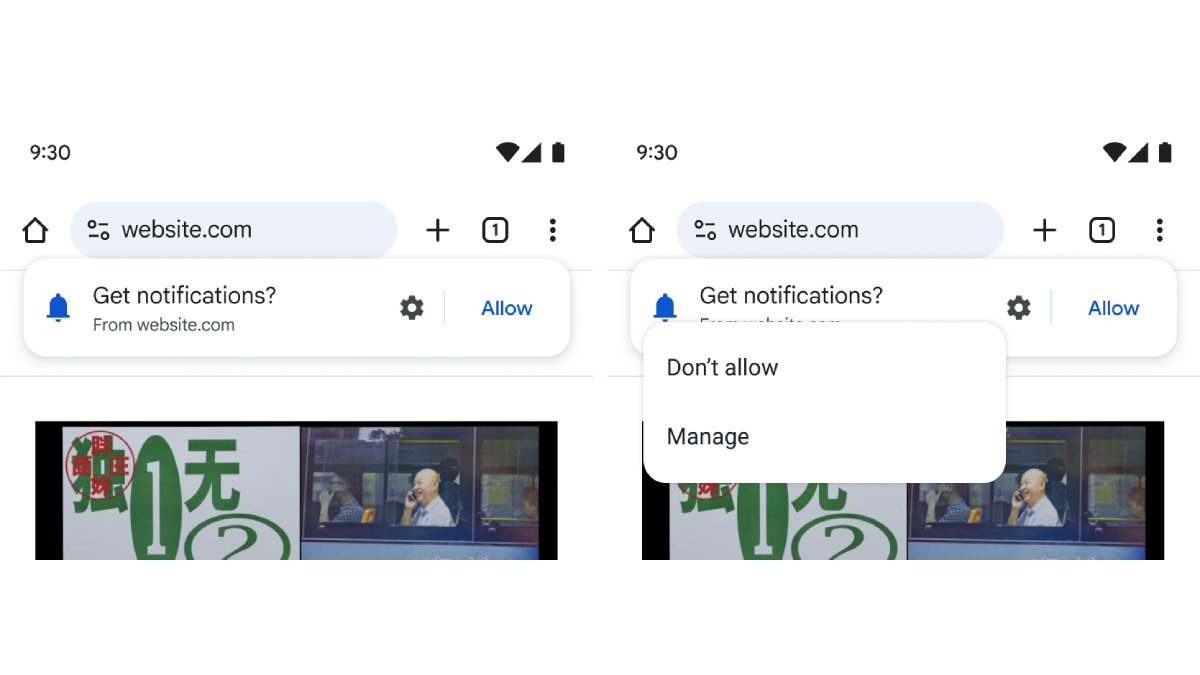
For this, Google has added a new dedicated notification subscription option within Chrome's Site Controls menu. The blog post includes a screenshot showing this option. With this update, users who choose not to respond immediately when a website has first prompted them can subscribe later by accessing the Site Controls interface. This is likely to give users more flexibility in browsing.
Google also noted that the new non-blocking notification prompt will automatically expire if users do not respond. Developers may need to modify code that checks for permission granted.
Google has asked developers to tie prompts to relevant context to improve user engagement. The tech giant has offered some examples for developers, such as an e-commerce site that can request notification permission for delivery updates right after placing an order. Similarly, a news website can suggest topic alerts after they read several related news articles, and travel sites could prompt users for fare alerts after they search for a specific flight.
Comments
Get your daily dose of tech news, reviews, and insights, in under 80 characters on Gadgets 360 Turbo. Connect with fellow tech lovers on our Forum. Follow us on X, Facebook, WhatsApp, Threads and Google News for instant updates. Catch all the action on our YouTube channel.
Related Stories



Advertisement
Follow Us




-
![[Sponsored] Galaxy Watch9 for Everyday Health Insights | Smarter Wellness Choices](https://www.gadgets360.com/static/desktop/images/spacer.png)
01:42
[Sponsored] Galaxy Watch9 for Everyday Health Insights | Smarter Wellness Choices -
01:15
[Sponsored] Galaxy Tab S10 Lite for Students: Notes, Solve Math and More -
04:17
[Sponsored] LG NANO 4K UHD AI TV NU885: Gemini Search, Dolby Atmos & 5 Years of Updates -
00:57
[Sponsored] Samsung Galaxy Z Fold8 My Fan Cam in Action: Find the Moment, Then Share It -
01:41
[Sponsored] What Do You Need To Know Before Your Next Run? | Samsung Galaxy Watch Ultra2
-
NVIDIA के सीईओ ने पेश किए माइक्रोडक रोबोट, AI से चलते हैं, क्या काम आएंगे
-
iPhone Duo को बीच से खोला, फोल्डेबल डिस्प्ले से हटाया कवर, फिर क्या दिखा?
-
1 जनवरी से फोन में बिना सिम नहीं चलेगा WhatsApp, सिम बाइडिंग हुआ अनिवार्य
-
Oppo ला रही नया अफॉर्डेबल टैबलेट, 45W फास्ट चार्जिंग फीचर से होगा लैस!
-
OnePlus Ace 7 सीरीज में मिलेगा डुअल-एयरफ्लो डिजाइन, 3 कलर्स के ऑप्शन
Advertisement
Popular on Gadgets
- Samsung Galaxy S26 Ultra
- Motorola Razr Fold
- ChatGPT
- OPPO Find N6
- Mobiles Under Rs. 40,000
- Vivo X300 Ultra
- Asus Zenbook S14
- iQOO 15
- Vivo X300 Pro
- Lenovo Yoga Slim 7i Aura Edition
- iQOO 15R
- Vivo X Fold 5
- Sony PlayStation 5
- HP OmniPad 12
- OnePlus Nord CE 6 Lite
- OnePlus Pad 4
- OPPO F33 Pro 5G
- Cryptocurrency
- HP OmniBook Ultra 14 (2026)
- iPhone 17
- Eureka Forbes AP 355 Room Air Purifier
- Latest Mobile Phones
- Compare Phones
Latest Gadgets
- HMD 2660 Flip Senior Edition
- Lava Aura Curve
- Poco X8s
- Samsung Galaxy F70 5G
- Tecno Spark 50S 5G
- Vivo Y600s Pro
- Vivo Y32 (2026)
- Infinix Smart 20 HD
- Lenovo Yoga 9n 2-in-1
- Lenovo Yoga Pro 9n
- Amazon Alexa Tablet 8
- Amazon Alexa Tablet 11
- Pebble Qore 2
- Amazfit T-Rex Dual Solar
- Toshiba 65-Inch 4K Ultra HD Smart Mini LED QLED TV (65Z670SP)
- Haier M70 Mini LED 65-inch
- Acer Predator Atlas 8
- Asus ROG Ally
- Blue Star 1.5 Ton 5 Star Inverter Split AC (IE518ZNURS)
- Blue Star 2 Ton 3 Star Inverter Window AC (WIE324L)

- About Us
- Sitemaps
- Feedback
- Archives
- Contact Us
- RSS
- Advertise
- Career
- Privacy Policy
- Ethics
- Editorial Policy
- Terms & Conditions
- Complaint Redressal
Download Our Apps
Available in Hindi
© Copyright Red Pixels Ventures Limited 2026. All rights reserved.
-
 Apple Watch Series 12
Starts from ₹56,900
Apple Watch Series 12
Starts from ₹56,900
-
 Samsung Galaxy Watch Ultra 2
Starts from ₹62,479
Samsung Galaxy Watch Ultra 2
Starts from ₹62,479
-
 Samsung Galaxy Watch 9 (44mm, LTE)
Starts from ₹41,999
Samsung Galaxy Watch 9 (44mm, LTE)
Starts from ₹41,999
-
 Samsung Galaxy Watch 9 (40mm, LTE)
Starts from ₹38,999
Samsung Galaxy Watch 9 (40mm, LTE)
Starts from ₹38,999
-
 Samsung Galaxy Watch 9 (40mm)
Starts from ₹36,999
Samsung Galaxy Watch 9 (40mm)
Starts from ₹36,999
-
 Samsung Galaxy Watch 9 (44mm)
Starts from ₹40,999
Samsung Galaxy Watch 9 (44mm)
Starts from ₹40,999
-
 Realme 17 Pro Series Tipped to Feature 10,000mAh Battery, 200-Megapixel Camera
-
 Star Wars: Battlefront 3 Reportedly in the Works at EA's Respawn and Dice Studios
-
 WhatsApp Reels Shortcut for Chats Rolling Out to Android Beta Testers
-
 OnePlus Buds Clip Features, Colours Revealed Ahead of Expected Global Launch