- Home
- Mobiles
- Mobiles News
- Google’s Motion Assist Expands to More Android Phones: How to Enable the Motion Sickness Feature
Google’s Motion Assist Expands to More Android Phones: How to Enable the Motion Sickness Feature
Google’s Motion Assist feature is available on devices running Android 17.
Written by Nithya P Nair, Edited by Rohan Pal | Updated: 15 September 2026 12:42 IST
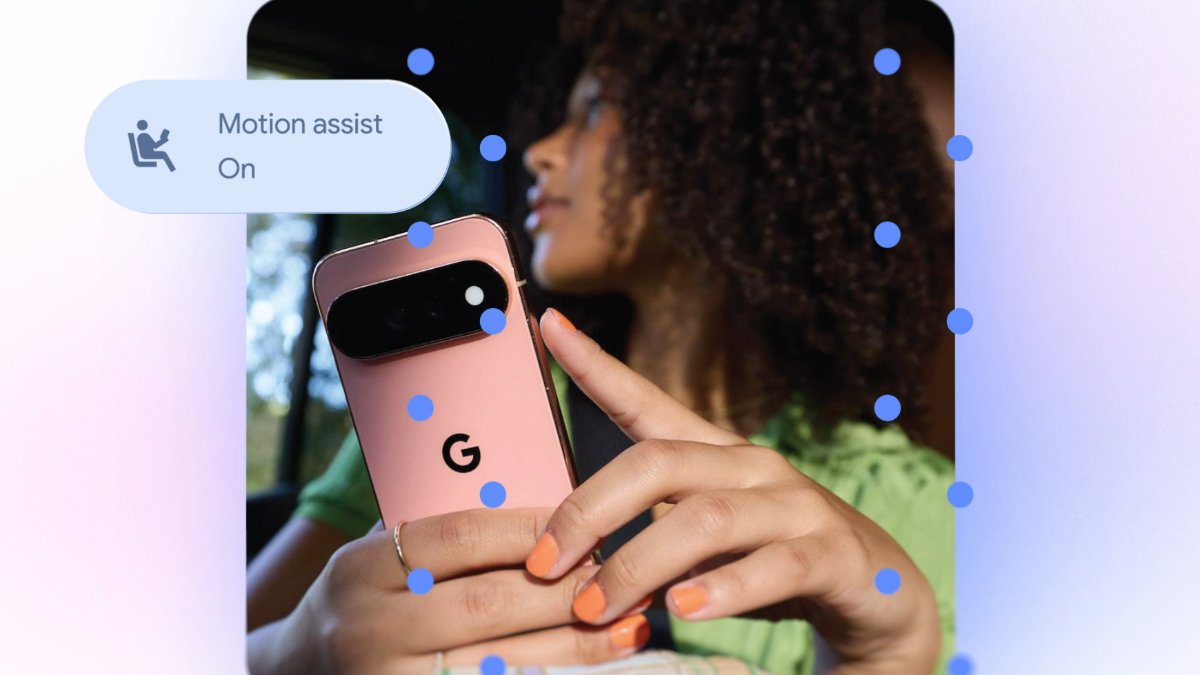
Photo Credit: Google
Motion Assist shows small, subtle visual bubbles along your screen edges
Click Here to Add Gadgets360 As A Trusted Source

Advertisement
Google released the Motion Assist feature with its September Android Drop earlier this month. This latest feature, designed to help Pixel smartphone users deal with motion sickness while travelling, is now expanding to more Android devices. Motion Assist shows moving shapes around the edges of the screen that match a vehicle's movements to make it easier to use a phone while travelling. This functionality is available on Android devices running Android 17 or higher with Google Play Services updated.
Google's Motion Assist Feature Expands to More Android Phones
As per an X post by Mishaal Rahman, Motion Assist is now available on devices running Android 17. As mentioned, the feature shows small, subtle visual bubbles along screen edges. These bubbles move using the phone's motion sensors and match how the vehicle turns, speeds up, or brakes, helping the user's brain synchronise what their eyes see with what their body feels.
Users with an Android device running Android 17 or higher with Google Play Services updated can access the Motion Assist feature in the Settings app. It can be done by heading to Settings > Tap profile > All services > Personal & device safety > Motion Assist. Google Pixel smartphone users can also access it from the Quick Settings editor.
Google lets users set their phone to automatically show Motion Assist bubbles when a vehicle's motion is detected. Interested users can also add a dedicated Quick Settings tile for faster manual control. Motion Assist offers customisation options, and users can change the design and visibility of the visual bubbles at any time.
Users can customise the colour theme and choose from options like red, yellow, green, or blue, as well as different bubble shapes. Google also let users customise how dark or see-through the bubbles appear on screen. Users can turn the Randomisation option on or off to change the colour and shape of the bubbles every few seconds.
Google announced Motion Assist as part of its September Android Drop. With the latest rollout, it will be available across the latest Google Pixel smartphones and the Samsung Galaxy Fold 8 series devices running Android 17.
Comments
Get your daily dose of tech news, reviews, and insights, in under 80 characters on Gadgets 360 Turbo. Connect with fellow tech lovers on our Forum. Follow us on X, Facebook, WhatsApp, Threads and Google News for instant updates. Catch all the action on our YouTube channel.


Google’s Motion Assist Expands to More Android Phones: How to Enable the Motion Sickness Feature


Advertisement
Follow Us




-
05:20
Samsung Galaxy Watch Ultra 2 Review: Is This the Best Android Smartwatch? -
07:01
Samsung Galaxy Z Fold 8 Review: Is This the Best Foldable Phone? -
06:39
Samsung Galaxy Z Fold8 Ultra Review: Cameras, Battery, Performance Tested -
04:33
[Sponsored] JBL Live 780NC: Great Sound, Perfect Comfort, Smart ANC & 80-Hour Battery -
12:04
[Partner Content] OPPO Reno16 Series Deep Dive: Built for Creators?
Advertisement
Popular on Gadgets
- Samsung Galaxy S26 Ultra
- Motorola Razr Fold
- ChatGPT
- OPPO Find N6
- Mobiles Under Rs. 40,000
- Vivo X300 Ultra
- Asus Zenbook S14
- iQOO 15
- Vivo X300 Pro
- Lenovo Yoga Slim 7i Aura Edition
- iQOO 15R
- Vivo X Fold 5
- Sony PlayStation 5
- HP OmniPad 12
- OnePlus Nord CE 6 Lite
- OnePlus Pad 4
- OPPO F33 Pro 5G
- Cryptocurrency
- HP OmniBook Ultra 14 (2026)
- iPhone 17
- Eureka Forbes AP 355 Room Air Purifier
- Latest Mobile Phones
- Compare Phones
Latest Gadgets
- iPhone Duo
- OPPO A7 Pro
- Huawei Mate XT 2 Ultimate Design
- Realme 16 Pro Harry Potter Edition
- Samsung Galaxy A07s
- Huawei Pura X View
- Tecno Camon Slim 5G
- iQOO Z11xa
- Acer Aspire G 3D 16
- Acer Swift Air 16 (2026)
- Xiaomi Pad 9 Pro
- Xiaomi Pad 9
- Apple Watch Ultra 4
- Apple Watch Series 12
- Haier M70 Mini LED 65-inch
- Xiaomi TV FX Mini LED 65
- Acer Predator Atlas 8
- Asus ROG Ally
- Blue Star 1.5 Ton 5 Star Inverter Split AC (IE518ZNURS)
- Blue Star 2 Ton 3 Star Inverter Window AC (WIE324L)

- About Us
- Sitemaps
- Feedback
- Archives
- Contact Us
- RSS
- Advertise
- Career
- Privacy Policy
- Ethics
- Editorial Policy
- Terms & Conditions
- Complaint Redressal
Download Our Apps
Available in Hindi
© Copyright Red Pixels Ventures Limited 2026. All rights reserved.