-
 Amazon Great Indian Festival 2026: Best Premium Smartwatch Deals15 October 2026
 -
iPhone Duo Screen Repair in India Costs Almost as Much as an iPhone 18 Pro15 October 2026
-
iPhone 18 Reportedly Set to Enter Production Soon; Apple Anticipating Strong Demand15 October 2026
-
How Apple Uses the Hinge to Cool the iPhone Duo14 October 2026
-
Apple TV 4K (4th Generation), HomePod Mini 2 Launched in India With Siri AI: Price, Specifications13 October 2026
- Home
- Apps
- Apps Features
- How to Improve Battery Life on iOS 8
How to Improve Battery Life on iOS 8
By Pranay Parab | Updated: 22 September 2014 12:28 IST
Click Here to Add Gadgets360 As A Trusted Source

Advertisement
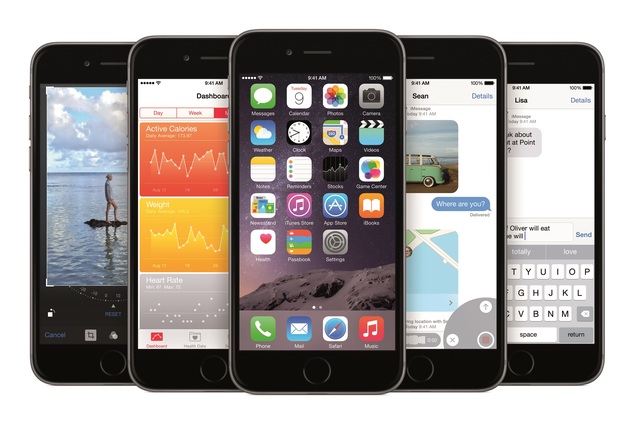
While iOS 8.0 has some great new features, some people that updated to the new version have been experiencing battery drain. Apple's OS updates have been known to cause minor battery issues that are usually fixed quickly with the next update. Until iOS 8.0.1 comes along, here's what you can do to improve your iOS device's battery life.
(Also see: How to improve battery life on iOS 7.1)
- Apple Watch or AirPods upgrade first?
- Apple to Introduce redesigned Apple Pencil models in 2027
- Apple to introduce a new device leasing programme, Apple Upgrade tomorrow
- Apple has increased the prices of Apple Music and Apple One Subscription plans
- Apple is planning to bring OLED technology to the iPad mini
Check battery usage
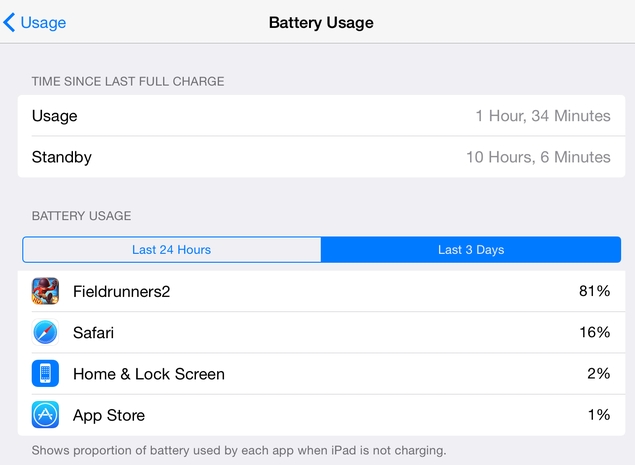
The first thing you can do to reduce battery drain is to turn off apps that are using it the most. We did experience fairly noticeable battery drain even when the device was not in use, but turning off the battery hogs will give you some extra time. You can check this by going to:
- Settings > General > Usage > Battery Usage.
- Now tap Last 24 Hours or Last 7 Days (you might see a different number if you've just switched to iOS 8, but the counter stops at seven days) to see which apps have been using the most battery.
- Depending on what you see, you can take steps to reduce battery drain. For example, if you see that Mail uses a lot of battery life because of background activity, then you can change the background refresh settings, which we discuss below.
(Also see: NDTV Gadgets Staff Pick Their Favourite New iOS 8 Feature)
Display
A big chunk of your iOS device's battery is drained by the display. Here's how you can ensure that the screen isn't consuming more power than it needs to.
- Swipe up from the bottom of the screen to open Control Centre.
- The slider above the music player helps control brightness. Slide it all the way to the left to keep it to the minimum. Indoors, this should actually be good enough, but in bright areas you'll need to adjust the settings for readability.
- The auto-brightness feature in iOS keeps the screen at the just the right level of brightness depending on ambient lighting. However, it uses a bit of battery power to do so, and if you want to maximise battery life, you'll want to set brightness to minimum, and turn off auto-brightness. If you're running low on power, go to Settings > Display & Brightness > Auto-Brightness > Off.
- Make sure that your device's screen isn't on longer than it needs to. Head to Settings > General > Auto-Lock. Now pick the lowest value - 1 minute on iPhone or 2 minutes on iPad.
- You can also turn off the cool parallax effect, which may not be so cool when your battery is dying. Head to Settings > General > Accessibility > Reduce Motion > On.
(Also see: How to Upgrade to iOS 8 When It Cannot Be Installed Because It Requires GBs of Storage)
Wireless connections
Your iPhone or iPad will constantly be switching from LTE to 3G and even to Edge when you're outdoors. We found that controlling mobile data usage has improved battery life dramatically. Here's what you can do.
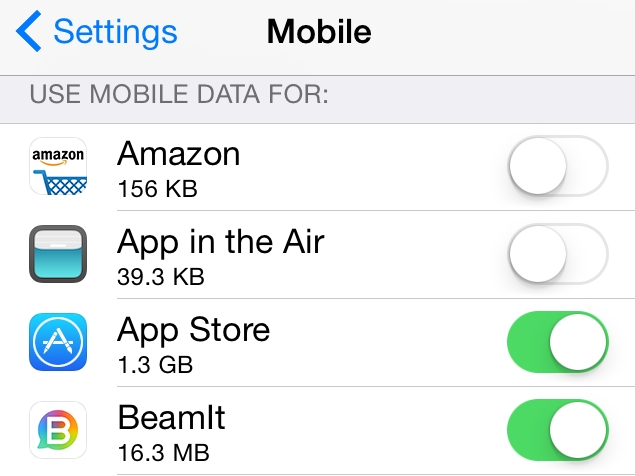
- Go to Settings > Mobile. If you are on a WiFi network, you can flick the Mobile Data switch to Off. There's an Enable LTE switch below Mobile Data. You can switch that off too, unless you're one of the rare few in India with 4G access right now.
- Now scroll down to the header "USE MOBILE DATA FOR:". This is a list of all the apps that are allowed to use mobile data on your iOS device. There's an on/off switch next to each app. You can turn it off for apps that don't need mobile data. Most games don't need it and neither do fitness apps.
- Below the name of each app, you will see how much mobile data it has used so far. Check apps with the maximum mobile data usage and see if you can disable it for these apps.
- You can also stop apps from using mobile data to download updates. Go to Settings > iTunes & App Store > Use Mobile Data > Off.
- You can also turn off WiFi, Bluetooth and AirDrop, when you are not using them. Doing this is easy - just swipe up from the bottom of the screen to open Control Centre and turn off WiFi and Bluetooth. Tap AirDrop and select Off to turn it off. Just remember to switch WiFi on again when you get home or reach office.
(Also see: Six iOS 8 Extensions You Should Not Miss)
Location services
Another big battery hog is your device's GPS. Several apps want access to your location and the result is near-constant battery drain. There are some cool new location options in iOS 8 that let you save battery. Check these steps to find out how.
- If you don't want any apps to use your location, go to Settings > Privacy > Location Services > turn Location Services off.
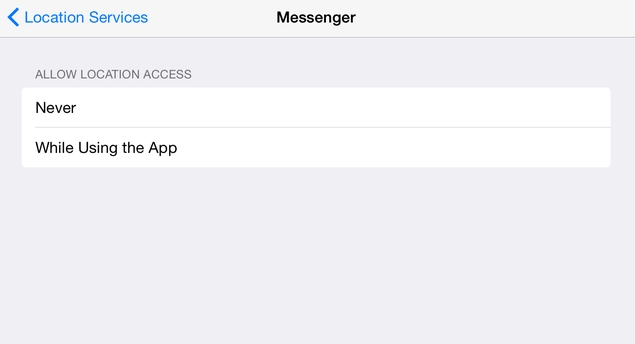
- If that's not an option for you, scroll down to the list of apps. In iOS 7, you could either allow or block location access. In iOS 8 you can choose to let apps access your location only while you are using them.
- In Settings > Privacy > Location Services, tap any app from the list. Most apps will have three options: Never, While Using the App and Always. Tap Never for apps to disable location access, or While Using the App if you want the app to have location access while it's actively being used.
- Go back to Settings > Privacy > Location Services and tap Share My Location. You can disable this too but we suggest you keep it on if you use the Find My Friends app to let friends and family know where you are.
- You can also disable Find My iPhone from Settings > iCloud > Find My iPhone, but that's a very useful anti-theft feature. So we suggest that you keep it on.
(Also see: The Best iOS 8 Notification Centre Widgets)
Notifications
Nearly every app that you install on iOS will ask permission to send you notifications. Some of these can be very useful, such as alerts to deals on apps, but many are not. Whenever you get a notification your device's screen is turned on and it plays a sound and vibrates. All of these things add up to reduce battery life.
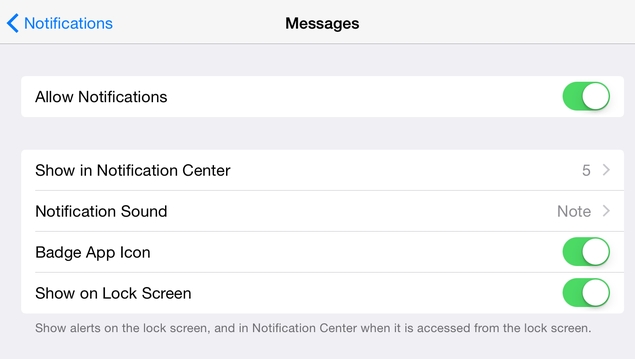
- iOS 8 has a neat switch that lets you disable all notifications from any app. Follow these steps to disable notifications.
- Go to Settings > Notifications.
- Scroll down, tap any app under the "INCLUDE:" header > flick the Allow Notifications switch to Off. You can disable notifications from games without missing much and depending on what services are important to you, there are going to be a fair number of apps whose notifications you can switch off.
- If you'd rather not disable notifications then you can use the Do Not Disturb mode. This won't wake your iOS device even if you get notifications. You can set it up at Settings > Do Not Disturb. This could be useful if you're in office, for example, and don't need to be notified for mails for the next several hours.
- Once you've set it up, Do Not Disturb can be quickly accessed via the Control Centre. Swipe upwards from the bottom of the screen and hit the moon icon.
- If you have push notifications enabled for email, you might want to reduce the frequency of alerts. Go to Settings > Mail, Contacts, Calendars > Fetch New Data. Turn Push off. This means you'll have to check for mail manually but it should help with battery life.
- Select each of your accounts and select Manual instead of Fetch. This way, the app will download emails, contact and calendar updates only when you open the app instead of doing it in the background.
- Scroll down to FETCH. If you've set any accounts to Fetch data automatically, you can set how often it refreshes. To save battery, select either Manually or Hourly.
(Also see: Our Favourite iOS 8 Third-Party Keyboard Apps)
Background data use
A lot of apps will update automatically or download data in the background. Here's how to disable that.
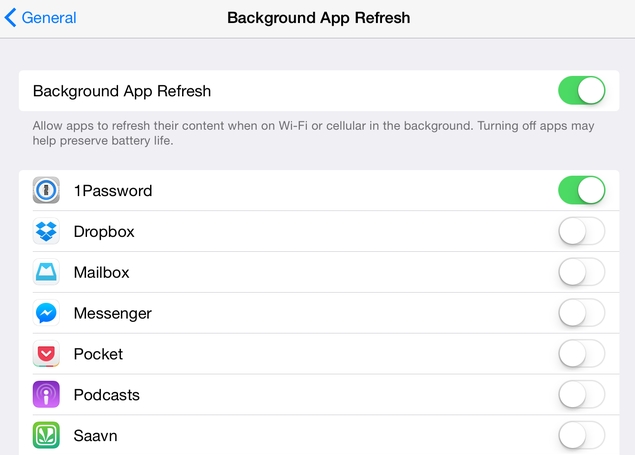
- If you don't want apps to download data in the background, head to Settings > General > Background App Refresh > Off. This will stop all apps from working in the background. If that's not an option, you can scroll down and turn it off for any app in the list.
- iOS 8 has a new feature called Handoff that lets you take calls on your iPad or MacBook as long as they're on the same WiFi network as the iPhone. It's useful but if you need the extra battery life, turn it off at Settings > Handoff & Suggested Apps > Off.
- You should also turn off automatic downloads of app updates for better battery life. Go to Settings > iTunes & App Store. Scroll down to AUTOMATIC DOWNLOADS. Flip the switch to Off for Music, Apps, Books and Updates. Scroll down to SUGGESTED APPS and turn off App Store.
- While we recommend that you set your device to backup automatically via iCloud, it's better for battery life if you do it over WiFi only. Go to Settings > iCloud > iCloud Drive > Use Mobile Data > Off.
- Another rather extreme battery saving option is at Settings > Safari > Preload Top Hit > Off. When you search in Safari, this will prevent the browser from loading the top website from search results. Small gains, but they all count when you're craving for a little more battery life.
(Also see: How to Set Up iOS 8's Family Sharing Feature and Why It Is Super Useful)
Don't let the device vibrate
When you're in office or at home, your phone probably won't be in your pocket, and vibrations are just wasting battery life. To turn them off, follow these steps:
- Open Settings > Sounds > Vibrate on Ring > Off. If you wish, you can also turn off Vibrate on Silent.
- If you're battery woes are rather extreme, you can disable the sound when the device locks and the click sounds when you type. In Settings > Sound, scroll down all the way and turn off Lock Sounds and Keyboard Clicks.
(Also see: How to Prevent Theft of Photos From Your iCloud Account)
That should cover the battery saving needs of everyone, from those with minor complaints to those who're regretting downloading iOS 8 due to battery drain. If we've missed anything, let us know via the comments. As always, you can find more tutorials in our How to section. Comments
Get your daily dose of tech news, reviews, and insights, in under 80 characters on Gadgets 360 Turbo. Connect with fellow tech lovers on our Forum. Follow us on X, Facebook, WhatsApp, Threads and Google News for instant updates. Catch all the action on our YouTube channel.
Related Stories


Advertisement
Follow Us




-
![[Sponsored] LG NANO 4K UHD AI TV NU885: Gemini Search, Dolby Atmos & 5 Years of Updates](https://www.gadgets360.com/static/desktop/images/spacer.png)
04:17
[Sponsored] LG NANO 4K UHD AI TV NU885: Gemini Search, Dolby Atmos & 5 Years of Updates -
00:57
[Sponsored] Samsung Galaxy Z Fold8 My Fan Cam in Action: Find the Moment, Then Share It -
01:41
[Sponsored] What Do You Need To Know Before Your Next Run? | Samsung Galaxy Watch Ultra2 -
01:32
[Sponsored] Big Day Tomorrow? Prep Today | Samsung Galaxy Watch Ultra2 -
04:37
[Sponsored]: CP PLUS CarKam CP-F89B: 4K Dashcam With Rear Camera, GPS & Emergency Recording
-
अंजान नंबर से आने वाली कॉल में नजर आएगा KYC रजिस्टर्ड नाम
-
Flipkart Big Billion Days Sale: 50 इंच स्मार्ट TV पर आया धांसू डिस्काउंट
-
Flipkart Big Billion Days: 7000 से ज्यादा सस्ता मिल रहा Nothing का ये फोन
-
सबसे सस्ता iPhone 16? Amazon Sale में ₹750 का कूपन डिस्काउंट, बैंक ऑफर मिलाकर ₹4 हजार की बचत
-
Tata Play Smart ऐप लॉन्च: आपके टीवी पर बिना केबल/DTH के चलेंगे 500 से ज्यादा लाइव चैनल
Advertisement
Popular on Gadgets
- Samsung Galaxy S26 Ultra
- Motorola Razr Fold
- ChatGPT
- OPPO Find N6
- Mobiles Under Rs. 40,000
- Vivo X300 Ultra
- Asus Zenbook S14
- iQOO 15
- Vivo X300 Pro
- Lenovo Yoga Slim 7i Aura Edition
- iQOO 15R
- Vivo X Fold 5
- Sony PlayStation 5
- HP OmniPad 12
- OnePlus Nord CE 6 Lite
- OnePlus Pad 4
- OPPO F33 Pro 5G
- Cryptocurrency
- HP OmniBook Ultra 14 (2026)
- iPhone 17
- Eureka Forbes AP 355 Room Air Purifier
- Latest Mobile Phones
- Compare Phones
Latest Gadgets
- Vivo Y600s Pro
- Vivo Y32 (2026)
- Infinix Smart 20 HD
- Vivo V80
- Vivo S2 FE
- Vivo Y600K Turbo
- Realme P4s Lite
- Vivo S60t
- HP ZBook Ultra G3a
- Dell Pro Rugged 14
- Amazon Alexa Tablet 8
- Amazon Alexa Tablet 11
- Amazfit T-Rex Dual Solar
- OPPO Watch S2
- Toshiba 65-Inch 4K Ultra HD Smart Mini LED QLED TV (65Z670SP)
- Haier M70 Mini LED 65-inch
- Acer Predator Atlas 8
- Asus ROG Ally
- Blue Star 1.5 Ton 5 Star Inverter Split AC (IE518ZNURS)
- Blue Star 2 Ton 3 Star Inverter Window AC (WIE324L)

- About Us
- Sitemaps
- Feedback
- Archives
- Contact Us
- RSS
- Advertise
- Career
- Privacy Policy
- Ethics
- Editorial Policy
- Terms & Conditions
- Complaint Redressal
Download Our Apps
Available in Hindi
© Copyright Red Pixels Ventures Limited 2026. All rights reserved.