-
 AI That Solves for India Can Solve for the World: Google DeepMind's Manish Gupta8 April 2026
 -
Google Improves AI-Powered Shopping Experience in India With Gemini, Search, and Circle to Search Updates8 April 2026
-
Anthropic, Google and OpenAI Join Hands to Fight AI Model Copying Attempts by Chinese Rivals: Report7 April 2026
-
Google Pixel 10a Launched in Japan-Exclusive Isai Blue Colourway Created in Collaboration With Heralbony7 April 2026
-
Samsung Confirms Deadline for Samsung Messages App: Here’s What You Will Use Instead6 April 2026
Google Chrome Updated With Vertical Tabs Feature and Full Page Reading Mode
The full-page interface in reading mode can be accessed by right-clicking on any page and selecting "Open in reading mode".
Written by Nithya P Nair, Edited by David Delima | Updated: 8 April 2026 11:02 IST
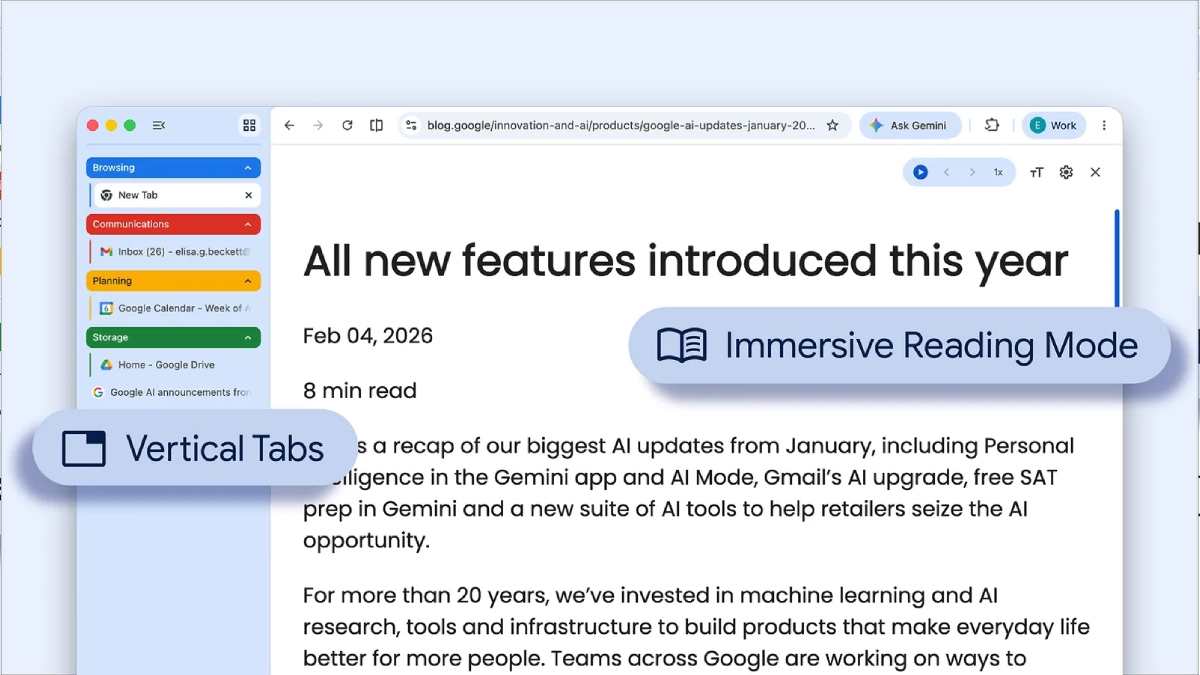
Photo Credit: Google
Google has been rolling out new features for Chrome in recent months
Click Here to Add Gadgets360 As A Trusted Source

Advertisement
Google has introduced two new features in its Chrome browser designed to boost user experience. The first feature allows users to view tabs vertically along the side of the window, marking a shift from the traditional horizontal layout at the top. This vertical tab feature brings Chrome in line with browsers like Microsoft Edge and Mozilla Firefox. Additionally, Google has updated Chrome's Reading Mode. The new feature simplifies webpages by hiding distractions and offering a full-page interface.
Chrome Update Adds Vertical Tabs and Improved Reading Mode
Through a blog post on Tuesday, Google announced the rollout of two new features for the Chrome browser. The company has also posted short video clips showcasing how the new features work. As mentioned, Google Chrome now offer the option to use vertical tabs. This can be enabled by right-clicking on any Chrome window and selecting Show Tabs Vertically.
Too many @GoogleChrome tabs open? Try vertical tabs, rolling out now.
— Google (@Google) April 7, 2026
Just right-click any Chrome window and select “Show Tabs Vertically” to move your tabs to the side of the browser window, making it easier to read page titles and manage tab groups. pic.twitter.com/DO7ShWl89f
Google says moving the tabs to the side of the browser window allows users to read full page titles and manage tab groups with ease, even when the tab count hits double digits. The new layout is likely to help with multitasking. The vertical tabs can be selected depending on user preferences
Alongside vertical tabs, Google officially announced another Chrome feature: the reading mode gets a new full-page interface. This can be accessed by right-clicking on any page and selecting Open in reading mode to remove visual distractions and transform the webpage to a text-focused one.
Google has been rolling out new features for Chrome in recent months. Last month, the company introduced the Gemini side panel in Chrome for users in India. However, unlike the US version, it does not yet include the Auto Browse feature that enables Gemini to take control of the browser and carry out tasks on the user's behalf. Similarly, in February, the company updated Chrome with features like Split View, built-in PDF markup tools, and more.
Comments
Get your daily dose of tech news, reviews, and insights, in under 80 characters on Gadgets 360 Turbo. Connect with fellow tech lovers on our Forum. Follow us on X, Facebook, WhatsApp, Threads and Google News for instant updates. Catch all the action on our YouTube channel.
Related Stories







Advertisement
Follow Us




-

05:05
Goboult Mustang Racer Smartwatch Review: Should You Get This Mustang Smartwatch? -
04:58
OnePlus Nord Buds 4 Pro Review: Specs, Sound Quality, ANC, and Battery Backup Tested -
02:29
[Sponsored] Samsung Galaxy S26 Ultra First Look: AI Smartphone for Creators, Gaming & Productivity -
04:25
Vivo X200T Review - Full Camera, Gaming & Battery Test | Worth Buying? -
28:31
The Future of Productivity: Logitech's Anatoliy Polyanker On AI, Hybrid Work, And India's Tech Boom
-
10 हजार रुपये सस्ती कीमत में खरीदें Xiaomi का फ्लैगशिप स्मार्टफोन, जानें
-
Fujifilm X-T30 III डिजिटल कैमरा लॉन्च, 26.1MP सेंसर के साथ गजब फीचर्स
-
WhatsApp पर पासकी का उपयोग करके कैसे करें बैकअप, जानें पूरी प्रक्रिया
-
OnePlus Nord 6 vs Vivo V70 FE vs Oppo Reno 15C 5G: जानें कौन सा फोन है बेस्ट
-
Amazon ने 14,000 वर्कर्स की छंटनी से किया इनकार, मीडिया रिपोर्ट्स को गलत बताया
Advertisement
Popular on Gadgets
- Samsung Galaxy Unpacked 2026
- iPhone 17 Pro Max
- ChatGPT
- iOS 26
- Laptop Under 50000
- Smartwatch Under 10000
- Apple Vision Pro
- Oneplus 12
- OnePlus Nord CE 3 Lite 5G
- iPhone 13
- Xiaomi 14 Pro
- Oppo Find N3
- Tecno Spark Go (2023)
- Realme V30
- Best Phones Under 25000
- Samsung Galaxy S24 Series
- Cryptocurrency
- iQoo 12
- Samsung Galaxy S24 Ultra
- Giottus
- Samsung Galaxy Z Flip 5
- Apple 'Scary Fast'
- Housefull 5
- GoPro Hero 12 Black Review
- Invincible Season 2
- JioGlass
- HD Ready TV
- Latest Mobile Phones
- Compare Phones
Latest Gadgets
- Moto G Stylus (2026)
- OPPO A6k
- Realme C100 5G
- Honor Play 80
- OnePlus Nord 6
- Honor X80i
- Honor Play 80 Pro
- Redmi Note 15 SE 5G
- MSI Prestige 13 AI+ (2026)
- MSI Raider 18 Max HX
- Moto Pad (2026)
- Vivo Pad 6 Pro
- boAt Valour Watch 1R
- Xiaomi Watch S5
- Xiaomi QLED TV X Pro 75
- Haier H5E Series
- Asus ROG Ally
- Nintendo Switch Lite
- Haier 1.6 Ton 5 Star Inverter Split AC (HSU19G-MZAID5BN-INV)
- Haier 1.6 Ton 5 Star Inverter Split AC (HSU19G-MZAIM5BN-INV)

- About Us
- Sitemaps
- Feedback
- Archives
- Contact Us
- RSS
- Advertise
- Career
- Privacy Policy
- Ethics
- Editorial Policy
- Terms & Conditions
- Complaint Redressal
Download Our Apps
Available in Hindi
© Copyright Red Pixels Ventures Limited 2026. All rights reserved.