-
 Samsung’s Hearing Aid Features Are Coming to Galaxy Buds 4 Pro and Buds 3 Pro Early Next Year5 November 2026
 -
Samsung Galaxy Buds T1 Fitness Earbuds Receive FCC Certification Ahead of Expected 2027 Launch5 November 2026
-
Xiaomi Tipped to be Developing a Wide-Screen Slab Phone Inspired by Xiaomi 18 Fold5 November 2026
-
Samsung Galaxy S27 Ultra Tipped to Feature Snapdragon 8 Elite Extreme Gen 6, NBD Listing Reveals5 November 2026
-
Samsung Galaxy A38 Will Launch Next Year With a Notable Battery Upgrade, Report Says4 November 2026
- Home
- Mobiles
- Mobiles Sponsored
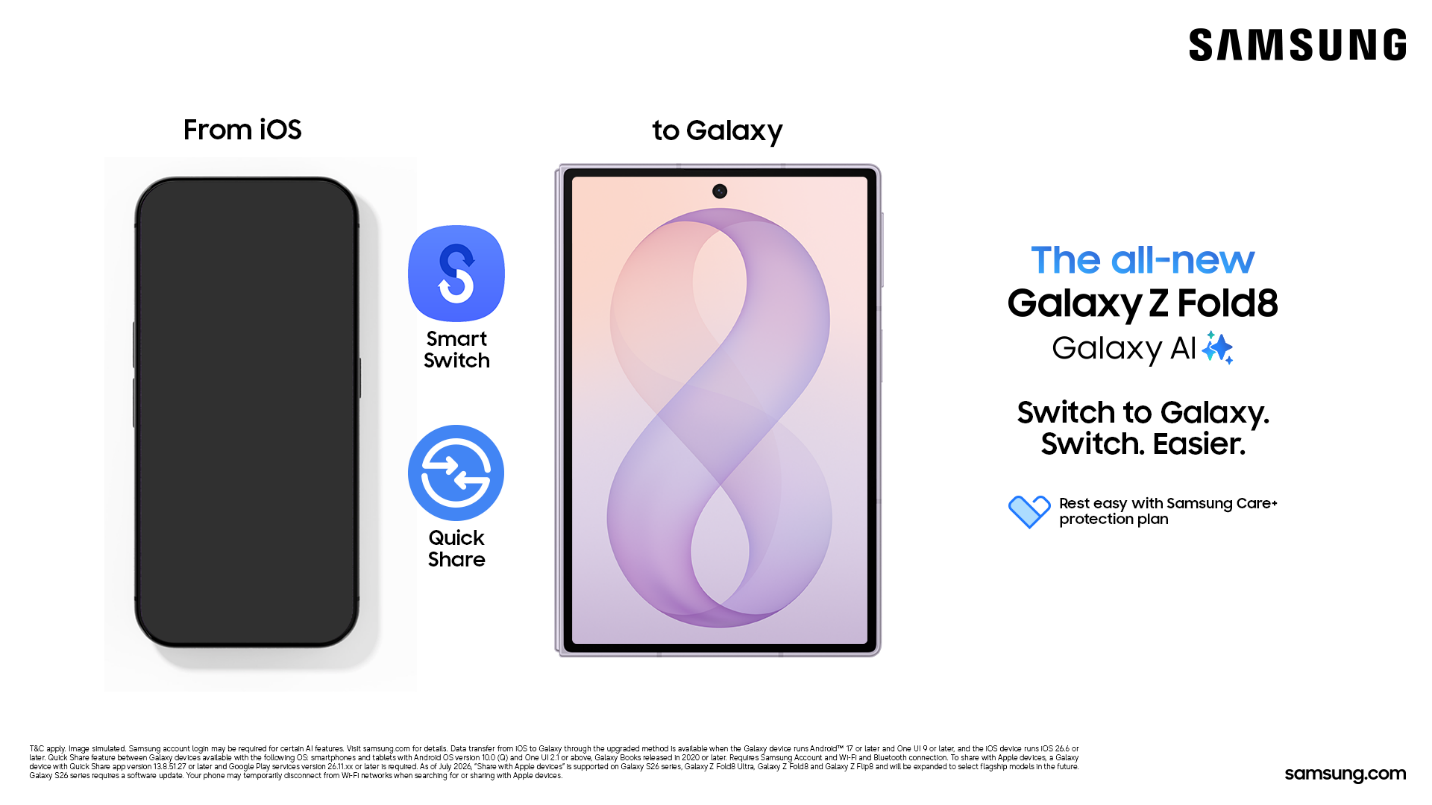
- Moving From iOS to Galaxy Z Fold 8? Smart Switch Makes It a 5 Minute Job
Sponsored Content
Moving From iOS to Galaxy Z Fold 8? Smart Switch Makes It a 5-Minute Job
By Sponsored Content | Updated: 17 September 2026 15:03 IST
Click Here to Add Gadgets360 As A Trusted Source

Getting a new phone should feel exciting. But if you have used an iOS device for years, the thought of moving all your stuff to a new one can hold you back. Your contacts, your photos, your messages, all of it feels stuck in place.
That is exactly the problem Samsung built Smart Switch to solve. Whether you have your eye on Galaxy Z Fold 8, Galaxy Z Fold 8 Ultra or Galaxy Z Flip 8, switching over is far simpler than most people expect.
- Samsung Galaxy Buds FE vs OnePlus Buds 3: which would you choose for an Android phone?
- Samsung EcoBubble vs LG AI Direct Drive: which feature set would you trust for everyday clothes?
- Samsung Bespoke vs LG convertible refrigerators: which design is actually practical?
- Samsung Galaxy Watch vs OnePlus Watch around Rs.20,000: which would you choose for Android?
- Samsung Galaxy Watch vs Amazfit: which makes more sense for someone who hates frequent charging?
Why People Put Off Switching Phones
Nobody wants to lose their photos from three years back or forget half their contact list. That fear alone stops a lot of people from switching, even when they really want to try a new phone. The good news is that this worry is outdated. Samsung built Smart Switch to remove that exact pain point.
Say Hello to Smart Switch
Smart Switch is Samsung's built in tool for moving your data from an old device to your new Galaxy. You do not need to download any extra apps or plug in a bunch of cables. It works wirelessly, and it is designed to handle the move from an iOS device just as smoothly as from another Galaxy phone.
Setting Up Your New Galaxy Takes Just 4 Steps
Here is what the whole process looks like from start to finish.
What you do:
- Keep your old device and your new Galaxy phone next to each other
- Scan the QR code to connect both devices
- Pick the data you want to move over
- Let Smart Switch handle the transfer
That is the entire process. No manuals, no tech support calls, no guesswork.
Everything Smart Switch Can Carry Over
Once your devices are connected, Smart Switch gets to work moving your important data across. Here is a quick look at what typically transfers.
| Data Type | Transfers From iOS? |
| Contacts | Yes |
| Text messages | Yes |
| Photos and videos | Yes |
| Calendar entries | Yes |
| Other apps | Most, with similar Galaxy alternatives suggested for the rest |
Not every single iOS app will make the jump, since some are built only for Apple's ecosystem. But Smart Switch does not leave you hanging. It suggests similar apps built for Galaxy so you are not starting from zero.
No Data Lost, No Apps Needed, No Stress
Here is the part that puts most people at ease. Smart Switch does not delete anything from your old device. Once the transfer finishes, your data lives on both phones. Your old iOS device stays exactly as it was. So if you want to double-check something or keep using your old phone for a bit longer, you can.
This is what makes switching to a Galaxy Z Fold 8, Z Fold 8 Ultra or Z Flip 8 such a low-risk decision. You get to enjoy a new foldable screen and Samsung's latest features without leaving your digital life behind.
FAQs
Will all my data move over from my iOS device?
Pretty much everything does. Your contacts, texts, photos and videos all make the jump without any hassle. The only thing to watch out for is a handful of iOS only apps. Those won't transfer directly, but Smart Switch shows you similar options built for Galaxy, so you're not left searching on your own.
What happens to my old device after the transfer? Does it get wiped?
Not at all. Your old device stays exactly the way it was before you started. Smart Switch copies your data across instead of moving it, so once things are done, you've got the same content sitting on both phones.
Do I need to download anything before I start?
Nope, nothing extra required. It's already built into your Galaxy phone, so you can jump straight into the transfer the moment you set up your new device.
How long is this going to take me?
That really comes down to how much you're moving over. A lighter load like contacts and messages can be done in a couple of minutes. If you've got years of photos and videos piled up, give it a bit more time, but it's still nowhere close to an all day job.
Is it actually safe to transfer my data this way?
Yes, and this is one area Samsung hasn't cut corners on. The whole transfer happens directly between your two devices, so your information isn't passing through some random server or sitting exposed anywhere in between.
Affiliate links may be automatically generated - see our ethics statement for details.
Comments
Get your daily dose of tech news, reviews, and insights, in under 80 characters on Gadgets 360 Turbo. Connect with fellow tech lovers on our Forum. Follow us on X, Facebook, WhatsApp, Threads and Google News for instant updates. Catch all the action on our YouTube channel.
Further reading:
Samsung
Related Stories


Follow Us




-

01:33
A Festive Surprise for Her | Samsung Galaxy A57 5G -
00:54
Expectation vs Reality: Parents Said Notice Every Detail. She Added One | Galaxy S26 FE -
01:55
From Group Photos to Festive Nights | Samsung Galaxy A57 5G -
01:33
Galaxy Watch Ultra2 on the Trail: Tracking, Hydration & Elevation -
01:38
Galaxy Z Fold8 Captures the Funniest Diwali Moments | My Fan Cam
-
₹44500 सस्ता मिल रहा Samsung फ्लिप स्मार्टफोन, Amazon दिवाली सेल में मौका
-
दिल्ली में प्रदूषण, एयर प्यूरिफर करेंगे मदद, Amazon सेल में सस्ते खरीदें
-
Google Pixel 11 Pro XL vs Vivo X300 Ultra vs Samsung Galaxy S26 Ultra
-
12,000mAh बैटरी वाला फोन ला रहा Oppo, जल्द हो सकता है लॉन्च
-
Jio दे रहा 5 महीने तक फ्री वाई-फाई, मिस्ड कॉल देकर क्लेम करें JioHome Diwali Offer
Popular on Gadgets
- Samsung Galaxy S26 Ultra
- Motorola Razr Fold
- ChatGPT
- OPPO Find N6
- Mobiles Under Rs. 40,000
- Vivo X300 Ultra
- Asus Zenbook S14
- iQOO 15
- Vivo X300 Pro
- Lenovo Yoga Slim 7i Aura Edition
- iQOO 15R
- Vivo X Fold 5
- Sony PlayStation 5
- HP OmniPad 12
- OnePlus Nord CE 6 Lite
- OnePlus Pad 4
- OPPO F33 Pro 5G
- Cryptocurrency
- HP OmniBook Ultra 14 (2026)
- iPhone 17
- Eureka Forbes AP 355 Room Air Purifier
- Latest Mobile Phones
- Compare Phones
Latest Gadgets
- Karbonn Rebel
- Karbonn Rebel Pro
- OnePlus Turbo 6Vs
- Redmi M100 Pro
- OnePlus Ace 7 Pro
- OnePlus Ace 7
- Samsung W27
- Huawei Pura 90 Plus
- Dell 14S (2026)
- HP ProBook 4 G2iS 14
- iPad mini (2026)
- Amazon Alexa Tablet 8
- Pebble Qore 2
- Amazfit T-Rex Dual Solar
- Toshiba 65-Inch 4K Ultra HD Smart Mini LED QLED TV (65Z670SP)
- Haier M70 Mini LED 65-inch
- Acer Predator Atlas 8
- Asus ROG Ally
- Blue Star 1.5 Ton 5 Star Inverter Split AC (IE518ZNURS)
- Blue Star 2 Ton 3 Star Inverter Window AC (WIE324L)

- About Us
- Sitemaps
- Feedback
- Archives
- Contact Us
- RSS
- Advertise
- Career
- Privacy Policy
- Ethics
- Editorial Policy
- Terms & Conditions
- Complaint Redressal
Download Our Apps
Available in Hindi
© Copyright Red Pixels Ventures Limited 2026. All rights reserved.