
- Home
- Ai
- Ai Features
- Help Me Write Feature on Gmail Explained: What Is It, How to Use, and More
Help Me Write Feature on Gmail Explained: What Is It, How to Use, and More
While it does not think for you, Google's Help Me Write feature can save time and make composing emails feel much less stressful.
Written by Sucharita Ganguly, Edited by David Delima | Updated: 9 January 2026 19:33 IST
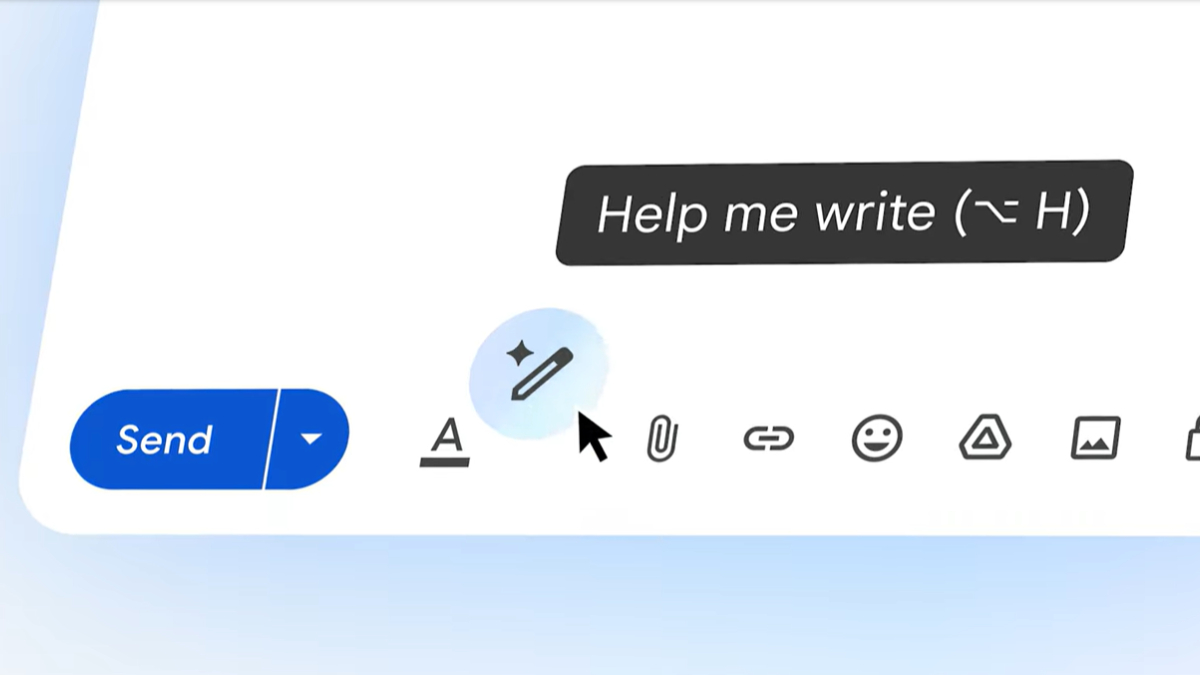
Photo Credit: Google
The Help me write feature in Gmail acts like a built-in AI writing helper
Click Here to Add Gadgets360 As A Trusted Source

Advertisement
Gmail now includes an AI writing tool called Help Me Write that makes drafting emails quicker and easier. It is meant for anyone who finds it hard to get the wording or tone right. Instead of typing everything yourself, you can simply tell Gmail what you want to say. The tool then creates a full email draft in a few seconds. You can use it for quick replies, work emails, or longer messages that need to sound clear and polished.
Help Me Write Feature on Gmail Explained
Help Me Write is part of Google's effort to add AI features to everyday apps. It works directly inside Gmail, so there is nothing extra to install. You can tweak the draft of an email by shortening it, making the tone more formal, or more friendly. While it does not think for you, it can save time and make writing emails feel much less stressful. Here's all you need to know about the feature.
What Is the Help Me Write Feature in Gmail?
The Help me write feature in Gmail acts like a built-in AI writing helper powered by Google's Gemini models. It is designed to take some of the pressure off when you are unsure how to start an email or how to phrase something clearly. Whether you are writing a brand-new message or fixing up an existing one, the tool helps you get there faster while keeping the tone appropriate.
You can ask Help me write to create a full draft by entering a short prompt about what you want to say. It looks at your instruction and the previous messages in the conversation to generate a suitable reply. If you already have text written, you can also use it to refine your message. The tool can make your email sound more professional, add more detail, shorten it, or polish the wording by improving grammar and clarity.
How Does Help Me Write Work on Gmail?
The Help me write feature works by carefully reading what you give it. This can be a short prompt explaining what you want to say, or an email draft you have already started. The tool also looks at the context of the email thread, including earlier messages, so the response feels relevant and natural.
Based on this information, the AI generates a draft that matches your intent and tone. If you are replying to someone, it tries to stay on topic and fit the conversation. You can then review the draft, make changes, or ask the tool to adjust the tone, length, or clarity before sending the email.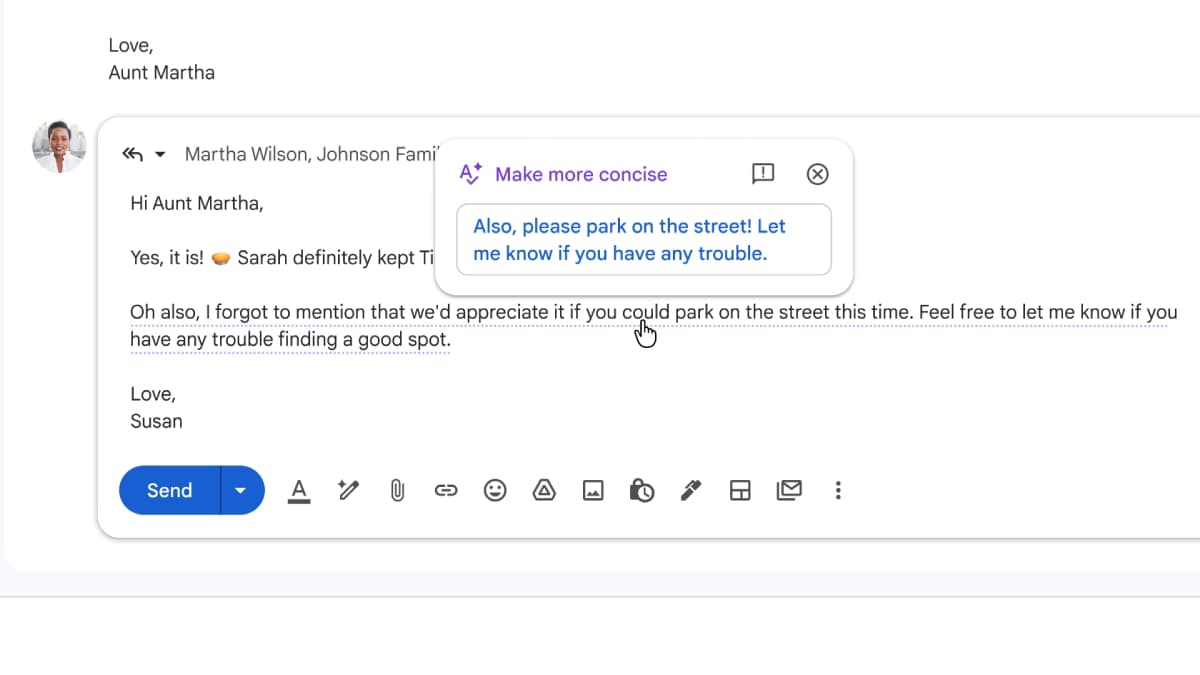
How to Use Help Me Write in Gmail Step by Step?
- Open Gmail on your device. If you are on a computer, click the Compose button to start a new email or open an existing message to reply. On a mobile device, tap the Compose icon at the bottom right of the screen.
- Make sure the email compose window is open. You should see the text field where you normally type your message.
- Look for the Help me write option at the bottom of the compose window. It may appear as text or as an icon that looks like a star with a pencil.
- Tap or click Help me write to activate the feature. A prompt box will appear on the screen.
- In the prompt box, describe the email you want to write. Mention who the email is for, what it is about, and the tone you want, such as formal, polite, or friendly.
- Tap or click the Create button to let Gmail generate a draft based on your prompt.
- Read through the generated draft carefully to see if it matches what you want to say.
- If you like the draft, choose the Insert option to add it to the email body.
- If the draft needs changes, use the refine options to make it more formal, add more details, shorten it, or polish the wording. You can also edit the text directly.
- Once you are satisfied with the message, add the recipient's email address and a subject line.
- Review the email one last time, then click or tap Send to deliver it.
What You Can Do With Help Me Write?
Help me write takes the pressure off when you are not sure how to phrase something. You can use it to create new content from a simple prompt, whether that means drafting a work email, writing a social media post, or putting together a quick thank you message. It is also useful when you already have a draft and just want the wording to sound clearer or more polished.
The feature helps you adjust the tone to fit the situation. You can make your writing more formal, more relaxed, or more friendly with ease. It can shorten long sections, expand short ideas, or rephrase sentences so they sound more natural. For longer emails or documents, it can summarise key points.
Where Is Help Me Write Available?
The Google Help Me Write feature works on desktops, laptops, tablets, and smartphones and requires an active Google account or an eligible Google Workspace subscription.
It is available to personal Google account users worldwide and works directly in Gmail. For Google Workspace users, access depends on organisation-level admin settings, so availability may vary in work or school accounts.
On computers running Windows, macOS, Linux, or Chrome OS, the feature can be used in Gmail through a web browser and across Google Docs, Sheets, and Slides, as well as in the Chrome browser. On Android and iOS devices, it is accessible through the Gmail app, Google Docs app, and other supported Google Workspace apps.
Comments
Get your daily dose of tech news, reviews, and insights, in under 80 characters on Gadgets 360 Turbo. Connect with fellow tech lovers on our Forum. Follow us on X, Facebook, WhatsApp, Threads and Google News for instant updates. Catch all the action on our YouTube channel.
Further reading:
Gmail Help Me Write, Help Me Write, Gmail, Google, Google Workspace, AI, Artificial Intelligence

Related Stories



Advertisement
Follow Us




-
![[Sponsored]: CP PLUS CarKam CP-F89B: 4K Dashcam With Rear Camera, GPS & Emergency Recording](https://www.gadgets360.com/static/desktop/images/spacer.png)
04:37
[Sponsored]: CP PLUS CarKam CP-F89B: 4K Dashcam With Rear Camera, GPS & Emergency Recording -
04:23
[Partner Content] Your Phone Can Do WAY More Than You Think | OPPO ColorOS 16 -
01:59
Samsung Galaxy Z Fold8 Ultra: Unfold the Ultra Night -
03:24
Apple Pay Launches In India: Supported Devices, Cards And Payments Explained -
00:21
[Sponsored] Samsung Galaxy Z Fold8, Fold8 Ultra
-
Flipkart Big Billion Days: ₹20 हजार में आने वाले टॉप 5 टैबलेट
-
Aadhaar के साथ बैंक अकाउंट की सुरक्षा के लिए यूज करें ये फीचर
-
Flipkart Sale: ₹90 हजार वाला Pixel फोन मिल रहा ₹21 हजार से ज्यादा सस्ता
-
Oppo Find X10 Pro Max ग्लोबल लॉन्च 21 अक्टूबर के लिए कंफर्म, 200MP तीन कैमरा, 8,000mAh बैटरी!
-
TCS का नेट प्रॉफिट 13,884 करोड़ रुपये, रेवेन्यू में 11 प्रतिशत की बढ़ोतरी
Advertisement
Popular on Gadgets
- Samsung Galaxy S26 Ultra
- Motorola Razr Fold
- ChatGPT
- OPPO Find N6
- Mobiles Under Rs. 40,000
- Vivo X300 Ultra
- Asus Zenbook S14
- iQOO 15
- Vivo X300 Pro
- Lenovo Yoga Slim 7i Aura Edition
- iQOO 15R
- Vivo X Fold 5
- Sony PlayStation 5
- HP OmniPad 12
- OnePlus Nord CE 6 Lite
- OnePlus Pad 4
- OPPO F33 Pro 5G
- Cryptocurrency
- HP OmniBook Ultra 14 (2026)
- iPhone 17
- Eureka Forbes AP 355 Room Air Purifier
- Latest Mobile Phones
- Compare Phones
Latest Gadgets
- Vivo Y32 (2026)
- Infinix Smart 20 HD
- Vivo V80
- Vivo S2 FE
- Vivo Y600K Turbo
- Realme P4s Lite
- Vivo S60t
- OPPO F35 5G
- Dell Pro Rugged 14
- Dell Pro Rugged 13 Extreme
- Amazon Alexa Tablet 8
- Amazon Alexa Tablet 11
- Amazfit T-Rex Dual Solar
- OPPO Watch S2
- Toshiba 65-Inch 4K Ultra HD Smart Mini LED QLED TV (65Z670SP)
- Haier M70 Mini LED 65-inch
- Acer Predator Atlas 8
- Asus ROG Ally
- Blue Star 1.5 Ton 5 Star Inverter Split AC (IE518ZNURS)
- Blue Star 2 Ton 3 Star Inverter Window AC (WIE324L)

- About Us
- Sitemaps
- Feedback
- Archives
- Contact Us
- RSS
- Advertise
- Career
- Privacy Policy
- Ethics
- Editorial Policy
- Terms & Conditions
- Complaint Redressal
Download Our Apps
Available in Hindi
© Copyright Red Pixels Ventures Limited 2026. All rights reserved.
-
 Apple Watch Series 12
Starts from ₹56,900
Apple Watch Series 12
Starts from ₹56,900
-
 Samsung Galaxy Watch Ultra 2
Starts from ₹63,999
Samsung Galaxy Watch Ultra 2
Starts from ₹63,999
-
 Samsung Galaxy Watch 9 (44mm, LTE)
Starts from ₹41,999
Samsung Galaxy Watch 9 (44mm, LTE)
Starts from ₹41,999
-
 Samsung Galaxy Watch 9 (40mm, LTE)
Starts from ₹38,999
Samsung Galaxy Watch 9 (40mm, LTE)
Starts from ₹38,999
-
 Samsung Galaxy Watch 9 (40mm)
Starts from ₹36,999
Samsung Galaxy Watch 9 (40mm)
Starts from ₹36,999
-
 Samsung Galaxy Watch 9 (44mm)
Starts from ₹40,999
Samsung Galaxy Watch 9 (44mm)
Starts from ₹40,999
-
 Amazon Great Indian Festival 2026: iPhone 16, iPhone 17e Get Discounts
-
 Dell Pro Rugged 13 Extreme, Pro Rugged 14 Launched in India With Up to Intel Core Ultra 7 Processor: Price, Specifications
-
 Amazon Great Indian Festival 2026: Best Phone Deals Under Rs. 60,000
-
 Amazon Great Indian Festival 2026: Best Soundbar Deals Under Rs. 20,000 From JBL, Sony, Boat and More