-
 WhatsApp Usernames Are Now Reportedly Available for Some Android and iOS Users17 July 2026
 -
How to Reserve Your Username on WhatsApp: A Step-By-Step Guide4 July 2026
-
Government Reportedly Seeks Explanation From WhatsApp Over Usernames Feature, Asks Meta to Delay Rollout2 July 2026
-
No More Phone Numbers? WhatsApp Touts Usernames as Next Big Privacy Step1 July 2026
-
WhatsApp Now Lets You Reserve Your Username Before the Much-Anticipated Feature Goes Live29 June 2026
- Home
- Apps
- Apps Features
- WhatsApp Usernames Explained: What It Is, Benefits, How to Use, and More
WhatsApp Usernames Explained: What It Is, Benefits, How to Use, and More
WhatsApp is currently allowing users to reserve their WhatsApp Usernames.
Written by Dhruv Raghav, Edited by Rohan Pal | Updated: 15 August 2026 10:00 IST

Photo Credit: Unsplash
Here's everything you need to know about WhatsApp Usernames
Click Here to Add Gadgets360 As A Trusted Source

Advertisement
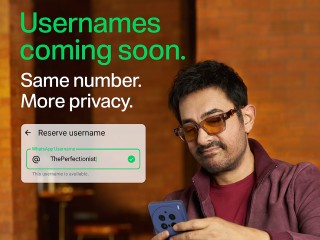
WhatsApp introduced the ability to reserve usernames in late June. The instant messaging platform is currently allowing users to reserve their WhatsApp Usernames only via the mobile app as a precursor to the upcoming functionality. While announcing the same, the company said that soon users will be able to search for others using their usernames. The tech firm claims that this will eliminate the need for users to share their phone numbers with others if they do not wish to do so. The introduction of WhatsApp Usernames, which is expected to be rolled out soon, will bring the instant messaging service closer to other social media platforms.
Here is everything you need to know about the recently launched WhatsApp Usernames functionality, including what it is, how it works, and the benefits of using WhatsApp Usernames. You can also see how to reserve your WhatsApp username here.
What Are WhatsApp Usernames?
The soon-to-be-rolled-out WhatsApp Usernames functionality will let you search for other known and unknown users by simply typing their usernames in a dedicated search box. The feature is said to work similarly to how you search for your friends and other users on Instagram, Facebook, X, or Reddit. The functionality will bridge the gap between WhatsApp as a messaging platform and other social media platforms.
WhatsApp, while rolling out the ability to reserve WhatsApp Usernames, said that with the launch of the upcoming functionality, you will be able to just share your username with others to allow them to contact you. Currently, you have to provide your phone number to let users message you or initiate a voice or video call. Usernames will virtually remove this requirement. The company claims that this will enhance the security and privacy on the platform.
As previously mentioned, you can currently only reserve your WhatsApp Username. However, to offer convenience, the instant messaging platform is letting users import their usernames from other Meta-owned social media platforms. As a security measure, the company is also allowing users to set up a Username Key. If you set up one, only users who have this key will be able to contact you using your WhatsApp Username.
What Are the Benefits of Using WhatsApp Usernames?
The Kunal Shah-led platform claims that WhatsApp Usernames will offer various benefits to users. The functionality is claimed to offer enhanced privacy, as users will no longer have to share their phone numbers with someone they do not know. Similarly, the WhatsApp Usernames feature is also claimed to offer a more convenient way for others to search for you on WhatsApp, even if they do not have your phone number.
On top of this, in a professional environment, where you might not want to share your personal phone number, WhatsApp Usernames could be a better alternative. On the other hand, if you want to let others contact you on WhatsApp for a specific purpose, you simply share your WhatsApp Username publicly, instead of sharing your personal contact details.
The WhatsApp Usernames will also bring a more familiar way of networking for people who are also using other social media platforms, by making the user experience more uniform. Lastly, it can help in networking, as you can share your WhatsApp Username with a group of unknown people, allowing them to message or call you.
How to Use WhatsApp Usernames?
- It is important to note that the company has yet to roll out WhatsApp Usernames, and it currently only allows users to reserve usernames.
- First, you will have to set up your username by opening WhatsApp on your phone.
- Then, navigate to the Account Settings menu.
- Here, you will be able to set your existing Instagram or Facebook username as your WhatsApp username.
- Alternatively, you can create a new username.
- Once you have reserved your WhatsApp Username, you can share it with your other users to let them contact you once the functionality has been rolled out in India.
FAQs
1. Can I reserve my WhatsApp Username via my phone?
Yes, WhatsApp is currently only letting users reserve their WhatsApp Usernames. You can reserve one by going to the Account Settings menu in the WhatsApp app on your phone.
2. Is it safe to use WhatsApp Usernames?
WhatsApp claims that WhatsApp Usernames will offer enhanced privacy and security. However, the move has received criticism from users online.
3. Why should I use WhatsApp Usernames instead of my phone number?
By using WhatsApp Usernames, you will not have to share your phone number, which could be misused by a bad actor.
Comments
Get your daily dose of tech news, reviews, and insights, in under 80 characters on Gadgets 360 Turbo. Connect with fellow tech lovers on our Forum. Follow us on X, Facebook, WhatsApp, Threads and Google News for instant updates. Catch all the action on our YouTube channel.
Related Stories





Advertisement
Follow Us




-
![[Sponsored] Samsung Galaxy Z Fold8, Fold8 Ultra](https://www.gadgets360.com/static/desktop/images/spacer.png)
00:21
[Sponsored] Samsung Galaxy Z Fold8, Fold8 Ultra -
03:41
[Sponsored] Samsung Galaxy Z Fold8: How It Fits Into an Actor’s Busy Day | Camera, Multitasking & More -
09:53
iPhone 18 Goes On Sale In India: Huge Crowds, Long Queues At Apple Stores -
06:32
Google Pixel 11 Pro XL Review: The Most Exciting Pixel Yet? | 120X Zoom + Tensor G6 -
05:20
Samsung Galaxy Watch Ultra 2 Review: Is This the Best Android Smartwatch?
-
Amazon vs Flipkart Sale: iPhone 17 ₹79,999 में, iPhone 15 ₹63,999 से शुरू
-
HMD 106 Pure लेटेस्ट फीचर फोन हुआ पेश, कीमत ₹1,100 के करीब
-
1 स्पीकर में 3 के मजे! Portronics ने भारत में लॉन्च किया AuraTrio
-
₹2508 डिस्काउंट पर मिल रहा Vivo Y सीरीज फोन! 50MP कैमरा, 5500mAh है बैटरी
-
भारत में स्मार्ट TV के मार्केट में Xiaomi का जोरदार परफॉर्मेंस, 1 करोड़ से ज्यादा हुआ यूजर बेस
Advertisement
Popular on Gadgets
- Samsung Galaxy S26 Ultra
- Motorola Razr Fold
- ChatGPT
- OPPO Find N6
- Mobiles Under Rs. 40,000
- Vivo X300 Ultra
- Asus Zenbook S14
- iQOO 15
- Vivo X300 Pro
- Lenovo Yoga Slim 7i Aura Edition
- iQOO 15R
- Vivo X Fold 5
- Sony PlayStation 5
- HP OmniPad 12
- OnePlus Nord CE 6 Lite
- OnePlus Pad 4
- OPPO F33 Pro 5G
- Cryptocurrency
- HP OmniBook Ultra 14 (2026)
- iPhone 17
- Eureka Forbes AP 355 Room Air Purifier
- Latest Mobile Phones
- Compare Phones
Latest Gadgets
- HMD Vibe 2 Pro 5G
- OPPO K14 Plus 5G
- Lava Shark 2 Pro 5G
- Ai+ Pulse 2 FE
- OPPO Reno 16t
- Itel Zeno 300
- Vivo Y600i
- Mivi One 5G
- Dell 14 Plus 2-in-1 (AMD Ryzen AI 7 350, 2025)
- Microsoft Surface Laptop, 13-inch (2nd Edition)
- iQOO Pad Ultra
- Ai+ NovaTab
- Amazfit T-Rex Dual Solar
- OPPO Watch S2
- Toshiba 65-Inch 4K Ultra HD Smart Mini LED QLED TV (65Z670SP)
- Haier M70 Mini LED 65-inch
- Acer Predator Atlas 8
- Asus ROG Ally
- Blue Star 1.5 Ton 5 Star Inverter Split AC (IE518ZNURS)
- Blue Star 2 Ton 3 Star Inverter Window AC (WIE324L)

- About Us
- Sitemaps
- Feedback
- Archives
- Contact Us
- RSS
- Advertise
- Career
- Privacy Policy
- Ethics
- Editorial Policy
- Terms & Conditions
- Complaint Redressal
Download Our Apps
Available in Hindi
© Copyright Red Pixels Ventures Limited 2026. All rights reserved.