-
 Google Rolls Out Gemini App for Windows With Video Generation Support, Multi Agents11 September 2026
 -
Singapore Grants Gemini Full Licence to Provide Crypto Payment Services9 September 2026
-
Google’s September Android Drop Brings Gemini Item Tracking, Motion Assist and Chat Themes2 September 2026
-
Gemini Notebook Short Video Overviews Get Support for 70+ More Languages, Three English Variants2 September 2026
-
Google Unveils Gemini Omni 1.1 Flash With 4K Video and 40-Second Extension Support28 August 2026
Gemini Now Lets Users Generate and Export Files With Support for PDF, Word Formats
Google says Gemini's new feature eliminates the need for copying and pasting content across apps.
Written by Shaurya Tomer, Edited by Ketan Pratap | Updated: 30 April 2026 09:49 IST
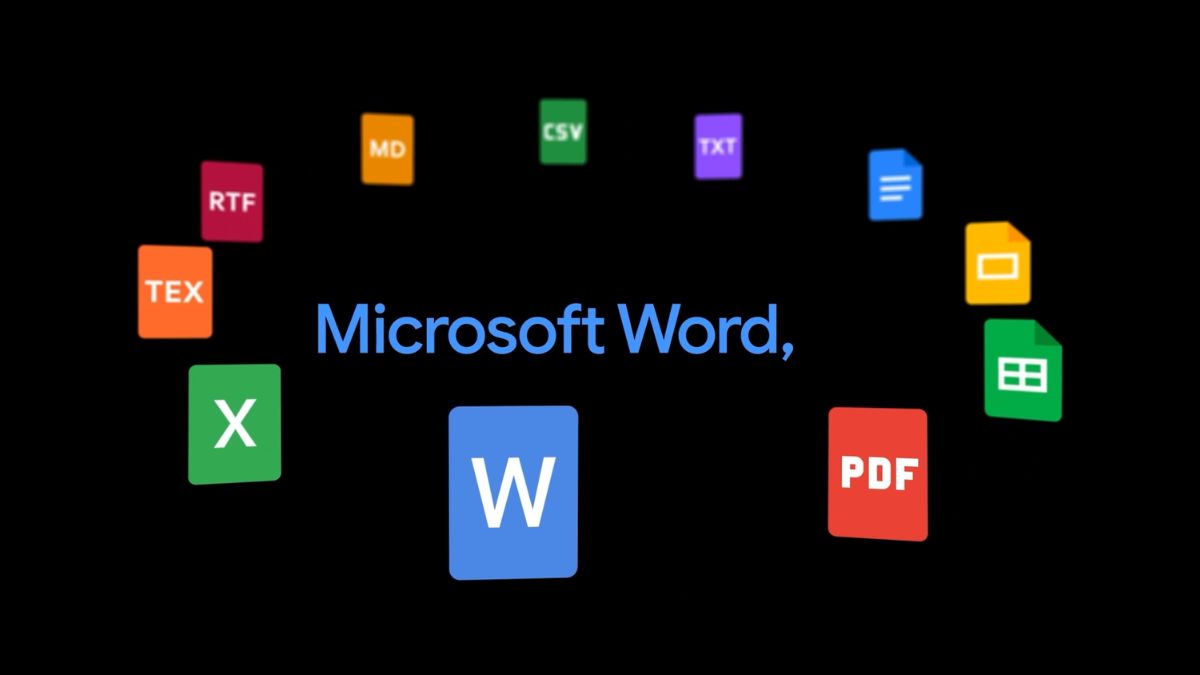
Photo Credit: Google
The feature also supports technical formats such as LaTeX and Markdown (MD)
Click Here to Add Gadgets360 As A Trusted Source

Advertisement
Google on Wednesday rolled out a new feature for the Gemini app that allows users to generate and export files directly from chat. As per the Mountain View-based tech giant, its new addition makes it easier to turn ideas into shareable documents. Users can create downloadable files such as PDFs, Microsoft Word documents, Excel spreadsheets, and Google Workspace files with a single prompt. Google says they can move from brainstorming to a finished file without needing to switch between apps.
Downloadable Files in Gemini
With the latest update, Gemini can create a wide range of file formats directly within the chat interface. In a blog post, the company said that it supports document formats like Google Docs, Google Slides, Microsoft Word (.docx), PDF, Plain Text (TXT), and Rich Text Format (RTF). For spreadsheets, users can generate Google Sheets, Microsoft Excel (.xlsx), and CSV files.
Apart from this, the feature also supports technical formats such as LaTeX and Markdown (MD).
Google claims this eliminates the need for copying and pasting content across apps. Giving an example, the company said that users can prompt Gemini to create a budget proposal and export it as an Excel file, or turn rough ideas into a structured document that can be saved as a PDF or Word file. Once the file is generated, it can be downloaded directly to a device or exported to Google Drive.
To use the feature, users need to enter a prompt describing the file they want to create, such as drafting a report or building a spreadsheet. Gemini then generates the file, after which users can select an export option to save it in their preferred format. The feature is said to be rolling out globally and is available to all Gemini app users, including Google Workspace customers, individual subscribers, and users signed in with personal accounts.
The latest addition builds upon a broad set of features for Google Workspace announced at the Google Cloud Next 2026 event earlier this month. The most notable highlight is Workspace Intelligence, a system that can interpret relationships between files, projects, and collaborators across apps like Docs, Slides, and Gmail to enable more advanced, automated workflows.
Comments
Get your daily dose of tech news, reviews, and insights, in under 80 characters on Gadgets 360 Turbo. Connect with fellow tech lovers on our Forum. Follow us on X, Facebook, WhatsApp, Threads and Google News for instant updates. Catch all the action on our YouTube channel.
Related Stories





Advertisement
Follow Us




-

05:20
Samsung Galaxy Watch Ultra 2 Review: Is This the Best Android Smartwatch? -
07:01
Samsung Galaxy Z Fold 8 Review: Is This the Best Foldable Phone? -
06:39
Samsung Galaxy Z Fold8 Ultra Review: Cameras, Battery, Performance Tested -
04:33
[Sponsored] JBL Live 780NC: Great Sound, Perfect Comfort, Smart ANC & 80-Hour Battery -
12:04
[Partner Content] OPPO Reno16 Series Deep Dive: Built for Creators?
-
iPhone Duo के लिए ₹3 लाख का बजट नहीं है? ये 4 सस्ते फोल्डेबल फोन देखिए
-
सोशल मीडिया में छाया 80s AI Photo Trend, आप भी आजमाएं ये 5 Prompts
-
Motorola के 7000mAh बैटरी वाले फोन पर ₹4,500 तक की बचत
-
₹23 हजार से ज्यादा सस्ता मिल रहा 55 हजार एमआरपी वाला Vivo 5G फोन! 50MP कैमरा, 7200mAh बैटरी
-
Mivi One 5G सस्ता फोन भारत में आएगा तीन रंगों में, Android 16 सपोर्ट, 24 सितंबर को है लॉन्च
Advertisement
Popular on Gadgets
- Samsung Galaxy S26 Ultra
- Motorola Razr Fold
- ChatGPT
- OPPO Find N6
- Mobiles Under Rs. 40,000
- Vivo X300 Ultra
- Asus Zenbook S14
- iQOO 15
- Vivo X300 Pro
- Lenovo Yoga Slim 7i Aura Edition
- iQOO 15R
- Vivo X Fold 5
- Sony PlayStation 5
- HP OmniPad 12
- OnePlus Nord CE 6 Lite
- OnePlus Pad 4
- OPPO F33 Pro 5G
- Cryptocurrency
- HP OmniBook Ultra 14 (2026)
- iPhone 17
- Eureka Forbes AP 355 Room Air Purifier
- Latest Mobile Phones
- Compare Phones
Latest Gadgets
- iPhone Duo
- OPPO A7 Pro
- Huawei Mate XT 2 Ultimate Design
- Realme 16 Pro Harry Potter Edition
- Samsung Galaxy A07s
- Huawei Pura X View
- Tecno Camon Slim 5G
- iQOO Z11xa
- Acer Aspire G 3D 16
- Acer Swift Air 16 (2026)
- Infinix Xpad 30 Pro
- Lenovo Yoga Tab Gen 2
- Apple Watch Ultra 4
- Apple Watch Series 12
- Haier M70 Mini LED 65-inch
- Xiaomi TV FX Mini LED 65
- Acer Predator Atlas 8
- Asus ROG Ally
- Blue Star 1.5 Ton 5 Star Inverter Split AC (IE518ZNURS)
- Blue Star 2 Ton 3 Star Inverter Window AC (WIE324L)

- About Us
- Sitemaps
- Feedback
- Archives
- Contact Us
- RSS
- Advertise
- Career
- Privacy Policy
- Ethics
- Editorial Policy
- Terms & Conditions
- Complaint Redressal
Download Our Apps
Available in Hindi
© Copyright Red Pixels Ventures Limited 2026. All rights reserved.