-
 YouTube Adds Amazon Product Tags to Shorts, Videos and Livestreams28 August 2026
 -
Netflix Reportedly in Talks to Bring Rival Streaming Services to Its Platform25 August 2026
-
Best Free AI Video Editing Apps for Creators in India: CapCut, InVideo and More16 August 2026
-
YouTube Partner Program Entry Thresholds Updated With Higher Requirements for New Creators11 August 2026
-
Samsung Galaxy S26 Ultra's Privacy Display Feature Gets a Major Upgrade in One UI 9 Beta21 July 2026
YouTube Brings Its In-App Chat and Video Sharing Features to More Countries
Users can click the new messaging icon directly within the YouTube app to send an invite to share videos and react in real-time.
Written by Nithya P Nair, Edited by David Delima | Updated: 12 June 2026 11:03 IST
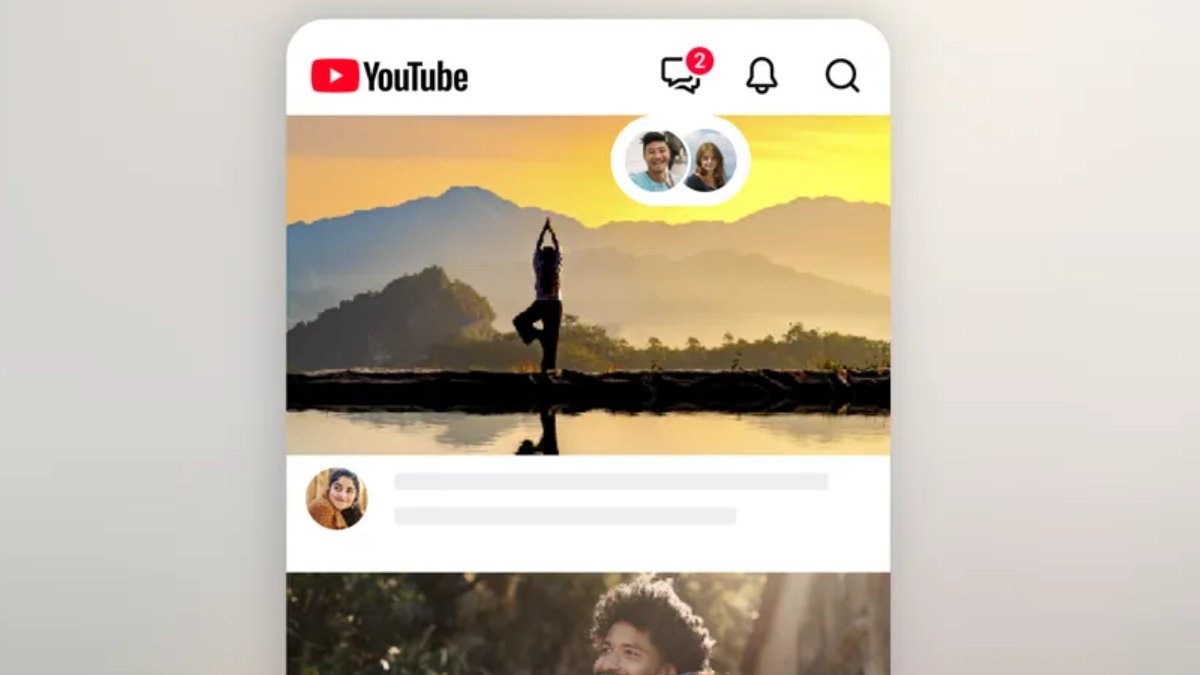
Photo Credit: YouTube
YouTube's in-app messaging feature is rolling out to adults 18 years or older
Click Here to Add Gadgets360 As A Trusted Source

Advertisement
YouTube started testing a new feature last year that lets users share videos and have conversations about them directly in the YouTube mobile app. Now, the Google-owned video streaming platform has announced that it is expanding this in-app video-sharing and messaging feature to the US and more global locations. With this update, users aged 18 and older can connect over their favourite videos directly on YouTube. This feature was earlier limited to users in Ireland and Poland.
YouTube's In-App Chat Feature Is Now Available in 40 Countries
The platform announced the expansion of its in-app messaging feature to 40 countries, including Brazil, Italy, Singapore, the UK, and the US. It was previously available in the testing phase in Ireland and Poland. This functionality enables more sharing activity within the platform, eliminating the need to share links to YouTube content via other messaging apps like WhatsApp.
YouTube's in-app video sharing and messaging feature lets users share all types of videos like Shorts, live streams and have conversations right where they're watching. Users have to click the new messaging icon within the YouTube app to send an invitation to share videos and react in real-time.
"We're excited for user feedback in new markets and look forward to expanding even further soon", YouTube said in the blog post. YouTube started testing this feature in November last year.
Users who are 18 years or older and signed in to a YouTube channel can share videos and send messages on YouTube. Users need the latest version of the YouTube app installed to access this feature.
How to Share a Video While Watching Content
- Open the YouTube app on your smartphone.
- Find the video you want to share.
- Tap the Share button.
- Select the contact you would like to send the video to or tap Invite to message on YouTube to send an invitation through another app.
Invite Others to Share Content and Exchange Messages
- Tap Messages in the top-right corner of the YouTube app.
- Select Invite to chat.
- Share the invitation link with the person you want to connect with.
The person who gets the message will have the option to Allow or Decline the messages. If the message invite is accepted, you can share content and messages with that person directly on YouTube. Invitation links expire seven days after they are created.
Comments
Get your daily dose of tech news, reviews, and insights, in under 80 characters on Gadgets 360 Turbo. Connect with fellow tech lovers on our Forum. Follow us on X, Facebook, WhatsApp, Threads and Google News for instant updates. Catch all the action on our YouTube channel.
Related Stories





Advertisement
Follow Us




-

05:20
Samsung Galaxy Watch Ultra 2 Review: Is This the Best Android Smartwatch? -
07:01
Samsung Galaxy Z Fold 8 Review: Is This the Best Foldable Phone? -
06:39
Samsung Galaxy Z Fold8 Ultra Review: Cameras, Battery, Performance Tested -
04:33
[Sponsored] JBL Live 780NC: Great Sound, Perfect Comfort, Smart ANC & 80-Hour Battery -
12:04
[Partner Content] OPPO Reno16 Series Deep Dive: Built for Creators?
-
iPhone Duo के लिए ₹3 लाख का बजट नहीं है? ये 4 सस्ते फोल्डेबल फोन देखिए
-
सोशल मीडिया में छाया 80s AI Photo Trend, आप भी आजमाएं ये 5 Prompts
-
Motorola के 7000mAh बैटरी वाले फोन पर ₹4,500 तक की बचत
-
Motorola Edge 70 Neo भारत में लॉन्च होगा Snapdragon चिप, 6GB रैम के साथ, IP68, IP69 रेटिंग!
-
85km रेंज वाली नई इलेक्ट्रिक बाइक Trek Inbound+ लॉन्च, जानें कीमत
Advertisement
Popular on Gadgets
- Samsung Galaxy S26 Ultra
- Motorola Razr Fold
- ChatGPT
- OPPO Find N6
- Mobiles Under Rs. 40,000
- Vivo X300 Ultra
- Asus Zenbook S14
- iQOO 15
- Vivo X300 Pro
- Lenovo Yoga Slim 7i Aura Edition
- iQOO 15R
- Vivo X Fold 5
- Sony PlayStation 5
- HP OmniPad 12
- OnePlus Nord CE 6 Lite
- OnePlus Pad 4
- OPPO F33 Pro 5G
- Cryptocurrency
- HP OmniBook Ultra 14 (2026)
- iPhone 17
- Eureka Forbes AP 355 Room Air Purifier
- Latest Mobile Phones
- Compare Phones
Latest Gadgets
- iPhone Duo
- OPPO A7 Pro
- Huawei Mate XT 2 Ultimate Design
- Realme 16 Pro Harry Potter Edition
- Samsung Galaxy A07s
- Huawei Pura X View
- Tecno Camon Slim 5G
- iQOO Z11xa
- Acer Aspire G 3D 16
- Acer Swift Air 16 (2026)
- Infinix Xpad 30 Pro
- Lenovo Yoga Tab Gen 2
- Apple Watch Ultra 4
- Apple Watch Series 12
- Haier M70 Mini LED 65-inch
- Xiaomi TV FX Mini LED 65
- Acer Predator Atlas 8
- Asus ROG Ally
- Blue Star 1.5 Ton 5 Star Inverter Split AC (IE518ZNURS)
- Blue Star 2 Ton 3 Star Inverter Window AC (WIE324L)

- About Us
- Sitemaps
- Feedback
- Archives
- Contact Us
- RSS
- Advertise
- Career
- Privacy Policy
- Ethics
- Editorial Policy
- Terms & Conditions
- Complaint Redressal
Download Our Apps
Available in Hindi
© Copyright Red Pixels Ventures Limited 2026. All rights reserved.