-
 EPFO Launches WhatsApp Services to Check PF Balance, Passbook, and Recent Transactions2 November 2026
-
How to Claim PF Online Without Employer Approval Under New EPFO Rules: A Step-by-Step Guide18 May 2026
-
EPFO 3.0 Explained: What It Is, New UPI Withdrawal Service, Launch Timeline, and More11 February 2026
-
EPFO Member Passbook: How to Download EPFO Member Passbook Online Using Different Methods27 January 2026
-
How to Log in to the EPFO Member Portal: A Step-by-Step Guide17 December 2025
- Home
- How to
- How to Features
- EPFO Services on WhatsApp: How to Check PF Balance, Download Passbook, View Last Transactions and More
EPFO Services on WhatsApp: How to Check PF Balance, Download Passbook, View Last Transactions and More
EPFO members can check their PF account balance by sending a message to the organisation's dedicated WhatsApp number.
Written by Nithya P Nair, Edited by Rohan Pal | Updated: 7 November 2026 10:00 IST
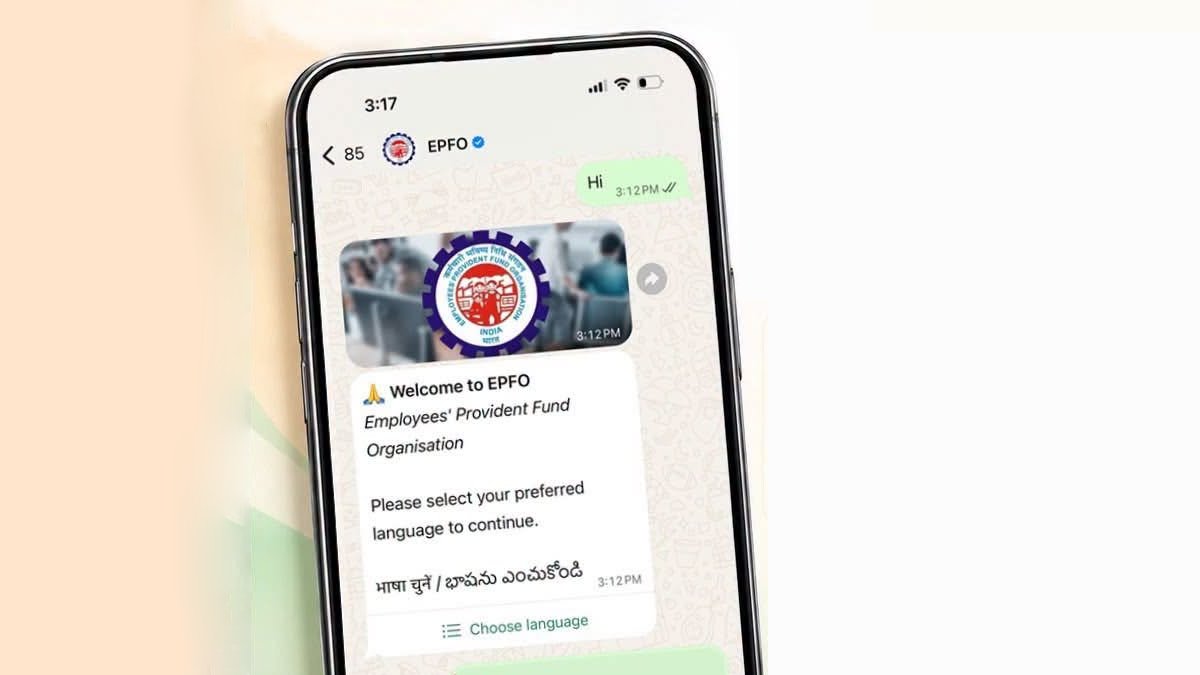
Photo Credit: EPFO/ Facebook
WhatsApp service allows members to view their five most recent EPF transactions
Click Here to Add Gadgets360 As A Trusted Source

Advertisement
The Employees' Provident Fund Organisation (EPFO) launched WhatsApp-based services recently. With the latest update, members can easily access provident fund (PF) information on their phones. Dr Mansukh Mandaviya, Union Minister for Labour and Employment and Youth Affairs and Sports, on the occasion of the 74th EPFO Foundation Day, unveiled the new service. The new facility allows PF subscribers to check their EPF balance, see last transactions and download passbooks directly via WhatsApp.
EPFO WhatsApp Services: How to Check EPF Balance on WhatsApp
The dedicated EPFO WhatsApp number is +91 87964 41800 and can be used to access services, including viewing the available balance in the EPF account, checking the last five transactions, and downloading the EPF passbook.
EPFO's WhatsApp service supports English and indian langues like Hindi, Marathi, Tamil, Telugu, Bengali, Gujarati, and Urdu. It requires one-time password (OTP) verification through the mobile number linked to the member's Universal Account Number (UAN). EPFO has also launched a QR code that members can scan to begin a chat with the official WhatsApp account.
Follow these steps to check EPF balance on WhatsApp:
- Save the EPFO WhatsApp Number +91 8796441800 to your phone's contacts.
- Open WhatsApp and start a conversation with the EPFO contact.
- Send 'Hi'.
- The official EPFO WhatsApp account will respond with a welcome message
- Select Your Language.
- Browse the available menu and select Check Balance to request your latest EPF account balance.
- Enter the one-time password sent to the mobile number registered with your UAN.
- Select your PF Account.
If multiple member IDs or provident fund accounts are linked to your UAN, you need to select the relevant account to view the balance.
After the verification process, the requested PF balance details will be displayed in the WhatsApp conversation. The balance will be shown with three options: Download Passbook, Change Member ID and return to Main Menu. From this, you can tap Download Passbook to access the corresponding passbook PDF.
How to Check Last 5 EPF Transactions on WhatsApp
To see the five most recent EPF transactions, EPFO members can start a chat with the EPFO number and select the Last 5 Transactions option from the service menu. After completing OTP verification, choose the relevant PF account to view its recent transaction details.
Members with multiple UANs or member IDs may need to select the appropriate account at different stages of the process to retrieve the correct information.
FAQs
What is the official EPFO WhatsApp number to check PF balance?
The official EPFO WhatsApp number is +91 87964 41800.
Can I download my EPF passbook using WhatsApp?
Yes. Users can select the 'Passbook PDF' option from the EPFO WhatsApp service menu and complete the OTP verification to access their passbook.
Is OTP verification required to access EPFO services on WhatsApp?
Yes. Members have to verify their identity using an OTP sent to the mobile number registered with their UAN.
Comments
Get your daily dose of tech news, reviews, and insights, in under 80 characters on Gadgets 360 Turbo. Connect with fellow tech lovers on our Forum. Follow us on X, Facebook, WhatsApp, Threads and Google News for instant updates. Catch all the action on our YouTube channel.
Further reading:
EPFO, EPFO Services on WhatsApp, EPFO on WhatsApp, EPFO WhatsApp, How to Check PF Balance
Related Stories




EPFO Services on WhatsApp: How to Check PF Balance, Download Passbook, View Last Transactions and More


Advertisement
Follow Us


-
00:50
Expectation vs Reality: Dad Wanted Good Scores. She Made a Lasting Impression! | Galaxy S26 FE -
01:33
A Festive Surprise for Her | Samsung Galaxy A57 5G -
00:54
Expectation vs Reality: Parents Said Notice Every Detail. She Added One | Galaxy S26 FE -
01:55
From Group Photos to Festive Nights | Samsung Galaxy A57 5G -
01:33
Galaxy Watch Ultra2 on the Trail: Tracking, Hydration & Elevation
-
Diwali की रात लेनी हैं शानदार फोटो? फोन में बदलें ये कैमरा सेटिंग्स
-
कैमरा टेस्ट में iPhone 18 Pro से आगे निकला Motorola का ये फोन
-
itel दिवाली ऑफर: टीवी-वॉशिंग मशीन खरीदें सिर्फ ₹40 प्रतिदिन में
-
Motorola Signature 27 की टक्कर Oppo Find X10 और Google Pixel 11 Pro XL से: देखें कौन सा है ज्यादा बेहतर
-
Realme 17 Pro लॉन्च से पहले लीक, 50MP दो कैमरा, 10,000mAh होगी बैटरी!
Advertisement
Popular on Gadgets
- Samsung Galaxy S26 Ultra
- Motorola Razr Fold
- ChatGPT
- OPPO Find N6
- Mobiles Under Rs. 40,000
- Vivo X300 Ultra
- Asus Zenbook S14
- iQOO 15
- Vivo X300 Pro
- Lenovo Yoga Slim 7i Aura Edition
- iQOO 15R
- Vivo X Fold 5
- Sony PlayStation 5
- HP OmniPad 12
- OnePlus Nord CE 6 Lite
- OnePlus Pad 4
- OPPO F33 Pro 5G
- Cryptocurrency
- HP OmniBook Ultra 14 (2026)
- iPhone 17
- Eureka Forbes AP 355 Room Air Purifier
- Latest Mobile Phones
- Compare Phones
Latest Gadgets
- Karbonn Rebel
- Karbonn Rebel Pro
- OnePlus Turbo 6Vs
- Redmi M100 Pro
- OnePlus Ace 7 Pro
- OnePlus Ace 7
- Samsung W27
- Huawei Pura 90 Plus
- Dell 14S (2026)
- HP ProBook 4 G2iS 14
- iPad mini (2026)
- Amazon Alexa Tablet 8
- Moto Watch 2 Fit
- Pebble Qore 2
- Toshiba 65-Inch 4K Ultra HD Smart Mini LED QLED TV (65Z670SP)
- Haier M70 Mini LED 65-inch
- Acer Predator Atlas 8
- Asus ROG Ally
- Blue Star 1.5 Ton 5 Star Inverter Split AC (IE518ZNURS)
- Blue Star 2 Ton 3 Star Inverter Window AC (WIE324L)

- About Us
- Sitemaps
- Feedback
- Archives
- Contact Us
- RSS
- Advertise
- Career
- Privacy Policy
- Ethics
- Editorial Policy
- Terms & Conditions
- Complaint Redressal
Download Our Apps
Available in Hindi
© Copyright Red Pixels Ventures Limited 2026. All rights reserved.