-
 Logitech MX Keypad Launched in India as a Customisable AI Control Centre With LCD Keys: Price, Features9 September 2026
 -
Logitech Signature Comfort Plus M850 L Review: Creature Comforts for Those Who Need It26 July 2026
-
Logitech MX Master 4 Launched in India With 8,000 DPI Sensor and Multi-Pairing Support15 December 2025
-
Amazon Sale 2025: The Ultimate Deals on Wireless Mice From Logitech, HP, Dell and More Brands1 October 2025
-
Amazon Sale 2025: Top Deals on Gaming Headsets Under Rs. 5,000 From Logitech, Razer, Ant Esports, and More30 September 2025
- Home
- Laptops
- Laptops Reviews
- Logitech MX Master 4 Review: New Features, New Price
Logitech MX Master 4 Review: New Features, New Price
With new material upgrades and haptics thrown in, can the MX Master 4 still entice productivity users?
Written by Sheldon Pinto, Edited by Ketan Pratap | Updated: 13 January 2026 17:48 IST
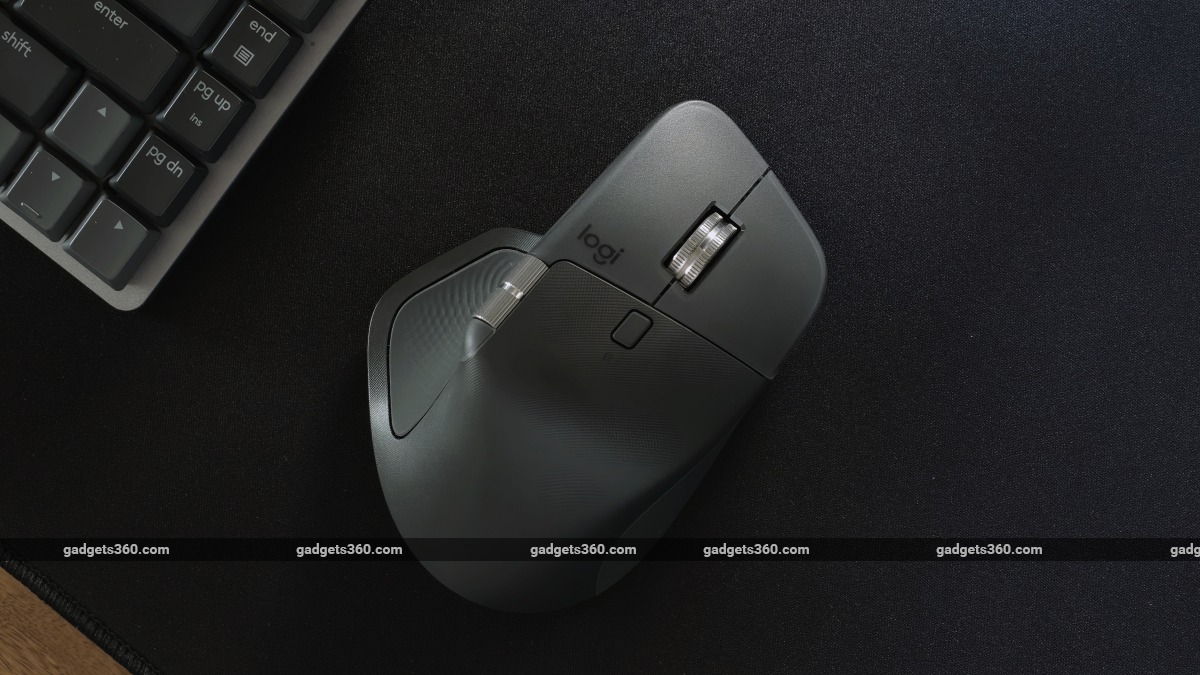
The Logitech MX Master 4 mouse is priced at Rs. 15,995 in India
Click Here to Add Gadgets360 As A Trusted Source

Advertisement
Logitech's MX Master series has been the gold standard for productivity mice globally over the past couple of years. They may not offer gaming-grade hardware, but they come with their own software and hardware features that make them stand out when compared to the competition. With the MX Master 3, Logitech introduced the MagSpeed electromagnetic scroll wheel, and with the Master 3S, we got the Quiet Click feature, which has also made it into more affordable Logitech peripherals. As with smartphones and everything else in 2025, AI was the buzzword. Thankfully, Logitech does not go all out with AI features but adds a new hardware feature called a Haptic Sense Panel, which is paired with a software feature called Actions Ring. In the past, every new hardware feature delivered by Logitech has been a success. Can the brand turn this Haptic Sense Panel into a necessity that indirectly justifies its steep asking price this year? Let's dive right in!
Logitech MX Master 4 Design: Sensible stuff
- Dimensions - 128.15 x 88.35 x 50.8mm
- Number of buttons - 8
- Weight - 150g
- Wireless dongle included - Yes
The design of the Logitech MX Master 4 will feel familiar to owners of the MX Master 3 and 3S. The angular design is just as comfortable as the last model and provides good support along with a slightly tilted wrist position, which is useful for maintaining all-day comfort and keeping wrist problems at bay. The thumb support is now placed a bit higher than the 3S, and this makes it easier to press the Haptic Sense Panel that is placed almost vertically beneath the left side buttons and thumb-wheel.
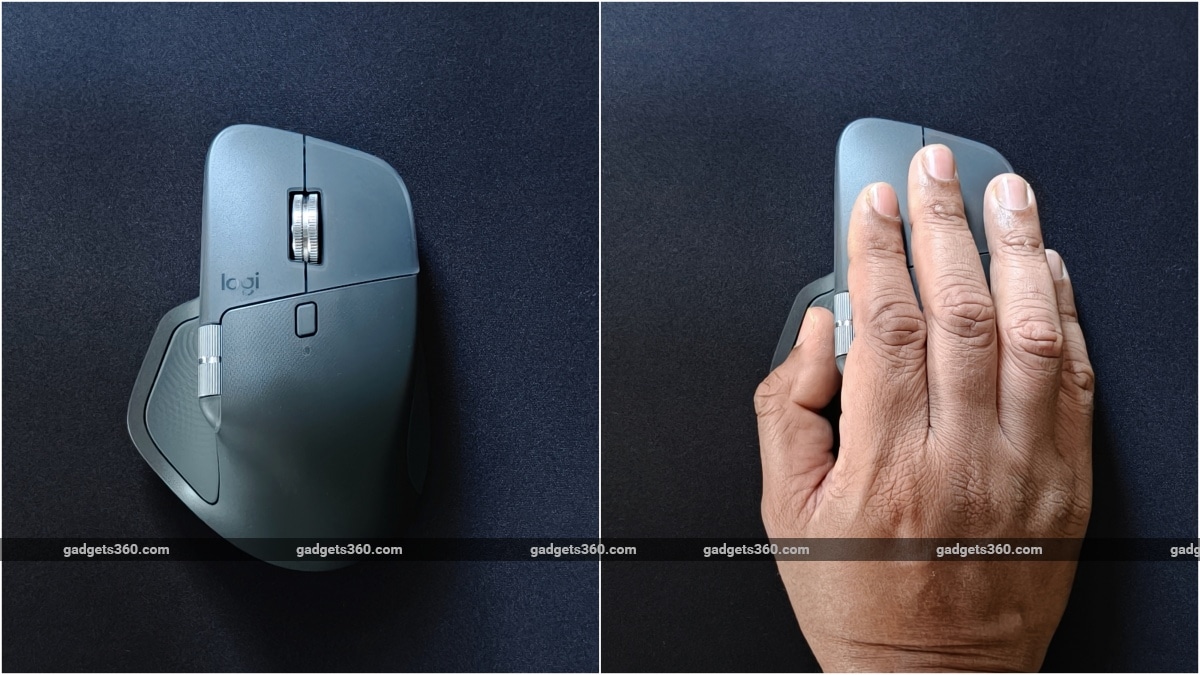
The Logitech MX Master 4's design and grip remain similar to the Master 3S
The Gesture button, which by default allows for switching between desktops (on macOS), has now been moved ahead of the two multi-function buttons just below the thumb-wheel. This is really an odd position for the gesture button, as it is a bit of a stretch even for my large hands. Those who switch desktops (whether on macOS or Windows) will find this a bit annoying. Its original placement under the thumb was perfect on the 3S, and so, the new position will take some getting used to.
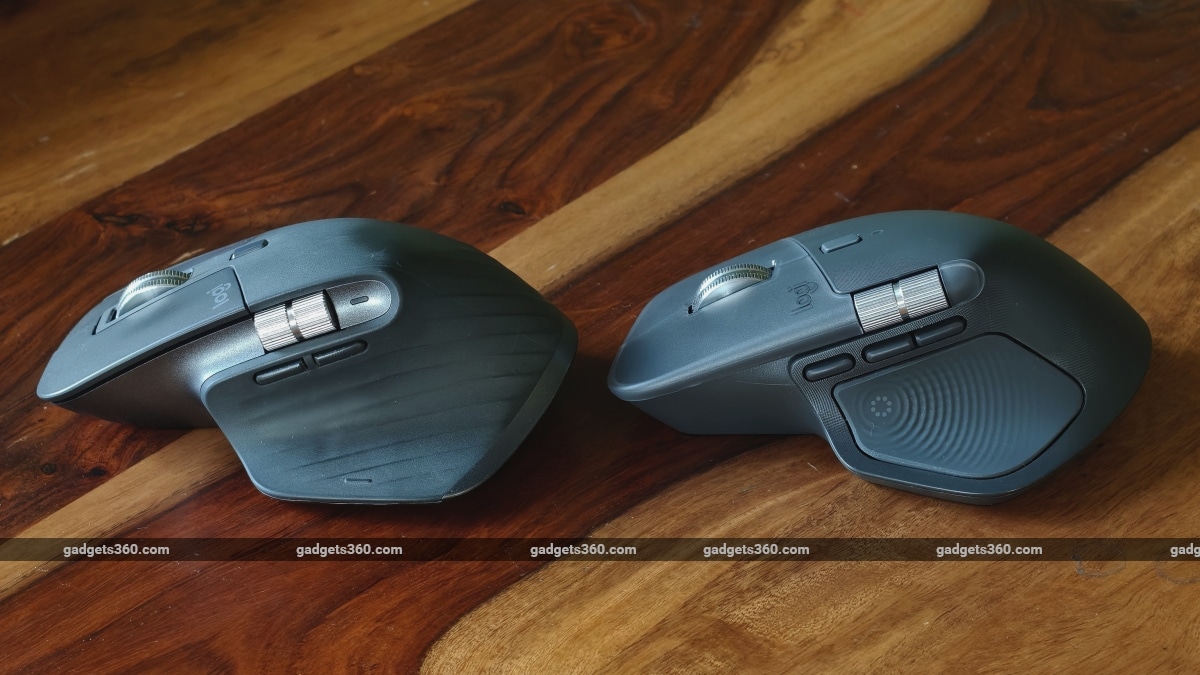
The Gesture button has moved up, and the new Haptic Sense Panel (or button) takes its place below. Left: MX Master 3S, right: MX Master 4
Around the top, the layout looks fairly familiar but with some meaningful changes. The MagSpeed wheel is now a lot quieter than on the MX Master 3S. The left and right click keys have grown wider, and the annoying ledge next to the right click button is no more. It is now accommodated under the right-click key. While the main click-wheel looks, functions, and feels the same (as it should), the thumb-wheel is as stiff as it was on the 3S, which has been moved outwards, forming a shoulder that flows downward into the left click button. Given that the thumb wheel is more exposed, it is now a lot easier to move, making it more useful. Although you still cannot flick it for high-speed scrolling like the main scroll wheel.
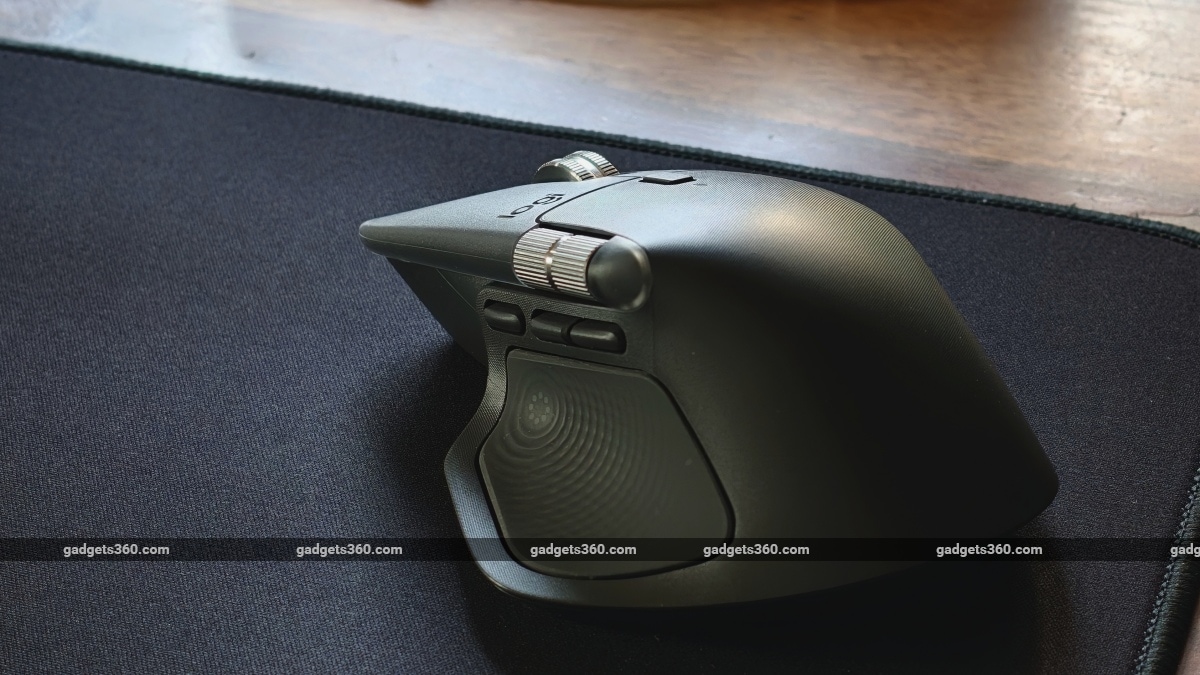
The metal thumb-wheel is now wider (or longer), and its more exposed position makes it easier to scroll.
Most important of all are the changes to the materials used. The rubberised finish used on the 3S' click keys and upper body is finally a thing of the past. While these did make holding the mouse incredibly stable and provided plenty of grip, they grew sticky and messy over time. The left and right click buttons have a translucent polycarbonate layer that feels smooth to the touch, while the upper case has a plastic feel with fine grooves for grip. The only areas with a soft rubber surface are the Haptics Sense Panel (on the left) and the entire right side, making the mouse easy to handle and manoeuvre.
Indeed, all of the above refinements make the MX Master 4 one of the best regular mice in terms of ergonomics. At the time of writing this review, after a few weeks of use, I can confirm that I have not developed any wrist pain. Of course, you can get even better ergonomics and comfort from a vertical mouse like Logitech's smaller Lift (for small to medium hands) or the Razer Pro Click V2 Vertical (for medium to large hands).
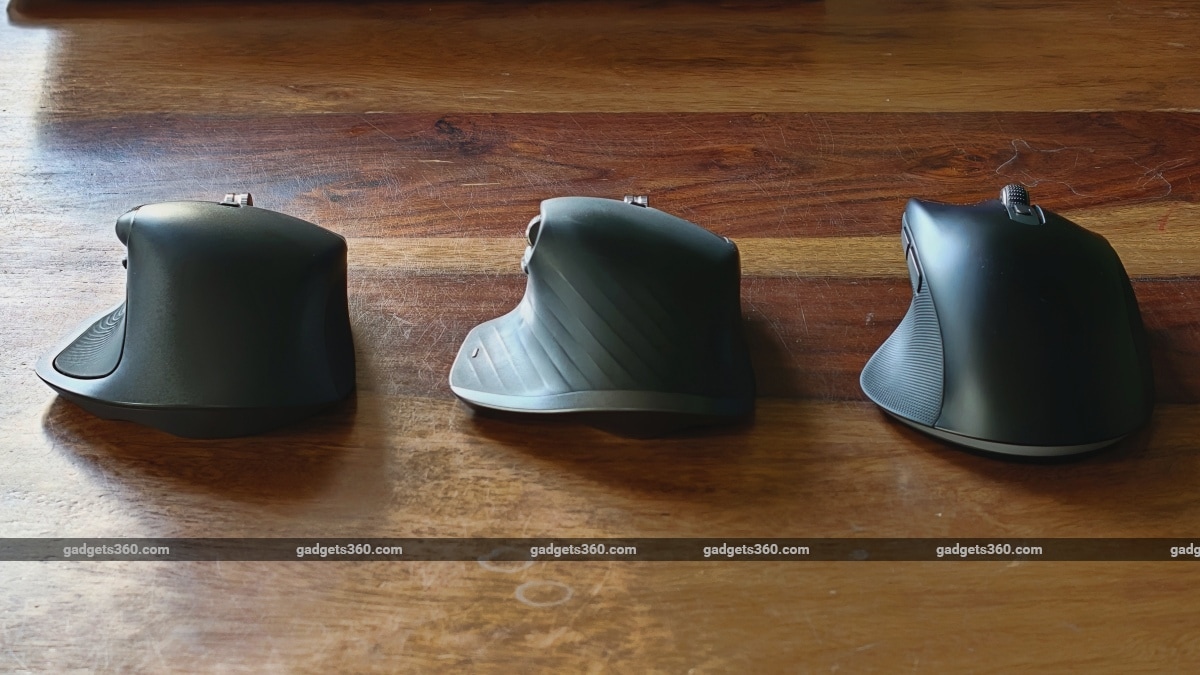
The Logitech MX Master 4 versus the MX Master 3S and the Razer Pro Click V2
What has been a sore spot for me is the overall weight. The bigger battery and added haptic motor increase its weight by 25 grams. While this does not sound like much, it feels noticeably heavier to move. More so, because I have been using the Razer Pro Click V2 daily lately. The V2 is a mix of productivity and gaming and weighs just 110g, making it feel supremely lighter and easier to move.
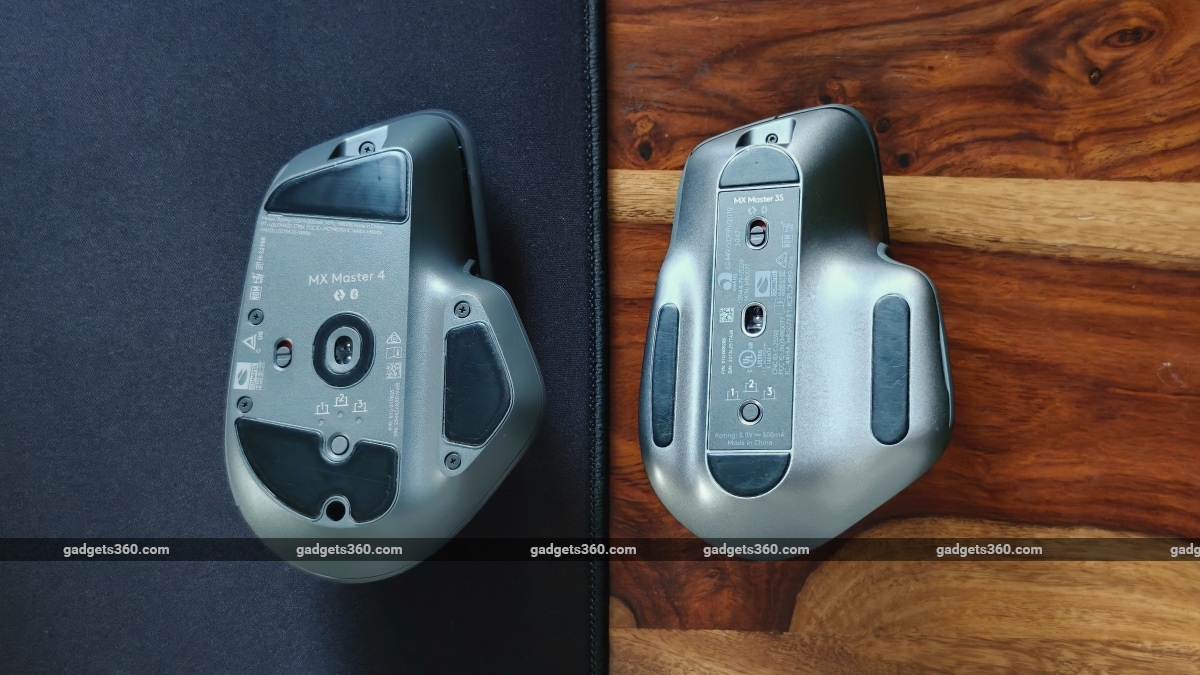
The screws for accessing the battery and other internal components are no longer hidden
On a side note, it's also nice to finally see exposed screws for battery replacement, which no longer requires the removal of mouse skates to access them.
Logitech MX Master 4 Software: Overdependence
- Software - Logi Options+
- Works best with - Windows, macOS
Logi Options+ remains the only way to program or tweak anything and everything on the mouse. The MX Master series' dependence seems to grow with every new update, and the MX Master 4 is no different. Logi Options+ lets you tweak everything from the DPI to assigning button functions and even change the scrolling speed. Its installation is vital for professionals who use macros and heavily customise their mice to perform multiple functions with a single click.
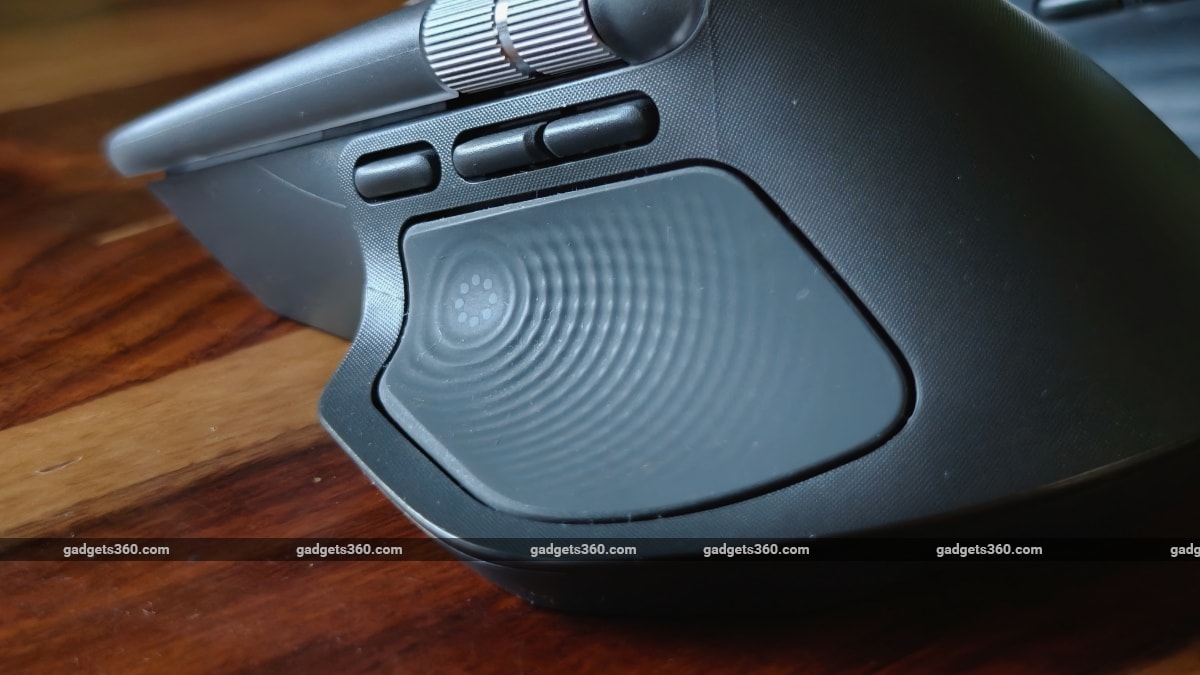
With the Haptic Sense Panel, it is possible to adjust both button press sensitivity and vibration feedback to your liking
This year, added to the mix is the new Actions Ring feature. Pressing down the Haptic Sense Panel, which is essentially a large capacitive button, produces a subtle vibration and opens the Actions Ring menu. This menu is very customisable, but the idea is to execute tasks in the blink of an eye.
You basically do this by pressing and holding the panel, moving your mouse in the direction of the feature you want to execute, and lifting your finger to select the option you want to execute. You get 8 options to choose from, and you can pick and choose which functions you want to see. One of the defaults also includes an Explore AI action. It further expands into your AI tool of choice (ChatGPT, Perplexity, CoPilot, Gemini), which then opens the selected tool in the browser (like a shortcut). This can also be connected to Logi's AI Prompt builder, and so it is possible to build and run custom prompts as well.
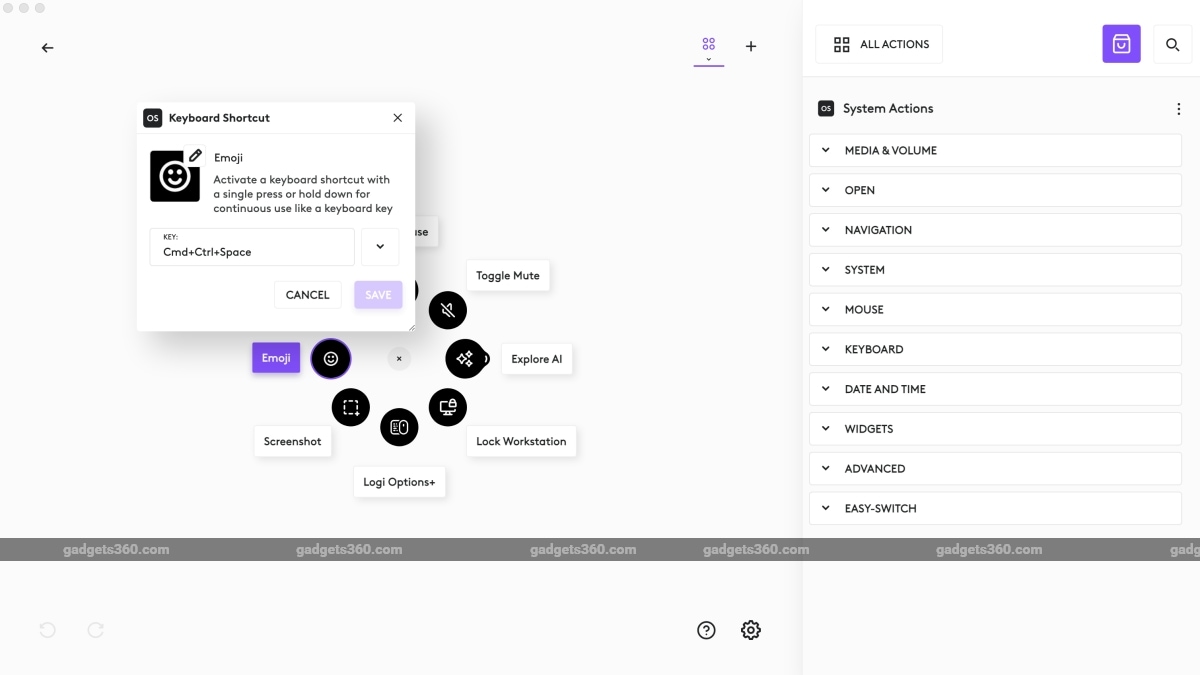
The Actions Ring feature is infinitely customisable using the Logi Option+ app
While I initially found the Actions Ring feature a bit gimmicky, I gradually realised it does speed up basic everyday tasks. Need to lock your desktop? Press, hold and drag! Need to mute audio? Press, hold and drag! Need to add an emoji? Well… you get it! And after using it for a few weeks with my customisations, I must say it does feel like muscle memory, reducing the need to visually see the options before executing them. One detail to keep in mind is that Actions Ring is available on other Master peripherals as well. The key difference on the Master 4 is the Haptic Sense Panel, which makes it more accessible and easier to use. Is Actions Ring a necessity? No. Is it useful? Yes!
And now, coming to the elephant in the room. Given how critical Logi Options+ is to most professionals who will customise and use this productivity mouse, there is a price to pay for this dependence. Whether it's for keyboards or mice, Logi Options has always been reliable, more so because it works beautifully with Logitech's hardware. The only downside is that the Master 4 still can't store profiles on-device.
A few days prior to publishing this story, the Logi Options+ app refused to launch. To most people, that would be fine, but this made the MX Master series users pull out their hair, because all of the above-mentioned customisations (including basic functions like scrolling directions) are tied to the app. And since the app was down, the customisations just didn't work, with devices reverting to default profiles. To think that this entire multi-system workflow you have set up on your desk won't work, because the governing software is temporarily down, is unthinkable for most professionals.
In Logitech's case, it wasn't an outage or a server issue, but an expired certificate for the macOS version of the app. It was down for about a day, but Logitech then issued a manual patch, which fixed the issue. However, I would like to clarify that over several years of owning Logitech hardware, the Options app has rarely been down. So, the app's refusal to launch is a rare occurrence. And once the software was up and running, device profiles saved across multiple machines could be synced flawlessly.
Logitech MX Master 4 Performance: The good, the bad and the ugly
- Minimal and Maximal DPI - 200-8,000
- Maximum polling rate - 125Hz
- Receiver port type - USB-C
- Connectivity - Wireless only, Bluetooth (BLE) 5.1, 10m range
- Battery capacity - 650mAh
Not much has changed in terms of performance with the Logitech MX Master 4. The DPI remains the same as on the Master 3S, which was bumped up from 4,000 on the Master 3. And the same can be said about polling rate, which remains a rather basic 125Hz. After using the Razer Pro Click V2, which supports up to 1,000Hz, the MX Master 4 feels a bit sluggish.
I tested the MX Master 4 on both a 5K monitor and a full-HD laptop display, and it worked fine for the most part. Connectivity using the bolt receiver is stable most of the time, but there were certain days I did find the connectivity shaky, leading to a sluggish pointing experience, which got annoying rather quickly.
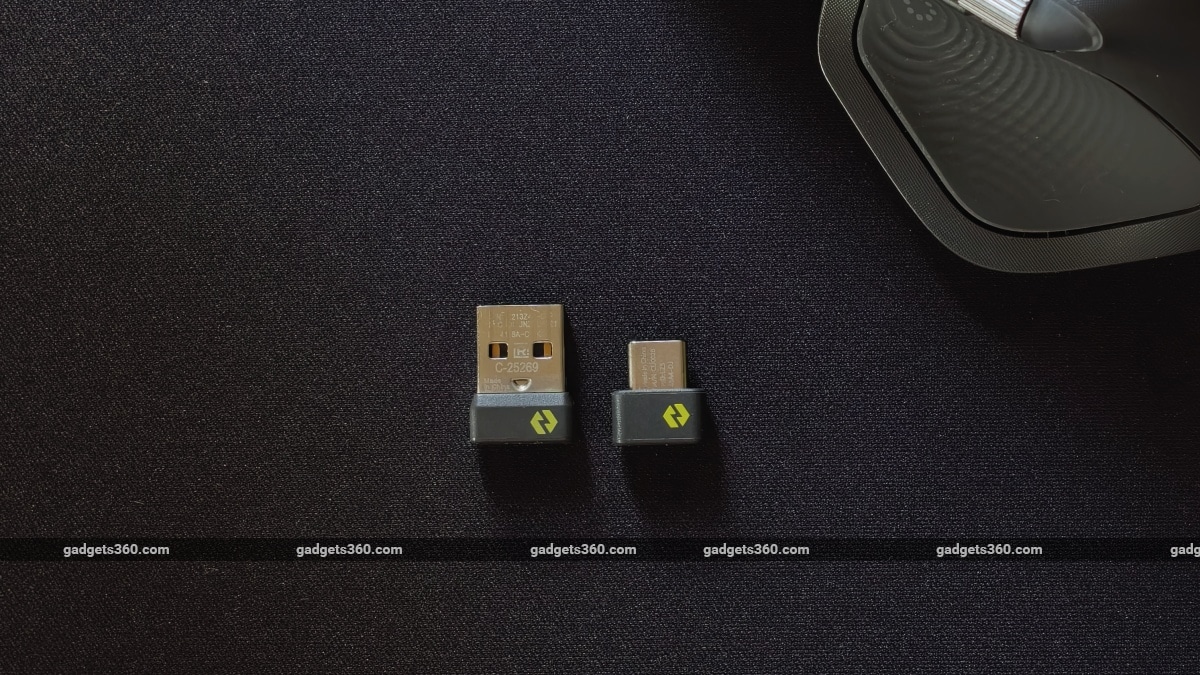
The new Bolt receiver (right) has a USB-C connector
During testing, the Bolt receiver was just 2 feet away from the mouse with a clear line of sight. Sometimes switching the mouse on and off seemed to get it up to speed, but this did not always work. Indeed, this could be because of other wireless accessories connected to the same machine, but it does conclude that Bolt isn't bulletproof.
While Bluetooth connectivity issues with older MX mice on macOS were mostly resolved with the MX Master 3S, a higher polling rate has long been a much-requested feature for the Master series. Logitech seems to have done nothing about it, and to make things worse, there is no wired connectivity mode either. I get that nobody is going to use an MX Master 4 for playing games, but a slightly higher polling rate (even 250-400Hz) would have made for a more stable and robust pointing experience. Moreover, it's not that Logitech cannot pull it off, as its G-series gaming wireless mice can do 1,000Hz.
The Logitech MX Master 4 does get a higher capacity battery but delivers nearly the same longevity as the MX Master 3S, which is about 2 months. Given that I have been using it for the past few weeks, I've only managed to drain it to 75 percent. The additional 150mAh battery capacity over last year's 500mAh is clearly in place to accommodate the power requirements of the haptic motor, which delivers the vibration feedback in certain apps and actions. You can get even better battery life by disabling haptic feedback entirely in the Logi Options+ app.
Logitech MX Master 4 Verdict
Despite a few hiccups, the MX Master 4 is an excellent productivity mouse, provided you can digest its Rs. 15,995 price tag in India. The product currently retails online for Rs. 12,995, so it's mainly a Rs. 3,000 bump over the MX Master 3S' price tag.
Somehow, I don't see Master 3S users upgrading to this one. This is because the MX Master 4 does not offer anything substantially different in terms of hardware and features. There's no higher polling rate; connectivity options remain the same as before, and the new Haptic Sense Panel isn't necessary. The Actions Ring feature can also be enabled on older Master peripherals. The design, although improved, has mainly changed from a materials standpoint.
Moreover, the Logitech MX Master 3S is still on sale at Rs. 9,300 in India and is bound to get a discounted price during festive sales. Those seeking a higher polling rate can look at Razer's Pro Click V2 or the V2 Vertical as they work equally well for both productivity and gaming. But if your Master 3 or 3S has died out on you and you don't mind paying up, the Master 4 is a solid productivity mouse that adds a bit of fun with its newfound haptics.
Pros:
- Ergonomic design
- Accurate tracking
- Highly customisable buttons
- Long battery life
- Quiet Click keys
- Excellent companion app
Cons:
- Low polling rate
- Can feel a bit heavy
- No on-device profile storage
- Overly reliant on the companion app
- No wired mode
Ratings (Out of 10)
Design: 10
Performance: 8
Value for Money: 7
Overall: 9
Comments
Get your daily dose of tech news, reviews, and insights, in under 80 characters on Gadgets 360 Turbo. Connect with fellow tech lovers on our Forum. Follow us on X, Facebook, WhatsApp, Threads and Google News for instant updates. Catch all the action on our YouTube channel.
Further reading:
Logitech, Logitech MX Master 4, Logitech MX Master 4 Price in India, Logitech MX Master 4 Specifications, Logitech MX Master 4 Design, Logitech MX Master 4 Software, Logitech MX Master 4 Performance, Logitech MX Master 4 Battery
Related Stories



Advertisement
Follow Us




-
![[Sponsored]: CP PLUS CarKam CP-F89B: 4K Dashcam With Rear Camera, GPS & Emergency Recording](https://www.gadgets360.com/static/desktop/images/spacer.png)
04:37
[Sponsored]: CP PLUS CarKam CP-F89B: 4K Dashcam With Rear Camera, GPS & Emergency Recording -
04:23
[Partner Content] Your Phone Can Do WAY More Than You Think | OPPO ColorOS 16 -
01:59
Samsung Galaxy Z Fold8 Ultra: Unfold the Ultra Night -
03:24
Apple Pay Launches In India: Supported Devices, Cards And Payments Explained -
00:21
[Sponsored] Samsung Galaxy Z Fold8, Fold8 Ultra
-
OnePlus 16 लॉन्च: 200 मेगापिक्सल कैमरा, 9000mAh की बैटरी से लैस, जानें
-
Vivo का लेटेस्ट फोन Amazon Great Indian Festival में मिल रहा ₹6,300 सस्ता
-
Amazon Great Indian Festival: ₹51000 सस्ता मिल रहा Samsung फोल्डेबल फोन
-
Flipkart Big Billion Sale 2026: ₹5,500 से ज्यादा सस्ता मिल रहा Motorola Signature, 50MP तीन कैमरा वाला फोन
Advertisement
Popular on Gadgets
- Samsung Galaxy S26 Ultra
- Motorola Razr Fold
- ChatGPT
- OPPO Find N6
- Mobiles Under Rs. 40,000
- Vivo X300 Ultra
- Asus Zenbook S14
- iQOO 15
- Vivo X300 Pro
- Lenovo Yoga Slim 7i Aura Edition
- iQOO 15R
- Vivo X Fold 5
- Sony PlayStation 5
- HP OmniPad 12
- OnePlus Nord CE 6 Lite
- OnePlus Pad 4
- OPPO F33 Pro 5G
- Cryptocurrency
- HP OmniBook Ultra 14 (2026)
- iPhone 17
- Eureka Forbes AP 355 Room Air Purifier
- Latest Mobile Phones
- Compare Phones
Latest Gadgets
- Vivo Y600s Pro
- Vivo Y32 (2026)
- Infinix Smart 20 HD
- Vivo V80
- Vivo S2 FE
- Vivo Y600K Turbo
- Realme P4s Lite
- Vivo S60t
- Dell Pro Rugged 14
- Dell Pro Rugged 13 Extreme
- Amazon Alexa Tablet 8
- Amazon Alexa Tablet 11
- Amazfit T-Rex Dual Solar
- OPPO Watch S2
- Toshiba 65-Inch 4K Ultra HD Smart Mini LED QLED TV (65Z670SP)
- Haier M70 Mini LED 65-inch
- Acer Predator Atlas 8
- Asus ROG Ally
- Blue Star 1.5 Ton 5 Star Inverter Split AC (IE518ZNURS)
- Blue Star 2 Ton 3 Star Inverter Window AC (WIE324L)

- About Us
- Sitemaps
- Feedback
- Archives
- Contact Us
- RSS
- Advertise
- Career
- Privacy Policy
- Ethics
- Editorial Policy
- Terms & Conditions
- Complaint Redressal
Download Our Apps
Available in Hindi
© Copyright Red Pixels Ventures Limited 2026. All rights reserved.