-
 Android 17 Pause Point May Be Limited to Pixel 11 Series, Google Says21 August 2026
 -
Nothing to Unveil Android 17-Based Nothing OS 5.0 Next Week: Expected Features21 August 2026
-
Android Auto Connection Problem Resolved With the Latest Update, Google Says21 August 2026
-
Google Photos Could Soon Add a Map View to Ask Photos Search Results, Feature Spotted in APK Teardown20 August 2026
-
Google Reportedly Plans Googlebook Hardware Preview for September 1520 August 2026
- Home
- Mobiles
- Mobiles Features
- How to Create Mobile Hotspot on Android, iOS, Windows Phone, and BlackBerry
How to Create Mobile Hotspot on Android, iOS, Windows Phone, and BlackBerry
By NDTV Correspondent | Updated: 8 February 2017 19:09 IST

Click Here to Add Gadgets360 As A Trusted Source

Advertisement
We wrote about easy ways to turn your laptop into a Wi-Fi hotspot earlier, and some readers asked us how to turn their smartphones into a hotspot. As it turns out, it's much simpler than turning your laptop into a hotspot and all mobile operating systems come with one-click methods of doing this very easily.
However, some telecom operators may not allow you to create a hotspot. They might restrict it if you are on a plan that allows high data usage or they may not enable this feature unless requested. So if you don't see these options, try getting in touch with your operator.
Here's how to turn your phone or tablet into a Wi-Fi hotspot
How to Set Up Mobile Hotspot on iPhone, iPad
Here's how to share your mobile Internet connection on iOS devices - will work for both iPhone and iPad.
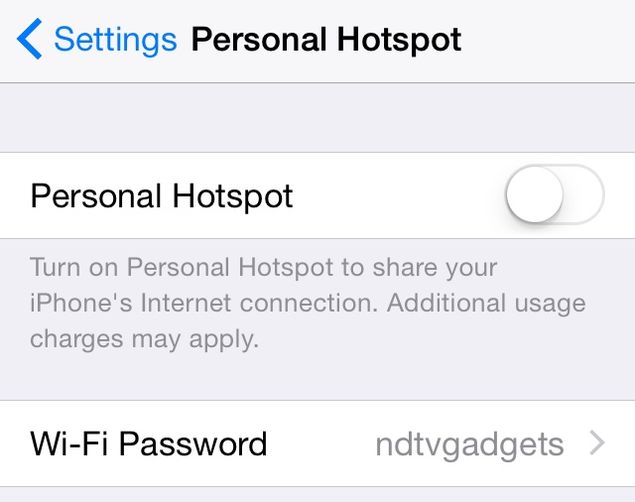
- Go to Settings > Personal Hotspot > On.
- Enter a password.
- Now you'll see a Wi-Fi network on other devices, which you can connect to easily.
- The name of this Wi-Fi network is the name of your phone. You can change it by going to Settings > General > About > Name.
- By default, iOS devices use the fairly secure WPA2-PSK encryption on Wi-Fi hotspots.
How to Set Up Mobile Hotspot on Android
Follow these steps to create a Wi-Fi hotspot on Android devices.
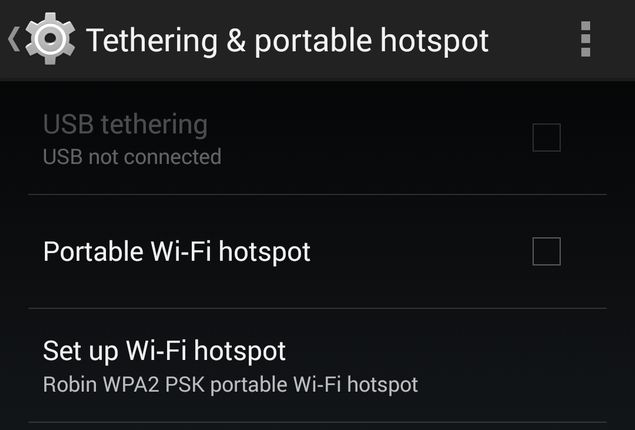
- Go to Settings > More... > Tethering & portable hotspot. While this option is there in all Android phones, the wording may vary depending on the device. In some phones, this shows up under Settings > Networks > Sharing. Look for words such as Sharing or Tethering to find it in your phone.
- Now set up the hotspot by tapping Set up Wi-Fi hotspot. This option shows up as Configure Wi-Fi hotspot on some smartphones.
- Key in the name of the Wi-Fi network, a password and tap Save.
- Tap Portable Wi-Fi hotspot to switch on the hotspot.
How to Set Up Mobile Hotspot on Windows Phone
Check these steps to start a Wi-Fi hotspot on your Windows Phone device.
- Go to Settings > Internet Sharing.
- Tap the edit icon (pencil) at the bottom to configure the hotspot.
- Tap Broadcast Name to change the name of the network and enter a password in its field below.
- Tap the tick mark to finish configuration.
- Now flick the Internet Sharing slider to On.
How to Set Up Mobile Hotspot on BlackBerry 10
Here's how to quickly set up a hotspot on a BlackBerry 10 smartphone.
- Swipe down from the top of the screen. Tap Settings.
- Tap Network Settings > Mobile Hotspot > Next
- You'll see four warning prompts (data use, monitor users on hotspot, battery usage and inactivity timer). Tap Next each time.
- Type a password for the Wi-Fi network you are about to create. Tap Next
- Tap Configure. You can now change the name of the network if you want to.
- Once that's done, tap Save to create a hotspot.
For more tutorials, visit our How To section.
Comments
Get your daily dose of tech news, reviews, and insights, in under 80 characters on Gadgets 360 Turbo. Connect with fellow tech lovers on our Forum. Follow us on X, Facebook, WhatsApp, Threads and Google News for instant updates. Catch all the action on our YouTube channel.
Related Stories



Advertisement
Follow Us




-

06:39
Samsung Galaxy Z Fold8 Ultra Review: Cameras, Battery, Performance Tested -
04:33
[Sponsored] JBL Live 780NC: Great Sound, Perfect Comfort, Smart ANC & 80-Hour Battery -
12:04
[Partner Content] OPPO Reno16 Series Deep Dive: Built for Creators? -
05:33
Poco M8 Power Review | 8000mAh battery phone | Best budget phone 2026? -
03:28
[Partner Content] OPPO Enco Air5, Flagship ANC for Just Rs. 3,299?
-
Poco M8x 5G लॉन्च, 50 मेगापिक्सल कैमरा के साथ 3 दिन चलेगी बैटरी, जानें
-
OnePlus का 50MP कैमरा, 7400mAh बैटरी वाला फोन मिल रहा ₹3000 सस्ते में
-
Google दे रही 1 साल तक AI Plus सब्सक्रिप्शन बिल्कुल फ्री, ऐसे पाएं ऑफर
-
Vivo V80 Lite 5G आ रहा 10,000mAh बैटरी, 50MP दो कैमरा के साथ, 3 सितंबर को होगा लॉन्च
-
7,000mAh की बैटरी और टैबलेट जैसे डिस्प्ले के साथ पेश हुआ Huawei Pura X View
Advertisement
Popular on Gadgets
- Samsung Galaxy S26 Ultra
- Motorola Razr Fold
- ChatGPT
- OPPO Find N6
- Mobiles Under Rs. 40,000
- Vivo X300 Ultra
- Asus Zenbook S14
- iQOO 15
- Vivo X300 Pro
- Lenovo Yoga Slim 7i Aura Edition
- iQOO 15R
- Vivo X Fold 5
- Sony PlayStation 5
- HP OmniPad 12
- OnePlus Nord CE 6 Lite
- OnePlus Pad 4
- OPPO F33 Pro 5G
- Cryptocurrency
- HP OmniBook Ultra 14 (2026)
- iPhone 17
- Eureka Forbes AP 355 Room Air Purifier
- Latest Mobile Phones
- Compare Phones
Latest Gadgets
- Poco M8x 5G
- iQOO Z11
- Redmi M100
- iQOO Neo 11 Ultra
- iQOO Z11S
- Pova 8 Pro 5G
- Moto G Max
- Google Pixel 11 Pro XL
- Huawei MateBook Pro S
- Asus Chromebook CX15 (CX1505CTA)
- Ira Duo Pro 5G
- Pad 70
- Xiaomi Redmi Watch 6 Active
- Google Pixel Watch 5
- Xiaomi TV FX Mini LED 65
- Sony Bravia 9 II
- Acer Predator Atlas 8
- Asus ROG Ally
- Blue Star 1.5 Ton 5 Star Inverter Split AC (IE518ZNURS)
- Blue Star 2 Ton 3 Star Inverter Window AC (WIE324L)

- About Us
- Sitemaps
- Feedback
- Archives
- Contact Us
- RSS
- Advertise
- Career
- Privacy Policy
- Ethics
- Editorial Policy
- Terms & Conditions
- Complaint Redressal
Download Our Apps
Available in Hindi
© Copyright Red Pixels Ventures Limited 2026. All rights reserved.