
-
 Canva Launches Multiple Visual Suite Features Across Docs, Sheets, Whiteboards, Websites and More3 September 2026
-
Canva Code 2.0 With Vibe Coding Support for Website Building Now Available to All Users15 July 2026
-
Canva Rolls Out Offline Mode That Enables Content Creation Without an Internet Connection10 June 2026
-
Canva Restores Services After a Server Outage Affected Hundreds of Users Globally9 June 2026
-
Google’s Gemini Offers Agentic Design Creation With New Adobe and Canva Connectors21 May 2026
Canva Rolls Out New AI Control Settings for Free and Pro Users
Canva's new settings give individual users more control over the platform's AI tools and generated content.
Written by Sucharita Ganguly, Edited by Ketan Pratap | Updated: 20 November 2026 12:28 IST
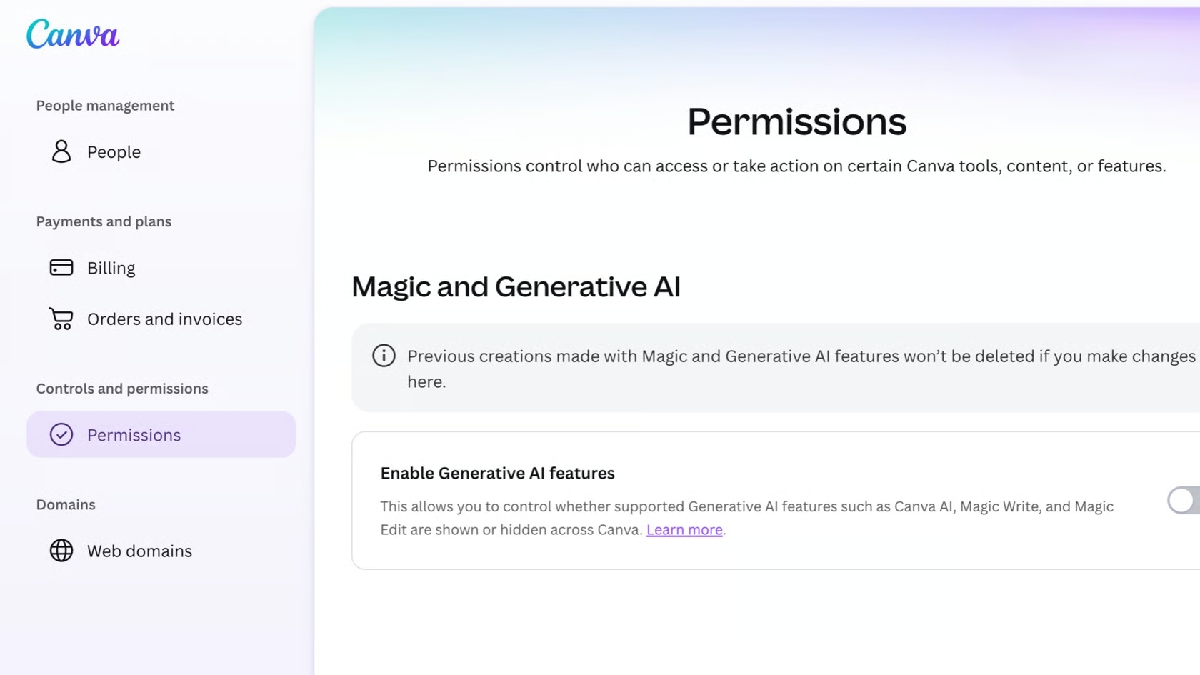
Photo Credit: Canva
Canva already offers AI management settings for business plans
Click Here to Add Gadgets360 As A Trusted Source
Advertisement
Canva has introduced new settings that let users decide how they want to use AI features on its design platform. The options allow them to switch off generative AI tools across Canva or limit the number of AI-generated images and other assets that appear while browsing its library. The controls are available to users on Canva Free and Pro plans. Those who prefer not to use generative AI can disable these tools, while others can continue using them alongside their regular design features.
Canva AI Controls Features
Canva now allows users to switch off generative AI features across the platform through a new setting. Once disabled, these tools will no longer appear in Canva, but users can turn them back on at any time. The option is available under Profile, Settings and Permissions.
There is also a separate setting for users who want to see less AI-generated content while browsing Canva's library. It reduces the number of AI-generated images and other assets shown in search results and recommendations. Users can find it under Profile, Your account and AI Personalisation. It does not change any designs they have already created.
Not all AI-powered tools will disappear when generative AI is switched off. Background Remover and Magic Grab, for instance, will continue to work as they edit existing content rather than generate new images. Using these tools will not add metadata marking a design as AI-generated.
Administrators on Canva's Business, Enterprise, Teams and Education plans already have settings to manage their teams' use of AI tools. The new options extend some of that control to individual users.
Canva AI Controls Availability
Canva's new AI controls are available to users on its Free and Pro plans. The generative AI switch is available under Profile, Settings and Permissions, while the option to limit AI-generated content can be found under Profile, Your account and AI Personalisation.
Comments
Get your daily dose of tech news, reviews, and insights, in under 80 characters on Gadgets 360 Turbo. Connect with fellow tech lovers on our Forum. Follow us on X, Facebook, WhatsApp, Threads and Google News for instant updates. Catch all the action on our YouTube channel.
Further reading:
Canva, Canva AI, Canva AI Controls, Generative AI, Artificial Intelligence, AI Image Generation, Canva Free, Canva Pro
Related Stories




Advertisement
Follow Us


-
 Winter Bedding Essentials: Comforters, Quilts & Duvets
-
Best Men's T-Shirt Combos Under ₹1,000 for Everyday Style and Comfort
-
Best-Rated TIRTIR Makeup Products for Flawless, Glass-Skin Coverage
-
Best Wedding Gifts Under ₹2,500: Luxury Home Decor, Crockery & Appliances
-
Best Reversible Hot and Cold ACs for North Indian Winters
Advertisement
Popular on Gadgets
- Samsung Galaxy S26 Ultra
- Motorola Razr Fold
- ChatGPT
- OPPO Find N6
- Mobiles Under Rs. 40,000
- Vivo X300 Ultra
- Asus Zenbook S14
- iQOO 15
- Vivo X300 Pro
- Lenovo Yoga Slim 7i Aura Edition
- iQOO 15R
- Vivo X Fold 5
- Sony PlayStation 5
- HP OmniPad 12
- OnePlus Nord CE 6 Lite
- OnePlus Pad 4
- OPPO F33 Pro 5G
- Cryptocurrency
- HP OmniBook Ultra 14 (2026)
- iPhone 17
- Eureka Forbes AP 355 Room Air Purifier
- Latest Mobile Phones
- Compare Phones
Latest Gadgets
- Lava Smart 4 Pro
- OPPO Reno 17 Pro (China)
- OPPO Reno 17 (China)
- Vivo Y6k
- Karbonn Rebel
- Karbonn Rebel Pro
- OnePlus Turbo 6Vs
- Redmi M100 Pro
- Dell 14S (2026)
- HP ProBook 4 G2iS 14
- OPPO Pad Air 6
- Infinix Xpad 30
- Xiaomi Watch S5 41mm
- OPPO Watch 5
- Toshiba 65-Inch 4K Ultra HD Smart Mini LED QLED TV (65Z670SP)
- Haier M70 Mini LED 65-inch
- Acer Predator Atlas 8
- Asus ROG Ally
- Blue Star 1.5 Ton 5 Star Inverter Split AC (IE518ZNURS)
- Blue Star 2 Ton 3 Star Inverter Window AC (WIE324L)

- About Us
- Sitemaps
- Feedback
- Archives
- Contact Us
- RSS
- Advertise
- Career
- Privacy Policy
- Ethics
- Editorial Policy
- Terms & Conditions
- Complaint Redressal
Download Our Apps
Available in Hindi
© Copyright Red Pixels Ventures Limited 2026. All rights reserved.