-
 Microsoft Reportedly Working on Shared Audio Feature on Windows 11 Alongside Tweaked Widgets8 June 2026
 -
Everything Announced at Xbox Games Showcase: Gears of War: E-Day, Senua, Persona 6 and More8 June 2026
-
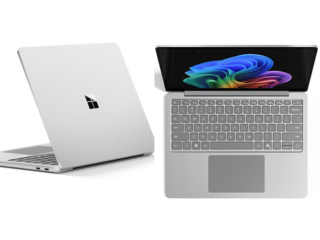
Microsoft Surface Laptop Ultra Announced With Blackwell RTX GPU, Nvidia RTX Spark Superchip1 June 2026
-
Xbox Delays Fable to February 2027 to Give It a Window 'All to Itself', Avoid Clash With GTA 61 June 2026
-
Microsoft Surface for Business (2026) Series Launched With Up to Intel Core Ultra X7 Processor: Price, Specifications20 May 2026
Microsoft Paint Can Now Create AI-Generated Colouring Books, Notepad Updated With New Markdown Features
Microsoft said Colouring Book in Paint is an AI-powered feature that lets users create colouring book pages from a prompt.
Written by Akash Dutta, Edited by Rohan Pal | Updated: 23 January 2026 23:54 IST
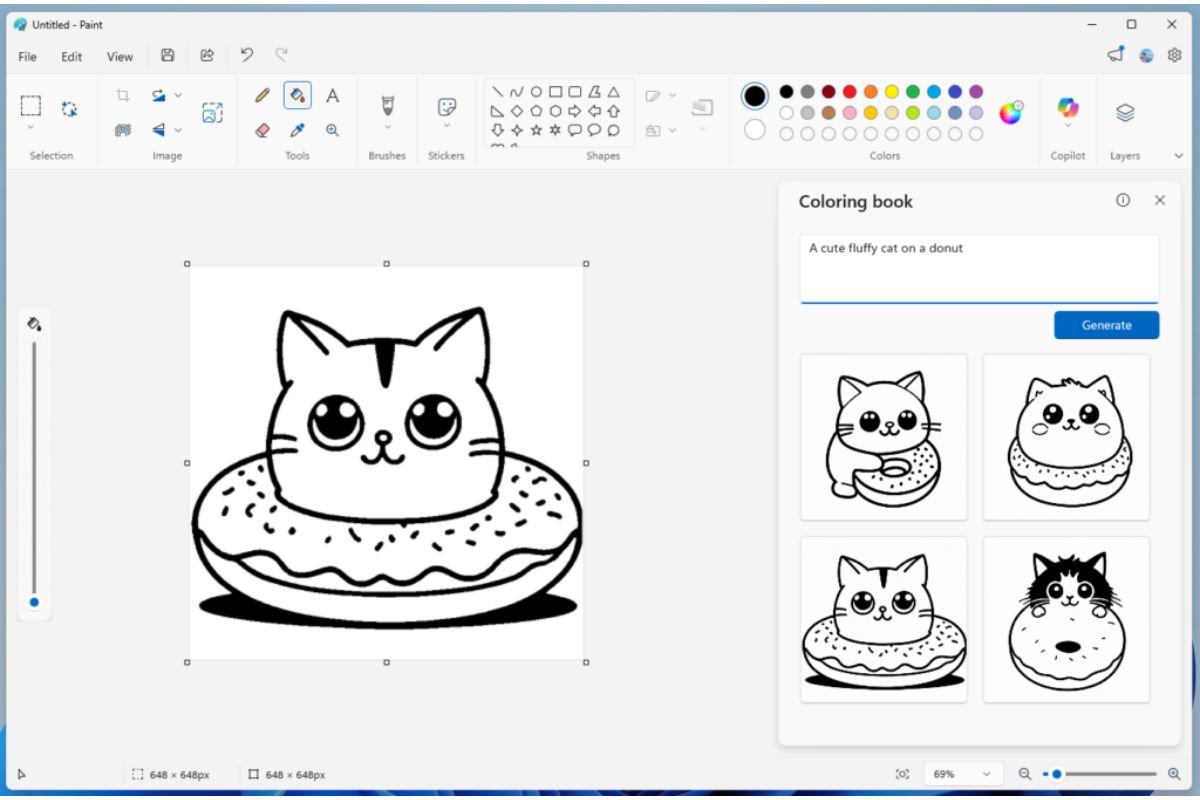
Photo Credit: Microsoft
Microsoft Paint’s Colouring Book will be available only on Copilot+ PCs
Click Here to Add Gadgets360 As A Trusted Source


Advertisement
Microsoft has started rolling out updates to Microsoft Paint and Notepad for those in the Windows Insider testing programme, introducing a range of new capabilities that tap artificial intelligence (AI). Among the changes, Paint is gaining an AI Colouring Book feature that lets users generate fully custom colouring pages by typing their desired text prompts. Apart from this, Notepad is also getting a couple of new features, including new Markdown syntax features. These have not yet rolled out globally, but will in the coming months.
Microsoft Adds New Paint and Notepad Features
In a Windows blog post, Microsoft announced the new features coming to Windows Insiders in the Canary and Dev Channels on Windows 11. The new AI colouring book feature in MS Paint uses AI to transform natural language text prompts into line art that can be coloured digitally or printed for hand colouring. Users can open Paint, choose the colouring book option, and the tool will show a text box.
Typing the prompt here will automatically produce a simplified outline resembling the colouring books for children. Notably, the colouring book will be available only on Copilot+ PCs. To use the colouring book, users will need to sign in with their Microsoft account.
Alongside the colouring book feature, Paint also received a fill tolerance slider. This control lets users adjust how precisely the Fill tool applies colour to a selected area, offering finer control over painting and shading effects. Users can move the slider to increase or decrease the area that gets filled when using the tool, which can help with detailed artwork or effects where bleed-over would otherwise be an issue.
In Notepad, the update brings several improvements to text formatting and AI text tools. Microsoft expanded Markdown support to include features such as strikethrough and nested lists, which can be accessed via keyboard shortcuts, a formatting toolbar, or directly by typing markdown syntax. Notepad also added a new welcome experience designed to highlight recent features to users when they first open the app.
The update also enhances the behaviour of existing AI text features, Write, Rewrite and Summarise, by making results appear sooner through streaming previews. Instead of waiting for the entire response to be generated before seeing anything, users can interact with snippets of output as they arrive. These AI features work whether the text is generated locally on the device or in the cloud, but require testers to be signed in with their Microsoft account to use them.
Comments
Get your daily dose of tech news, reviews, and insights, in under 80 characters on Gadgets 360 Turbo. Connect with fellow tech lovers on our Forum. Follow us on X, Facebook, WhatsApp, Threads and Google News for instant updates. Catch all the action on our YouTube channel.
Related Stories



Microsoft Paint Can Now Create AI-Generated Colouring Books, Notepad Updated With New Markdown Features


Advertisement
Follow Us




-
03:47
Best Upcoming Smartphones in June 2026 | Xiaomi 17T, Motorola Edge 70 Pro+, Galaxy A27 -
19:39
LIVE: Xiaomi 17T & Xiaomi TV FX Mini LED Series Launch | Get Closer to Every Detail -
04:26
Moto Buds 2 Review: Best TWS Under Rs. 3000? -
03:26
How To Apply For Driving Licence Online From Home? | Step-by-Step Guide 2026 -
05:58
Motorola Edge 70 Pro Review | Full Specs, Performance & Battery Test
-
7500 रुपये सस्ता मिल रहा 200 मेगापिक्सल कैमरा वाला Vivo स्मार्टफोन
-
WWDC 2026: iOS 27 से लेकर नए Siri AI के साथ Apple की ये 10 बड़ी घोषणाएं
-
Ultraviolette का धांसू ऑफर, नई बाइक खरीदने पर मिलेगा 30 हजार रुपये कैशबैक
-
Oppo Reno 16 जल्द होगा भारत में लॉन्च, Geekbench पर हुई लिस्टिंग
-
Infinix Smart 20 vs Moto G37 vs Realme P4 Lite 5G: खरीदने से पहले जान लें कौन सा रहेगा बेहतर
Advertisement
Popular on Gadgets
- Samsung Galaxy S26 Ultra
- Motorola Razr Fold
- ChatGPT
- OPPO Find N6
- Mobiles Under Rs. 40,000
- Vivo X300 Ultra
- Asus Zenbook S14
- iQOO 15
- Vivo X300 Pro
- Lenovo Yoga Slim 7i Aura Edition
- iQOO 15R
- Vivo X Fold 5
- Sony PlayStation 5
- HP OmniPad 12
- OnePlus Nord CE 6 Lite
- OnePlus Pad 4
- OPPO F33 Pro 5G
- Cryptocurrency
- HP OmniBook Ultra 14 (2026)
- iPhone 17
- Eureka Forbes AP 355 Room Air Purifier
- Latest Mobile Phones
- Compare Phones
Latest Gadgets
- Vivo V70 Lite 5G
- Infinix Smart 20
- Lava Bold N2 5G
- Motorola Edge 2026
- Honor X7e
- Huawei Nova 16 Ultra
- Huawei Nova 16 Pro
- Huawei Nova 16z
- Asus ExpertBook B5 Flip G2 (2026)
- Asus TUF 16 (2026)
- Asus Pad
- Poco Pad C1
- Amazfit Balance Ultra
- Amazfit Balance 3
- Sony Bravia 7II
- Lumio Vision 9 (2026)
- Acer Predator Atlas 8
- Asus ROG Ally
- IFB 1.5 Ton 3 Star Inverter Split AC (CI193GN22RGM3)
- IFB 2 Ton 3 Star Inverter Split AC (CI223GD32RGM3)

- About Us
- Sitemaps
- Feedback
- Archives
- Contact Us
- RSS
- Advertise
- Career
- Privacy Policy
- Ethics
- Editorial Policy
- Terms & Conditions
- Complaint Redressal
Download Our Apps
Available in Hindi
© Copyright Red Pixels Ventures Limited 2026. All rights reserved.