-
 OpenAI GPT-6 Introduces Intelligent UI With Interactive Tools, Faster Responses and More8 October 2026
 -
OpenAI Reveals Exactly How ChatGPT Predicts Your Age7 October 2026
-
OpenAI to Add Invisible Watermarks to ChatGPT Text in EU; Set to Test New Ad Format6 October 2026
-
ChatGPT Plus Is Free for One Month in India: Here’s How to Claim It5 October 2026
-
OpenAI Launches ChatGPT Space to Create, Organise Pages and Collaborate on Documents30 September 2026
ChatGPT Locked Chats Feature to Hide Sensitive Conversations Rolling Out to Free, Plus and Other Users
ChatGPT’s Locked Chats feature is rolling out gradually across Free, Go, Plus, Pro, Business, Enterprise, and Edu plans.
Written by Shaurya Tomer, Edited by Rohan Pal | Updated: 21 October 2026 15:03 IST
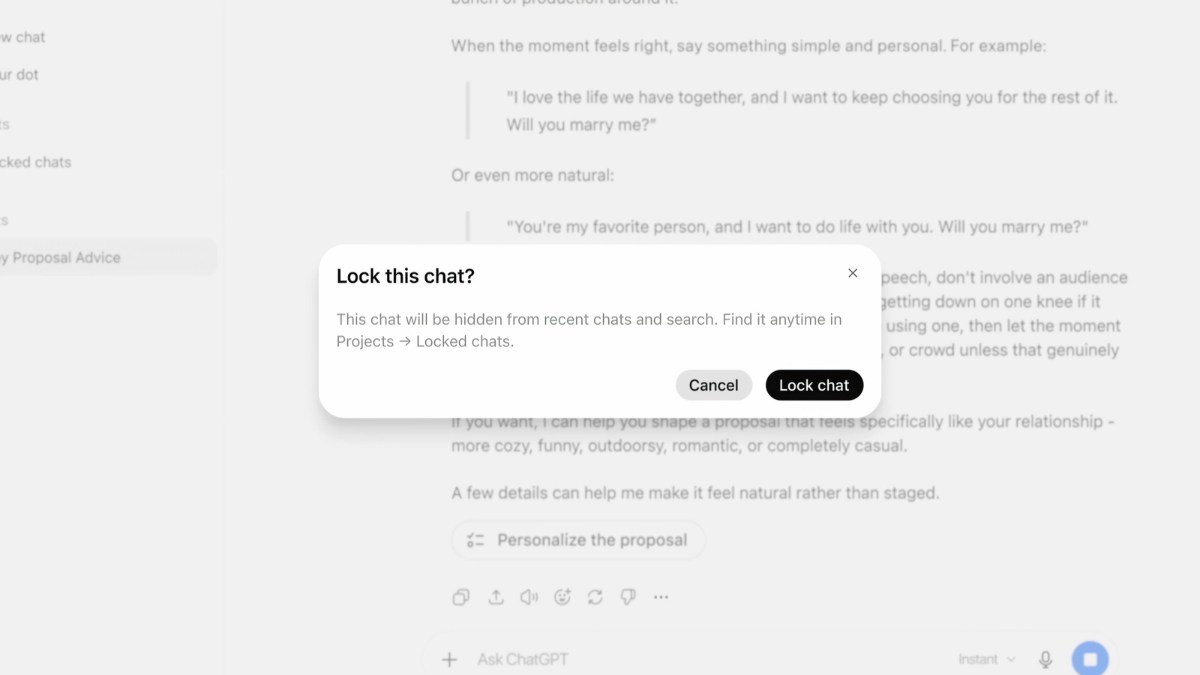
Photo Credit: OpenAI
Locked Chats are saved in the user's account but are hidden from regular chat history
Click Here to Add Gadgets360 As A Trusted Source

Advertisement
OpenAI announced a new privacy feature for ChatGPT on Wednesday. Called Locked Chats, it lets users protect select conversations from being viewed by others who may have access to their devices. The San Francisco-based AI company said that Locked Chats moves conversations out of the regular chat history and search results into a protected section that requires authentication for access. Users can secure conversations with a four-digit PIN or use biometric authentication on supported devices.
Locked Chats on ChatGPT
On a support page, OpenAI said that Locked Chats remain saved in the user's account but are hidden from regular chat history, pinned chats, and standard conversation search. Users can find such conversations under Projects > Locked chats. To gain access, they need to enter the four-digit account PIN on the web and desktop.
Meanwhile, eligible Android and iOS devices also support Face ID, Touch ID, or other forms of biometric authentication.
New messages sent in locked chats will not update the memory used in regular conversations, as per OpenAI. Locking a chat, however, does not remove information ChatGPT remembered before the conversation was locked. Such conversations can also use relevant information from regular Memory, if the feature is enabled.
OpenAI said that instead of end-to-end encryption, Locked Chats is aimed at bolstering privacy on ChatGPT with an additional layer. The feature does not change OpenAI's chat retention policies or the user's existing setting for whether conversations can be used to improve its models.
How to Lock a Chat in ChatGPT
- Open ChatGPT and find the conversation you want to protect.
- Select the three-dot menu (•••) next to the chat.
- Select Lock chat and confirm your choice.
- Create a four-digit account PIN if prompted, or enter your existing PIN.
The conversation will move to Projects > Locked chats and disappear from regular chat history and search. To open it later, users can navigate to Locked chats and authenticate with their PIN or a supported device authentication method. The company has warned that resetting a forgotten account PIN will permanently delete all locked chats and content protected only by the previous PIN.
ChatGPT's Locked Chats feature is rolling out gradually across Free, Go, Plus, Pro, Business, Enterprise, and Edu plans. It is also available through the ChatGPT apps for macOS and Windows desktop platforms. As per OpenAI, some conversation types, including temporary chats, archived chats, group chats, and chats created from shared links, cannot be locked. Further, Locked Chats in Enterprise and Edu workspaces are subject to applicable organisational policies and compliance requirements.
Comments
Get your daily dose of tech news, reviews, and insights, in under 80 characters on Gadgets 360 Turbo. Connect with fellow tech lovers on our Forum. Follow us on X, Facebook, WhatsApp, Threads and Google News for instant updates. Catch all the action on our YouTube channel.
Related Stories




ChatGPT Locked Chats Feature to Hide Sensitive Conversations Rolling Out to Free, Plus and Other Users


Advertisement
Follow Us




-
04:17
[Sponsored] LG NANO 4K UHD AI TV NU885: Gemini Search, Dolby Atmos & 5 Years of Updates -
00:57
[Sponsored] Samsung Galaxy Z Fold8 My Fan Cam in Action: Find the Moment, Then Share It -
01:41
[Sponsored] What Do You Need To Know Before Your Next Run? | Samsung Galaxy Watch Ultra2 -
01:32
[Sponsored] Big Day Tomorrow? Prep Today | Samsung Galaxy Watch Ultra2 -
04:37
[Sponsored]: CP PLUS CarKam CP-F89B: 4K Dashcam With Rear Camera, GPS & Emergency Recording
-
SBI डाटा लीक, क्या हुआ और कैसा डाटा था, अकाउंट है तो क्या करना चाहिए?
-
भारत में गिरी स्मार्टफोन की बिक्री, फोन महंगे होने से 26% कम हुई शिपमेंट
-
Lava Aura Curve 5G: 6000mAh बैटरी, 50 मेगापिक्सल कैमरा के साथ पेश, जानें
-
Poco X8s लॉन्च हुआ 6300mAh बैटरी फीचर, IP68 रेटिंग के साथ
-
OnePlus Ace 7 सीरीज में गेमिंग के लिए मिलेगा एक्टिव कूलिंग सिस्टम
Advertisement
Popular on Gadgets
- Samsung Galaxy S26 Ultra
- Motorola Razr Fold
- ChatGPT
- OPPO Find N6
- Mobiles Under Rs. 40,000
- Vivo X300 Ultra
- Asus Zenbook S14
- iQOO 15
- Vivo X300 Pro
- Lenovo Yoga Slim 7i Aura Edition
- iQOO 15R
- Vivo X Fold 5
- Sony PlayStation 5
- HP OmniPad 12
- OnePlus Nord CE 6 Lite
- OnePlus Pad 4
- OPPO F33 Pro 5G
- Cryptocurrency
- HP OmniBook Ultra 14 (2026)
- iPhone 17
- Eureka Forbes AP 355 Room Air Purifier
- Latest Mobile Phones
- Compare Phones
Latest Gadgets
- Poco X8s
- Samsung Galaxy F70 5G
- Tecno Spark 50S 5G
- Vivo Y600s Pro
- Vivo Y32 (2026)
- Infinix Smart 20 HD
- Vivo V80
- Vivo S2 FE
- HP ZBook Ultra G3a
- Dell Pro Rugged 14
- Amazon Alexa Tablet 8
- Amazon Alexa Tablet 11
- Pebble Qore 2
- Amazfit T-Rex Dual Solar
- Toshiba 65-Inch 4K Ultra HD Smart Mini LED QLED TV (65Z670SP)
- Haier M70 Mini LED 65-inch
- Acer Predator Atlas 8
- Asus ROG Ally
- Blue Star 1.5 Ton 5 Star Inverter Split AC (IE518ZNURS)
- Blue Star 2 Ton 3 Star Inverter Window AC (WIE324L)

- About Us
- Sitemaps
- Feedback
- Archives
- Contact Us
- RSS
- Advertise
- Career
- Privacy Policy
- Ethics
- Editorial Policy
- Terms & Conditions
- Complaint Redressal
Download Our Apps
Available in Hindi
© Copyright Red Pixels Ventures Limited 2026. All rights reserved.