-
 Axis Bank Introduces Aadhaar Face Authentication: How to Update Your Axis Bank Mobile Number1 April 2026
 -
Apple, Samsung and Other Firms Reportedly Push Back on Preinstallation of Aadhaar App on Phones20 March 2026
-
How to Register on the New Aadhaar App: A Step-by-Step Guide1 February 2026
-
New Aadhaar App: How to Change Your Mobile Number and Address Online29 January 2026
-
How to Share Your Contact Card Using the New Aadhaar App: A Step-by-Step Guide28 January 2026
UIDAI Urges Users to Download New Aadhaar App; mAadhaar App to Be 'Retired' Soon
UIDAI said that the new Aadhaar app is designed to offer a “smarter, faster, and more secure digital journey.”
Written by Shaurya Tomer, Edited by David Delima | Updated: 15 May 2026 18:25 IST
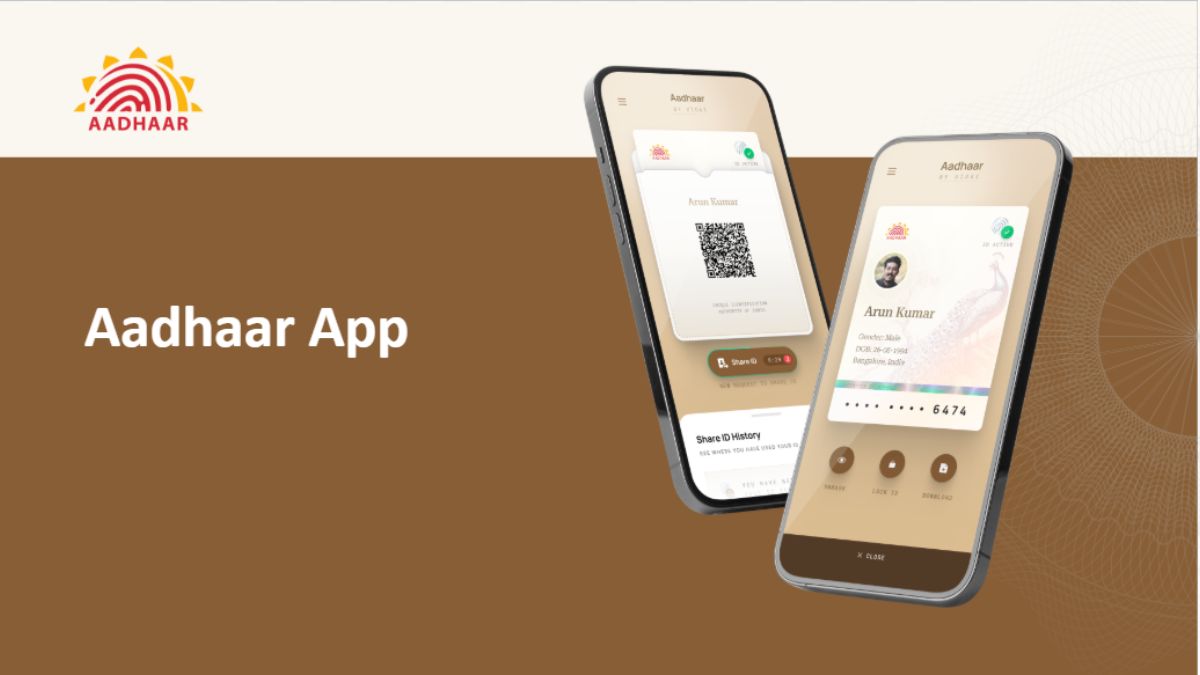
New Aadhaar app allows cardholders to store their Aadhaar card in a verifiable credential digital format
Click Here to Add Gadgets360 As A Trusted Source

Advertisement
The Unique Identification Authority of India (UIDAI) on Friday announced that the existing mAadhaar app will soon be discontinued. It has encouraged users to migrate to the recently launched Aadhaar app. Available on both the App Store for iPhone and the Google Play Store for Android, it is aimed at helping citizens securely store their Aadhaar information, keep it updated, and share it with others. The new app carries features like QR-based Aadhaar sharing, face authentication, biometric lock controls, and selective information sharing.
UIDAI Confirms mAadhaar App Is Going Away
In an official post on X, UIDAI confirmed that the mAadhaar app is “retiring soon”. The statutory body also highlighted that the new Aadhaar app is designed to offer a “smarter, faster, and more secure digital journey.” The new Aadhaar app supports 13 Indian languages for improved accessibility across regions.
The #mAadhaar App is retiring soon. Now experience a smarter, faster, and more secure digital journey with the new #AadhaarApp. From secure QR-based #Aadhaar sharing to enhanced privacy controls and seamless access to Aadhaar services — the new app is designed to make your… pic.twitter.com/snfeUx4Rgr
— Aadhaar (@UIDAI) May 15, 2026
According to UIDAI, one of the biggest additions in the new Aadhaar app is support for QR-based Aadhaar sharing and offline identity verification. It allows users to verify their identity without revealing their Aadhaar number through a feature called Selective Share. This enables them to choose exactly what information they want to share, including their photograph, name, age, gender, mobile number, address, or Aadhaar status. T
The app also generates a QR code that can be scanned at authorised terminals for identity verification. UIDAI says the app also allows users to update Aadhaar-linked mobile numbers and addresses directly. They can add up to five family members to their account through the Profile section.
There are biometric locking controls, too. It can be used to lock a citizen's fingerprint, face, and iris authentication data to prevent unauthorised usage. The lock can later be removed through the app if required. However, UIDAI notes that losing access to the linked phone number or smartphone may also lock users out of Aadhaar-related services temporarily.
UIDAI has not clarified whether data stored inside the older mAadhaar app will not automatically transfer to the new Aadhaar app. Existing users will therefore need to manually set up their profiles again after downloading the updated application.
How to Download and Register for the New Aadhaar App
The new Aadhaar app is available to download on the Google Play Store and App Store for Android and iOS, respectively.
- Open the Aadhaar app and select your preferred language
- Register for the app, either using your Aadhaar-linked mobile number or a different mobile number. The latter will require some extra authentication.
- Enter your 12-digit Aadhaar number and complete the SMS verification by entering the OTP
- Once completed, you will be prompted to perform a facial authentication. Ensure that there is sufficient lighting in the background and remove spectacles, if any.
- Now, enter a six-digit password that will be used to access the app
- You will now be redirected to the app's home page, where you can access your Aadhaar card, share it with others, and add a biometric lock
Comments
Get your daily dose of tech news, reviews, and insights, in under 80 characters on Gadgets 360 Turbo. Connect with fellow tech lovers on our Forum. Follow us on X, Facebook, WhatsApp, Threads and Google News for instant updates. Catch all the action on our YouTube channel.
Related Stories





Advertisement
Follow Us




-
![[Sponsored] Samsung Galaxy Z Fold8, Fold8 Ultra](https://www.gadgets360.com/static/desktop/images/spacer.png)
00:21
[Sponsored] Samsung Galaxy Z Fold8, Fold8 Ultra -
03:41
[Sponsored] Samsung Galaxy Z Fold8: How It Fits Into an Actor’s Busy Day | Camera, Multitasking & More -
09:53
iPhone 18 Goes On Sale In India: Huge Crowds, Long Queues At Apple Stores -
06:32
Google Pixel 11 Pro XL Review: The Most Exciting Pixel Yet? | 120X Zoom + Tensor G6 -
05:20
Samsung Galaxy Watch Ultra 2 Review: Is This the Best Android Smartwatch?
-
Amazon Great Indian Festival: सेल से पहले 6 मोबाइल पर Early Bird Deals
-
Vivo Y600i हुआ लॉन्च; 8000mAh बैटरी और ड्रॉप प्रोटेक्शन के साथ आया फोन
-
लैपटॉप की बैटरी हेल्थ ऐसे करें चेक, नहीं होगा नुकसान
-
Amazon Great Indian Festival Sale 2026: सेल से पहले ही ₹4 हजार सस्ता मिल रहा है 7000mAh बैटरी वाला Oppo F33 5G
-
iPhone 17, iPhone 15 Flipkart BBD सेल में ₹20 हजार तक सस्ते हुए!
Advertisement
Popular on Gadgets
- Samsung Galaxy S26 Ultra
- Motorola Razr Fold
- ChatGPT
- OPPO Find N6
- Mobiles Under Rs. 40,000
- Vivo X300 Ultra
- Asus Zenbook S14
- iQOO 15
- Vivo X300 Pro
- Lenovo Yoga Slim 7i Aura Edition
- iQOO 15R
- Vivo X Fold 5
- Sony PlayStation 5
- HP OmniPad 12
- OnePlus Nord CE 6 Lite
- OnePlus Pad 4
- OPPO F33 Pro 5G
- Cryptocurrency
- HP OmniBook Ultra 14 (2026)
- iPhone 17
- Eureka Forbes AP 355 Room Air Purifier
- Latest Mobile Phones
- Compare Phones
Latest Gadgets
- Vivo Y600i
- Mivi One 5G
- Xiaomi 18 Pro Max
- Motorola Signature 27
- OPPO Find X10 E
- OnePlus N6 Lite 4G
- Ai+ Nova 2 Power 5G
- Lava Virat Curve 5G
- Microsoft Surface Laptop, 13-inch (2nd Edition)
- Lenovo LOQ 15AHP11
- Microsoft Surface Pro, 12-inch (2nd Edition)
- Xiaomi Pad 9 Pro
- Amazfit T-Rex Dual Solar
- OPPO Watch S2
- Toshiba 65-Inch 4K Ultra HD Smart Mini LED QLED TV (65Z670SP)
- Haier M70 Mini LED 65-inch
- Acer Predator Atlas 8
- Asus ROG Ally
- Blue Star 1.5 Ton 5 Star Inverter Split AC (IE518ZNURS)
- Blue Star 2 Ton 3 Star Inverter Window AC (WIE324L)

- About Us
- Sitemaps
- Feedback
- Archives
- Contact Us
- RSS
- Advertise
- Career
- Privacy Policy
- Ethics
- Editorial Policy
- Terms & Conditions
- Complaint Redressal
Download Our Apps
Available in Hindi
© Copyright Red Pixels Ventures Limited 2026. All rights reserved.