-
 Aadhaar Enabled Payment System (AePS) Explained: What It Is, How It Works, Features and More31 May 2026
 -
UIDAI Urges Users to Download New Aadhaar App; mAadhaar App to Be 'Retired' Soon15 May 2026
-
How to Add Aadhaar Card to Google Wallet: A Step-By-Step Guide28 April 2026
-
Google Wallet Adds Support for Aadhaar Digital ID in India With Support for In-Person and Remote Verification28 April 2026
-
Axis Bank Introduces Aadhaar Face Authentication: How to Update Your Axis Bank Mobile Number1 April 2026
- Home
- How to
- How to Features
- How to Register on the New Aadhaar App: A Step by Step Guide
How to Register on the New Aadhaar App: A Step-by-Step Guide
The new app is dubbed Aadhaar, and it is currently available on both the Play Store and the App Store.
Written by Akash Dutta, Edited by Ketan Pratap | Updated: 1 February 2026 16:00 IST
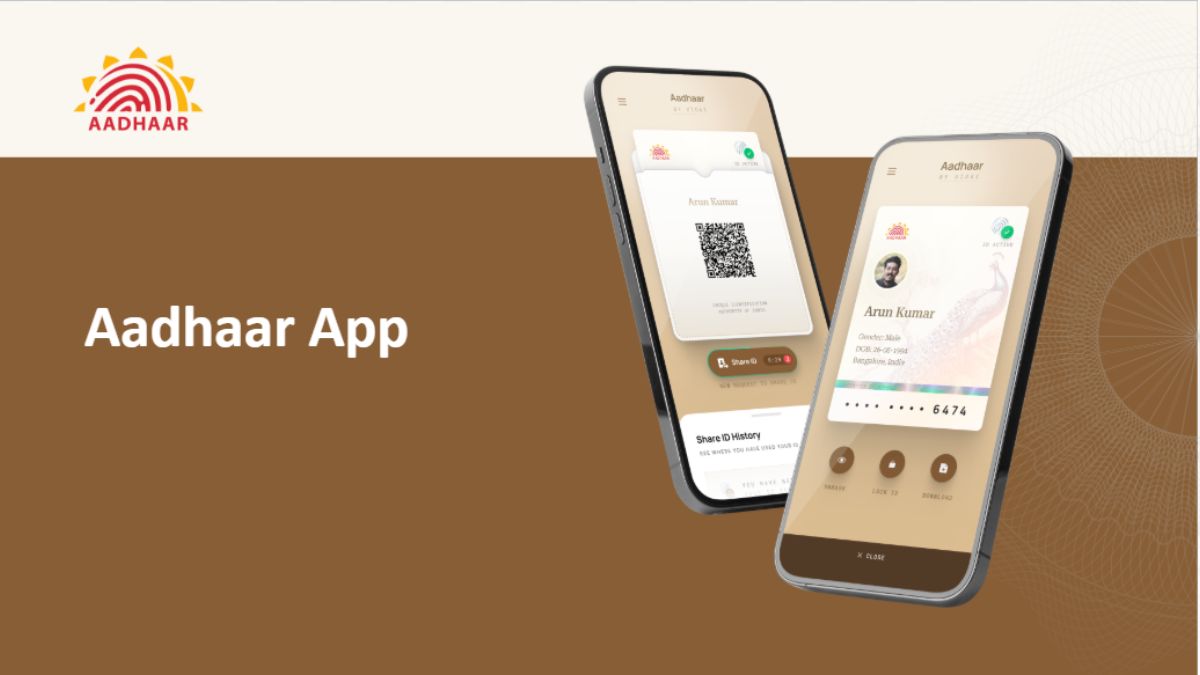
Photo Credit: UIDAI
The new app lets users store the Aadhaar cards of their family
Click Here to Add Gadgets360 As A Trusted Source

Advertisement
The new Aadhaar app was formally launched for everyone on Wednesday. With this, all the features and capabilities are now available to all Aadhaar Card holders in India. The new app is aimed at a digital-first, user-friendly platform that doubles as a place to store and share their details and to avail of various Aadhaar-related services. The Unique Identification Authority of India (UIDAI) highlighted that the app is aimed at broad digital identity usage. However, before you can use the app, you need to register for it, which can be tricky for some individuals.
Here, we have shared a detailed step-by-step guide for you to understand the requirements and learn how to register for the Aadhaar app without any hassle. Read on to know the steps.
The New Aadhaar App: Details
UIDAI's new app streamlines the Aadhaar experience by going paperless. Users can store up to five family ID cards digitally, share masked IDs, and scan Aadhaar QR codes with ease. It also lets users update the Aadhaar-linked mobile number and update their present and permanent address. These services can be availed via a dedicated tab that can be accessed by navigating through the bottom bar on the home page.
The app also introduces offline verification, allowing citizens to confirm their identity without revealing their Aadhaar number. Through the "Selective Share" feature, users can choose exactly which details to disclose, such as photo, name, or address. Additionally, biometric locking provides a layer of security that prevents unauthorised fingerprint, face, or iris scans. While this lock can be managed directly in the app, users should note that losing access to their registered phone or mobile number will result in being locked out of these Aadhaar services.
How to Register on the New Aadhaar App
Before you start the registration process, it is recommended to ensure that your smartphone has the Aadhaar-linked SIM card enabled on it. While it is possible to register from a different number as well, that will prevent the user from accessing the Aadhaar-related services. It is also recommended to do the registration at a place with good connectivity to avoid any delays and lags. Further, keep your physical Aadhaar card (or a digital copy) handy as you will need to enter your Aadhaar number.
- Get the Aadhaar app from the Play Store (Android) or the App Store (iOS). Ensure the developer is listed as UIDAI.
- Open the app, choose your preferred language, and accept the terms and conditions.
- Tap on the "Register Aadhaar" tab on the main dashboard.
- Once the process begins, type your 12-digit Aadhaar number
- Enter the mobile number linked to your Aadhaar. You will receive an OTP to verify your device.
- After that, follow the instructions to complete your face authentication. You will have to hold the phone in a way that the front camera can capture your face. Then blink twice.
- Next, you will have to create a six-digit PIN. Make sure to write it down somewhere, as you will have to enter the code when accessing the app.
And that's it. Once done, you will be redirected to the home page, and you will be able to see your Aadhaar details on the app.
Comments
Get your daily dose of tech news, reviews, and insights, in under 80 characters on Gadgets 360 Turbo. Connect with fellow tech lovers on our Forum. Follow us on X, Facebook, WhatsApp, Threads and Google News for instant updates. Catch all the action on our YouTube channel.
Related Stories





Advertisement
Follow Us




-

05:20
Samsung Galaxy Watch Ultra 2 Review: Is This the Best Android Smartwatch? -
07:01
Samsung Galaxy Z Fold 8 Review: Is This the Best Foldable Phone? -
06:39
Samsung Galaxy Z Fold8 Ultra Review: Cameras, Battery, Performance Tested -
04:33
[Sponsored] JBL Live 780NC: Great Sound, Perfect Comfort, Smart ANC & 80-Hour Battery -
12:04
[Partner Content] OPPO Reno16 Series Deep Dive: Built for Creators?
Advertisement
Popular on Gadgets
- Samsung Galaxy S26 Ultra
- Motorola Razr Fold
- ChatGPT
- OPPO Find N6
- Mobiles Under Rs. 40,000
- Vivo X300 Ultra
- Asus Zenbook S14
- iQOO 15
- Vivo X300 Pro
- Lenovo Yoga Slim 7i Aura Edition
- iQOO 15R
- Vivo X Fold 5
- Sony PlayStation 5
- HP OmniPad 12
- OnePlus Nord CE 6 Lite
- OnePlus Pad 4
- OPPO F33 Pro 5G
- Cryptocurrency
- HP OmniBook Ultra 14 (2026)
- iPhone 17
- Eureka Forbes AP 355 Room Air Purifier
- Latest Mobile Phones
- Compare Phones
Latest Gadgets
- iPhone Duo
- OPPO A7 Pro
- Huawei Mate XT 2 Ultimate Design
- Realme 16 Pro Harry Potter Edition
- Samsung Galaxy A07s
- Huawei Pura X View
- Tecno Camon Slim 5G
- iQOO Z11xa
- Acer Aspire G 3D 16
- Acer Swift Air 16 (2026)
- Xiaomi Pad 9 Pro
- Xiaomi Pad 9
- Apple Watch Ultra 4
- Apple Watch Series 12
- Haier M70 Mini LED 65-inch
- Xiaomi TV FX Mini LED 65
- Acer Predator Atlas 8
- Asus ROG Ally
- Blue Star 1.5 Ton 5 Star Inverter Split AC (IE518ZNURS)
- Blue Star 2 Ton 3 Star Inverter Window AC (WIE324L)

- About Us
- Sitemaps
- Feedback
- Archives
- Contact Us
- RSS
- Advertise
- Career
- Privacy Policy
- Ethics
- Editorial Policy
- Terms & Conditions
- Complaint Redressal
Download Our Apps
Available in Hindi
© Copyright Red Pixels Ventures Limited 2026. All rights reserved.