-
 Flipkart Big Billion Days Sale 2026: Samsung Galaxy S25, Galaxy S25 FE and More Teased to Get Discounts30 September 2026
 -
Galaxy S27 Ultra Camera Processing May Change From Galaxy S26 Ultra; Might Drop Dedicated 3X Telephoto Lens29 September 2026
-
Samsung One UI 9 Update Rolls Out With New Features for Galaxy S26 Users in the US: Report29 September 2026
-
Samsung Galaxy Tab S12+, Galaxy Tab S12 Ultra Design Revealed in New Leak; Spotted in EPREL Database29 September 2026
-
Samsung Galaxy Z Fold 8, Galaxy S25 Series Tipped to Receive Price Hikes After Galaxy A56 and Galaxy A3629 September 2026
Samsung SmartThings Gets Major Redesign on iPhone With New Home Tab, Routine Insights Feature, and More
SmartThings app for iOS features a redesigned Home tab that lets users access their frequently used features and essential information directly from the Home screen.
Written by Nithya P Nair, Edited by Rohan Pal | Updated: 30 September 2026 12:59 IST
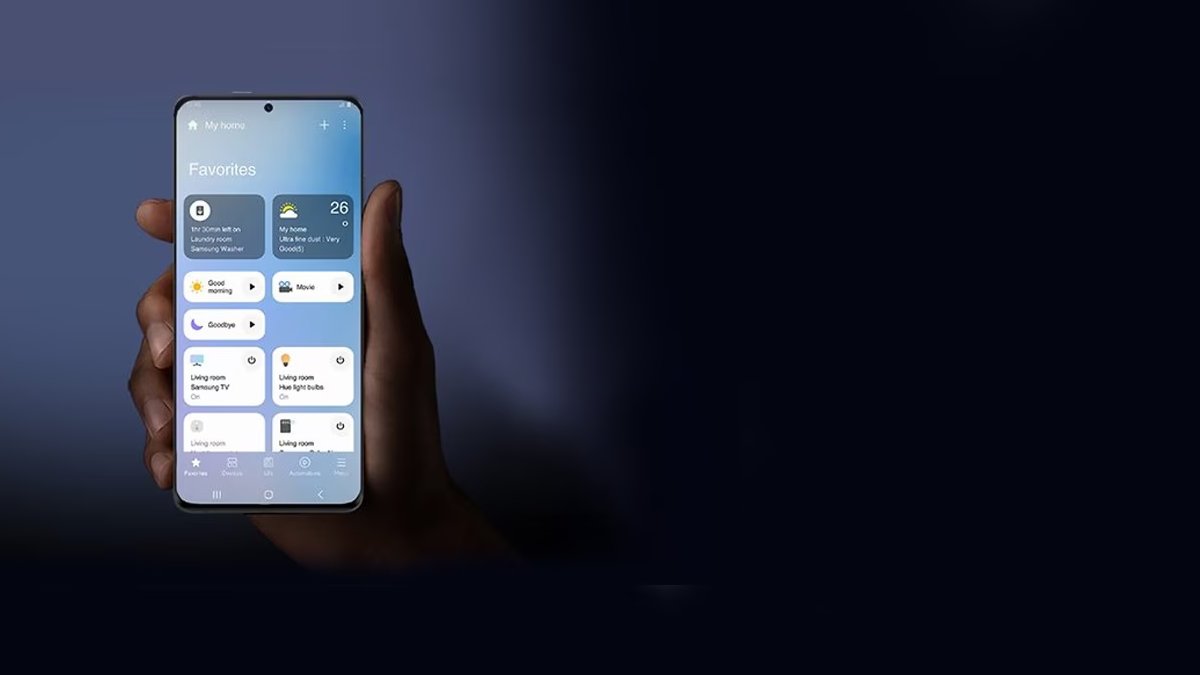
Photo Credit: Samsung
New SmartThings iOS update introduces a refreshed visual design
Click Here to Add Gadgets360 As A Trusted Source

Advertisement
Samsung's SmartThings app is designed to control, monitor and automate all smart home devices with a few taps. The South Korean tech brand has now started rolling out a significant redesign for the SmartThings app, introducing a refreshed interface, smaller device cards, and new controls for connected devices. The latest update also includes a Routine Insights feature. The redesigned SmartThings app is rolling out to iPhone users. The company could bring it to Android users through a future update.
Samsung Rolling Out SmartThings Redesign
SmartThings app version 1.7.51 available through the App Store includes a refreshed design matching Apple's Liquid Glass design language. The release notes say it includes a redesigned Home tab and adds a new Routine Insights feature that offers fast control of devices connected to a hub.
As spotted by SamMobile, the interface features a lighter colour palette. The five primary tabs in the app remain unchanged from the previous version, but Samsung seems to have redesigned the navigation with a floating bar featuring translucent elements.
Tapping the device icon will activate its primary function, while tapping elsewhere on the card opens the device's full controls. The redesigned SmartThings app features compact device and routine cards, and users can change the size. The Home tab now shows a summary card with insights about weekly or monthly power usage, remote controls for smart TVs and other notifications. The new design also moved the Favorites section on the Home tab, allowing users to quickly access the pinned devices and routines.
Routine Insights feature identifies the three routines that users activate most frequently and displays their recent activity. The virtual remote in the new version includes a dedicated Light Mode. The TV hub gets a floating navigation design in the latest update with For You, Featured, and Settings sections. The new design also features a home QR code, location selector, and overflow menu in a separate pill-shaped layout at the top of the screen.
Samsung is likely to roll out the SmartThings redesign to Android users soon.
Comments
Get your daily dose of tech news, reviews, and insights, in under 80 characters on Gadgets 360 Turbo. Connect with fellow tech lovers on our Forum. Follow us on X, Facebook, WhatsApp, Threads and Google News for instant updates. Catch all the action on our YouTube channel.
Related Stories
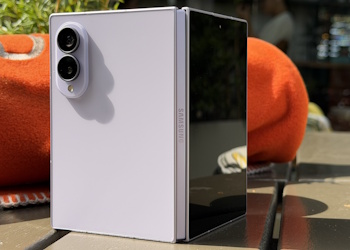

Samsung SmartThings Gets Major Redesign on iPhone With New Home Tab, Routine Insights Feature, and More


Advertisement
Follow Us




-
00:21
[Sponsored] Samsung Galaxy Z Fold8, Fold8 Ultra -
03:41
[Sponsored] Samsung Galaxy Z Fold8: How It Fits Into an Actor’s Busy Day | Camera, Multitasking & More -
09:53
iPhone 18 Goes On Sale In India: Huge Crowds, Long Queues At Apple Stores -
06:32
Google Pixel 11 Pro XL Review: The Most Exciting Pixel Yet? | 120X Zoom + Tensor G6 -
05:20
Samsung Galaxy Watch Ultra 2 Review: Is This the Best Android Smartwatch?
-
iQOO Pad Ultra 165Hz AMOLED डिस्प्ले के साथ हुआ लॉन्च
-
Apple Pay की भारत में एंट्री, सीधा iPhone और स्मार्टवॉच से होगी पेमेंट
-
भारत में बच्चों के सोशल मीडिया पर लगेगा बैन? सरकार उठा सकती है बड़ा कदम
-
Motorola की वाइड फोल्डेबल स्मार्टफोन लॉन्च करने की तैयारी, 5,000mAh हो सकती है बैटरी
-
Samsung Galaxy S27 Ultra के कैमरा फीचर्स होंगे कमाल! फोटोग्राफी में बड़े अपग्रेड लीक
Advertisement
Popular on Gadgets
- Samsung Galaxy S26 Ultra
- Motorola Razr Fold
- ChatGPT
- OPPO Find N6
- Mobiles Under Rs. 40,000
- Vivo X300 Ultra
- Asus Zenbook S14
- iQOO 15
- Vivo X300 Pro
- Lenovo Yoga Slim 7i Aura Edition
- iQOO 15R
- Vivo X Fold 5
- Sony PlayStation 5
- HP OmniPad 12
- OnePlus Nord CE 6 Lite
- OnePlus Pad 4
- OPPO F33 Pro 5G
- Cryptocurrency
- HP OmniBook Ultra 14 (2026)
- iPhone 17
- Eureka Forbes AP 355 Room Air Purifier
- Latest Mobile Phones
- Compare Phones
Latest Gadgets
- HMD Vibe 2 Pro 5G
- OPPO K14 Plus 5G
- Lava Shark 2 Pro 5G
- Ai+ Pulse 2 FE
- OPPO Reno 16t
- Itel Zeno 300
- Vivo Y600i
- Mivi One 5G
- Dell 14 Plus 2-in-1 (AMD Ryzen AI 7 350, 2025)
- Microsoft Surface Laptop, 13-inch (2nd Edition)
- iQOO Pad Ultra
- Ai+ NovaTab
- Amazfit T-Rex Dual Solar
- OPPO Watch S2
- Toshiba 65-Inch 4K Ultra HD Smart Mini LED QLED TV (65Z670SP)
- Haier M70 Mini LED 65-inch
- Acer Predator Atlas 8
- Asus ROG Ally
- Blue Star 1.5 Ton 5 Star Inverter Split AC (IE518ZNURS)
- Blue Star 2 Ton 3 Star Inverter Window AC (WIE324L)

- About Us
- Sitemaps
- Feedback
- Archives
- Contact Us
- RSS
- Advertise
- Career
- Privacy Policy
- Ethics
- Editorial Policy
- Terms & Conditions
- Complaint Redressal
Download Our Apps
Available in Hindi
© Copyright Red Pixels Ventures Limited 2026. All rights reserved.