-
 iOS 27 Update for iPhone Rolling Out Today: How to Download, India Release Time, Supported iPhones and More14 September 2026
 -
Google Rolls Out Gemini App for Windows With Video Generation Support, Multi Agents11 September 2026
-
iOS 27: Top New Features, List of Compatible Devices, and More10 September 2026
-
Flipkart Takes on Blinkit and Zepto With New Dedicated Minutes App in India9 September 2026
-
Apple Plans to Make New Changes to App Store to Increase Margins and Recurring Revenue: Report7 September 2026
Vine Launches It First App for Windows 10 PCs and Tablets
By Ketan Pratap | Updated: 5 May 2016 18:15 IST
Click Here to Add Gadgets360 As A Trusted Source

Advertisement
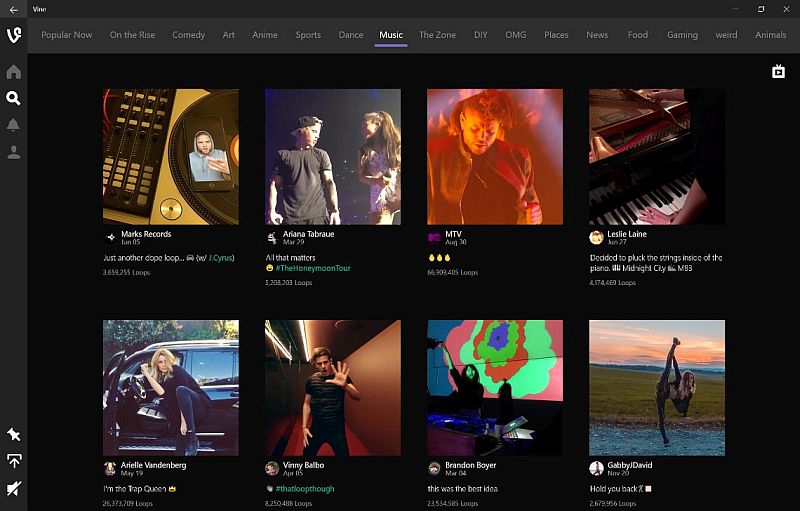
Vine, the popular six-second video sharing service, has finally launched its first app for Windows 10 desktops and tablets.
The company announced the news on Wednesday in a blog and said, "Today we're releasing a new app: Vine for Windows 10 computers and tablets. Now you can watch entertaining stories and your favourite channels and accounts on larger Windows 10 devices."
Users can download the new Vine for Windows 10 desktop and tablets from the Windows Store. Windows 10 users can share a Vine of their own either by uploading them manually, or just dragging and dropping videos right from their desktops.
- I started with cooling as the priority and somehow ended up comparing apps
- I never realised how much storage speed matters until my old phone started taking forever to open big apps
- There is a common myth that many apps are not fully optimized for foldable devices.
- On the Samsung Galaxy Z Fold 8 Ultra, you do not need to open multiple apps just to check multiple things
- What apps look dramatically better on the Samsung Galaxy Z Fold8 when unfolded?
The new Vine app comes with Windows 10 native features including Live Tiles, an adaptive UI, and Drag and Drop.
The Vine app will offer Explore option which will include channels such as Music, Dance, Comedy, and Sports. Additionally, users will also receive updates about trends and viral Vines. "You can enjoy all of this great content even if you don't yet have a Vine account," said Vine.
Users for quick access to their favourite Vine channels and accounts can pin it to Start menu. Once an account pinned, users will see a preview of their latest Vines in the Live Tile.
Vine app on Windows 10 desktop or tablets can play videos in a loop. The company notes, "Vines play back to back, similar to the experience you get when you use the Watch button in our mobile apps. If you want to make a post loop so you can watch it over and over again, mouse over it or touch the screen if you have a touch-enabled device. You can also create and share a Vine of your own by uploading a video from your PC."
Affiliate links may be automatically generated - see our ethics statement for details.
Comments
Get your daily dose of tech news, reviews, and insights, in under 80 characters on Gadgets 360 Turbo. Connect with fellow tech lovers on our Forum. Follow us on X, Facebook, WhatsApp, Threads and Google News for instant updates. Catch all the action on our YouTube channel.
Related Stories




Advertisement
Follow Us




-

09:53
iPhone 18 Goes On Sale In India: Huge Crowds, Long Queues At Apple Stores -
06:32
Google Pixel 11 Pro XL Review: The Most Exciting Pixel Yet? | 120X Zoom + Tensor G6 -
05:20
Samsung Galaxy Watch Ultra 2 Review: Is This the Best Android Smartwatch? -
07:01
Samsung Galaxy Z Fold 8 Review: Is This the Best Foldable Phone? -
06:39
Samsung Galaxy Z Fold8 Ultra Review: Cameras, Battery, Performance Tested
-
10 मिनट में घर पहुंचेंगे iPhone 18 Pro, Pro Max: सेल हुई शुरू
-
Lava ने लॉन्च किया 6000mAh बैटरी वाला Bold N4 Pro 5G
-
itel Zeno 300 भारत में होगा लॉन्च, मिलेगी 6,000mAh बैटरी और डुअल कैमरा
-
₹1 में BSNL दे रही फ्री SIM, 24GB डेटा, अनलिमिटिड कॉलिंग और बहुत कुछ
-
Ai+ Nova 2 Power जल्द होगा भारत में लॉन्च, MediaTek Dimensity 7100 चिपसेट
Advertisement
Popular on Gadgets
- Samsung Galaxy S26 Ultra
- Motorola Razr Fold
- ChatGPT
- OPPO Find N6
- Mobiles Under Rs. 40,000
- Vivo X300 Ultra
- Asus Zenbook S14
- iQOO 15
- Vivo X300 Pro
- Lenovo Yoga Slim 7i Aura Edition
- iQOO 15R
- Vivo X Fold 5
- Sony PlayStation 5
- HP OmniPad 12
- OnePlus Nord CE 6 Lite
- OnePlus Pad 4
- OPPO F33 Pro 5G
- Cryptocurrency
- HP OmniBook Ultra 14 (2026)
- iPhone 17
- Eureka Forbes AP 355 Room Air Purifier
- Latest Mobile Phones
- Compare Phones
Latest Gadgets
- Samsung Galaxy A08
- Itel Muzik 450L
- OPPO K14 Lite
- Samsung Galaxy A18 4G
- iPhone Duo
- OPPO A7 Pro
- Huawei Mate XT 2 Ultimate Design
- Realme 16 Pro Harry Potter Edition
- Asus Vivobook S14 (S5452MA)
- Acer Aspire G 3D 16
- Xiaomi Pad 9 Pro
- Xiaomi Pad 9
- Apple Watch Ultra 4
- Apple Watch Series 12
- Haier M70 Mini LED 65-inch
- Xiaomi TV FX Mini LED 65
- Acer Predator Atlas 8
- Asus ROG Ally
- Blue Star 1.5 Ton 5 Star Inverter Split AC (IE518ZNURS)
- Blue Star 2 Ton 3 Star Inverter Window AC (WIE324L)

- About Us
- Sitemaps
- Feedback
- Archives
- Contact Us
- RSS
- Advertise
- Career
- Privacy Policy
- Ethics
- Editorial Policy
- Terms & Conditions
- Complaint Redressal
Download Our Apps
Available in Hindi
© Copyright Red Pixels Ventures Limited 2026. All rights reserved.