-
 Google Pay Flex Credit Card Gets New Rewards: More Stars on UPI Spending, Google One Benefits14 October 2026
 -
NPCI to Soon Allow Users to Port UPI AutoPay Mandates Across Digital Payments Platforms: Report31 August 2026
-
Ask Google Pay Explained: What It Is, Features, How to Use, and More2 August 2026
-
Google Launches Gemini-Powered Ask Google Pay in India With a Dedicated In-App AI Chatbot29 July 2026
-
Apple May Be Required to Allow External App Payments, Third-Party NFC Access in UK: Report30 June 2026
- Home
- How to
- How to Features
- How to Pay Electricity, Water, and DTH Bills on Google Pay: Step by Step Guide
How to Pay Electricity, Water, and DTH Bills on Google Pay: Step-by-Step Guide
Paying your electricity, water, or DTH bill using Google Pay is a simple and secure process. Here’s how.
Written by Shaurya Tomer, Edited by Ketan Pratap | Updated: 1 December 2025 07:00 IST

Photo Credit: Unsplash/David Dvorcek
Google Pay says it does not charge a fee on bill payments with UPI
Click Here to Add Gadgets360 As A Trusted Source

Advertisement
The emergence of digital payment apps has made paying monthly utility bills a far convenient process. Long queues, handwritten receipts, and manual verification processes have been replaced by a simple payment process that does not take more than a couple of seconds from start to completion. The growth of billing and payment apps in India has made tasks like paying for electricity, gas, broadband, water, or DTH services quick, secure, and accessible from anywhere. Most major utilities are now integrated into payment platforms, and these services have become part of everyday digital routines, much like UPI transfers and wallet payments.
Among the available options, apps such as Google Pay, PhonePe, Paytm, Amazon Pay, and BHIM UPI are usually the most commonly used for recurring bill payments. Apart from the convenience factor, making bill and utility payments through these apps bundles several other benefits, too. Many of them also offer cashback, reward points, and scratch cards. While incremental, these rewards can add up over time for users who regularly pay multiple bills each month.
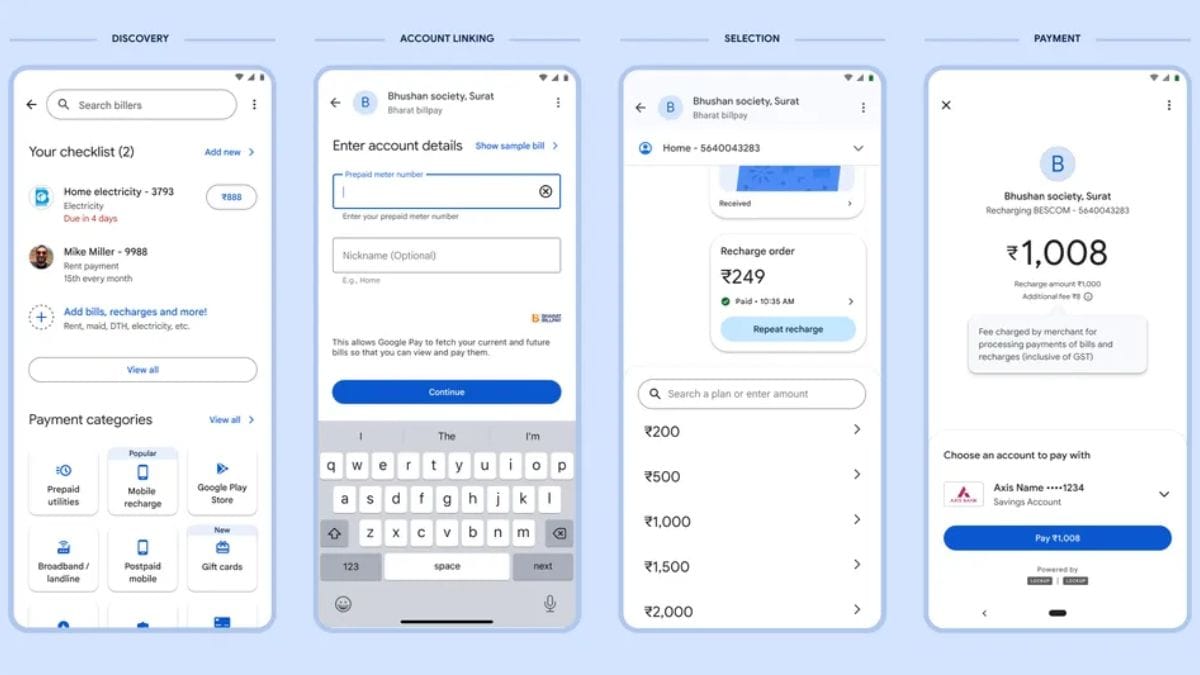
Bill and utility payments on Google Pay
Photo Credit: Google
Google Pay remains one of the most popular choices because of its clean and simple UI, integration with UPI, and automatic bill reminders. Features like multi-bank support and detailed transaction history enhance the convenience factor. Paying your electricity, water, or DTH bill using Google Pay is a simple and secure process. Here's how to do it:
How to Pay Electricity/Water/DTH Bills on Google Pay
- Open Google Pay on your Android or iOS device
- Scroll down to the Bills and Payments section or tap Bill Payments under Services
- Select the category you want to pay for — Electricity, Water, Gas, Broadband, DTH, or Mobile Postpaid
- From the list, choose your service provider (for example, Tata Power, BSES, Airtel DTH, or your local utility board)
- Enter your Customer ID, Consumer Number, or Account Number, as required
- Tap Link Account to connect your utility account to GPay. The app will fetch outstanding bill details if available
- Verify the amount and select your payment method (bank account via UPI)
- Tap Pay Bill and authenticate using your UPI PIN
- You will receive an instant confirmation on the app. Once the transaction completes, you will see a receipt and may receive cashback or rewards depending on eligibility.
Do note that it may take up to 3 business days for the payment to reflect in your utility provider's records
Comments
Get your daily dose of tech news, reviews, and insights, in under 80 characters on Gadgets 360 Turbo. Connect with fellow tech lovers on our Forum. Follow us on X, Facebook, WhatsApp, Threads and Google News for instant updates. Catch all the action on our YouTube channel.
Further reading:
Google Pay
Related Stories




Advertisement
Follow Us




-
![[Sponsored] LG NANO 4K UHD AI TV NU885: Gemini Search, Dolby Atmos & 5 Years of Updates](https://www.gadgets360.com/static/desktop/images/spacer.png)
04:17
[Sponsored] LG NANO 4K UHD AI TV NU885: Gemini Search, Dolby Atmos & 5 Years of Updates -
00:57
[Sponsored] Samsung Galaxy Z Fold8 My Fan Cam in Action: Find the Moment, Then Share It -
01:41
[Sponsored] What Do You Need To Know Before Your Next Run? | Samsung Galaxy Watch Ultra2 -
01:32
[Sponsored] Big Day Tomorrow? Prep Today | Samsung Galaxy Watch Ultra2 -
04:37
[Sponsored]: CP PLUS CarKam CP-F89B: 4K Dashcam With Rear Camera, GPS & Emergency Recording
-
Dell Pro Essential 14, Essential 15 लॉन्च, सिक्योरिटी के लिए गजब फीचर्स
-
Flipkart Big Billion Days Sale: ₹15 हजार में स्टूडेंट के लिए बेस्ट लैपटॉप
-
Amazon Great Indian Festival Sale: 10 हजार से सस्ते मिल रहे ये स्मार्टफोन
-
Amazon पर Samsung Galaxy A56 5G, Flipkart पर Motorola Edge 70 Fusion की डील, ₹30 हजार में कौनसा फोन बेहतर?
-
iQOO Neo 12 में मिलेगा Snapdragon 8 Elite Gen 5 चिपसेट, इस महीने होगा लॉन्च
Advertisement
Popular on Gadgets
- Samsung Galaxy S26 Ultra
- Motorola Razr Fold
- ChatGPT
- OPPO Find N6
- Mobiles Under Rs. 40,000
- Vivo X300 Ultra
- Asus Zenbook S14
- iQOO 15
- Vivo X300 Pro
- Lenovo Yoga Slim 7i Aura Edition
- iQOO 15R
- Vivo X Fold 5
- Sony PlayStation 5
- HP OmniPad 12
- OnePlus Nord CE 6 Lite
- OnePlus Pad 4
- OPPO F33 Pro 5G
- Cryptocurrency
- HP OmniBook Ultra 14 (2026)
- iPhone 17
- Eureka Forbes AP 355 Room Air Purifier
- Latest Mobile Phones
- Compare Phones
Latest Gadgets
- Vivo Y600s Pro
- Vivo Y32 (2026)
- Infinix Smart 20 HD
- Vivo V80
- Vivo S2 FE
- Vivo Y600K Turbo
- Realme P4s Lite
- Vivo S60t
- Dell Pro Rugged 14
- Dell Pro Rugged 13 Extreme
- Amazon Alexa Tablet 8
- Amazon Alexa Tablet 11
- Amazfit T-Rex Dual Solar
- OPPO Watch S2
- Toshiba 65-Inch 4K Ultra HD Smart Mini LED QLED TV (65Z670SP)
- Haier M70 Mini LED 65-inch
- Acer Predator Atlas 8
- Asus ROG Ally
- Blue Star 1.5 Ton 5 Star Inverter Split AC (IE518ZNURS)
- Blue Star 2 Ton 3 Star Inverter Window AC (WIE324L)

- About Us
- Sitemaps
- Feedback
- Archives
- Contact Us
- RSS
- Advertise
- Career
- Privacy Policy
- Ethics
- Editorial Policy
- Terms & Conditions
- Complaint Redressal
Download Our Apps
Available in Hindi
© Copyright Red Pixels Ventures Limited 2026. All rights reserved.