-
 Firefox Now Lets You Shake Your Android Phone to Summarise Websites24 June 2026
 -
YouTube Bug Reportedly Freezes Browser Tabs, Increases CPU and Memory Usage4 May 2026
-
Anthropic’s Claude Finds 22 Vulnerabilities in Mozilla Firefox in Just Two Weeks9 March 2026
-
Mozilla Firefox Will Let You Decide How Much AI You Want in Your Browser3 February 2026
-
How to Delete History on Google Chrome, Firefox, Other Browsers: A Step-by-Step Guide8 December 2025
- Home
- Internet
- Internet News
- Firefox for iOS Gets Native Ad Blocking for Ads, Trackers and Pop Ups
Firefox for iOS Gets Native Ad Blocking for Ads, Trackers and Pop-Ups
The ad blocker is disabled by default, so users need to activate it if they want Firefox to filter advertisements.
Written by Sucharita Ganguly, Edited by Rohan Pal | Updated: 17 August 2026 11:28 IST
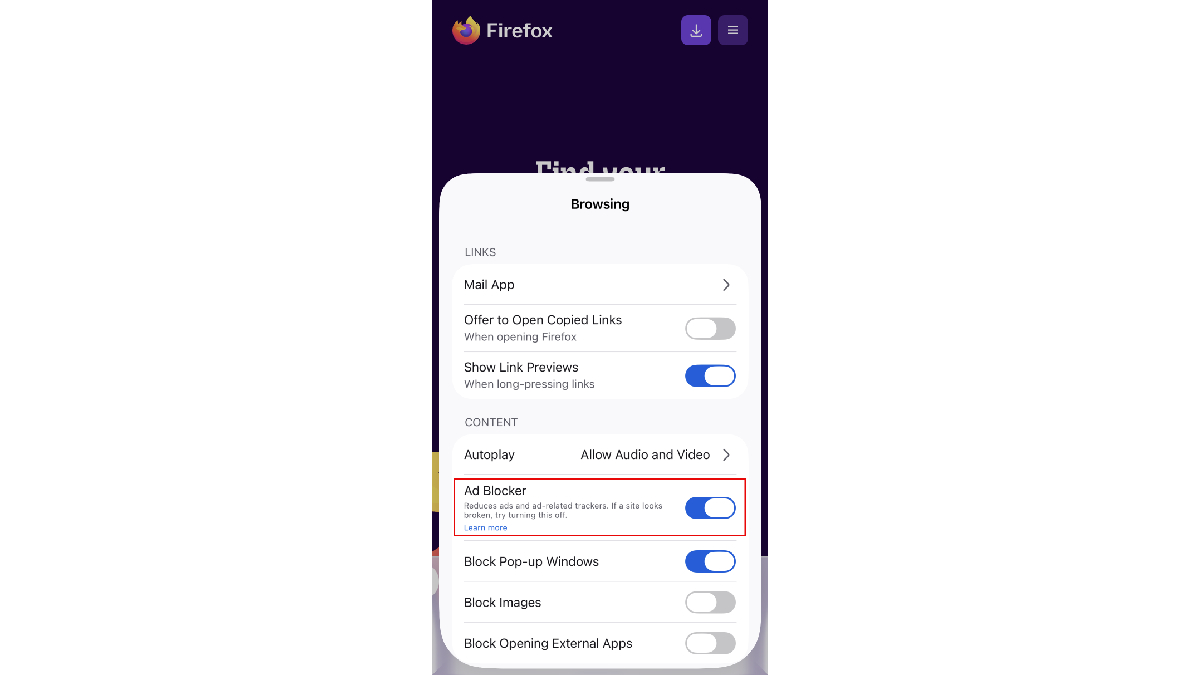
Photo Credit: Mozilla
Ads displayed on search engine results pages are not blocked
Click Here to Add Gadgets360 As A Trusted Source

Advertisement
Mozilla is rolling out a native ad blocker for Firefox on iOS that can reduce the number of advertisements users encounter while browsing. The experimental feature operates at the network level and uses an EasyList-based filter to block many ads before they load. It can also stop ad-related trackers, third-party advertising networks, pop-ups and overlays. Mozilla is introducing the feature gradually, so it may not be available to every Firefox for iOS user yet. The ad blocker is switched off by default when introduced.
Firefox for iOS Native Ad Blocker Starts Rolling Out to Users
According to a Mozilla support page, Firefox for iOS now offers an optional ad blocker that works at the network level. The feature uses a filter list based on EasyList to identify and block many advertisements before they load. It can filter ads from third-party advertising networks and exchanges, ad-related trackers and many third-party advertisements served by websites. It also targets more intrusive formats, including pop-ups and overlays that appear while browsing.
The blocker does not prevent every advertisement from appearing. Mozilla notes that websites use different technologies to deliver ads, and some of those methods may not be covered by the current filter list. This means users may still encounter certain advertisements even after enabling the feature. The blocker is also designed to leave some advertising categories untouched.
Ads displayed on search engine results pages are not blocked. This applies to advertising shown on Google, Bing, DuckDuckGo and other search providers. Mozilla also excludes sponsored content that appears on the Firefox Home or New Tab page from the ad-blocking feature.
Users can enable the feature through Firefox's main settings. After opening Firefox for iOS, they can tap the menu button, select Settings and scroll down to Browsing. The Ad Blocker option is under the Content section, where users can switch it on or off. Mozilla also allows users to control the feature while visiting a website through the Site menu.
To change the setting during browsing, users can open a webpage, tap the menu button and select Ad Blocker from the Site menu. Firefox opens the relevant setting, allowing users to enable or disable the feature for the browsing session. This provides a quicker alternative to navigating through the full Settings menu.
The ad blocker is disabled by default, so users need to activate it if they want Firefox to filter advertisements. Mozilla says the setting can be changed at any time through either the main Settings menu or the Site menu. The feature is currently experimental and is being introduced through a progressive rollout, meaning it may not yet be available to every Firefox for iOS user.
Mozilla has not announced when the feature will become available across the entire Firefox for iOS user base. For now, availability depends on the ongoing rollout, while the current implementation remains subject to the limitations of its advertising filter.
Comments
Get your daily dose of tech news, reviews, and insights, in under 80 characters on Gadgets 360 Turbo. Connect with fellow tech lovers on our Forum. Follow us on X, Facebook, WhatsApp, Threads and Google News for instant updates. Catch all the action on our YouTube channel.
Related Stories






Advertisement
Follow Us




-

06:39
Samsung Galaxy Z Fold8 Ultra Review: Cameras, Battery, Performance Tested -
04:33
[Sponsored] JBL Live 780NC: Great Sound, Perfect Comfort, Smart ANC & 80-Hour Battery -
12:04
[Partner Content] OPPO Reno16 Series Deep Dive: Built for Creators? -
05:33
Poco M8 Power Review | 8000mAh battery phone | Best budget phone 2026? -
03:28
[Partner Content] OPPO Enco Air5, Flagship ANC for Just Rs. 3,299?
-
सड़क पर दिखा गड्ढा तो सीधे होगी कॉन्ट्रैक्टर की पहचान, AI करेगा सारा काम
-
₹4,699 सस्ती कीमत में मिल रहा 7,000mAh बैटरी वाला Oppo Reno16c, जानें ऑफर
-
फोन पर फोटो-वीडियो से स्टोरेज हो गई फुल! ऐसे करें चुटकी में स्पेस खाली
-
1 महीने में 7.98 लाख बिक गए स्कूटर्स, सबसे ज्यादा इस कंपनी की हुई सेल
-
HMD 102 4G Pro बजट फीचर फोन में मिलेगी 1200mAh बैटरी, IP52 रेटिंग!
Advertisement
Popular on Gadgets
- Samsung Galaxy S26 Ultra
- Motorola Razr Fold
- ChatGPT
- OPPO Find N6
- Mobiles Under Rs. 40,000
- Vivo X300 Ultra
- Asus Zenbook S14
- iQOO 15
- Vivo X300 Pro
- Lenovo Yoga Slim 7i Aura Edition
- iQOO 15R
- Vivo X Fold 5
- Sony PlayStation 5
- HP OmniPad 12
- OnePlus Nord CE 6 Lite
- OnePlus Pad 4
- OPPO F33 Pro 5G
- Cryptocurrency
- HP OmniBook Ultra 14 (2026)
- iPhone 17
- Eureka Forbes AP 355 Room Air Purifier
- Latest Mobile Phones
- Compare Phones
Latest Gadgets
- Moto G Max
- Google Pixel 11 Pro XL
- Google Pixel 11 Pro
- Google Pixel 11
- Google Pixel 11 Pro Fold
- Robot Phone
- Realme 16x 5G
- Redmi K100 Pro
- Huawei MateBook Pro S
- Asus Chromebook CX15 (CX1505CTA)
- Pad 70
- Moto Pad 70 Groove
- Google Pixel Watch 5
- Samsung Galaxy Watch 9 (44mm)
- Sony Bravia 9 II
- Haier HQLED P7 Pro
- Acer Predator Atlas 8
- Asus ROG Ally
- Blue Star 1.5 Ton 5 Star Inverter Split AC (IE518ZNURS)
- Blue Star 2 Ton 3 Star Inverter Window AC (WIE324L)

- About Us
- Sitemaps
- Feedback
- Archives
- Contact Us
- RSS
- Advertise
- Career
- Privacy Policy
- Ethics
- Editorial Policy
- Terms & Conditions
- Complaint Redressal
Download Our Apps
Available in Hindi
© Copyright Red Pixels Ventures Limited 2026. All rights reserved.