-
 Apple Reportedly Working on Android-Like Theft Detection Lock Feature for iPhone27 May 2026
 -
Google Introduces Gemini 3.5 Flash Low to Help Antigravity Users Maximise Usage26 May 2026
-
iOS 27 Said to Offer Third-Party AirPlay Alternatives Such as Google Cast to EU Users25 May 2026
-
Google’s AI Overviews Reportedly Broke Down When Users Searched ‘Disregard’ or ‘Stop’25 May 2026
-
Google Might Sell Over 2 Million Android XR-Powered Smart Glasses This Year: Report22 May 2026
Google App for Windows Rolls Out With AI Mode, System-Wide Search and Lens Features
AI Mode in the Google app for Windows enables users to ask questions and receive AI-generated responses along with relevant web links.
Written by Shaurya Tomer, Edited by David Delima | Updated: 15 April 2026 12:04 IST
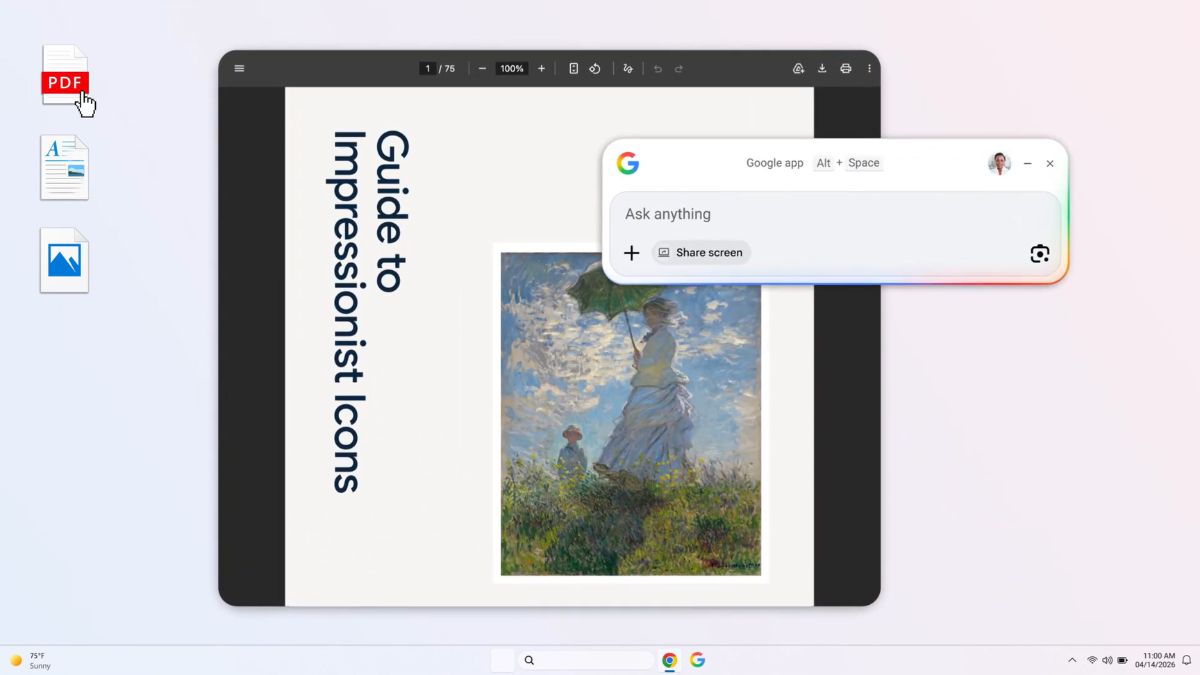
Photo Credit: Google
To use the app, users need to be 13 years or older running a Windows 10 or later PC
Click Here to Add Gadgets360 As A Trusted Source

Advertisement
Google on Monday announced the global rollout of its upgraded Google app for desktop on Windows. It brings AI-powered Search features directly to users' PCs. As per the Mountain View-based tech giant, the app integrates AI Mode in Search, which enables users to ask questions and receive contextual responses without opening a browser. The new Google app for Windows combines web search, local file discovery, and AI tools into a single interface.
Google's App Lets You Search for Files Like Spotlight on macOS
The new Google app introduces a system-wide search experience, Google explained in a blog post. This is accessible via the Alt + Space keyboard shortcut. The feature allows users to quickly search across multiple sources, including the web, local files, installed apps, and even Google Drive content.
The upgraded Google app for desktop is now available for Windows users globally in English. 💻✨
— Rajan Patel (@rajanpatel) April 14, 2026
Use a simple keyboard shortcut (Alt + Space) to instantly find what you need—information from the web, your computer files, installed apps, and Google Drive files—all from the Search… pic.twitter.com/t9pKomFglE
A notable inclusion is the integration of AI Mode. Similar to the web experience, AI Mode in the Google app for Windows enables users to ask questions and receive AI-generated responses along with relevant web links. They can continue conversations with follow-up queries, making it more interactive compared to traditional search.
As per the company, the app also features screen-aware capabilities. With this feature, users can select a specific window or their entire desktop and continue asking questions based on what they are viewing. Another feature is Google Lens. The company says this allows users to search, translate, or analyse content, such as text in images or webpages, directly from their screen.
Instead of switching between tabs or applications, users can retrieve information and return to their work with the Google app for Windows. As per Google, the app is designed to minimise interruptions by keeping users within their current task while accessing search and AI tools.
To use the app, users need to be 13 years or older and running a Windows 10 or later PC. It is currently available only in English. The company notes that AI Mode may not yet be supported across all accounts, regions, or languages.
Comments
Get your daily dose of tech news, reviews, and insights, in under 80 characters on Gadgets 360 Turbo. Connect with fellow tech lovers on our Forum. Follow us on X, Facebook, WhatsApp, Threads and Google News for instant updates. Catch all the action on our YouTube channel.
Related Stories




Advertisement
Follow Us




-

05:58
Motorola Edge 70 Pro Review | Full Specs, Performance & Battery Test -
07:07
Moto g37 Power Review: Best Phone To Buy Under 25,000? -
03:11
[Sponsored] Samsung Galaxy A57 5G: The Perfect Phone Under Rs. 50,000? -
03:58
Dreame D20 Ultra Review: The Most Intelligent Robot Vacuum Cleaner Under ₹40,000? -
03:23
iPhone Fold Leaks & Rumors 2026 | Apple's Foldable iPhone Launch, Price & Specs Revealed
-
5000 रुपये सस्ता मिल रहा Samsung का 50MP कैमरा, 5000mAh बैटरी वाला फोन
-
50MP कैमरा, 6500mAh बैटरी के साथ Xiaomi 17T लॉन्च, जानें कीमत और फीचर्स
-
boAt Storm Call 4, Ultima Vogue 2 लॉन्च, एडवांस हेल्थ, फिटनेस फीचर से लैस
-
Vivo S60, S60 Vitality Edition लेटेस्ट फोन लॉन्च हुए 7200mAh बैटरी, 16GB रैम, 50MP कैमरा के साथ, जानें कीमत
Advertisement
Popular on Gadgets
- Samsung Galaxy S26 Ultra
- Motorola Razr Fold
- ChatGPT
- OPPO Find N6
- Mobiles Under Rs. 40,000
- Vivo X300 Ultra
- Asus Zenbook S14
- iQOO 15
- Vivo X300 Pro
- Lenovo Yoga Slim 7i Aura Edition
- iQOO 15R
- Vivo X Fold 5
- Sony PlayStation 5
- HP OmniPad 12
- OnePlus Nord CE 6 Lite
- OnePlus Pad 4
- OPPO F33 Pro 5G
- Cryptocurrency
- HP OmniBook Ultra 14 (2026)
- iPhone 17
- Eureka Forbes AP 355 Room Air Purifier
- Latest Mobile Phones
- Compare Phones
Latest Gadgets
- Vivo S60 Vitality Edition
- Vivo S60
- Honor Win Turbo
- Vivo T5
- Xiaomi 17T Pro
- Xiaomi 17T
- Lava Shark 2 5G
- Infinix Hot 70
- Acer Aspire Go 15
- Acer Swift Spin 14 AI
- Poco Pad C1
- iQOO Pad 6 Pro
- boAt Ultima Vogue 2
- boAt Storm Call 4
- Lumio Vision 9 (2026)
- Lumio Vision 7 (2026)
- Acer Predator Atlas 8
- Asus ROG Ally
- IFB 1.5 Ton 3 Star Inverter Split AC (CI193GN22RGM3)
- IFB 2 Ton 3 Star Inverter Split AC (CI223GD32RGM3)

- About Us
- Sitemaps
- Feedback
- Archives
- Contact Us
- RSS
- Advertise
- Career
- Privacy Policy
- Ethics
- Editorial Policy
- Terms & Conditions
- Complaint Redressal
Download Our Apps
Available in Hindi
© Copyright Red Pixels Ventures Limited 2026. All rights reserved.