-
 How to Use Telegram Web: A Step-by-Step Guide6 December 2025
 -
The End of Anonymous WhatsApp? What the SIM-Binding Rule Means for User Privacy in India1 December 2025
-
Telegram Rolls Out Live Stories, Repeated Messages, and Other Creator-Focused Features25 November 2025
-
Telegram Rolls Out Live Stories, Auctions for Gifts, Enhanced Liquid Glass UI for iPhone, and More20 November 2025
-
Telegram Founder Pavel Durov Launches Cocoon, a Decentralised AI Project on TON30 October 2025
Telegram App for Android Gets Liquid Glass-Inspired Redesign With Bottom Navigation Bar
The New Group menu on the Telegram app for Android is now accessible through a three-dot overflow menu.
Written by Nithya P Nair, Edited by David Delima | Updated: 9 February 2026 16:53 IST

Photo Credit: Unsplash/ Dina Solomin
Liquid Glass design was rolled out on Telegram for iOS in early January
Click Here to Add Gadgets360 As A Trusted Source

Advertisement
Telegram for iOS got the popular Liquid Glass design touch with transparent elements and refraction effects earlier this year. Now, the messaging company has released a major update for its Android app, introducing a refreshed design based on the same Liquid Glass styling. The update expands on visual changes first introduced late last year. It brings new design elements, including translucent panels and an updated hamburger menu. The latest update of Telegram for Andorid adds a new four-tab bottom navigation bar, resembling the design of the iOS version.
Telegram's Latest Android App Borrows Design Elements from iOS 26
Available to users who have updated to Telegram for Android version 12.4.0 via the Play Store, the update introduces a Liquid Glass-inspired look with transparent and modern visual elements across the app. As mentioned, the update includes a new four-tab bottom navigation bar that closely matches the layout used on iOS.
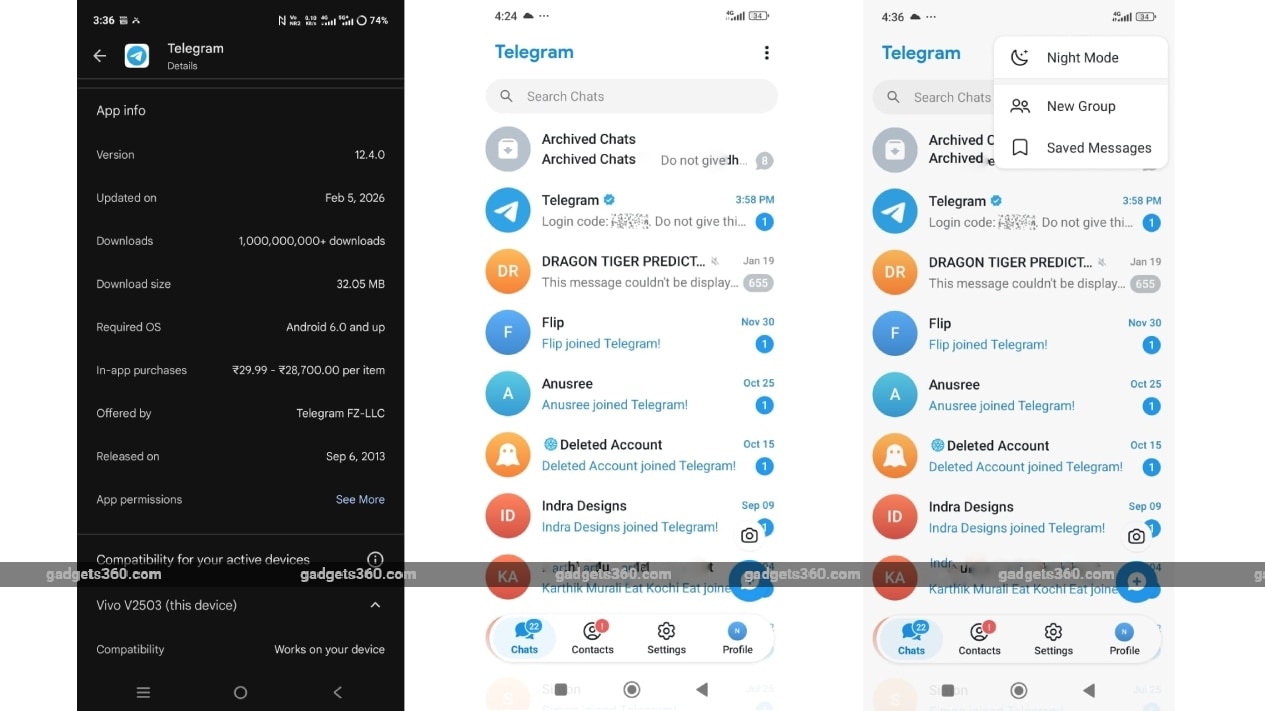
The navigation bar features four tabs — Chats, Contacts, Settings, and Profile. This bottom bar remains visible when we scroll through each section. Telegram has also removed the hamburger side menu entirely.
The New Group menu is now accessible through a three-dot overflow menu in the top-right corner of the chats screen. This was previously available in the hamburger menu. The Dark Mode and Saved Messages options can also be accessed from the three-dot menu.
The transparent interface elements inspired by Apple's Liquid Glass design are noticeable when using the app in light mode.
The latest Android update closely mirrors the Liquid Glass design that Telegram rolled out on iOS in early January. With the Android update, the messaging app appears to be ensuring visual consistency across platforms. This update builds on changes introduced in October and November 2025.
Telegram's January update added an AI summaries feature for channel posts that added instant summaries for long posts in channels. It also brought an Instant View pages feature to get an automatic AI summary at the top.
Comments
Get your daily dose of tech news, reviews, and insights, in under 80 characters on Gadgets 360 Turbo. Connect with fellow tech lovers on our Forum. Follow us on X, Facebook, WhatsApp, Threads and Google News for instant updates. Catch all the action on our YouTube channel.
Further reading:
Telegram, Telegram for Android, Telegram Update, Telegram Features, Telegram for iOS
Related Stories






Advertisement
Follow Us




-

19:39
LIVE: Xiaomi 17T & Xiaomi TV FX Mini LED Series Launch | Get Closer to Every Detail -
04:26
Moto Buds 2 Review: Best TWS Under Rs. 3000? -
03:26
How To Apply For Driving Licence Online From Home? | Step-by-Step Guide 2026 -
05:58
Motorola Edge 70 Pro Review | Full Specs, Performance & Battery Test -
07:07
Moto g37 Power Review: Best Phone To Buy Under 25,000?
-
5200mAh बैटरी, 8 मेगापिक्सल कैमरा से लैस Infinix Smart 20 लॉन्च, जानें
-
WWDC 2026: जाने कैसे देखें लाइव स्ट्रीम, Apple इवेंट में होगी ये घोषणाएं
-
Google Photos में फोटो Unblur का कैसे करें उपयोग, ये है आसान तरीका
-
iQOO Neo 12 में होगा सबसे धांसू डिस्प्ले! लॉन्च से पहले बड़ा खुलासा
-
Portronics Titan 35 पावर बैंक लॉन्च, 20000mAh की बैटरी कैपेसिटी, एक साथ चार्ज होंगे कई डिवाइस
Advertisement
Popular on Gadgets
- Samsung Galaxy S26 Ultra
- Motorola Razr Fold
- ChatGPT
- OPPO Find N6
- Mobiles Under Rs. 40,000
- Vivo X300 Ultra
- Asus Zenbook S14
- iQOO 15
- Vivo X300 Pro
- Lenovo Yoga Slim 7i Aura Edition
- iQOO 15R
- Vivo X Fold 5
- Sony PlayStation 5
- HP OmniPad 12
- OnePlus Nord CE 6 Lite
- OnePlus Pad 4
- OPPO F33 Pro 5G
- Cryptocurrency
- HP OmniBook Ultra 14 (2026)
- iPhone 17
- Eureka Forbes AP 355 Room Air Purifier
- Latest Mobile Phones
- Compare Phones
Latest Gadgets
- Vivo V70 Lite 5G
- Infinix Smart 20
- Lava Bold N2 5G
- Motorola Edge 2026
- Honor X7e
- Huawei Nova 16 Ultra
- Huawei Nova 16 Pro
- Huawei Nova 16z
- Asus ExpertBook B5 Flip G2 (2026)
- Asus TUF 16 (2026)
- Asus Pad
- Poco Pad C1
- Amazfit Balance Ultra
- Amazfit Balance 3
- Sony Bravia 7II
- Lumio Vision 9 (2026)
- Acer Predator Atlas 8
- Asus ROG Ally
- IFB 1.5 Ton 3 Star Inverter Split AC (CI193GN22RGM3)
- IFB 2 Ton 3 Star Inverter Split AC (CI223GD32RGM3)

- About Us
- Sitemaps
- Feedback
- Archives
- Contact Us
- RSS
- Advertise
- Career
- Privacy Policy
- Ethics
- Editorial Policy
- Terms & Conditions
- Complaint Redressal
Download Our Apps
Available in Hindi
© Copyright Red Pixels Ventures Limited 2026. All rights reserved.