-
 NexPhone Unveiled With 64-Megapixel Camera and Support for Android 16, Linux and Windows 1122 January 2026
 -
Android 17 May Redesign Notifications and Quick Settings With Split Layout15 January 2026
-
HyperOS 3 Update Rolls Out to Xiaomi 14, Redmi Note 14 5G and More Devices With Android 16, New AI Features16 December 2025
-
Nothing OS 4.0 Update Rollout Reportedly Paused to Implement ‘Urgent’ Fix8 December 2025
-
Google Pixel Phones Get AI Notification Summaries, New Parental Controls With Android 16 QPR2 Update3 December 2025
- Home
- Mobiles
- Mobiles News
- Google Expands Android Theft Protection With New Security Features
Google Expands Android Theft Protection With New Security Features
Google says it has made it harder for a thief to guess the PIN, pattern, or password to the Android device.
Written by Shaurya Tomer, Edited by Ketan Pratap | Updated: 28 January 2026 09:30 IST
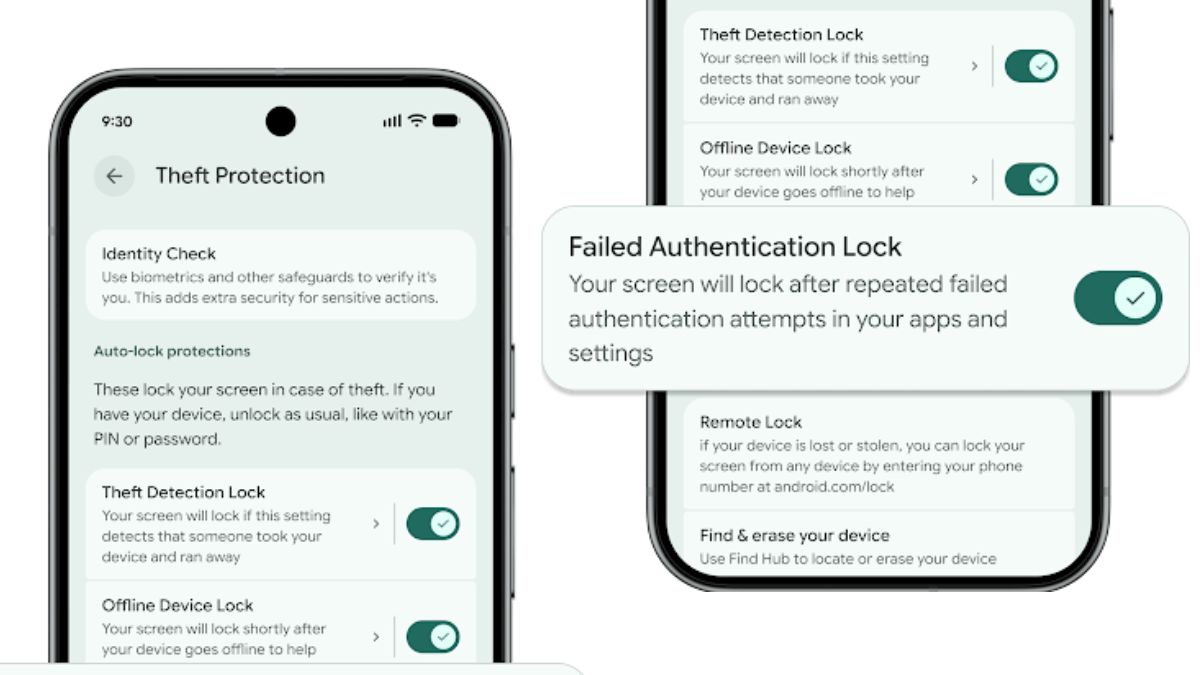
Photo Credit: Google
The new theft protection features are rolling out to devices Android 16 and later versions
Click Here to Add Gadgets360 As A Trusted Source

Advertisement
Google on Monday announced the expansion of theft protection features for Android devices. These are aimed at making smartphones harder targets for thieves and helping users safeguard their data before, during and after a theft attempt. As per the Mountain View-based tech giant, the updated Android theft protection tools, which are currently rolling out, build upon the existing protection measures by providing enhanced control over authentication, lockout behaviour, and recovery options.
New Theft Protection Features on Android
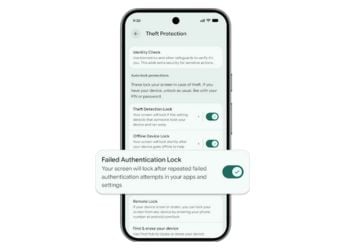
The new theft protection features are rolling out to Android devices running Android 16 or later versions, Google said in a security blog post. The Failed Authentication Lock feature, introduced with Android 15, has been expanded and now features a dedicated toggle for enabling/disabling it in settings.
Applications such as third-party banking apps and Google Password Manager, that use Android Biometric Prompt for verification, will benefit from the Identity Check feature. It notably requires users to verify using their biometrics when performing certain actions outside of the trusted spaces.
The tech giant also claims to have made it harder for a thief to guess the PIN, pattern, or password to the Android device by increasing the lockout time after failed attempts. However, to ensure users aren't locked out by mistake, identical incorrect guesses will no longer count toward the retry limit.
In addition to the aforementioned authentication safeguards, Google is also rolling out enhanced recovery tools for devices running Android 10 or later versions. Its latest initiative includes more control over Remote Lock, with a new optional security question or challenge to the process that can be enabled by the device owner as an additional layer of security to the recovery flow.
To make theft protection available out-of-the-box for more Android users, Google is enabling two key theft protection features by default on Android devices activated in Brazil. These include Theft Detection Lock, which uses on-device AI to sense motion and context that indicates a “snatch-and-run” theft. In such cases, the phone will automatically be locked to ensure data protection.
The second feature is Remote Lock. Android users can lock their smartphone from any device with web access, without the need to have enabled the feature in advance.
Comments
Get your daily dose of tech news, reviews, and insights, in under 80 characters on Gadgets 360 Turbo. Connect with fellow tech lovers on our Forum. Follow us on X, Facebook, WhatsApp, Threads and Google News for instant updates. Catch all the action on our YouTube channel.
Related Stories




Advertisement
Follow Us




-

03:06
How To Delete Instagram Account | Step-By-Step Guide -
05:36
[Sponsored] Haier C90 OLED TV | Dolby Vision IQ, 144Hz OLED and Google TV in Action -
07:38
Redmi Pad 2 Pro Review | Worth Buying or not? | Best Tablet in Budget? -
08:02
Top OxygenOS 16 Features You Must Know: Don't Miss These OnePlus Features On Your Phone! -
10:42
[Partner Content] OPPO Find X9 Two Week Experience: Here's Why It Stands Out
Advertisement
Popular on Gadgets
- Samsung Galaxy Unpacked 2025
- ChatGPT
- Redmi Note 14 Pro+
- iPhone 16
- Apple Vision Pro
- Oneplus 12
- OnePlus Nord CE 3 Lite 5G
- iPhone 13
- Xiaomi 14 Pro
- Oppo Find N3
- Tecno Spark Go (2023)
- Realme V30
- Best Phones Under 25000
- Samsung Galaxy S24 Series
- Cryptocurrency
- iQoo 12
- Samsung Galaxy S24 Ultra
- Giottus
- Samsung Galaxy Z Flip 5
- Apple 'Scary Fast'
- Housefull 5
- GoPro Hero 12 Black Review
- Invincible Season 2
- JioGlass
- HD Ready TV
- Laptop Under 50000
- Smartwatch Under 10000
- Latest Mobile Phones
- Compare Phones
Latest Gadgets
- Realme Neo 8
- OPPO Reno 15 FS
- Red Magic 11 Air
- Honor Magic 8 RSR Porsche Design
- Honor Magic 8 Pro Air
- Infinix Note Edge
- Lava Blaze Duo 3
- Tecno Spark Go 3
- HP HyperX Omen 15
- Acer Chromebook 311 (2026)
- Lenovo Idea Tab Plus
- Realme Pad 3
- HMD Watch P1
- HMD Watch X1
- Haier H5E Series
- Acerpure Nitro Z Series 100-inch QLED TV
- Asus ROG Ally
- Nintendo Switch Lite
- Haier 1.6 Ton 5 Star Inverter Split AC (HSU19G-MZAID5BN-INV)
- Haier 1.6 Ton 5 Star Inverter Split AC (HSU19G-MZAIM5BN-INV)

- About Us
- Sitemaps
- Feedback
- Archives
- Contact Us
- RSS
- Advertise
- Career
- Privacy Policy
- Ethics
- Editorial Policy
- Terms & Conditions
- Complaint Redressal
Download Our Apps
Available in Hindi
© Copyright Red Pixels Ventures Limited 2026. All rights reserved.