-
 Axis Bank Introduces Aadhaar Face Authentication: How to Update Your Axis Bank Mobile Number1 April 2026
 -
Apple, Samsung and Other Firms Reportedly Push Back on Preinstallation of Aadhaar App on Phones20 March 2026
-
How to Register on the New Aadhaar App: A Step-by-Step Guide1 February 2026
-
New Aadhaar App: How to Change Your Mobile Number and Address Online29 January 2026
-
New Aadhaar App Full Version Launched in India, Introduces Easy Mobile Number Updation, and More28 January 2026
- Home
- Apps
- Apps Features
- How to Share Your Contact Card Using the New Aadhaar App: A Step by Step Guide
How to Share Your Contact Card Using the New Aadhaar App: A Step-by-Step Guide
The full version of the new Aadhaar app allows users to share digital QR contact cards with their name and phone number.
Written by Akash Dutta, Edited by Ketan Pratap | Updated: 28 January 2026 17:37 IST
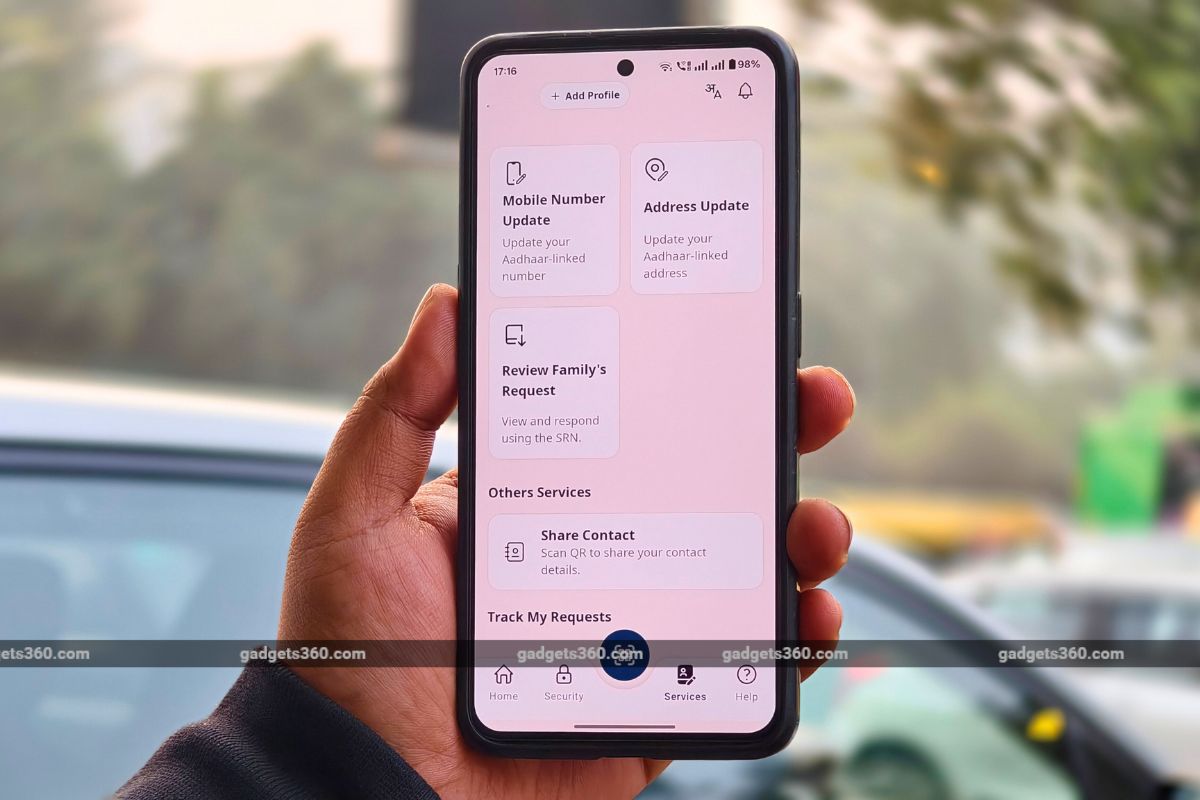
The Aadhaar app supports 13 Indian languages for wider accessibility
Click Here to Add Gadgets360 As A Trusted Source


Advertisement
Unique Identification Authority of India (UIDAI) has officially launched the full version of the new Aadhaar app on Android and iOS. The new app is designed to offer a user-centric interface and multiple Aadhaar-related services to make it easier for users to carry and manage the digital version of their national identification. However, the app also has an interesting non-Aadhaar feature that will make it easy for anyone to share their name and number with others with the new QR code-based contact sharing service.
What Is the Share Contact Feature in the New Aadhaar App
While the new Aadhaar app primarily focuses on providing Aadhaar-related services, such as downloading and sharing their digital ID, adding a biometric lock, updating mobile number and address, or even reviewing a request from a member of the family. But that's not all. It also lets users share their contact information as an easy-to-use QR code.
If you're someone who meets new people frequently, or you're going to be at an event or a concert where you'd like to share your details with others, doing it manually is a big hassle. While companies like Apple do offer the Near-Field Communication (NFC)-based NameCard feature, those who use Android do not have an easy way to share their contact information.
However, with the new Aadhaar app, users can take advantage of its Share Contact feature, which creates a scannable QR Code and offers a one-tap way to share their name and phone number. If you want to use this feature, here's a step-by-step guide on how to do so.
How to Share Your Contact Card Using the New Aadhaar App
- Download the new Aadhaar app on Android via the Play Store, or on iOS via the App Store.
- Register on the app using your Aadhaar number, registered number, and face scan.
- Enter a six-digit PIN code.
- Once done, you will be redirected to the home page of the app.
- Navigate to the Services tab, which is located at the bottom of the screen.
- Scroll down to Other Services.
- Tap on Share Contact.
- A QR code will be automatically generated, which can be scanned by anyone to receive your contact details.
- Alternatively, you can tap on the Share button to send it via supported apps and messaging platforms.
Do note, that this feature only lets you share the name and phone number that is linked with your Aadhaar card. This information cannot be edited.
What is the new Aadhaar App?
The new Aadhaar App is an official mobile application launched by the Unique Identification Authority of India (UIDAI) in 2025.
Does the new Aadhaar App replace the physical Aadhaar card?
No. The new Aadhaar App does not replace your physical Aadhaar card. It provides a secure digital version of your Aadhaar identity that can be shared electronically, but the physical or PDF version of Aadhaar may still be required for certain official verifications.
What services does the new Aadhaar app offer?
With the new Aadhaar app, users can share their Aadhaar card, download it, update number, update address, and share contact information.
What is the Share Contact feature?
The Share Contact feature creates a QR code that can be scanned by a friend or acquaintance to receive your name and phone number linked with your Aadhaar card.
Can I share my contact card directly via the new Aadhaar app?
Yes, you can tap on the Share button to send your contact card directly via supported apps.
Can I edit my name or number before sharing?
No. The new Aadhaar card does not allow editing of the contact details. Only the information registered with Aadhaar can be shared.
Comments
Get your daily dose of tech news, reviews, and insights, in under 80 characters on Gadgets 360 Turbo. Connect with fellow tech lovers on our Forum. Follow us on X, Facebook, WhatsApp, Threads and Google News for instant updates. Catch all the action on our YouTube channel.
Related Stories





Advertisement
Follow Us




-
05:05
Goboult Mustang Racer Smartwatch Review: Should You Get This Mustang Smartwatch? -
04:58
OnePlus Nord Buds 4 Pro Review: Specs, Sound Quality, ANC, and Battery Backup Tested -
02:29
[Sponsored] Samsung Galaxy S26 Ultra First Look: AI Smartphone for Creators, Gaming & Productivity -
04:25
Vivo X200T Review - Full Camera, Gaming & Battery Test | Worth Buying? -
28:31
The Future of Productivity: Logitech's Anatoliy Polyanker On AI, Hybrid Work, And India's Tech Boom
-
Redmi 15A 5G की सेल शुरू, जानें कितने में मिल रहा 6300mAh बैटरी वाला फोन
-
7300mAh बैटरी, 50MP कैमरा वाले OnePlus फोन पर बंपर डिस्काउंट, जानें
-
Zepto बेच रहा 24 हजार रुपये सस्ता iPhone 17 Pro Max, सबसे तगड़ा डिस्काउंट
-
Redmi K90 Ultra में मिल सकती है ज्यादा कैपेसिटी वाली बैटरी, MediaTek Dimensity 9500 चिपसेट
Advertisement
Popular on Gadgets
- Samsung Galaxy Unpacked 2026
- iPhone 17 Pro Max
- ChatGPT
- iOS 26
- Laptop Under 50000
- Smartwatch Under 10000
- Apple Vision Pro
- Oneplus 12
- OnePlus Nord CE 3 Lite 5G
- iPhone 13
- Xiaomi 14 Pro
- Oppo Find N3
- Tecno Spark Go (2023)
- Realme V30
- Best Phones Under 25000
- Samsung Galaxy S24 Series
- Cryptocurrency
- iQoo 12
- Samsung Galaxy S24 Ultra
- Giottus
- Samsung Galaxy Z Flip 5
- Apple 'Scary Fast'
- Housefull 5
- GoPro Hero 12 Black Review
- Invincible Season 2
- JioGlass
- HD Ready TV
- Latest Mobile Phones
- Compare Phones
Latest Gadgets
- Honor Play 80
- Nord 6
- Honor X80i
- Honor Play 80 Pro
- Redmi Note 15 SE 5G
- Redmi A7 Pro
- OPPO K15 Pro
- OPPO K15 Pro+
- Xiaomi Book Pro 14
- MacBook Neo
- Vivo Pad 6 Pro
- Lenovo Legion Y700 Gen 5
- boAt Valour Watch 1R
- Xiaomi Watch S5
- Xiaomi QLED TV X Pro 75
- Haier H5E Series
- Asus ROG Ally
- Nintendo Switch Lite
- Haier 1.6 Ton 5 Star Inverter Split AC (HSU19G-MZAID5BN-INV)
- Haier 1.6 Ton 5 Star Inverter Split AC (HSU19G-MZAIM5BN-INV)

- About Us
- Sitemaps
- Feedback
- Archives
- Contact Us
- RSS
- Advertise
- Career
- Privacy Policy
- Ethics
- Editorial Policy
- Terms & Conditions
- Complaint Redressal
Download Our Apps
Available in Hindi
© Copyright Red Pixels Ventures Limited 2026. All rights reserved.