
- Home
- Mobiles
- Mobiles News
- Nothing OS 5.0 Stable Update Rolls Out With New Widgets, System Improvements
Nothing OS 5.0 Stable Update Rolls Out With New Widgets, System Improvements
Based on Android 17, Nothing OS 5.0 introduces changes to the interface, system performance, widgets, and AI-powered features.
Written by Shaurya Tomer, Edited by Rohan Pal | Updated: 13 October 2026 10:39 IST
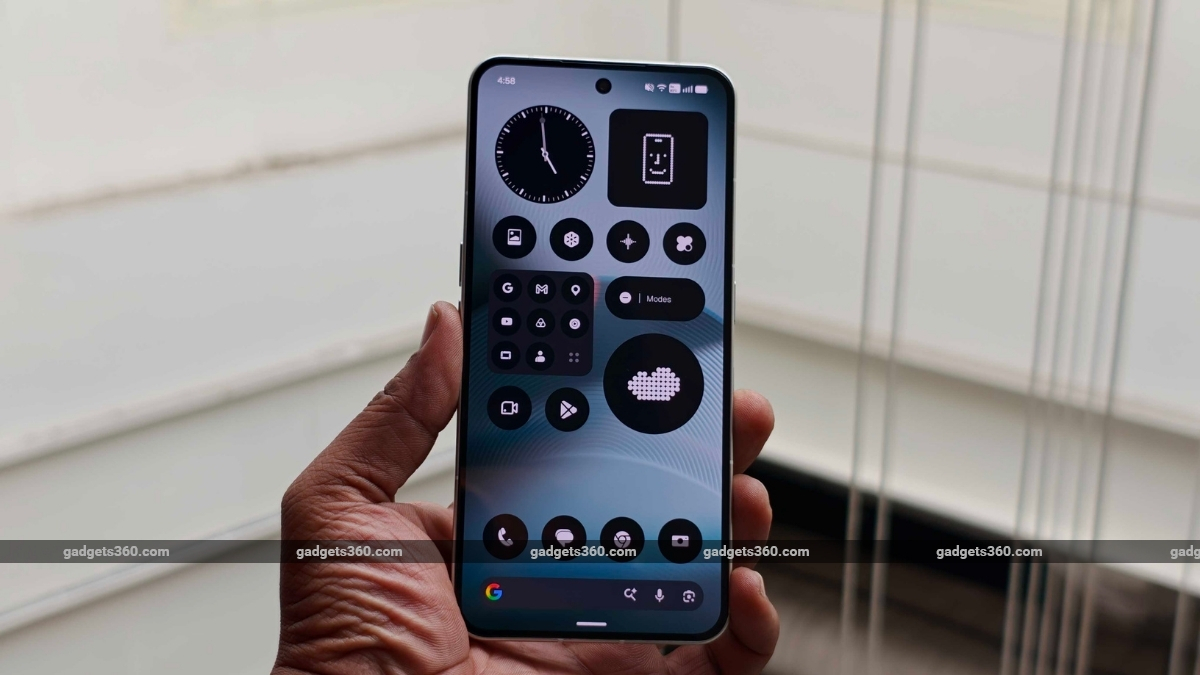
Nothing says its latest update brings more than 80 updates across systems
Click Here to Add Gadgets360 As A Trusted Source

Advertisement
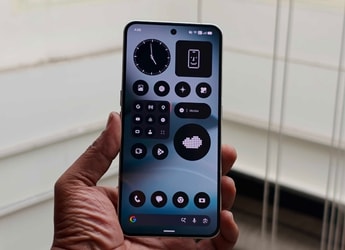
Nothing on Monday announced the stable rollout of Nothing OS 5.0, its latest software update based on Android 17. As per the UK-based company, the update introduces a redesigned Home Screen, a new Lock Screen clock face, and improvements to the company's Essential Space features. There are also updated system animations, new widgets, improved multitasking, and AI-powered app creation tools, which were previously available with the Nothing OS 5.0 open beta.
Nothing OS 5.0 Update: Availability
The stable version of Nothing OS 5.0 has started rolling out, beginning with the Nothing Phone (3). The company says the update will reach more Nothing and CMF smartphones over the coming months. The stable release of the update for other eligible handsets is planned for November.
Nothing OS 5.0's stable release follows the Nothing OS 5.0 open beta programme, which introduced several of the software's major changes ahead of the general rollout.
Nothing OS 5.0 Update: Features
Based on Android 17, Nothing OS 5.0 (review) introduces changes to the interface, system performance, widgets, and AI-powered features. Beginning with the home screen, there are now transparent details across widgets and the search bar. Nothing's new adaptive colour system is said to draw colours from the user's wallpaper to create a more consistent appearance across the interface.
There is a new Micrographics clock face for the Lock Screen. As per the company, it is inspired by hardware design and displays the date, time, weather, and upcoming meetings in one place.
Nothing plans to roll out further improvements to Essential Space, its AI-powered hub, through Google Play alongside the general release. Meanwhile, the company's AI suite has been expanding through tools like Essential Voice, which offers faster and cleaner transcription, and Smart Collections in Essential Space. Nothing says Essential Apps Builder can now be accessed directly on the phone.
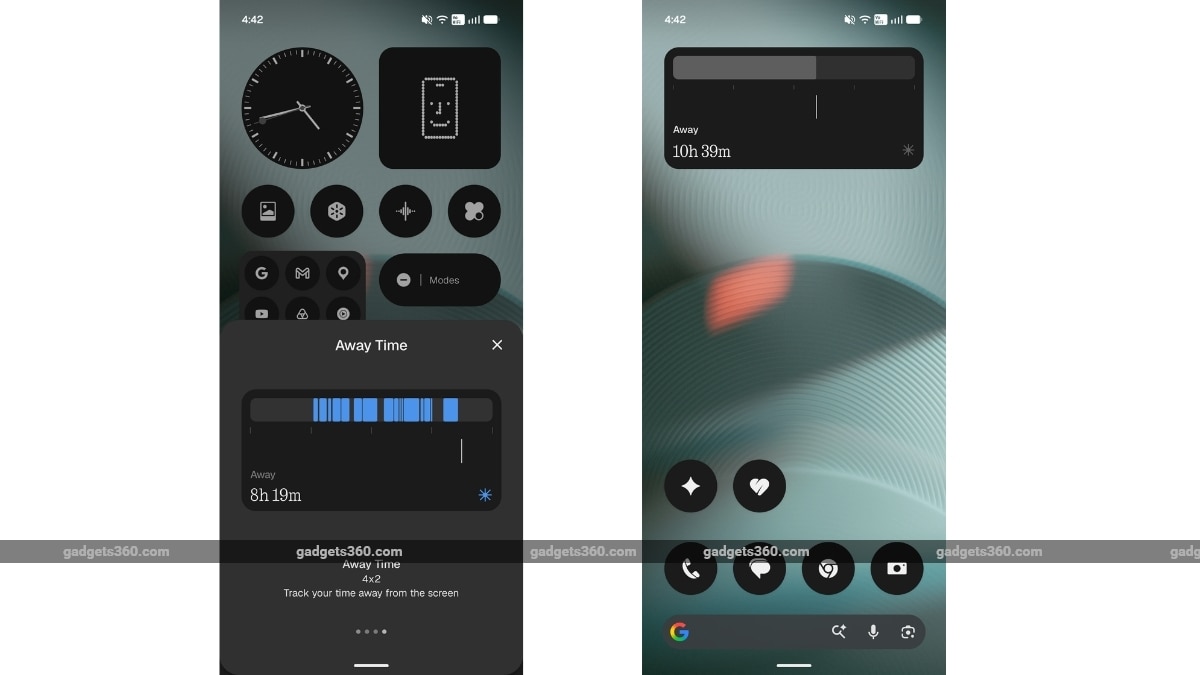
There are also refreshed icons, updated spacing, and refined animations across the status bar, Settings, Camera, and Gallery. On the personalisation front, users can access new widgets, such as the Collector, which lets users create visual collections of objects. Another one is Away Time, which, as the name suggests, tracks screen-free time.
Nothing OS 5.0 includes several performance improvements as well. The company says it brings faster touch response, better background app retention, and improved system resource management. Animations across apps, folders, widgets, and multitasking have also been refined.

- REVIEW
- KEY SPECS
- NEWS
- Good
- Sturdy design
- The new Glyph Interface is fun to use
- Primary camera is fantastic
- Decent everyday performance
- IP68 rating
- Good battery backup
- Bad
- Doesn't come cheap
- No charger in the box
- Periscope and ultra-wide camera performance inconsistent
Read detailed Nothing Phone 3 review
Display 6.67-inch
Front Camera 50-megapixel
Rear Camera 50-megapixel + 50-megapixel + 50-megapixel
RAM 12GB, 16GB
Storage 256GB, 512GB
Battery Capacity 5500mAh
OS Android 15
Resolution 1260x2800 pixels
Comments
Get your daily dose of tech news, reviews, and insights, in under 80 characters on Gadgets 360 Turbo. Connect with fellow tech lovers on our Forum. Follow us on X, Facebook, WhatsApp, Threads and Google News for instant updates. Catch all the action on our YouTube channel.
Further reading:
Nothing OS 5 0, Nothing, Nothing OS 5 0 Beta Release Schedule, Nothing OS 5 0 Features

Related Stories


Advertisement
Follow Us




-
![[Sponsored]: CP PLUS CarKam CP-F89B: 4K Dashcam With Rear Camera, GPS & Emergency Recording](https://www.gadgets360.com/static/desktop/images/spacer.png)
04:37
[Sponsored]: CP PLUS CarKam CP-F89B: 4K Dashcam With Rear Camera, GPS & Emergency Recording -
04:23
[Partner Content] Your Phone Can Do WAY More Than You Think | OPPO ColorOS 16 -
01:59
Samsung Galaxy Z Fold8 Ultra: Unfold the Ultra Night -
03:24
Apple Pay Launches In India: Supported Devices, Cards And Payments Explained -
00:21
[Sponsored] Samsung Galaxy Z Fold8, Fold8 Ultra
-
OnePlus 16 लॉन्च: 200 मेगापिक्सल कैमरा, 9000mAh की बैटरी से लैस, जानें
-
Vivo का लेटेस्ट फोन Amazon Great Indian Festival में मिल रहा ₹6,300 सस्ता
-
Amazon Great Indian Festival: ₹51000 सस्ता मिल रहा Samsung फोल्डेबल फोन
-
Vivo V80 की सेल शुरू, बड़ा डिस्काउंट, एक्सचेंज बोनस और कई तरह के फायदे
-
Amazon Great Indian Festival Sale 2026: ₹35,000 से कम में 55 इंच Smart TV, लिस्ट में QD-Mini LED TV भी
Advertisement
Popular on Gadgets
- Samsung Galaxy S26 Ultra
- Motorola Razr Fold
- ChatGPT
- OPPO Find N6
- Mobiles Under Rs. 40,000
- Vivo X300 Ultra
- Asus Zenbook S14
- iQOO 15
- Vivo X300 Pro
- Lenovo Yoga Slim 7i Aura Edition
- iQOO 15R
- Vivo X Fold 5
- Sony PlayStation 5
- HP OmniPad 12
- OnePlus Nord CE 6 Lite
- OnePlus Pad 4
- OPPO F33 Pro 5G
- Cryptocurrency
- HP OmniBook Ultra 14 (2026)
- iPhone 17
- Eureka Forbes AP 355 Room Air Purifier
- Latest Mobile Phones
- Compare Phones
Latest Gadgets
- Vivo Y600s Pro
- Vivo Y32 (2026)
- Infinix Smart 20 HD
- Vivo V80
- Vivo S2 FE
- Vivo Y600K Turbo
- Realme P4s Lite
- Vivo S60t
- Dell Pro Rugged 14
- Dell Pro Rugged 13 Extreme
- Amazon Alexa Tablet 8
- Amazon Alexa Tablet 11
- Amazfit T-Rex Dual Solar
- OPPO Watch S2
- Toshiba 65-Inch 4K Ultra HD Smart Mini LED QLED TV (65Z670SP)
- Haier M70 Mini LED 65-inch
- Acer Predator Atlas 8
- Asus ROG Ally
- Blue Star 1.5 Ton 5 Star Inverter Split AC (IE518ZNURS)
- Blue Star 2 Ton 3 Star Inverter Window AC (WIE324L)

- About Us
- Sitemaps
- Feedback
- Archives
- Contact Us
- RSS
- Advertise
- Career
- Privacy Policy
- Ethics
- Editorial Policy
- Terms & Conditions
- Complaint Redressal
Download Our Apps
Available in Hindi
© Copyright Red Pixels Ventures Limited 2026. All rights reserved.
-
 Apple Watch Series 12
Starts from ₹56,900
Apple Watch Series 12
Starts from ₹56,900
-
 Samsung Galaxy Watch Ultra 2
Starts from ₹63,999
Samsung Galaxy Watch Ultra 2
Starts from ₹63,999
-
 Samsung Galaxy Watch 9 (44mm, LTE)
Starts from ₹41,999
Samsung Galaxy Watch 9 (44mm, LTE)
Starts from ₹41,999
-
 Samsung Galaxy Watch 9 (40mm, LTE)
Starts from ₹38,999
Samsung Galaxy Watch 9 (40mm, LTE)
Starts from ₹38,999
-
 Samsung Galaxy Watch 9 (40mm)
Starts from ₹36,999
Samsung Galaxy Watch 9 (40mm)
Starts from ₹36,999
-
 Samsung Galaxy Watch 9 (44mm)
Starts from ₹40,999
Samsung Galaxy Watch 9 (44mm)
Starts from ₹40,999
-
 Nothing OS 5.0 Stable Update Rolls Out With New Widgets, System Improvements
-
 Google Launches Fitbit Edge With AMOLED Screen, Built-In GPS and Health Coach Features: Price, Specifications
-
 Amazon Great Indian Festival 2026: Best Bluetooth Speaker Deals From Sony, JBL and More
-
 JioPC Turns Your Existing Devices Into Cloud PCs With Ubuntu Interface, AI Tools: Price, Features